This tool allows you to migrate selected tables from one database instance to another.
Prerequisites
If you are using an Oracle database as the source and the table list remains empty even though the connection is active, set the default catalog for the source connection to PUBLIC. You can find this setting under Configuration > Connections > Databases/Connectors > [Open connection] > Advanced settings. Background: Oracle interprets the default catalog differently – if the alias or schema name is entered there, no tables are detected.
Navigation path
Administration > Admin console > Tools > Data Migration
Limitations
A complete switch of the database system (e.g., from MS SQL Server or MySQL to PostgreSQL) is only supported as long as the system is still running on _data, i.e., before upgrading to Lobster Data Platform. After the upgrade, a complete switch of the database system is no longer supported. If you are planning such a switch, please carry it out before the upgrade. If in doubt, contact your Lobster representative.
Settings
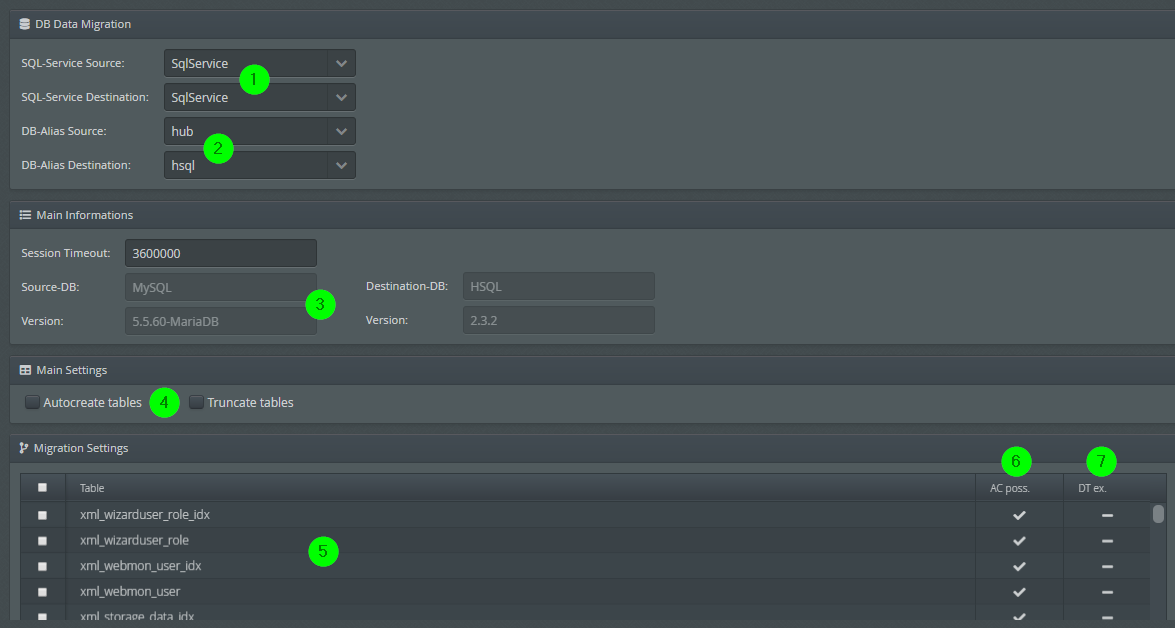
① The SQL services to be used for the migration.
② Selecting database aliases for the source and target of the migration.
③ Information about the databases selected in ② via their aliases.
④ Here you can specify whether tables that do not exist in the destination system should be created and whether existing tables should be emptied before being populated. See also ⑥ and ⑦.
⑤ Here you can select the tables in the source system that should be migrated.
⑥ Indicates whether "auto-create" is possible; that is, the data migration tool has scripts available that can be used to create a table that does not exist in the target system, thereby enabling migration. See also ④.
⑦ Indicates whether this table exists in the target system (target table). A migration is also possible even if there is no "auto-create script" (see ⑥ and ④)
NOTE:
If neither ⑥ nor ⑦ is specified, a table cannot be selected for migration.