Click path
Integration > Profile > Phase 6 > New response > Orchestration class> [Orchestration class] Settings
Settings
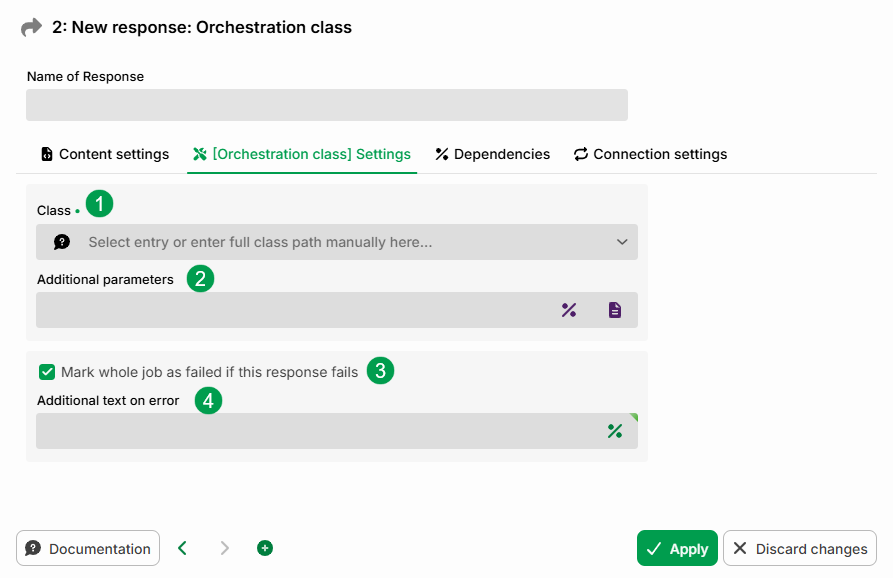
① Class: The class name can be selected from a list or specified manually as a full class path. For details, see the documentation for the respective class (see Responders (for Orchestration)).
② Additional parameters: You can enter a value directly here. You can also use the icons on the right to insert a variable or select a configuration file from the ./conf folder.
③ Mark whole job as failed if this response fails: A job is not automatically considered to have failed if a single response fails (see the "Status of Phase 6 – error behavior" section in Dependencies). This option allows you to enforce that behavior.
④ Additional text on error: You can enter additional log text here in the event of an error.
Retries
Retries for this response are controlled via the Connection settings tab – the general behavior is described there. The following also applies to the "Orchestration class" response:
The class is re-executed on the same instance and must support re-entry. A class that fails only after a side effect has already been executed will executed again.
Only exceptions are repeated. A class that suppresses its error and returns without an exception is not repeated.
The Permitted execution time field is not evaluated.