XML name | base:HolidayGroup |
Class name | de.lobster.scm.base.calendar.HolidayGroup |
Permission | Administration/Master Data/Holiday Groups |
Holiday groups and associated holidays can be defined here.
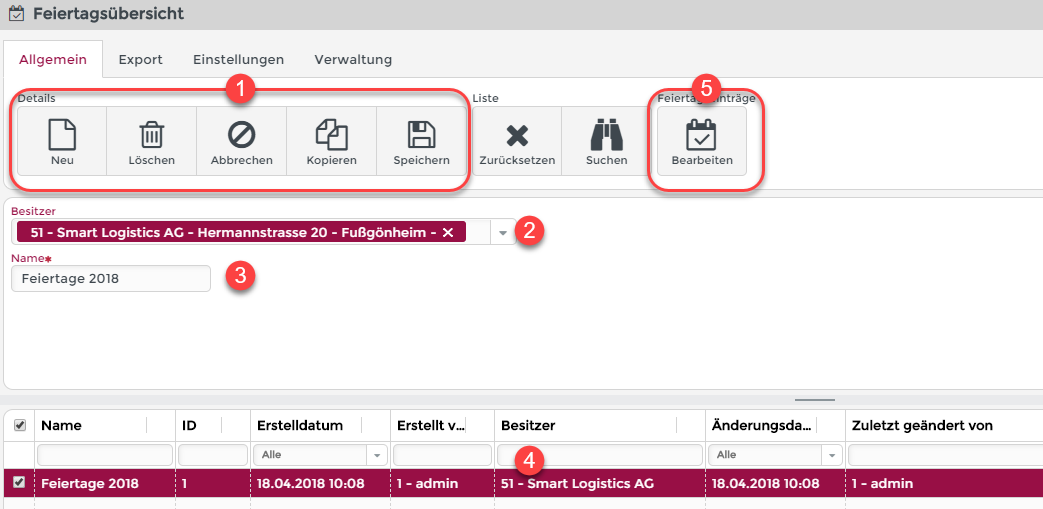
This screenshot shows the dialog box for the definition of holiday groups.
(1) New, Delete, Cancel, Copy, Save: Holiday groups can be saved or copied and deleted in the data bank.
(2) Owner: The owner of the holiday group.
(3) Name: The name of the holiday group can be changed here.
(4) A list of the defined holiday groups.
(5) Holiday entries: Here the data of a holiday can be created, edited or changed.
NOTE: Holiday entries are only stored in the database when the corresponding holiday group is saved.
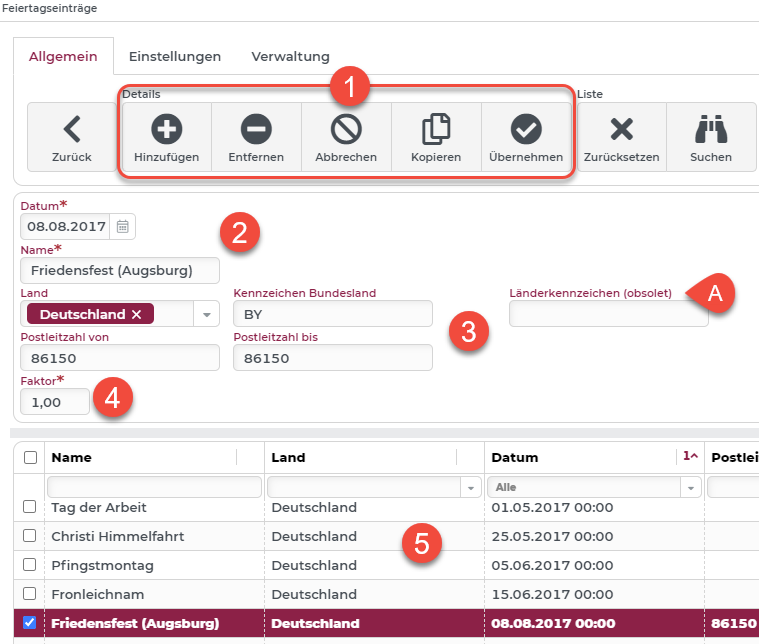
This screenshot displays the dialog box for the definition of holidays from the selected holiday group.
(1) Add, Remove, Cancel, Copy, Apply: Holiday entries can be saved or copied and deleted in the database.
(2) Name and Date of the holiday.
(3) An optional specification of a Country/state or valid ZIP (postal) code area. This information can be used for specific filtering or search restrictions. In this example, the Friedensfest in Augsburg was defined as a holiday for an exclusive ZIP code area. The fields "ZIP code from" and "ZIP code to" are alphanumeric fields.
NOTE: For postal code systems (e.g. UK) whose value ranges cannot be formulated, individual solutions must be found.
IMPORTANT: The country code is obsolete as of version 4.6.0 and should be transferred to the "Country" field until the next version (4.7.0). Since the country code was a free text field, no automatic migration of the data was possible.
(4) Factor can be used to calculate control times. This is set to 1.00 by default.
(5) A list of defined holidays within the selected holiday group.