---
title: "get matched value()"
slug: "basic-get-matched-value"
updated: 2026-08-11T13:02:24Z
published: 2026-08-11T13:02:24Z
canonical: "docs.lobstersoftware.com/basic-get-matched-value"
---
> ## Documentation Index
> Fetch the complete documentation index at: https://docs.lobstersoftware.com/llms.txt
> Use this file to discover all available pages before exploring further.
# get matched value()
This function is intended for the document types XML, EDIFACT and JSON (only fields).
It returns the value of the field's or node's match code that matched during the parsing of the input data. For the function to work, the following conditions must be met.
- The option "Normal data mapper" (see [Extended (Phase 2)](/v1/docs/en/profiles--tab-3-advanced)**)** has to be used.
- The checkbox "Use matchcode values for functions in Mapping" (see [Extended (Phase 2)](/v1/docs/en/profiles--tab-3-advanced)) must be set.
## Parameters
| Parameter | Description |
| --- | --- |
| a | Node or field name. The parameter type must be "*Source field"* if the match code of a field is required. If you need the match code of a node, the type must be "*Value"*. **IMPORTANT:** If you are using Document type "EDIFACT"*,* only nodes provide a meaningful result. In addition, the entire data line for which the match code matched is returned and not the match code itself, e.g. *LIN+1++101556:SA* |
## Example
Assume the following XML structure.
```matchedvalue
```
An XML that conforms to this schema looks like this, for example.
```matchedvalues
```
This XML is to be converted into a simple CSV file of the following form.
```plaintext
Date:2011-12-23 00:00:00
Date:1970-01-01 12:34:56
Date:2011-12-23 12:34:56
```
Solving it the regular way, it would be necessary to create one field per attribute and find out the relevant one during the mapping. Using this function, all attribute values can be assigned to a single field.
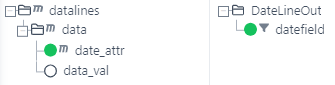
The match codes being used on source structure field *date-2_attr* are the following.
| Condition | Value |
| --- | --- |
| Equals | date |
| Equals | time |
| Equals | datetime |
The following functions are defined on target structure field *datefield*.
```plaintext
1) get matched value(a)
a field: date-2_attr
2) replace value(a, list b, list c)
a result: 1
b constant: date,time,datetime
c constant: yyyy-MM-dd,HH:mm:ss,yyyy-MM-dd HH:mm:ss
3) create date strict(value a, adjustable template b, default c, [locale d])
a linked field:
b result: 2
c constant: error
d constant:
4) concat( a, b )
a constant: Date:
b result: 3
```
## Example profile
Download the profile used in this example here and import it: [Profile-get_matched_value_example.pak](https://cdn.document360.io/4be90b94-ec83-41d8-963e-962df16110d4/Images/Documentation/Profile-get_matched_value_example.pak)
If you perform a mapping test, you will find the XML input file there.
XML (Extensible Markup Language) is a structured text format for storing and exchanging data. Content is enclosed within freely definable tags such as `<order>`. XML is human-readable, machine-processable, and platform-independent. In the Lobster Data Platform, you can receive, parse, and generate XML data.
International EDI standard established by the UN for electronic data interchange. EDIFACT defines message types such as ORDERS, INVOICE, and DESADV.
JSON (**J**ava**S**cript **O**bject **N**otation) is a lightweight text format for data exchange. The Lobster Data Platform handles JSON in integration profiles, web resources, and API interfaces. Value resolvers convert JSON data to internal objects and vice versa.
The core task of Phase 3. Mapping transfers data from the source structure to the target structure according to defined rules. In the process, fields can be transformed, functions can be called, and values can be calculated.
Configuration in Phase 2, which determines the format of the input data. The document type determines how the parser reads the data and transfers it to the source tree. Examples: EDIFACT, XML, JSON, CSV, X12.