---
title: "DatabaseService"
slug: "connection-service"
updated: 2026-06-08T12:21:38Z
published: 2026-06-08T12:21:38Z
canonical: "docs.lobstersoftware.com/connection-service"
---
> ## Documentation Index
> Fetch the complete documentation index at: https://docs.lobstersoftware.com/llms.txt
> Use this file to discover all available pages before exploring further.
# DatabaseService
**IMPORTANT:** Databases and JDBC drivers used to access databases are third-party products and are neither supported nor provided by Lobster. Any support or advice on databases or JDBC drivers that may nevertheless be provided by the Lobster support is voluntary and in no way implies a transfer of responsibility to them. The installation, operation and maintenance of databases/JDBC drivers, or measures carried out on them, are always and without exception the responsibility of the customer. The Lobster support will of course be happy to assist you with the internal configurations necessary to connect functioning third-party systems.
The DatabaseService allows neutral access to databases. The following is supported.
- Connection pooling – Links to databases are opened and kept open in advance, so they can be accessed more quickly within applications.
- Data type neutralization – Database specific peculiarities of standard data types are neutralized, e.g. the format of date and time, so that no database-dependent conversions on the application side are necessary.
- Automatic reconnection – The validity of an existing database connection is checked in regular intervals and re-established automatically in the event of a connection loss.
Each connected database is represented by a so-called database alias, in which all database-relevant information is stored (connection parameters, etc.). The alias is used to access the database. A change of the underlying database is greatly facilitated this way.
## Adding alias (configuration file)
### Service
There you will also find the responsible configuration file for a service.
### JDBC driver
You can get the driver (*.jar* file) for your database from your database vendor. Place it in the *./extlib* folder. *C*hanges require a service restart!
### Adding a new database alias
The following XML fragment can be used to add a new database alias (*./etc/database.xml*). The file contains examples for various database types. Changes require a service restart!
```xml
200000
false
db
wbv
jdbc:postgresql://server:5432/db
org.postgresql.Driver
dummy
dummy
lower
2
2
true
300000
select obj_id from xml_unitrealm
false
true
false
false
32000
propertyname
propertyvalue
```
The parameter have the following meaning.
| Parameter | Description |
| --- | --- |
| addNamedProperty | Allows setting so-called *ConnectionProperties*. For many JDBC drivers, the way to connect to the database can be controlled by setting key-value pairs. The first argument represents the key, the second represents the value to be set. Example**:** *transaction level* and *none*.Which value pairs can be set depends on the JDBC driver used. Therefore, please refer to the documentation of the respective driver. |
| alias | The database alias to use. |
| allowGrowing | If *true*, the pool is allowed to grow when all initially created connections have been issued to applications and another one is needed. If *false*, unfulfillable connection requests are rejected. |
| autogenKeysPrepareSupport | *true* sets the information that the driver is able to get the columns for automatically generated IDs configured by name. |
| blobEncoding | Character set to be used when converting text to binary data when setting BLOB parameters. |
| caching | If set to *true*, SQL statements used by applications are cached. All statements must be checked by the DatabaseService and adapted if necessary. Therefore, it makes sense to save the result of these checks/changes for future use if your system has sufficient resources. However, if you primarily use dynamic statements, explicit deactivation of this option may make sense to avoid unnecessary memory usage for never-reused SQL statements. |
| catalogName | Defines the name of the catalogue to be used as the default catalogue if statements do not contain any specific information. If this is not specified, the alias name is used. |
| checkConnection | If *true*, the validity of a connection is checked before it is issued to an application from the pool. This reduces the performance of the system, but ensures that the application gets a connection that works and has not become invalid since the last check. |
| database | The JDBC URL that represents the connection to the database. This URL is database-dependent, e.g. *jdbc:mysql://myserver:3306/db*. |
| driver | The class that represents the driver of the JDBC driver. This setting is database-dependent, e.g. *org.gjt.mm.mysql.Driver*. |
| idleTime | Specifies the time in milliseconds that a connection must be unused in the pool before its validity is checked by the DatabaseService. **IMPORTANT:** Please note that there is a global *idleTime* for the service itself and a local one for the respective alias. An alias is not checked until its local time has expired and the global one. |
| isolationLevel | Isolation level to be used. Details can be found in your JDBC documentation. -1: Driver default. 0: TRANSACTION_NONE 1: TRANSACTION_READ_UNCOMMITTED 2: TRANSACTION_READ_COMMITTED 4: TRANSACTION_REPEATABLE_READ 8: TRANSACTION_SERIALIZABLE Every other number: Other. |
| lowerCase | The name of the method for converting text to lowercase. Normally, this information is provided by the JDBC driver itself, but there are exceptions where an explicit specification is required. |
| maxSize | Maximum number (not negative) of connections held in the pool. *-1* sets the *maxSize* to twice the *minSize*, but at least to *1*. All connections exceeding this number are disconnected as soon as they are no longer used. *0* thus effectively deactivates the pool function of the service. |
| maxStatementLength | Maximum length of a statement including parameters. Is used by the JDOService to decide whether "stripping" should be used when saving data. *0* deactivates this check. |
| minSize | Number (not negative) of initial connections to be established at startup. If the currently set *maxSize* is smaller than the newly set minimum value, the maximum value is automatically adjusted. Therefore, *maxSize* should only be executed after *minSize* has been set in order to avoid unwanted side effects. |
| nullKeyword | Text (not empty) to be used in parameter values as a representation of NULL. |
| password | The password to use for authentication with the database. Obfuscation is allowed, e.g. *OBF:1wtm1xtz1w8v1xtj1wus* |
| readOnly | With *true*, the driver is informed that the database is to be accessed in read-only mode and allows the use of shadow databases instead of the main system in cluster operation. |
| rollback | *true* means that the database to be connected supports transaction-based work. Specifying *false* means that no attempt is made to start a transaction, which would result in an error message for some databases. **CAUTION****:** If you specify of *false* for a transactional database, the attempt to start a transaction is ignored. Commit and rollback also have no effect, although the database would actually be able to do that. |
| selectNullKeyWord | Text (not empty) to be used in results as a representation of NULL. |
| simulateAccess | *true* prevents the execution of data-changing statements such as UPDATE or DELETE. |
| skipTrimResultValues | In MSSQL and Informix databases, the result values of SQL calls are trimmed of leading and trailing spaces. If you do not want this, you can insert this parameter here and set it to "true". **IMPORTANT:** However, you should not use this setting in the alias for the repository database ("hub"), as this would lead to functional problems (partner management does not find channels, etc.). Rather create a second alias for the same database with this setting. |
| slowLogMilliSeconds | Execution time in milliseconds from which statements are to be logged. |
| sqlCommand | The SQL command to verify the validity of a database connection. If no command is specified, the list of available tables is queried. However, this information is cached by some JDBC drivers so that a connection can be considered valid, even though it is no longer. |
| strictSchema | With *true*, database metadata is filtered for entries that belong to the set catalog. |
| supportsStream | Determines whether the linked database supports so-called character streams as parameters for writing to and reading from a database. This information is used, for example, by the JDO service to decide whether an object to be written into the database should be "stripped" or not. |
| synchronousStartupInit | With *false*, the pool is initialized with a time delay and not as part of the start process. |
| user | The username to use for authenticating with the database. |
Optional properties are inserted via the following block. Obfuscation is allowed, e.g. *OBF:1wtm1xtz1w8v1xtj1wus*
```xml
propertyname
propertyvalue
```
### Rollover handler
A rollover handler is added via the method *addRolloverHandler*.
| HSQLCheckPointDefragHandler | A special execution of the *DBReorgHandler* that executes the statement *checkpoint defrag* against the database behind the respective alias. |
| --- | --- |
| DBReorgHandler | Allows setting SQL statements to be executed during rollover. |
```xml
hsql
[...]
```
```xml
hub
[...]
optimize table sampletable
```
## Log level dependencies
Changes to the log level of the LogService have no influence on the logging behavior of the DatabaseService.
If the service is set to verbose mode, the following additional logging steps are performed.
- The proprietary Java database connection system (*DriverManager* of the JDBC framework) is instructed to keep its own log. This is located in the directory *./logs* under the name *db.log.*
**CAUTION****:** The generated log file is not part of the regular logging system of the Integration Server (LogService), so it will not be renamed at the end of the day, but instead will continue to grow. If the server is restarted, the file will be overwritten if the DatabaseService continues to run in *verbose* mode.
- If a connection is checked for validity (e.g. when a connection with activated *checkConnection* is released or during the regular check), this is reported accordingly.
**NOTE:** If the SQL statements executed by the server and their used parameters are to be output, this must be done via the *verbose* mode of the SqlService.
## GUI
**CAUTION****:** Changes are lost after a restart of the DatabaseService or the Integration Server! Permanent changes must be made in the configuration file!
**(1)** Here you can specify the time between two connection checks (see parameter *idleTime*).
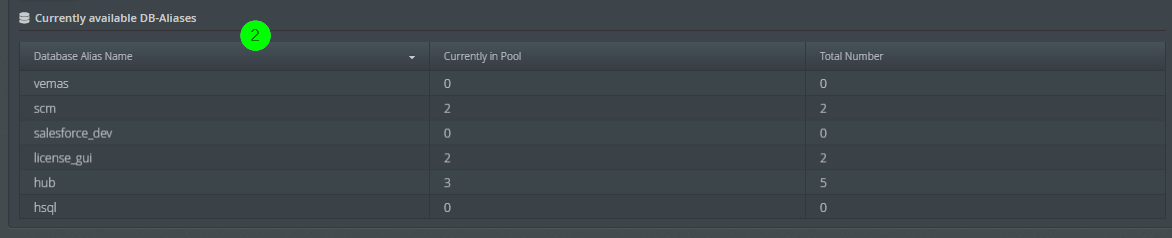
**(2)** List of available database aliases. You can see the unused connections in the pool and the connections that have been opened by the DatabaseService for the respective alias.
### Context menu of alias
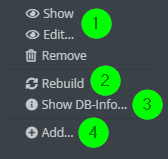
**(1)** Show/edit alias.
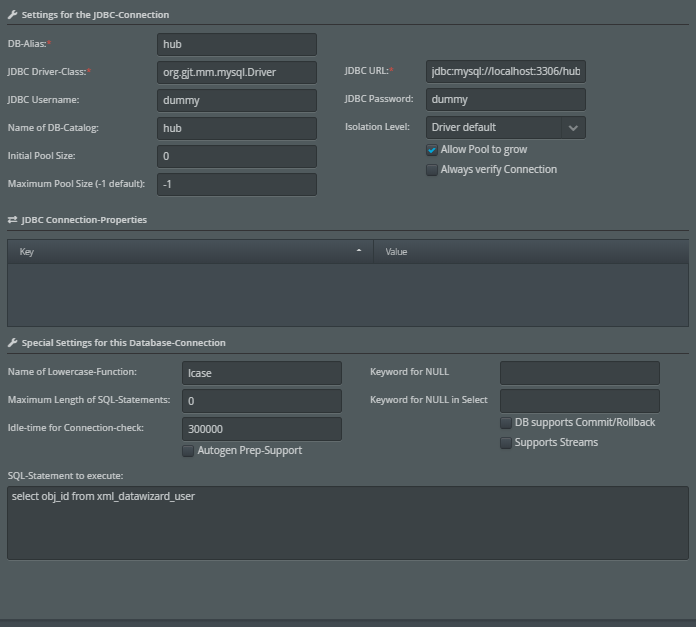
The fields represent the same parameters used/described in the XML configuration file.
If changes are applied, a rebuild **(2)** takes place.
**(2)** Closes all open connections to the target system and rebuilds the pool, meaning that as many connections are created and placed in the pool as defined by *minSize*.
**(3)** Show database information.
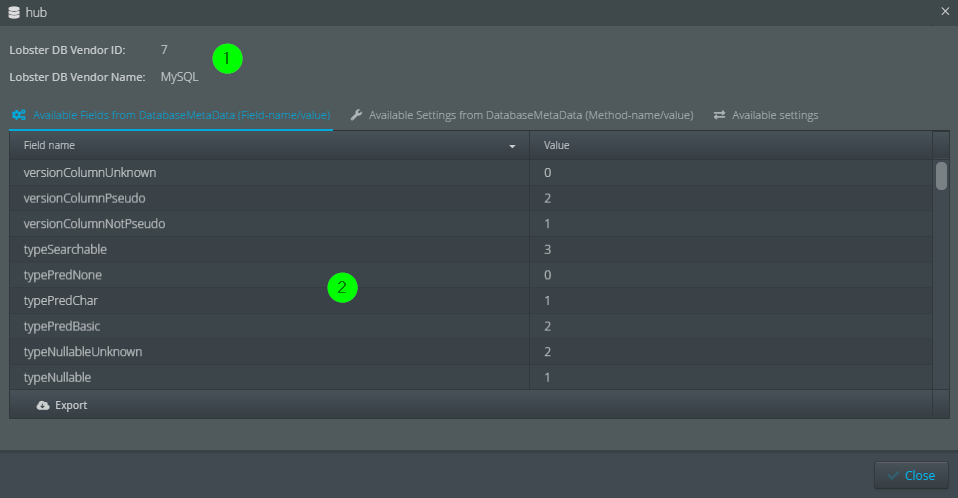
(3.1) The vendor ID indicates which database-specific configuration the DatabaseService uses for this alias.
(3.2) The fields that can be set for the JDBC driver.
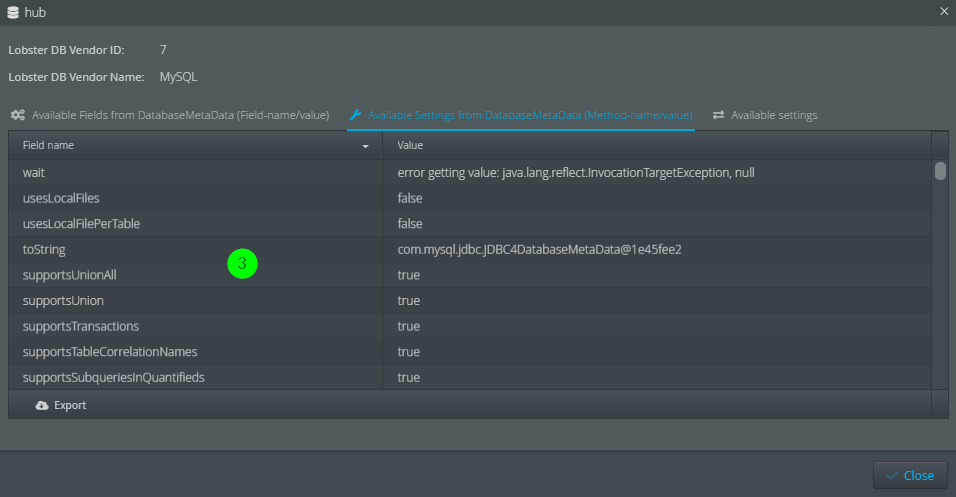
(3.3) The methods provided by the JDBC driver.
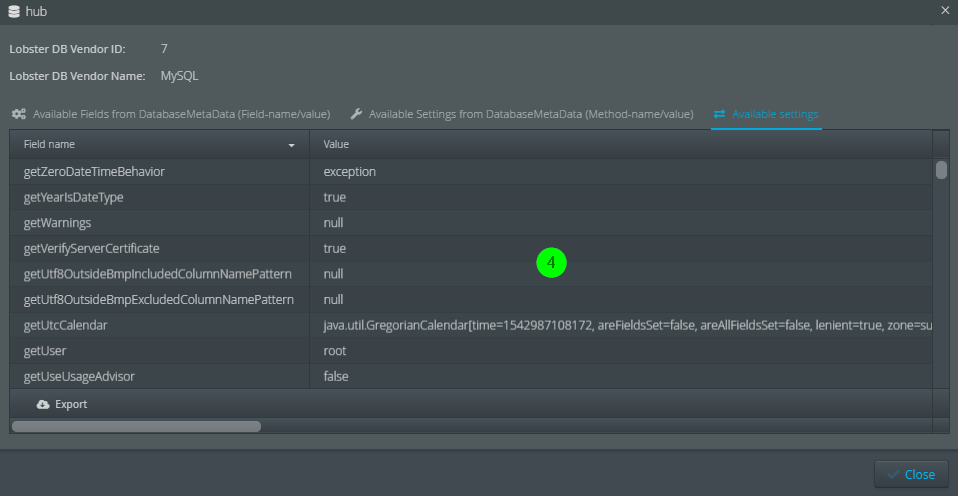
(3.4) The settings within the generated connections.
(4) Add alias.
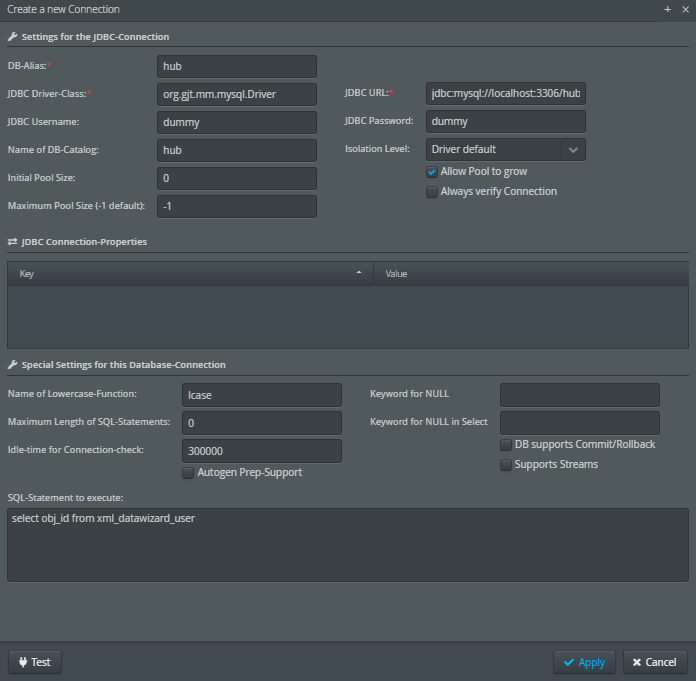
The fields represent the same parameters used/described in the XML configuration file.