---
title: "Client xml to object"
slug: "core-client-xml-decode-resolver"
updated: 2026-04-15T12:46:44Z
published: 2026-04-15T12:46:44Z
canonical: "docs.lobstersoftware.com/core-client-xml-decode-resolver"
---
> ## Documentation Index
> Fetch the complete documentation index at: https://docs.lobstersoftware.com/llms.txt
> Use this file to discover all available pages before exploring further.
# Client xml to object
*See also:* [Object to client xml](/v1/docs/en/core-client-xml-encode-resolver)
> [!NOTE]
> Value resolver – Abstract
>
> **Purpose:** Attempts to parse a string passed as *input value* as XML to return an object.
>
> > [!TIP]
> > Tooltip
> >
> > - **Usage**: The value resolver returns the generated object, if successful.
> > - **Parameter**: The **Class field name** (default value `class`) determines which property in the XML defines the class of objects or the data type of values.
> > - **NOTE:** If no value (`$null`) is present as *input value*, the no value (`$null`) is returned.
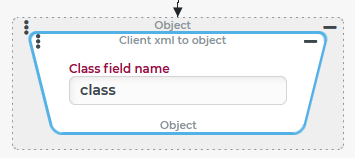
The [Object to client xml](/v1/docs/en/core-client-xml-encode-resolver) value resolver parses a string passed as a *input value* as XML (see [XML data encoder](/v1/docs/en/core-xml-data-encoder)) to return an object.
The **Class field name** parameter defines the name of the XML attribute that specifies the "class" of elements in the client XML. Elements that have this XML attribute should be converted to the relevant data type or class.
The following cases are differentiated:
| Input value (abstract) | Input value (specific examples) | Return value (suitable with "Class field name": `class`) | ... with unsuitable "Class field name" (here: not `class`) | Error |
| --- | --- | --- | --- | --- |
| No value (`$null`) | No value (`$null`) | No value (`$null`) | n/a |
| A string that does not define a well-formed XML | *Empty character string ("")* --- `abcXYZ` --- `<missingSlashInClosingTag>XYZ<missingSlashInClosingTag>` | n/a | `ProcessException:Failed to parse` |
| A well-formed XML that contains only text as content in an arbitrarily named `root` element. | `<obj>123E4` `</obj>` | `123E4`(String) | n/a |
| A well-formed XML with a `root` element whose (simple) content can be converted to the class specified in the applicable class field (*here*: `class`). | `<obj class="java.lang.Double">123E4</obj>` | `1230000.0` (`Double` value) --- **NOTE:** The original string `123E4` is interpreted considering the rules for the Java `Double` class and gives the numerical value 123 x 10^4 (`1230000.0`) as an exponential number. | ```json { "textContent": "123E4", "class": "..." } ``` (Client object in JSON notation) **NOTE:** If the *input value* `123E4` is interpreted without considering the `Double`/`Long` class, there is access to the original string via the automatically generated `textContent` property and to the name of the "actual" class via the `class` property. | n/a |
| A well-formed XML with a `root` element whose (simple) content cannot be converted to the class specified in the applicable class field (*here*: `class`). | `<obj class="java.lang.Long">123E4</obj>` | No value (`$null`) --- **NOTE:** The original string `123E4` is interpreted taking into account the rules for the Java `Long` class . The interpretation of the exponential notation (123 x 10^4) is not supported for `Long` in contrast to `Double`. Therefore, "no value" is returned. | n/a |
| A well-formed XML with a `root` element for which a class unknown in context is specified in the applicable class field (*here*: `class`). | `<obj class="fancy.Number">123E4</obj>` | ```json {"textContent": "123E4", "class": "fancy.Number"} ``` (Client object in JSON notation) | n/a |
| A well-formed XML whose `root` element refers to a `root` element type defined for the server (*here*: "incident") and can be successfully validated against its schema. | ```xml NEW SCHEDULED HIGH ... ``` **IMPORTANT:** The `incidentState`, `incidentSource`, and { `incidentSeverity` properties get their values from dynamic enumerations. The strings assigned in the example use the internal names of the corresponding values. For the automatic conversion from string to dynamic enumeration value to work, the relevant element must be explicitly assigned the class `string` (or `java.lang.String`) in the `class` attribute. | ```json { "class": "de.lobster.scm.scem.incident.Incident", "affectedEntities": null, "created": null, "creatorId": "0", "id": "0", "incidentSeverity": HIGH, "incidentSource": SCHEDULED, "incidentState": "NEW", "incidentType": null, "lastModified": null, "lastModifierId": "0", "ownerId": "0", "partialLoaded": false } ``` (New `Incident` entity – see [SCEM Incident](/v1/docs/en/scem-incident) – in JSON-Notation) --- **NOTE:** Contents that are not provided for in the data model of the class (in the example: `additionalInformation`) are "missing" in the created entity. Instead, default fields with default values for their data model appear here (e.g.: `id=0`). | ```json { "additionalInformation": ... "incidentState": { "textContent": "NEW", "class": "string" }, "incidentSource": { "textContent": "SCHEDULED", "class": "string" }, "incidentSeverity": { "textContent": "HIGH", "class": "string" }, "textContent": "NEWSCHEDULEDHIGH", "class": "de.lobster.scm.scem.incident:Incident" } ``` (Client object in JSON notation) --- **NOTE:** The client object reflects all the information from the XML, but maps it without any consideration of classes referenced in different layers. | n/a |
## Configuration
The input value is expected to be a string for a well-formed XML document.
The **Class field name** parameter defines a field name that can be used as an attribute within the XML string to identify the class of an object.
- By default, the `class` property is used.
If the **Class field name** specified in the configuration does not match the contents of the XML present as *input value* because it uses a different name for references to classes of objects, then the corresponding contents are not parsed against the object model of the specified class. Instead, a "client object" is created, in which the possibly existing reference to the ignored class can be read as a data field value under the unsuitable name. For the relevant examples, the table above with yellow shading in column 4 (using the JSON notation) shows how such client objects can look.
**NOTE:** "Ignoring" existing class references is typically undesirable when using the [Object to client xml](/v1/docs/en/core-client-xml-encode-resolver) value resolver, especially since it affects all "classified" content.
## Example
Event handling is used to access selected contents of a file containing weather data, which is periodically written to the file system of the **Lobster Data Platform** server.
The file provides a list of aviation weather reports in text form in XML format with the following structure:
Extract from an XML file with aviation weather data:
```xml
EDMO
COR
EDMO 201320Z 27013G23KT 250V310 CAVOK 29/14 Q1013=
EDMA
EDMA 201350Z 26013KT 230V290 CAVOK 29/14 Q1012=
...
```
In the context of event handling, an object is created that reflects the weather reports `metar` elements contained in the file as a list of client objects. For this purpose, a "list object" is created from the file content, which can be "examined" or evaluated in more detail in the context of event handling with value resolvers ([Rule list resolver](/v1/docs/en/core-list-rule-resolver), [List item](/v1/docs/en/core-list-item-resolver), etc.).
Configuration:
| Within an [Execute with](/v1/docs/en/core-with-actor) event action, the list of all weather reports (`metar` elements in the XML) from the file shall be considered as a different reference object. The following concatenation of value resolvers enables the XML file to be converted into a "list object": - The [File reference](/v1/docs/en/core-file-reference-content-builder) value resolver reads the file from the directory `./upload/wx/metar.xml` and returns. - The chained [Input object (type safe)](/v1/docs/en/core-root-entity-resolver) "reads" the content of the file (XML text). - The chained [Replace text](/v1/docs/en/core-replace-string-resolver) value resolver is needed to add a `class` attribute to the first *tag* of the XML structure, which is required so that the `root` element (named `avmet`, see above) is parsed as a list object (`java.util.List`) in the next step. The replacement is controlled by a regular expression (see screenshot). - The prepared XML is passed to the chained [Client xml to object](/v1/docs/en/core-client-xml-decode-resolver) value resolver, which, taking into account the inserted `class` mapping for the root element, returns a list of objects whose fields reflect the contents of one `metar` element each. **NOTE:** In the [Execute with](/v1/docs/en/core-with-actor) event action block, this list could, for example, be searched by a [Rule list resolver](/v1/docs/en/core-list-rule-resolver) for a weather report for a specific airport identified by an [Entity property rule](/v1/docs/en/core-entity-property-rule) for the `icaoAdId` property. | 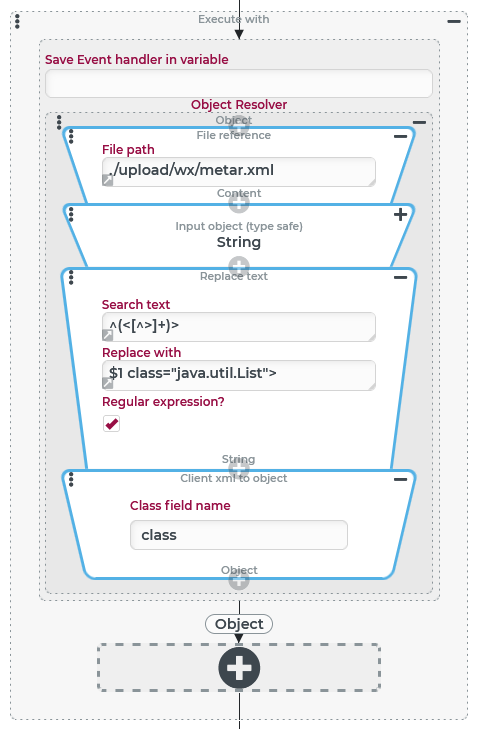 |
| --- | --- |