---
title: "Object to client xml"
slug: "core-client-xml-encode-resolver"
updated: 2026-04-15T12:05:55Z
published: 2026-04-15T12:05:55Z
canonical: "docs.lobstersoftware.com/core-client-xml-encode-resolver"
---
> ## Documentation Index
> Fetch the complete documentation index at: https://docs.lobstersoftware.com/llms.txt
> Use this file to discover all available pages before exploring further.
# Object to client xml
*See also:* [Client xml to object](/v1/docs/en/core-client-xml-decode-resolver)
> [!NOTE]
> Value resolver – Abstract
>
> **Purpose:** Returns the data structure of the *input value* as text in client XML format.
>
> > [!TIP]
> > Tooltip
> >
> > - **Usage:** The value resolver returns the data structure of the *input value* as text in client XML format.
> > - **Parameter:** The optional **Class field name** can be specified differently from the default (`class`), if required. Without any specification, the specification in the XML is omitted.
> > - **WARNING:** If the specified **Class field name** contains invalid characters (special characters, spaces), the *encoder* fails at runtime with an error message.
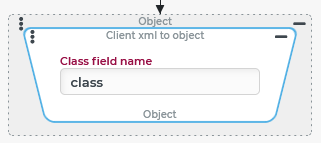
The [Object to client xml](/v1/docs/en/core-client-xml-encode-resolver) value resolver returns the data structure of the *input value* as text in client XML format (see [XML data encoder](/v1/docs/en/core-xml-data-encoder)).
The **Class field name** parameter defines the name of the XML attribute to be used in the output format to declare the "class" of objects.
## Configuration
The **Class field name** parameter allows the input of a static text as a [Text field](/v1/docs/en/custom-custom-text-field), which is used in the output format to declare the "class" of objects within the XML structure.
- The *default value* is the `class` string.
- If no **Class field name** is specified, the reference to the data type in the output XML is omitted without replacement.
**IMPORTANT:** The default value for the **Class field name** parameter can be overwritten in the configuration technically with any static string. However, only "names" that are also suitable as XML attribute names should be specified here. If the specified **Class field name** contains invalid characters (special characters, spaces), the *encoder* fails at runtime with an error message.
## Examples
The same configuration always forms the basis for the following examples of the [Object to client xml](/v1/docs/en/core-client-xml-encode-resolver):
| The dispatch of an e-mail notification is triggered by different triggering events (not shown in the image). The most important details of the "situation" in which the event was triggered are reproduced as client XML in the e-mail attachment: - The name of the event ([Triggering event](/v1/docs/en/core-caused-event-resolver)). - The ID (`id`) of the logged in user. - The name of the [Role of session](/v1/docs/en/base-session-role-value) (`roleName`). - The current date ("Begin of today", [Relative date with time](/v1/docs/en/core-date-time-value)) as the time specification. As shown on the right, the required information in the **Object Resolver** parameter of an [Execute with](/v1/docs/en/core-with-actor) event action is packed by a [Create list](/v1/docs/en/core-create-list-resolver) value resolver into a list that is the *reference object* for the following [E-mail](/v1/docs/en/core-send-mail-actor) event action. **NOTE:** The `contextEntity` variable (see **Save Object in variable** parameter) can be used to access the entity in the data context of the triggering event, e.g. to use its data in the subject or the body of the e-mail. | 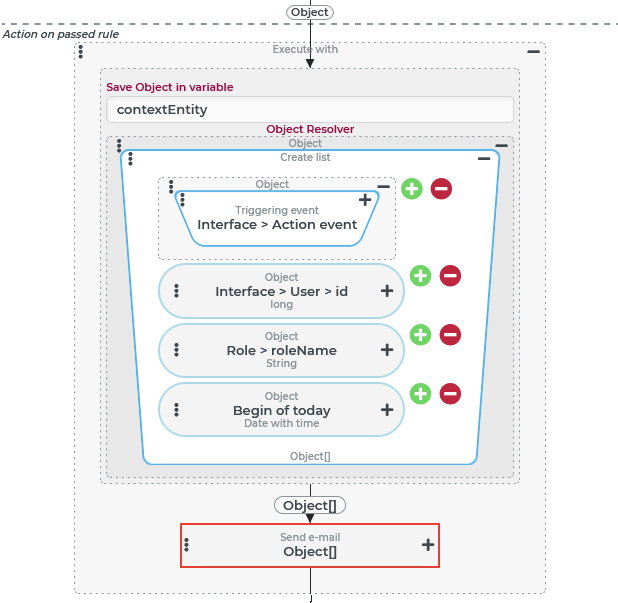 |
| --- | --- |
### Example: List object as default client XML
| On the right, the configuration for the **Attachments** tab of the [E-mail](/v1/docs/en/core-send-mail-actor) event action attaches the contents of the unspecific list of objects (`Objekt[]`) present as the *reference object* of the event action to the generated e-mail in the default client XML format (with the **Class field name** `class`). The attached file is assigned the **File name** ".log.xml" and the **Mime type** `text/xml` by statically defined texts. | 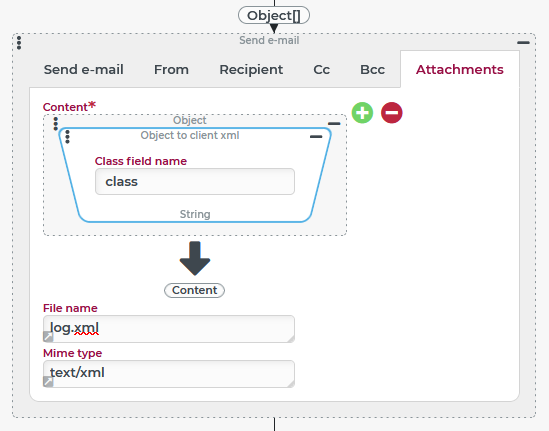 |
| --- | --- |
| Runtime example: - In the example, the `XF_TEST` event was triggered, which identifies the dynamic enumeration value in the first entry (`item`). - The `Long` value at the second line item identifies the [User of session](/v1/docs/en/base-session-user-value). - This is followed by a `String` with the name of the role used: "Super user limited". - The last item in the list is the time specification for the beginning of the day (UTC time zone) when the event was triggered. | Client XML (with Class field name: class) ```xml ``` |
### Example: List object as client XML with non-standard "Class field name".
| The configuration on the right is unchanged except for the different value `clazz` for the **Class field name** parameter. | 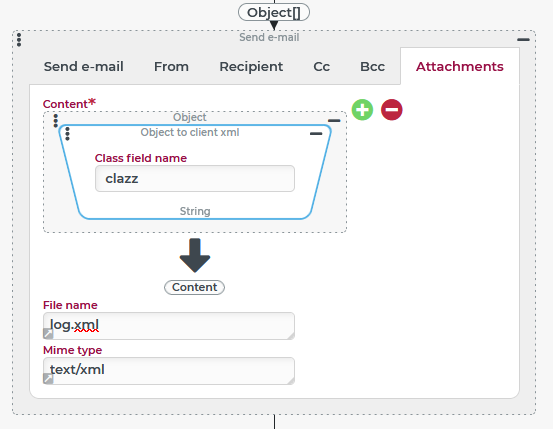 |
| --- | --- |
| Runtime example: - As specified in the configuration, the classes in the output XML are now identified by the XML attribute `clazz`. | Client XML (with Class field name: clazz) ```xml ``` |