---
title: "File reference"
slug: "core-file-reference-content-builder"
updated: 2026-04-15T06:16:12Z
published: 2026-04-15T06:16:12Z
canonical: "docs.lobstersoftware.com/core-file-reference-content-builder"
---
> ## Documentation Index
> Fetch the complete documentation index at: https://docs.lobstersoftware.com/llms.txt
> Use this file to discover all available pages before exploring further.
# File reference
> [!NOTE]
> Value resolver – Abstract
>
> **Purpose:** Allows reading, writing or deleting a file in the file system of the **Lobster Data Platform** server. The content of the referenced file is returned as a data object of the "Content" type.
>
> > [!TIP]
> > Tooltip
> >
> > - **Usage**:
> > - In general, the file defined by **File path** is read. The `body` field of the returned "Content" object then returns the (binary) file content as a byte array.
> > - To write a file, the [File reference](/v1/docs/en/core-file-reference-content-builder) value resolver must be used on the left side of an assignment via [Set value](/v1/docs/en/core-set-value-actor).
> > - To delete a file, the [File reference](/v1/docs/en/core-file-reference-content-builder) value resolver must be assigned the value "No value" (`$null`) via [Set value](/v1/docs/en/core-set-value-actor).
> > - When writing or deleting, the assigned value (updated content or "No value") appears as the return value.
> > - **Parameter**: The **File path** parameter defines an *absolute* or *relative* path in the **Lobster Data Platform** server file system.
> > - The start directory for the [File manager](/v1/docs/en/ac-environment-filemanager) (`upload` folder) can be addressed in the **File path** via the placeholder `$home` (e.g. `$home/web/`...).
> > - The reference point for *relative* paths is the home directory of the Lobster Integration Server (`%HUB_HOME%`) and not the `upload` folder (`$home`).
> > - **WARNING:** Writing and deleting files also works in test mode, i.e. when [Tests](/v1/docs/en/core-testing-set) are executed with an event handler.
> > - **WARNING:** The deletion or overwriting of an existing file is always done without further inquiry.
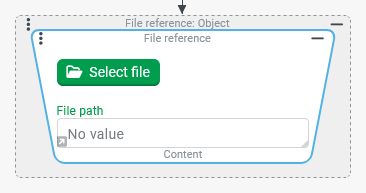
The [File reference](/v1/docs/en/core-file-reference-content-builder) value resolver provides access to a file defined by an *absolute* or *relative* **File path** in the file system of the **Lobster Data Platform** server.
> [!NOTE]
> **IMPORTANT:** Relative paths / "File reference" vs. "File manager"
>
> ---
>
> The [File reference](/v1/docs/en/core-file-reference-content-builder) resolver interprets *relative* file paths relative to the home directory of the Lobster Integration Server (`%HUB_HOME%`), that **Lobster Data Platform/Orchestration** is running on.
>
> The [File manager](/v1/docs/en/ac-environment-filemanager) of **Lobster Data Platform/Orchestration** interprets *relative* file paths relative to the `upload` folder, which is a sub-folder of `%HUB_HOME%` designated by server configuration.
>
> The following relative paths indicate typical locations for the `upload` folder of **Lobster Data Platform/Orchestration**:
>
> - `./PRO/config/files/upload` *Default* for current installation
> - `./SCM/config/files/upload` *Default* for legacy installations
> - `./upload` *Alternative* setting enabling shorter paths
>
> ---
>
> **NOTE:** The `$home` placeholder can be used in parameter **File path** of the [File reference](/v1/docs/en/core-file-reference-content-builder) resolver, to address the configured `upload` folder, without explicitly indicating its relative path.
>
> **NOTE:** The **Select file** [Button](/v1/docs/en/fre-button-vo) opens the [File reference](/v1/docs/en/core-file-reference-content-builder) modal to enable a ‘file selection’ for the **File path**. However, this only works for files that are in or below the upload folder (`$home`).
---
**CAUTION****:** The **Lobster Data Platform** server provides "public" read access for all files contained within the subfolder `web` of the designated `upload` folder via the URL for **Lobster Data Platform/Orchestration**.
---
- Content saved to a **File path** starting with `$home/web/` or an equivalent explicit path is therefore available without a **Lobster Data Platform/Orchestration** login.
- A file saved to **File path** `$home/web/gtc.htm` can be read or downloaded via URL `https://<pro_serverURL>/gtc.htm`, without the use of credentials.
- Files located within the `upload` folder but outside its `web` subfolder are accessible by the [File manager](/v1/docs/en/ac-environment-filemanager) within a **Lobster Data Platform/Orchestration** session.
- A file with a **File path** like `$home/logos/customer_4711.png` is accessible by the [File manager](/v1/docs/en/ac-environment-filemanager) via the path `./logos/customer_4711.png`,but not "publicly" available via URL.
---
**CAUTION****:** The [File reference](/v1/docs/en/core-file-reference-content-builder) resolver grants access to parts of the server file system, that are not accessible by the [File manager](/v1/docs/en/ac-environment-filemanager). The following aspects should be considered carefully with respect to data security!
---
- [Event handling](/v1/docs/en/administration-designer-workflow-action-event-handler-configuration) using the [File reference](/v1/docs/en/core-file-reference-content-builder) resolver may not only read but also (re-)write or delete files.
**Write and delete operations for files are irrevocably effective, even if executed in** [Tests](/v1/docs/en/core-testing-set)**!**
- In the context of write operations any "non-existing" folders will be created, if referred to within a **File path**.
- The configuration file `FileManager.xml` (see example below) controls details for access to the server file system. Appropriately restrictive regulations should be applied there, to exclude risks from unauthorized or unintentional access.
PRO/config/etc/systemManagers/de.lobster.scm.system.FileManager.xml (Example)
```xml
/config/files/upload
/tmp
```
## Configuration
The **File path** parameter defines a text value, that is interpreted relative (if applicable) to the `%HUB_HOME%` folder of the Lobster Integration Server file system.
The **File path** can be defined either statically (via direct input) or dynamically – via any value resolver.
| Static direct input for the file path |
| --- |
| In the example on the right, the [File reference](/v1/docs/en/core-file-reference-content-builder) value resolver is to access a text file statically determined in the configuration with "announcements", which an administrator can `upload` via the [File manager](/v1/docs/en/ac-environment-filemanager) to a dedicated subfolder of the upload directory for **Lobster Data Platform/Orchestration**. While the `billboard` subfolder appears in the [File manager](/v1/docs/en/ac-environment-filemanager) with the relative path `./billboard` (see bottom right), the **File path** in the [File reference](/v1/docs/en/core-file-reference-content-builder) value resolver must be formulated relative to the home directory of the Lobster integration server. As shown (see top right) the placeholder `$home` is used in the **File path**, which defines the path to the `upload` folder relative to the home directory of the Lobster Integration Server. A specific file path might look as follows: `./PRO/config/files/upload/billboard/admin_msg.txt` **NOTE:** Depending on the configuration of the system, the [File reference](/v1/docs/en/core-file-reference-content-builder) value resolver may allow access to files in the server’s file system via *absolute* or *relative* file paths that are not accessible via [File manager](/v1/docs/en/ac-environment-filemanager). The `FileManager.xml` configuration file (see below for details) can be used to control access to paths. | *Access via the* [File reference](/v1/docs/en/core-file-reference-content-builder) *value resolver:* 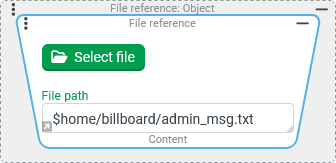 |
| **Select file via a** [Button](/v1/docs/en/fre-button-vo) |
| The **Select file** [Button](/v1/docs/en/fre-button-vo) opens a modal view for the [File manager](/v1/docs/en/ac-environment-filemanager) under the title **File Picker**, via which the path to a file determined by single selection can be adopted as a static value for the **File path** parameter using the **Apply** *ribbon button*. **NOTE:** - The **Select file** [Button](/v1/docs/en/fre-button-vo) only grants access to files that are saved in or below the `upload` folder (`$home`), as is usual for the [File manager](/v1/docs/en/ac-environment-filemanager). - If the **File path** already contains a value when the **File Picker** [Button](/v1/docs/en/fre-button-vo) is clicked, this is not used to "preassign" the **File Picker** even if the path to the file or folder could be mapped there (which is not necessarily the case). - The **Apply** menu function overwrites the **File path** parameter with a path that begins with `$home` and can then be edited interactively if required. In addition to the **Apply** *ribbon button*, this function is also available via the context menu that appears when right-clicking on the file to be applied. - The **File Picker** can be cancelled without any selection by clicking on the "**X"** at the top right of the modal window (not shown in the screenshot). The previous value for the **File path** then remains unchanged. - Double-clicking on a file in the **File Picker** does not **Apply** the reference to the **File path** but instead – just as in a [File manager](/v1/docs/en/ac-environment-filemanager) –triggers the download or displays the file contents in a separate tab. This can be useful for identifying the "correct" file for selection. | ***File Picker*** *via the* [File manager](/v1/docs/en/ac-environment-filemanager) using the **File Picker** [Button](/v1/docs/en/fre-button-vo): 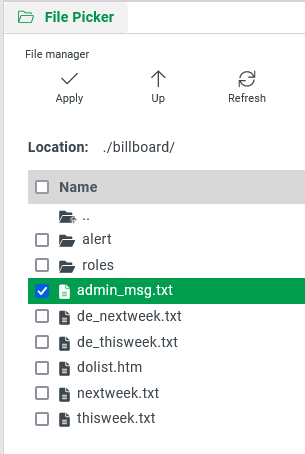 |
| **File path as return value of a resolver** |
| In the example on the right, the **File path** for the [File reference](/v1/docs/en/core-file-reference-content-builder) value resolver is defined using a chain of value resolvers. Starting from a URL in the `avatarURL` field of a user account, the *relative* path to the profile picture of the respective user is obtained as a **File path** by multiple [Replace text](/v1/docs/en/core-replace-string-resolver). Runtime example: *for the* [Users](/v1/docs/en/base-user) *"admin"* `./PRO/config/files/upload/web/avatar/user_avatar_admin.png` **NOTE:** The profile image can be read under this path by [File reference](/v1/docs/en/core-file-reference-content-builder) and used as a file attachment in a [E-mail](/v1/docs/en/core-send-mail-actor) event action. | 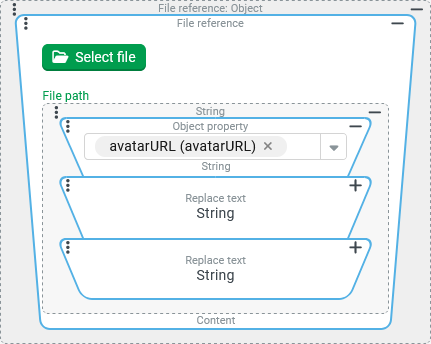 |
## Read access
Provided that the file already exists at the specified location and there is read access on the server side, the value resolver returns an action event "Content" object (`Content`) with the following properties of the file as a return value:
| Field | Data type | Content | Note |
| --- | --- | --- | --- |
| `name` | String | File name | The full **File path** does not appear as the file name. |
| `body` | `Byte[]`(Array) | File content (Byte Array) | The number of bytes, i.e. the length of the byte array in the `body` field, defines the size of a file (in bytes). |
| `mediaType` | `String` | *Not relevant in the context of the* [File reference](/v1/docs/en/core-file-reference-content-builder) *value resolver.* |
If the specified **File path** cannot be resolved, the value resolver returns "No value" (`$null`) on read access.
## Write access (write/delete)
The [File reference](/v1/docs/en/core-file-reference-content-builder) value resolver can be used as a target for a value assignment in a [Set value](/v1/docs/en/core-set-value-actor) event action, to perform write or delete operations.
### Write or rewrite a file
Data assigned to the [File reference](/v1/docs/en/core-file-reference-content-builder) value resolver is saved as the contents of the file specified in the **File path**, if the data type is appropriate (`Content`, `String` or` byte[]`).
- If the file specified in the **File path** does not exist yet, it will be created.
- If the **File path** refers to folders that do not yet exist, they will be created.
- If the file specified in the **File path** already exists, it will be overwritten.
If the assigned value is of type "Content" (`Content`) - for example provided by the [File reference](/v1/docs/en/core-file-reference-content-builder) resolver (see "Read access" above) - only the file content from the `body` field is copied to the target file.
Assignments of type "byte array" (`byte[]`) or text (`String`) are applied immediately als content of the target file.
- The name of the target file depends exclusively on the file name section of the given **File path**.
- The file name should be followed by a significant and relevant extension, w.r.t to file content, as this may be crucial for the ability to "View file" in the [File manager](/v1/docs/en/ac-environment-filemanager).
**NOTE:** It is possible to save a file without using an extension. However, this may lead to conflicts, when trying to create a folder using the same name as the file within the same target folder:
| In the example on the right a file named `04_APR` (without an extension) was created in an archive folder, that should use that same name for a systematically created subfolder when there is data to archive for the month of April. Any attempt to save data to a **File path** like `$home/archive/2020/04_APR/backlog.xml` will fail, as long as this file exists. However, no error message or *rollback* will occur. The issue with creating the folder will only appear (in the "Log") during [Tests](/v1/docs/en/core-testing-set). | 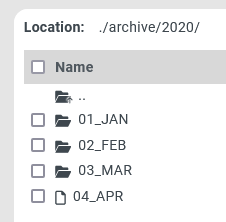 |
| --- | --- |
### Deleting a file or (empty) folder
- If "No value" (`$null`) is assigned to the [File reference](/v1/docs/en/core-file-reference-content-builder) value resolver, this deletes the file specified in the **File path**.
- Assigning "No value" (`$null`) to the **File path** of an empty folder deletes this folder.
- Assigning "No value" (`$null`) to the **File path** of a non-empty folder is ineffective (without error/notification).
**IMPORTANT:** If a value of *inappropriate* data type (not `Content`, `String` or `byte[]`) is assigned to the [File reference](/v1/docs/en/core-file-reference-content-builder) resolver, automatic type conversions fail rendering "No value" (`$null`) as a result. If the given **File path** refers to an existing file or empty folder, they will be deleted*.*
## Examples
---
**NOTE:** The following examples use the placeholder `$home`, that always refers to the `upload` folder, to make the **File path** robust against alternative configurations (via `setHomeDirectory` in the configuration file `FileManager.xml`).
---
### Read access
For users with different [Roles](/v1/docs/en/base-role), specific instructions should appear as a notification when logging in to **Lobster Data Platform/Orchestration**, provided that a corresponding text file has been uploaded in a specific path of the server file system for the [Role of session](/v1/docs/en/base-session-role-value).
Runtime example:
| 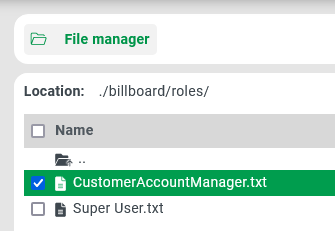 | 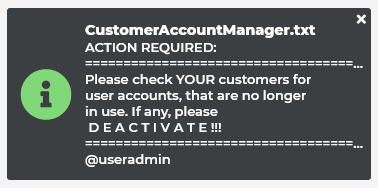 This message is displayed via the [Show alert (Popup)](/v1/docs/en/core-popup-actor) when logging in with the `CustomerAccountManager` role because it was placed as a text file with this name via the [File manager](/v1/docs/en/ac-environment-filemanager) in the `./billboard/roles` folder (see left). |
| --- | --- |
Configuration:
| An event handler that reacts to the **Triggering event** "Client logged in" (see [Login (Events)](/v1/docs/en/core-authentication-event)) is created and configured as shown on the right: - The **Validating rule** should immediately determine whether a notification is stored for the [Role of session](/v1/docs/en/base-session-role-value). If a corresponding text file exists in the `billboard/roles` subfolder of the `upload` directory, it is displayed as an **Action on passed rule**: - Within an [Entity property rule](/v1/docs/en/core-entity-property-rule), the [File reference](/v1/docs/en/core-file-reference-content-builder) value resolver is used to check whether a text file is found under the **File path** systematically constructed by [Concat strings](/v1/docs/en/core-concat-string-resolver) starting from the [Role of session](/v1/docs/en/base-session-role-value). If the [File reference](/v1/docs/en/core-file-reference-content-builder) does not return any **Content** (see negated [Is empty](/v1/docs/en/core-is-empty-matcher) matcher), **No action** will be taken. - The concatenated [Store value as variable](/v1/docs/en/core-store-value-resolver) value resolver transfers the return value (whether empty or not) into the variable `loginAlertFile`, so that when successful he data of the found file does not have to be read in again to create a **Content** object. - The **Action on passed rule** is an [Execute with](/v1/docs/en/core-with-actor) event action that defines the **Content** action event stored in the `loginAlertFile` variable as the *reference object*. This simplifies the access to the fields `name` (file name) and `body` (text in the file), through the **Title** and **Message** parameters in the [Show alert (Popup)](/v1/docs/en/core-popup-actor) event action executed in this context. **NOTE:** The file content can only be displayed directly to a popup because it is a text file where the "body" provided as a byte array is readable as a character string. The same text appears as a string transformation if the **Content** action event object is assigned as a **Message** without explicitly accessing the `body` field. | 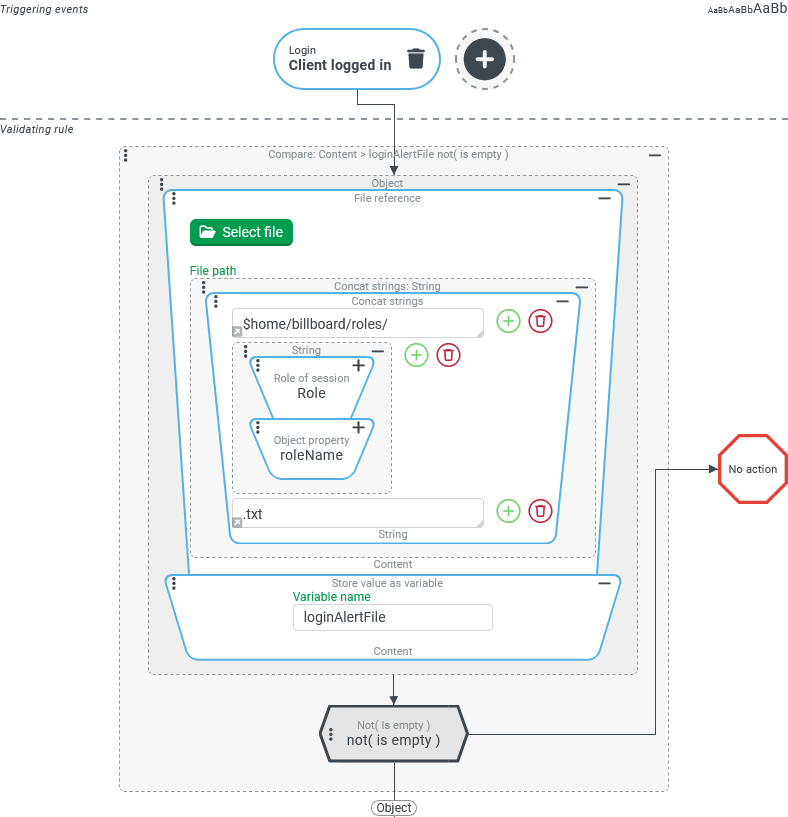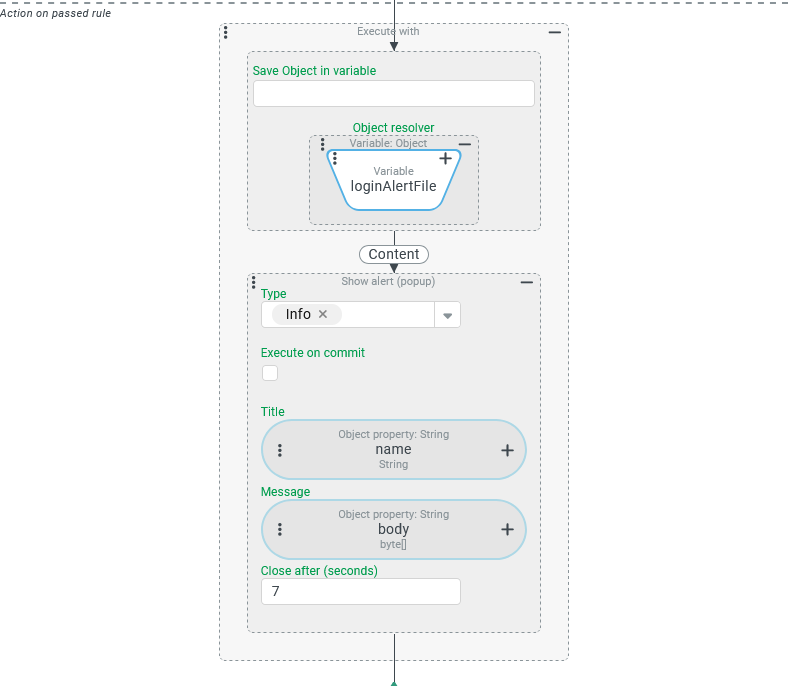 |
| --- | --- |
### Write access (write)
Triggered by a [Custom action event](/v1/docs/en/core-custom-action-events), a snapshot of a file named `statusQuo.pdf` is archived automatically as a copy.
The file path for the copy is defined as starting from the current date depending on the year () and month () related to the time of execution, according to the following schema:
| ./journal///monthlyReport.pdf |
| --- |
- The file name of the copy is therefore always "monthlyReport.pdf".
- The copy is always stored in the `journal` directory.
- The subfolders for year and month are created automatically if they don't already exist.
- If a copy already exists for the current month, it will be overwritten with the current data.
Configuration:
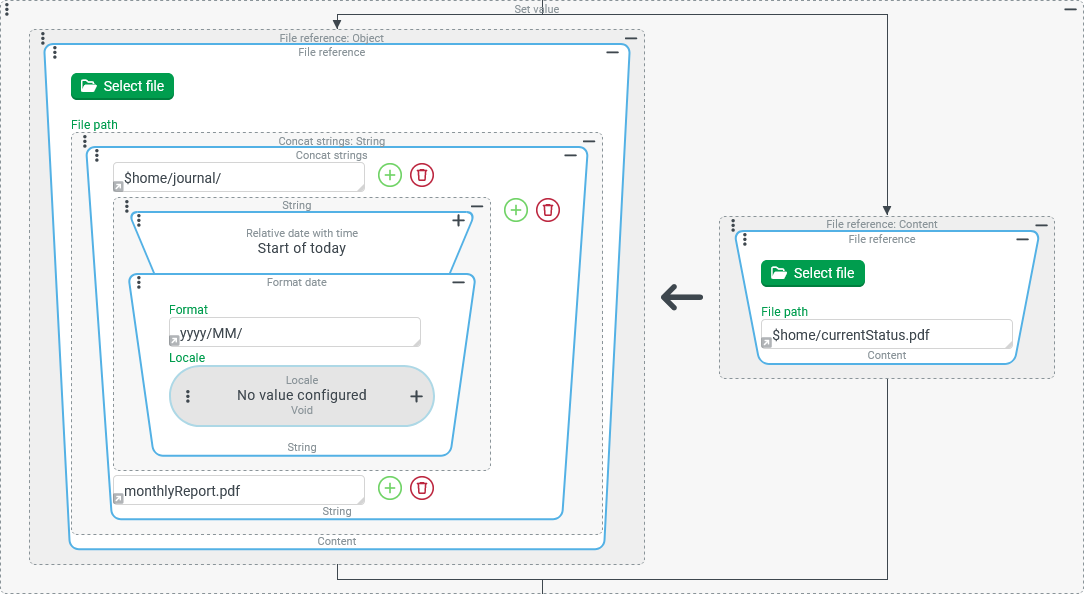
Creating the copy is accomplished within an event handler by a [Set value](/v1/docs/en/core-set-value-actor) event action as follows:
- The content of the original file is transferred to the **Content** data object by the [File reference](/v1/docs/en/core-file-reference-content-builder) value resolver on the right by read access.
- On the left, another [File reference](/v1/docs/en/core-file-reference-content-builder) value resolver implements the "copying" of this data into the **File path** systematically built up by text concatenation:
- The storage directory `journal` (at the top) and the file name `monthlyReport.pdf` (at the bottom) are defined statically.
- In between, the string for the year ("yyyy") and month ("MM") folder levels is provided starting from today’s date (see [Relative date with time](/v1/docs/en/core-date-time-value), "Start today") via [Format date](/v1/docs/en/core-date-format-resolver).
**CAUTION****:** ”s For the **Validating rule** of the event handling, which is not described in detail here, a check whether the original file exists at all is strongly recommended. Otherwise, the target file (left) will be assigned "No value". If a copy already existed for the respective month, this copy will be permanently deleted (see "Write access (delete)" below).
Runtime example:
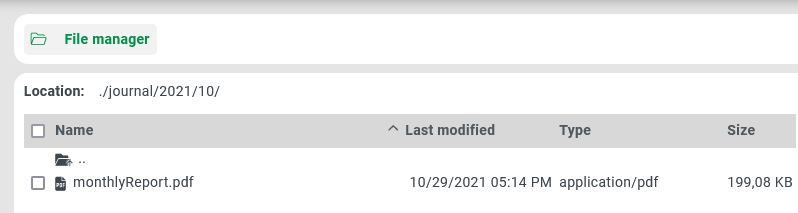
- If the event handling is executed on 11/02/2021, then the copy will appear at the location `journal/2021/11` (subdirectory of the `upload` folder), which is controlled in the [File manager](/v1/docs/en/ac-environment-filemanager) above.
### Write access (delete)
As an extension of the previous example ("Write access (write)"), the original file is to be deleted from the file system after copying.
Configuration:
The following [Set value](/v1/docs/en/core-set-value-actor) event action is attached to the event handling defined in the previous example:
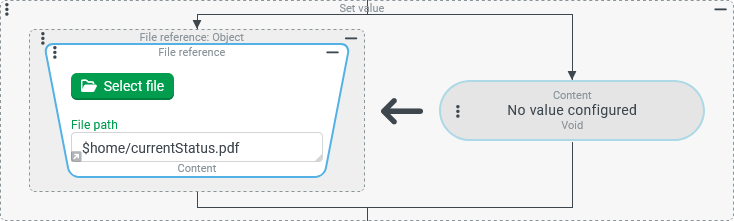
- The [File reference](/v1/docs/en/core-file-reference-content-builder) value resolver on the left defines the **File path** of the file to be deleted by a static text value.
- On the right, "No value" is defined so that the file defined on the left is deleted.