---
title: "Single import"
slug: "core-import"
updated: 2026-04-27T13:44:52Z
published: 2026-04-27T13:44:52Z
canonical: "docs.lobstersoftware.com/core-import"
---
> ## Documentation Index
> Fetch the complete documentation index at: https://docs.lobstersoftware.com/llms.txt
> Use this file to discover all available pages before exploring further.
# Single import
The [Single import](/v1/docs/en/core-import) is the easiest way to [Import](/v1/docs/en/orchestration-integration-import) a single object per "job". In contrast, a [Batch import](/v1/docs/en/core-batch-import) allows several objects to be processed in the same "job".
The [Import](/v1/docs/en/orchestration-integration-import) page provides an overview of the interaction between **Lobster Data Platform/Orchestration** and **Lobster Data Platform/Integration** and the general structure of an import profile.
In the following, only the details of the configuration of the target structure for the import are explained, which apply for the [Single import](/v1/docs/en/core-import) as well as the [Batch import](/v1/docs/en/core-batch-import).
> [!NOTE]
> The structure used for the [Single import](/v1/docs/en/core-import) corresponds exactly to the content of an individual `batch` node of a [Batch import](/v1/docs/en/core-batch-import). The following comments on the details in the structure therefore apply to both [Import](/v1/docs/en/orchestration-integration-import) methods.
>
> In practice, the [Batch import](/v1/docs/en/core-batch-import) structure is often used for importing individual objects, as this allows access to additional functionality only available for the [Batch import](/v1/docs/en/core-batch-import).
## Elements of the target structure for a single import
When creating an import profile for a [Single import](/v1/docs/en/core-import) , the target structure is ideally created from the template provided by the system for the `core:Import` object (for details, see [Orchestration templates](/v1/docs/en/orchestration-integration-templates)).
The following screenshot shows a target structure generated from the `core:Import` template, in which – starting from the original state – the fixed value `CREATE` was assigned to the `action_attr` field:
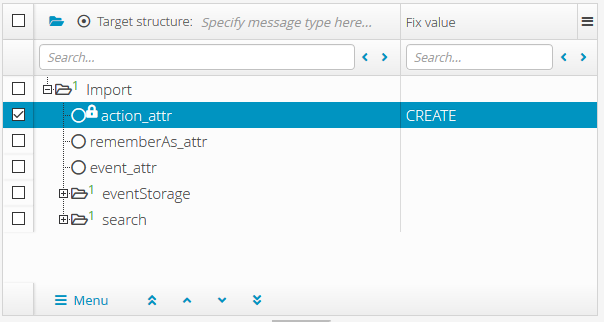
Overview of the standard components of the import structure:
| Component | Type | Description | Notes |
| --- | --- | --- | --- |
| `action_attr` | Field/Attribute | Determines the import action to be performed (see section "Import actions" below). | Required field |
| `rememberAs_attr` | Field/Attribute | Stores a reference to the current object under the name specified as text value for later access via [core:GetObjectFromBatch (Preprocessor)](/v1/docs/en/core-get-object-from-batch). **NOTE:** This is only useful in the context of a [Batch import](/v1/docs/en/core-batch-import) that processes several objects in sequence. | Optional |
| `event_attr` | Field/Attribute | Specifies a [Custom action event](/v1/docs/en/core-custom-action-events), to be dispatched by the `DISPATCH_EVENT` import action via import. | Required field for `DISPATCH_EVENT` |
| `eventStorage` | Node | Assigns values to event variables in the context of `DISPATCH_EVENT` values (see section "Dispatch custom action event" below). | Optional for `DISPATCH_EVENT` |
| `search` | Node | Defines an optional [Search](/v1/docs/en/core-search), which – if used at all – must return a uniquely identified entity as an object for the execution of the import. **NOTE:** The `search` node can be filled quite easily using a [Search](/v1/docs/en/core-search) configured in the [Search builder](/v1/docs/en/administration-system-search-builder) as described in detail for the example on page [Creating static target structures](/v1/docs/en/orchestration-integration-components-templates-static-target). | Optional |
### Definition of the object structure
The template does not contain a placeholder for the "payload" of the import, which must be defined by creating or inserting an additional subnode of the "Import" node. [Orchestration templates](/v1/docs/en/orchestration-integration-templates) can also be used for this.
In the following, the abstract description *object structure* will be used to address this node and the substructure it contains, since the specific node name is usually determined by the respective entity type.
**NOTE:** In principle, the target structure of an import profile can also contain several *object structures*, provided that it is ensured that these are handled strictly alternatively at runtime. If it is guaranteed that only one of the alternative object structures will be effective at runtime, different entity types can be addressed on the basis of the same import profile, for example, depending on specific content of the input data.
### Import actions
For the import, the name of one of the following actions must be specified by the attribute "action" (`action_attr` field):
| Action (`action_attr`) | Description |
| --- | --- |
| `CREATE` | The import should create a new object. The specification of an internal ID (`id`) within the *object structure* is optional. - If the *object structure* specifies a concrete value for the ID (`id`), this ID must not yet be in use for the entity type concerned, otherwise the import will fail. - If the *object structure* does not contain a default ID (`id`) for the object, an ID is automatically assigned when the object is created. **IMPORTANT:** In general, the designation of a specific ID (`id`) for the entity to be created should be avoided, as this by-passes the automatic generation *internal* ids, which may lead to conflicts with internally generated IDs at a later time. |
| `UPDATE` | The import should update an existing object, which must be uniquely identified by explicitly specifying an `id` or by defining a [Search](/v1/docs/en/core-search) (`search` nodes). - If the ID (`id`) specified in the *object structure* does not exist for the corresponding entity type, the import will fail. - If the *object structure* does not contain a default for the ID (`id`) of the object, the [Search](/v1/docs/en/core-search) specified in the `search` node (see below) is evaluated. - If there is no [Search](/v1/docs/en/core-search) defined, the import will fail. - The defined search must provide a unique result, otherwise the import will fail. |
| `CREATE_OR_UPDATE` | The import is to create or update the object uniquely identified by specifying an internal ID (`id`) or via a [Search](/v1/docs/en/core-search). - If the *object structure* specifies a concrete value for the ID (`id`), the relevant entity is created or updated. - If the *object structure* does not contain a default for the ID (`id`) of the object, the [Search](/v1/docs/en/core-search) specified in the `search` node (see below) is evaluated. - If there is no [Search](/v1/docs/en/core-search) defined, the import will fail. - If the defined [Search](/v1/docs/en/core-search) does not return a result and the *object structure* does not specify an ID (`id`) for the object, an ID is automatically assigned when the object is created. - If the defined [Search](/v1/docs/en/core-search) returns an ambiguous result, the import will fail. **IMPORTANT:** In general, the designation of a specific ID (`id`) for the entity to be created should be avoided, as this by-passes the automatic generation *internal* ids, which may lead to conflicts with internally generated IDs at a later time. |
| `CREATE_OR_NOTHING` | The import should create a new object, unless the condition in the `search` node (required for this action) identifies exactly one match among existing objects. - If the *object structure* specifies a concrete value for the ID (`id`), this ID must not yet be in use in for the entity type concerned, otherwise the import will fail. - If the *object structure* does not contain a default ID (`id`) for the object, an ID is automatically assigned when the object is created. - If there is no [Search](/v1/docs/en/core-search) defined, the import will fail. - If the defined [Search](/v1/docs/en/core-search) returns an ambiguous result, the import will fail. **IMPORTANT:** In general, the designation of a specific ID (`id`) for the entity to be created should be avoided, as this by-passes the automatic generation *internal* ids, which may lead to conflicts with internally generated IDs at a later time. |
| `UPDATE_OR_NOTHING` | The import should update an existing object, which must be uniquely identified by explicitly specifying an `id` or by defining a [Search](/v1/docs/en/core-search) (`search` nodes). - If the ID (`id`) specified in the *object structure* does not exist for the corresponding entity type, no action is executed. - If the *object structure* does not contain a default for the ID (`id`) of the object, the [Search](/v1/docs/en/core-search) specified in the `search` node (see below) is evaluated. - If there is no [Search](/v1/docs/en/core-search) defined, the import will fail. - If the defined [Search](/v1/docs/en/core-search) does not return a result, no action is executed. - If the defined [Search](/v1/docs/en/core-search) returns an ambiguous result, the import will fail. |
| `DELETE` | The import should delete the object uniquely identified by specifying an internal ID (`id`) or by a [Search](/v1/docs/en/core-search). - If the ID (`id`) specified in the *object structure* does not exist for the corresponding entity type, the import fails. - If the *object structure* does not contain a default for the ID (`id`) of the object, the [Search](/v1/docs/en/core-search) specified in the `search` node (see below) is evaluated. - If there is no [Search](/v1/docs/en/core-search) defined, the import will fail. - The defined [Search](/v1/docs/en/core-search) must provide a unique result, otherwise the import will fail. |
| `DISPATCH_EVENT` | Instead of a generic import action, a [Custom action event](/v1/docs/en/core-custom-action-events) should be executed. - The "event" attribute (`event_attr` field in the profile) must identify the custom action event by the internal name of the dynamic enumeration element. - If an *object structure* with data exists, these are transferred to the custom action event as input data. - Optionally, the `eventStorage` node can also be used to pass variables from the profile to the custom action event. |
**Dispatch custom action event**
A [Custom action event](/v1/docs/en/core-custom-action-events) can be dispatched by an import profile with or without transferring data (via variables and/or as object data) to the event. The different variants are demonstrated by the following examples:
Variant 1: Dispatch custom action event without transferring data:
In the simplest application case, the import profile – for example, in response to a certain "message" sent to the **Lobster Data Platform** from another system – should dispatch a certain [Custom action event](/v1/docs/en/core-custom-action-events) without the necessity to exchange detailed data.
In this case the target structure of the profile could look as compact as this:
| 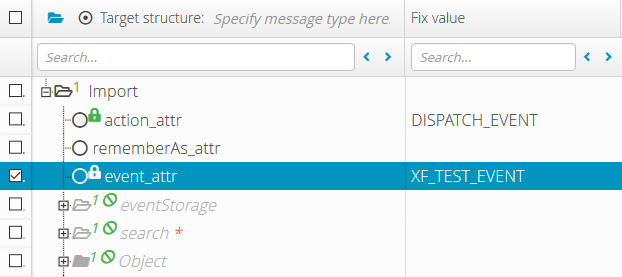 | - The field `action_attr` declares the import action `DISPATCH_EVENT`, since a [Custom action event](/v1/docs/en/core-custom-action-events) is to be dispatched. --- - The `event_attr` field specifies the internal name of the custom action event to be dispatched. --- - All other components of the template `core:Import` were set to inactive here, because they are not needed. The object structure (here: neutrally named as "Object" node) was also deactivated. |
| --- | --- |
The example results in the following target file (with namespace declarations skipped):
```xml
```
Variant 2: Dispatch a custom action event by transferring data to variables:
In another case, a certain key value (here: "SILENT") is to be passed to the same event via a variable "eventMode", which [Event handling](/v1/docs/en/administration-designer-workflow-action-event-handler-configuration) may evaluate and respond to, e.g. by suppressing certain output functions (mail dispatch etc.).
| 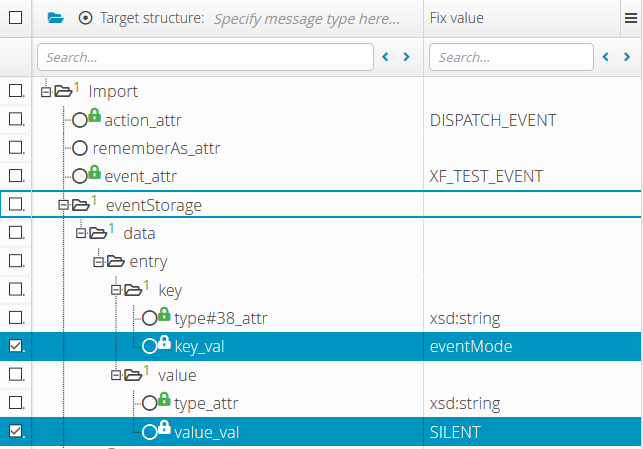 | - The node `eventStorage` (framed in blue in the screenshot) contains in its original template state the required subnode `data` and an exemplary `entry` structure with the subnodes `key` and `value`, which must be repeated for each variable to which a value is to be assigned. --- - The field `key_val` defines the name of the variable, which is set here to fixed value "eventMode". --- - The value of the variable is assigned to the field `value_val`. The key value "SILENT" is also set as a fixed value here. **NOTE:** While the template contains the fields `key_val` and `value_val`, in both cases the field `type_attr` must be completed for the required typing of the data. The variable name is always the `xsd:string`, type, other types are also possible for the value (e.g. for more complex contents). In addition, the "XML Namespace" property of the fields must be set to `xsi`. It is important that the target file represents the data as it usually appears in the `storage`. Corresponding structures can also be compiled via [Tests](/v1/docs/en/core-testing-set) and transferred to the target structure by [Creating static target structures](/v1/docs/en/orchestration-integration-components-templates-static-target). |
| --- | --- |
The example results in the following target file (without namespace declarations):
```xml
eventMode
SILENT
```
Variant 3: Dispatch custom action event by transferring object data
If the target file of an import profile with the `DISPATCH_EVENT` import action contains data from an *object structure*, this is considered as an "input value" (*more precisely*: "input object") for the custom action event. [Event handling](/v1/docs/en/administration-designer-workflow-action-event-handler-configuration) can then work with this data context and, among other things, use [Check type](/v1/docs/en/core-check-type-rule) in the "Validating rule".
If the "object data" refers to the ID (`id`) of an existing entity, or if the `search` node defines a [Search](/v1/docs/en/core-search) that returns a unique search result, the corresponding entity is considered to be the basis for this data context to which deviating contents from the *object structure* are overlayed as an update. If a specified ID does not exist or the [Search](/v1/docs/en/core-search) returns no result, the data context only contains the explicit assignments from the *object structure*. If an event handling dispatched by the custom action event executes the [Save changes later](/v1/docs/en/core-merge-later-once-actor) action, the `DISPATCH_EVENT` action implies a `CREATE_OR_UPDATE` action: Either a uniquely identified *existing* entity is updated or a new one is created.
**NOTE:** Since the *object structure* determines the entity type for the [Search](/v1/docs/en/core-search) defined in the `search` node, a [Search](/v1/docs/en/core-search) is not executed if the target file contains no object data. However, object data only appears in the target file if at least one field of the *object structure* is assigned a value statically or by mapping. If this is undesirable because it could override the data of the "found" entity, the [Search](/v1/docs/en/core-search) should be performed elsewhere, e.g. in a calculation node with the [SearchTask (Integration function)](/v1/docs/en/de-lobster-scm-dw-filters-scm-search-filter) function, to be able to assign the "found" ID (`id`) as a value for the `id_attr` field of the *object structur*e.
## Example
Sending a specific message to the **Lobster Data Platform** (from an external system) should trigger the deactivation of a user identified in the message by `username`.
Technically, this requires updating the "Active" field of the user account identified by the unique `username` to the value `false`.
Configuration:
| 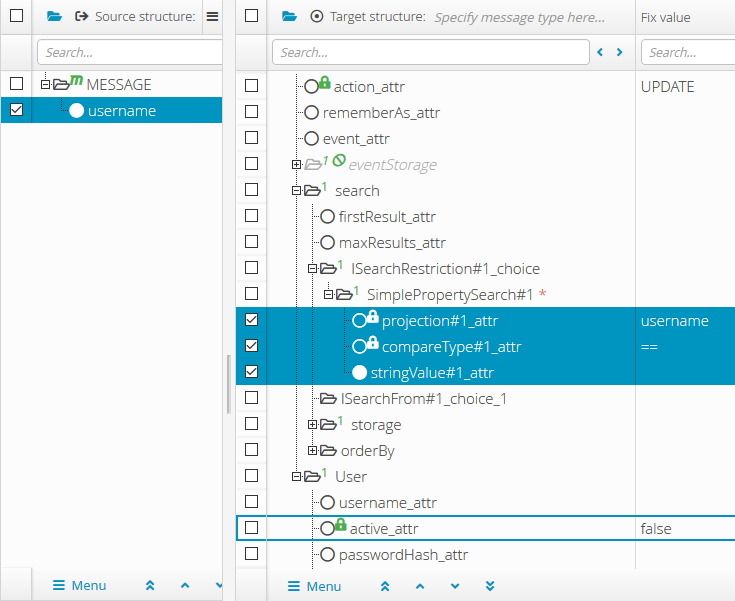 | - The **Source structure** (left in the screenshot) is very simple, since the message provides exactly one field, namely the `username` of the user account to be deactivated. --- - In the **Target structure** (on the right side of the screenshot), the field `action_attr` defines the import action `UPDATE`, which ensures that the [Import](/v1/docs/en/orchestration-integration-import) only update an existing user, which must be unambiguously identified for this purpose. --- - Within the [Search](/v1/docs/en/core-search) defined in the `search` node, exactly one `SimplePropertySearch` with the detail fields selected in the screenshot has been set up, which matches the `projection` of the field `username` of a user against the text (`stringValue`) obtained from the assigned source field `username`. Provided the login context of the profile grants access to a user with the specified username, the relevant entity is loaded and updated according to data or definitions provided in the *object structure* (`User` node). --- - In the `User` node, exactly one specific field is addressed: The field `active_attr`, highlighted by the blue frame in the screenshot, is assigned the fixed value `false`, so that a user identified by the [Search](/v1/docs/en/core-search) is deactivated if write access exists in the login context of the profile. |
| --- | --- |
Runtime example:
The profile sends the following destination file to the server, when a message is received specifying that a user with the user name `TEST` should be deactivated:
```xml
```
- If a user with the username `TEST` exists for which write access is granted, it is deactivated.