---
title: "Search (Event action)"
slug: "core-search-actor"
updated: 2026-04-01T13:43:42Z
published: 2026-04-01T13:43:42Z
canonical: "docs.lobstersoftware.com/core-search-actor"
---
> ## Documentation Index
> Fetch the complete documentation index at: https://docs.lobstersoftware.com/llms.txt
> Use this file to discover all available pages before exploring further.
# Search (Event action)
*See also*: [Search builder](/v1/docs/en/administration-system-search-builder), [Search API](/v1/docs/en/common-search-api), [Search (Form designer)](/v1/docs/en/frebehav-search), [Tuple search (Form designer)](/v1/docs/en/frebehav-tuple-search)
> [!NOTE]
> Event action – Abstract
>
> **Purpose:** Searches data in the database of **Lobster Data Platform/Orchestration** and stores the result in a variable.
>
> > [!TIP]
> > Tooltip
> >
> > - **Usage:** The 'Search' for the selected 'Entity', which can be configured in the same way as the [Search builder](/v1/docs/en/administration-system-search-builder), transfers the first or several return values from the database into the variable specified by 'Save result as', depending on the selected 'Mode'.
> > - **Parameter:**
> > - Save result as: Variable name.
> > - Entity: The entity type being looked for.
> > - Mode: Determines the return value.
> >
> > | ↓ Mode/Search → | Search | Tuple search | CSV search |
> > | --- | --- | --- | --- |
> > | First result | One entity | One tuple data object | First tuple as CSV row |
> > | Search value (List of results) | Entity list | Multiple tuple data objects | Multiple CSV rows |
> > | Search result (as in the [Search builder](/v1/docs/en/administration-system-search-builder)) | SearchResult (Data object) | TupleSearchResult (Data object) | CsvSearchResult (Data object) |
> > - Search: Specific parameters for [Search types](/v1/docs/en/core-abstract-search) (search, tuple/CSV search) analog [Search builder](/v1/docs/en/administration-system-search-builder).
> > - **Output:** Result data in the specified variable.
> > - **NOTE:** The search takes into account the access rights for the login context of the current session or deviating settings within an [Run as](/v1/docs/en/base-run-as-actor) event action.
A [Search (Event action)](/v1/docs/en/core-search-actor) 'searches' for entity data in the **Lobster Data Platform/Orchestration** database via the [Search API](/v1/docs/en/common-search-api) and, depending on the selected 'mode', stores the first hit (if any) or a data structure with multiple return values in a variable.
> [!NOTE]
> Search API background
>
> In contrast to a direct access to the database, which can also be realized via the [Execute SQL query](/v1/docs/en/core-native-sql-actor-configuration) event action, the [Search API](/v1/docs/en/common-search-api) considers access rights for a specific login context, which is either defined by the session or – in the context of an [Run as](/v1/docs/en/base-run-as-actor) event action – different from the current session. The [Search API](/v1/docs/en/common-search-api) also supports query definition (via an editor with graphical user interfaces for [Projections](/v1/docs/en/core-i-search-projection), [Restrictions](/v1/docs/en/core-i-search-restriction), [Joins](/v1/docs/en/core-abstract-join), [Resolvers](/v1/docs/en/core-i-value-resolver), etc.) which enables efficient handling of data that is often distributed internally across multiple tables, without the need to create SQL code, to understand the internal data model in detail, or to take into account peculiarities of the database system used. Furthermore, since the [Search API](/v1/docs/en/common-search-api) is also used in other contexts ([Search builder](/v1/docs/en/administration-system-search-builder), [Custom overviews](/v1/docs/en/administration-designer-client-preferences-overview), [Behaviors](/v1/docs/en/frebehaviours), etc.), existing configuration 'searches' (or parts of them) can be replaced by copy and paste if needed.
>
> Conceptual parallels between a database query (via `SELECT` in SQL) and the structure of a 'search', are also reflected in the language usage around the 'search'.
>
> **NOTE:** Against the background of superficial similarities, attention to differences is appropriate and skepticism towards *untested* assumptions is recommended!
Functionally, three different search types (**Search** parameter) are relevant for the [Search (Event action)](/v1/docs/en/core-search-actor): [Search](/v1/docs/en/core-search), [Tuple search](/v1/docs/en/core-tuple-search) and [CSV search](/v1/docs/en/core-csv-search).
In combination with three choices for the **Mode** parameter (regarding return value) the following combinatorics of usage scenarios for a [Search (Event action)](/v1/docs/en/core-search-actor) result.
| ↓ Mode/Search → | [Search](/v1/docs/en/core-search) | [Tuple search](/v1/docs/en/core-tuple-search) | [CSV search](/v1/docs/en/core-csv-search) |
| --- | --- | --- | --- |
| First result | **One single entity** Example: One [Address book](/v1/docs/en/base-address-book) entity (`base:Addressbook`) Value of the result variables ```xml CNE ``` | **One tuple data object** (one 'row' of a list) Example: ID and name of an [Address book](/v1/docs/en/base-address-book) entity. Value of the result variables ```xml Consignee 1321 ``` | **First tuple as CSV row** Example: ID and name of an [Address book](/v1/docs/en/base-address-book) entity. Value of the result variables ```xml id,name 1321,Consignee ``` **NOTE:** The first row of the CSV output contains the column name(s) (or the alias names of the projections) from the search. |
| Search value (List of results) | **A list of entities** Example: Two [Address book](/v1/docs/en/base-address-book) entities (`base:AddressBook`) Value of the result variable ```xml CNE DPA CNE ``` | **Multiple tuple data objects** ('rows' of a list) Example: ID and name of two [Address book](/v1/docs/en/base-address-book) entities (`base:AddressBook`) Value of the result variables ```xml Consignee 1321 XF_CUSTOMERS 801 ``` | **Multiple CSV lines** Example: ID and name of a set of [Address book](/v1/docs/en/base-address-book) entities (`base:AddressBook`) Value of the result variables ```xml id,name 1312,Consignee 1201,TEST 1151,XF_PRINCIPALS 1051,INTL_APTS 851,ZX_SPECIAL_CUSTOMERS 803,VX_CUSTOMERS 802,ZX_CUSTOMERS 801,XF_CUSTOMERS ``` |
| Search result (as in the [Search builder](/v1/docs/en/administration-system-search-builder)) | **Data object of 'Search result' type** `(search:SearchResult)` Example: Two [Address book](/v1/docs/en/base-address-book) entities (base:`AddressBook`) Value of the result variables ```xml CNE DPA CNE ``` | **Data object of the 'Tuple search result' type**`(search:TupleSearchResult)` Example: Two [Address book](/v1/docs/en/base-address-book) entities (`base:AddressBook`) Value of the result variables ```xml id name - 1321
- Consignee
- 801
- XF_CUSTOMERS
``` | **Data object of the 'CSV search result' type**`(search:CsvSearchResult)` Example: ID and name of a set of [Address book](/v1/docs/en/base-address-book) entities (`base:AddressBook`) Value of the result variables ```xml id,name 1321,Consignee 1201,TEST 1151,XF_PRINCIPALS 1051,INTL_APTS 851,ZX_SPECIAL_CUSTOMERS 803,VX_CUSTOMERS 802,ZX_CUSTOMERS 801,XF_CUSTOMERS ``` |
## Configuration
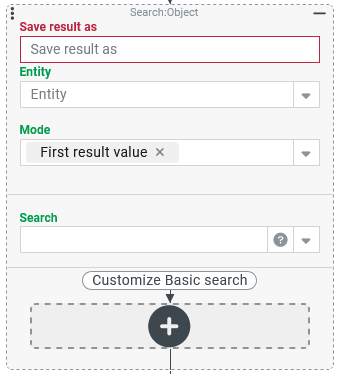
Independently of other parameters, the **Save result as** parameter must be specified as a variable name that can be used to access the *return valu*e after the **Search** has run without errors.
- The data type of the *return value* varies depending on the settings for **Mode** and **Search** (see the table above). In the case of a [Search](/v1/docs/en/core-search), the selection for **Entity** is additionally relevant.
It is necessary to select the **Entity** type for each search, which will be considered as the primary target of the search.
- Similar to the `FROM` section of the `SELECT` statement in a database query, additional data from entities of other types can be included via [Joins](/v1/docs/en/core-abstract-join) using the [Search API](/v1/docs/en/common-search-api).
- [Restrictions](/v1/docs/en/core-i-search-restriction) and – if applicable – [Projections](/v1/docs/en/core-i-search-projection) can also access data of 'foreign' entities directly or via [Joins](/v1/docs/en/core-abstract-join) and relate them to the *primary* entity.
As the **Mode**, one of the following options must be selected for passing the search results to the variable:
- **First result** (default) limits the return to the first 'match', if there is one at all.
- **Search value** returns all results of the search as a list, e.g. a list of shipments if a search for this entity is performed.
- **Search result** returns all the results of the search as a **Search result** object. This object contains the output of the **Search** **value** mode in object property **result** and further information about the search in other properties (e.g. `count`).
The selection for **Search** defines the type of search: [Search](/v1/docs/en/core-search), [Tuple search](/v1/docs/en/core-tuple-search) or [CSV search](/v1/docs/en/core-csv-search).
| As soon as a selection is made for the **Search** parameter, further parameters appear below, with which the search can be defined in the same way as in the [Search builder](/v1/docs/en/administration-system-search-builder). --- **CAUTION****:** In principle, the type of an already configured **Search** can be changed subsequently. However, when changing to the [Search](/v1/docs/en/core-search) type, configuration for [Projections](/v1/docs/en/core-i-search-projection) and **Grouping** are lost, since the [Search](/v1/docs/en/core-search) does not support them. --- Using the context menu for the **Search** parameter displayed in the upper right corner of the image, the complete configuration can be copied or cut via the **Lobster Data Platform/Orchestration** clipboard and pasted again in any context that refers to the [Search API](/v1/docs/en/common-search-api). The **Paste** option appears only if the clipboard already contains a search definition. This special clipboard not only enables the exchange of search definitions, e.g. for tests with the [Search builder](/v1/docs/en/administration-system-search-builder). It can also be used to 'freeze' a particular change state when editing, so that it can be restored later if needed. In addition, individual components such as [Projections](/v1/docs/en/core-i-search-projection), [Joins](/v1/docs/en/core-abstract-join), or [Restrictions](/v1/docs/en/core-i-search-restriction) can of course be cut, copied, and pasted, provided that the source and target contexts are compatible. | 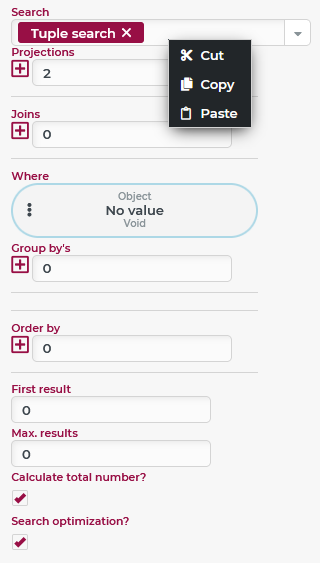 |
| --- | --- |
## Example
When creating [Shipments](/v1/docs/en/shp-shipment), it should be possible to identify a unique reference to exactly one item of a purchase order to which this shipment refers via a linked entity attribute (of the 'shipment to order line item' type) in the header of the shipment.
The deletion of [Orders](/v1/docs/en/ord-order) is not permitted as long as there are [Shipments](/v1/docs/en/shp-shipment) that refer to items of the order to be deleted. When trying to delete such an order, a message like the following should be displayed and the deletion should be prevented:
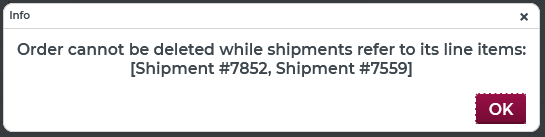
Configuration:
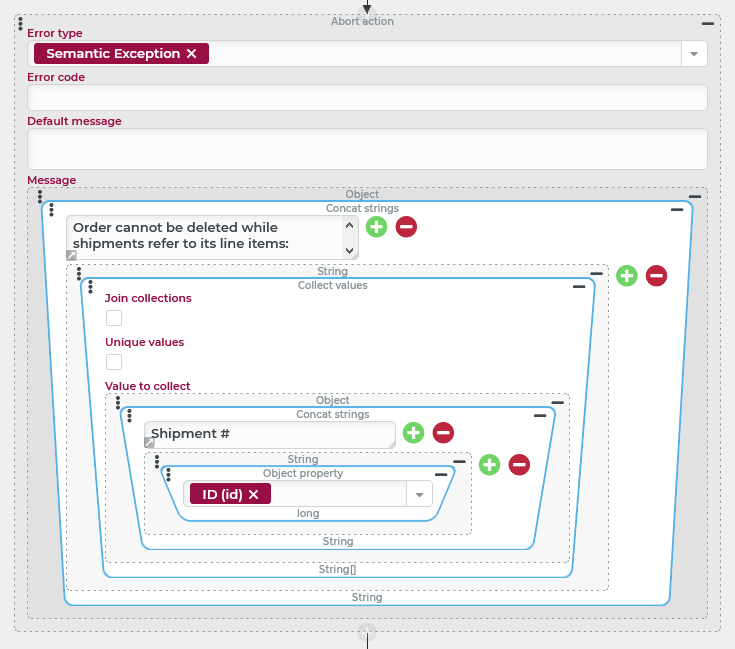
| An event handler is configured as shown on the right: - The **Triggering events** 'Delete' (see [Common action event](/v1/docs/en/core-common-action-event)) reacts to the deletion of any entity. --- - The **Validating rule** therefore determines by **Check type** whether an entity of the 'Order' type is to be deleted. --- - So the **Actions on passed rule** will be executed exactly when an order is to be deleted: - The [Search (Event action)](/v1/docs/en/core-search-actor) determines whether there are shipments that refer to one or more of the items of the order. The *return value* of the [Search (Event action)](/v1/docs/en/core-search-actor) is a variable `linkedShipments` (see details below), to which a list of all shipments found is to be assigned. - The *return value* is processed further by the following event action of the [Execute with](/v1/docs/en/core-with-actor) type. Its **Object resolver** refers to the variable `linkedShipments` via the [Variable](/v1/docs/en/core-storage-value) value resolver. - In the action block of the [Execute with](/v1/docs/en/core-with-actor) event action, an [Entity property rule](/v1/docs/en/core-entity-property-rule) is first used to check whether the [Search (Event action)](/v1/docs/en/core-search-actor) has 'found' any items at all. 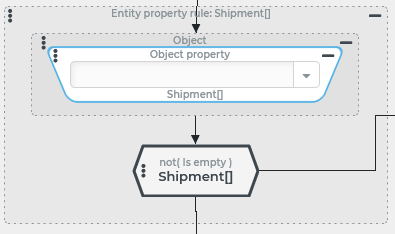 - If this is the case, then an [Abort](/v1/docs/en/core-abort-actor) is triggered, with the **Message** listing the IDs of the relevant shipments. For this purpose, value resolvers of the [Concat strings](/v1/docs/en/core-concat-string-resolver) types and [Collect values](/v1/docs/en/core-collect-resolver) are nested, as shown in the screenshot below. The outer [Concat strings](/v1/docs/en/core-concat-string-resolver) defines the entire message text and the [Concat strings](/v1/docs/en/core-concat-string-resolver) in the [Collect values](/v1/docs/en/core-collect-resolver) for the **Value to collect** parameter defines the text repeated for each 'collected' shipment ID. **NOTE:** Instead of the [Object property](/v1/docs/en/core-property-resolver) value resolver for the 'ID' property, other properties of the shipment could also be included, for example a reference attribute with an order number. | 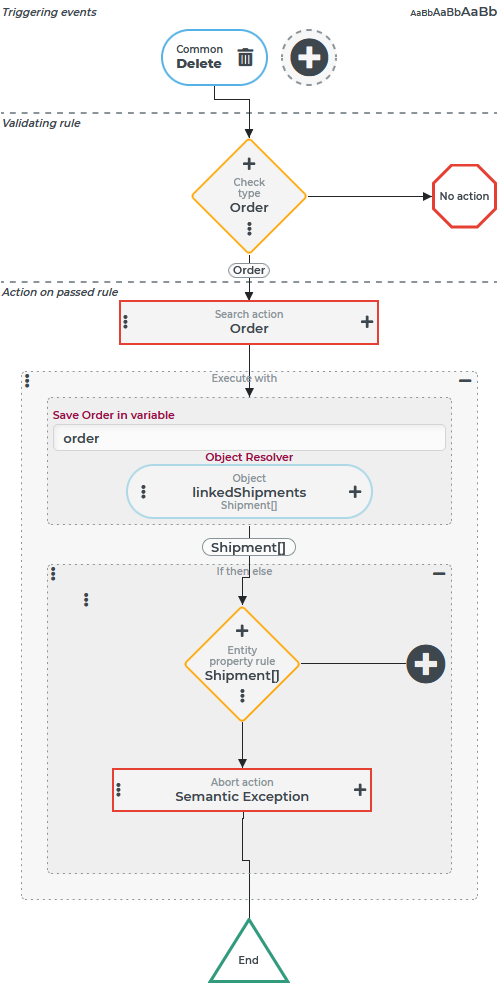 |
| --- | --- |
|  |
The initial [Search (Event action)](/v1/docs/en/core-search-actor) is configured as follows:
| - The **Save result as** parameter here specifies the variable name `linkedShipments` for the *return value* of the search. - The selection for **Entity** refers to the 'Shipment' entity type. - 'Search value' is selected as the **Mode** for the *return value* so that a list of shipments is written to the `linkedShipments` variable. - The **Search** should be executed as a 'Search', so that shipments found appear in the *return value* as a complete entity. For example, as long as only the 'ID' property is needed for the message, a 'tuple search' that returns only this property would be more efficient. With a 'Search' there is maximum flexibility in the design of the message, since all data of the found shipment is available in the *return value*. - The **Where** condition of the search checks a [Typed attribute projection](/v1/docs/en/core-typed-attribute-projection) whether the value of the 'ID of linked entity' property from the linked entity attribute of the **Type** 'Shipment to Order Line Item' (left side) is contained in a list of IDs of all order items, which is determined via [Collect values](/v1/docs/en/core-collect-resolver) resolver (right side) starting from the [Object property](/v1/docs/en/core-property-resolver) `lineItems` of the order to be deleted. | 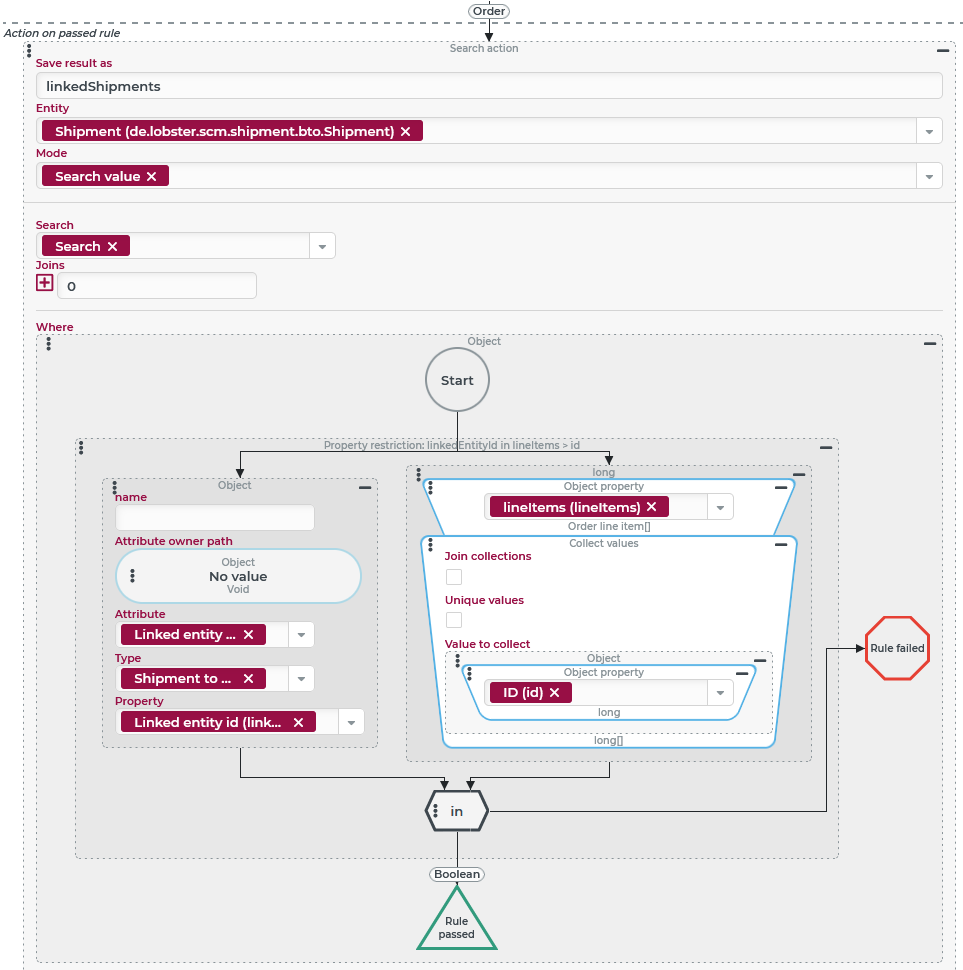 |
| --- | --- |
## Action block 'Customize Search'

In the 'Customize Search' block, [Event actions](/v1/docs/en/core-i-action-actor-configuration) can be configured that are executed before the search is carried out. The search is considered a *reference object* so that its definition can be customized.
### Typical use case: Paging
A typical use for customizing the search is the manipulation of the 'First result' and 'Max. results' parameters in order to implement *paging* for large amounts of data via the [Search (Event action)](/v1/docs/en/core-search-actor).
For the following configuration, we assume that two variables `firstResult` and `maxResults` in the execution context for the [Search (Event action)](/v1/docs/en/core-search-actor) are filled with `Long` values to enable 'scrolling' through a large number of results.
Configuration:
| The [Set values](/v1/docs/en/core-set-values-actor) event action shown on the right has been added to the 'Customize Search' block via the context menu for the  icon (see above). It defines two assignments: - The first assignment assigns the value of the `firstResult` variable to the 'First result' (`firstResult`) property of the 'Search' to be executed. - The second assignment assigns the value of the `maxResults` variable to the 'Max. results' (`maxResults`) property of the 'Search' to be executed. --- **NOTE:** As no **Target host** is defined, the [Object property](/v1/docs/en/core-property-resolver) value resolvers for the **Target values** (on the left in the image) refer to the configured 'Search' that applies to the reference object in the 'Customize Search' block. The entity type of this *reference object* depends on which of the [Search types](/v1/docs/en/core-abstract-search) is selected in the 'Search' parameter (see above). The label in the header of the 'Customize Search' block varies accordingly ('Customize Search', 'Customize tuple search' or 'Customize CSV search'). | 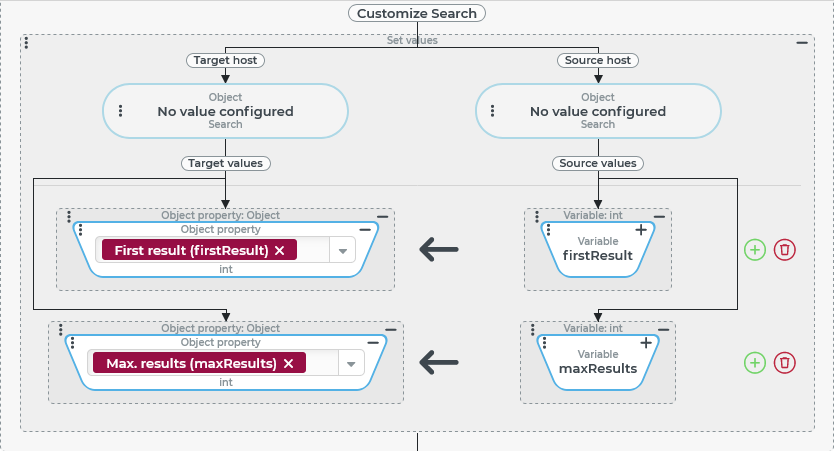 |
| --- | --- |
### Special application example: 'Upgrading' a condition
A [CSV search](/v1/docs/en/core-csv-search) in the context of a [Search (Event action)](/v1/docs/en/core-search-actor) does not have a 'Where' condition by default. In the 'Customize Search' block, however, a [Simple property restriction](/v1/docs/en/core-simple-property-search) is generated as a 'Where' condition based on two text values from variables (`propertyName` and `beginsWith`).
The following convention applies:
- The `propertyName` variable names a valid 'data field path' for the entity being searched for, e.g. `name` for the 'Name' property.
- The `beginsWith` variable defines a case-insensitive string that is expected at the beginning of the value in the relevant data field (`propertyName`), such as `TEST`.
Configuration:
| The screenshot on the right shows the configuration for [Event actions](/v1/docs/en/core-i-action-actor-configuration) in the 'Customize Search' block of a [Search (Event action)](/v1/docs/en/core-search-actor) that performs a 'CSV search': - Within the [Set values](/v1/docs/en/core-set-values-actor) event action, a [Simple property restriction](/v1/docs/en/core-simple-property-search) is created as the **Target host** via [Create instance](/v1/docs/en/core-create-instance-resolver) and stored in the variable `filter` via the concatenated [Store value as variable](/v1/docs/en/core-store-value-resolver) value resolver. - Three value assignments to properties of the newly created [Simple property restriction](/v1/docs/en/core-simple-property-search) instance follow: - The 'Projection' (`projection`) property is assigned the value provided by the [Variable](/v1/docs/en/core-storage-value) `propertyName`. - The 'Compare type' (`compareType`) property is assigned the key value `ilike` as static text. This is the comparison operator for upper/lower case indifferent text patterns. - The 'String' (`stringValue`) property is assigned the value of the variable `beginsWith` concatenated with the static text value `%` (wildcard for any number of characters). This link forces a 'Begins with' match of the value from the property addressed by `propertyName`. **NOTE:** We do not take into account the special case here that the value from the `beginsWith` variable contains characters that would have to be 'masked' in the context of the database (e.g. wildcard characters such as `%` or `_`). - Once the [Simple property restriction](/v1/docs/en/core-simple-property-search) has been created and parameterized, it is assigned as a whole to the 'Where' condition (`where`) property of the search in the following [Set value](/v1/docs/en/core-set-value-actor) event action. This access is made possible by the `filter` variable, which contains a reference to the created `SimplePropertySearch` object (see [Store value as variable](/v1/docs/en/core-store-value-resolver)). **NOTE:** If the configuration for the 'Where' condition of the CSV search does provide for one or more (static) [Restrictions](/v1/docs/en/core-i-search-restriction), our assignment completely overwrites these. If the created restriction is intended to be considered in addition to existing restrictions, a [Search junction](/v1/docs/en/core-search-junction) must be adapted or created in order to create either an AND or an OR relationship as required. | 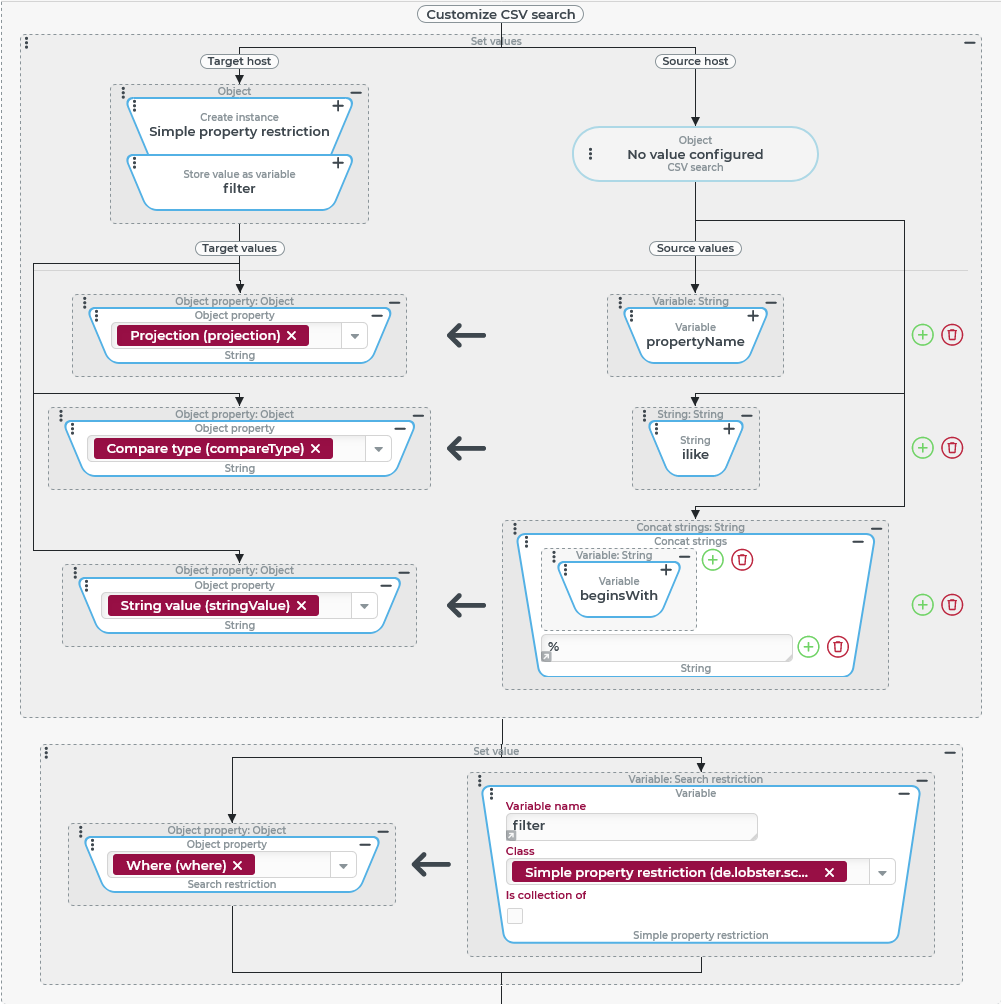 |
| --- | --- |
### Special use case: Generating a 'Search' object
The [Open view (Action)](/v1/docs/en/core-open-view-actor) can be used to open an overview for an *entity type* with a 'Search' (or 'CSV search' or 'Tuple search') object instead of 'Form data'. The 'Where' condition from the search then acts as a 'Restriction' for [Custom overviews](/v1/docs/en/administration-designer-client-preferences-overview). If the opened view is a custom overview, the 'Where' condition from the search is AND-linked with the configured restriction of the overview, if applicable.
As creating a condition via automation can quickly become complex and confusing if more than one [Simple property restriction](/v1/docs/en/core-simple-property-search) (see above) is involved, a [Search (Event action)](/v1/docs/en/core-search-actor) can be 'misused' to create the required 'Search' object for an [Open view (Action)](/v1/docs/en/core-open-view-actor).
Configuration:
| The screenshot on the right shows the configuration for a [Search](/v1/docs/en/core-search) (for the [Companies/Clients](/v1/docs/en/base-company-account) **Entity**) within a [Search (Event action)](/v1/docs/en/core-search-actor), which actually only serves to create a `Search` object in the context of event handling, which is then to be used by an [Open view (Action)](/v1/docs/en/core-open-view-actor) as a filter condition for the view to be opened. **NOTE:** As execution of the [Search](/v1/docs/en/core-search) cannot be prevented, it is configured here so that it generates as little data as possible. The **Mode** 'First result value' is therefore selected so that only one or no company account is saved in the `dummy` variable as the return value. - The value-giving component of this search is the more or less complex **Where** condition. Specific details about its content are not relevant. The AND operation shown in the image can conceal an extensive and multi-nested logical aggregate. - In the **Customize Search** block, a [Set value](/v1/docs/en/core-set-value-actor) event action assigns the 'Search' available there as a *reference object* to a `mySearch` variable, which, unlike the `entity` variable managed by the system, can also be accessed after the search has been executed by subsequent [Event actions](/v1/docs/en/core-i-action-actor-configuration) outside the 'Customize Search' block. --- **IMPORTANT:** In the subsequent [Open view (Action)](/v1/docs/en/core-open-view-actor) event action, the `Search` object is accessed as a whole. The **Where** condition defined in the `where` property is not directly adopted as a restriction for the opened overview. Instead, a [Sub search](/v1/docs/en/core-sub-search) restriction is created from the definition of the [Search](/v1/docs/en/core-search) *as a whole*, which is AND-linked with any existing 'restriction' for the view to be opened (see [Custom overviews](/v1/docs/en/administration-designer-client-preferences-overview)). This procedure may seem unnecessarily complicated, but it ensures, among other things, that the **Where** condition in the transferred [Search](/v1/docs/en/core-search) can also use [Restrictions](/v1/docs/en/core-i-search-restriction) that address fields from [Joins](/v1/docs/en/core-abstract-join). The restrictive effect of *INNER* [Joins](/v1/docs/en/core-abstract-join) can also only be transferred indirectly – with a 'detour' via the [Sub search](/v1/docs/en/core-sub-search) restriction – to the **View name**. | 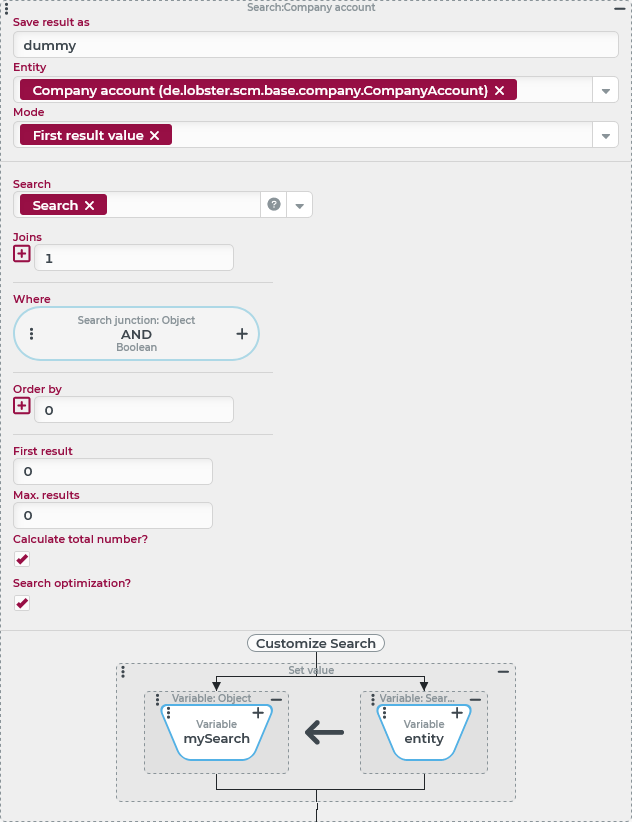 |
| --- | --- |
| The [Open view (Action)](/v1/docs/en/core-open-view-actor) event action shown on the right opens a standard 'Company account overview' for which the 'Where' condition from the `Search` object in the `mySearch` variable applies as a 'restriction' if the value of this variable is resolved as a `Search` object in the **Form data** parameter. --- **IMPORTANT:** In case a [Tuple search](/v1/docs/en/core-tuple-search) or [CSV search](/v1/docs/en/core-csv-search) is defined in the [Search (Event action)](/v1/docs/en/core-search-actor) in the `mySearch` variable instead of the [Search](/v1/docs/en/core-search), the addressed company overview would be opened but not restricted based on the search. It is important to understand why: [Open view (Action)](/v1/docs/en/core-open-view-actor) only attempts to derive a restriction for the **View name** to be opened from the **Form data** parameter if its value corresponds to the 'Search' (`Search`) or 'Search restriction' (`ISearchRestriction`) type. A `TupleSearch` object would not pass this test. The applicable default handling for **Form data** (see [Open view (Action)](/v1/docs/en/core-open-view-actor) does not result in a selection (or an *unintended* selection due to the lack of an ID property) of an entity in the context of the opened overview. | 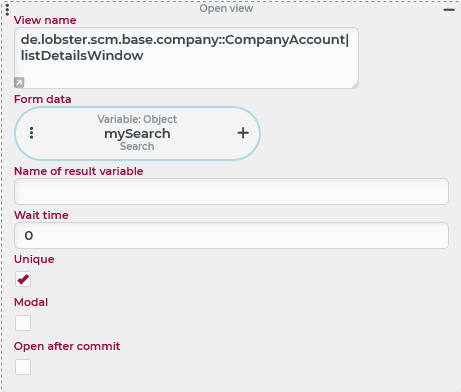 |
**NOTE:** For all relevant [Search types](/v1/docs/en/core-abstract-search) ([Search](/v1/docs/en/core-search), [Tuple search](/v1/docs/en/core-tuple-search) and [CSV search](/v1/docs/en/core-csv-search)), it is possible to access the `where` property within the search in the **Form data** parameter. An attempt is then made to consider the **Where** condition defined there directly (and AND-linked if necessary) as a restriction for the **View name**. However, this is only successful if no [Joins](/v1/docs/en/core-abstract-join) are accessed within the search restriction that are not completely integrated into the 'Where' condition via a [Chained projection](/v1/docs/en/core-chained-projection).