---
title: "Variable"
slug: "core-storage-value"
updated: 2026-04-27T08:12:04Z
published: 2026-04-27T08:12:04Z
canonical: "docs.lobstersoftware.com/core-storage-value"
---
> ## Documentation Index
> Fetch the complete documentation index at: https://docs.lobstersoftware.com/llms.txt
> Use this file to discover all available pages before exploring further.
# Variable
*See also:* [Store value as variable](/v1/docs/en/core-store-value-resolver), [Input object (type safe)](/v1/docs/en/core-root-entity-resolver)
> [!NOTE]
> Value resolver – Abstract
>
> **Purpose:** Establishes the reference to a variable in the execution context for read or write access, supporting type checks, type conversions and lookup functions similar to the [Input object (type safe)](/v1/docs/en/core-root-entity-resolver) value resolver.
>
> > [!TIP]
> > Tooltip
> >
> > - **Usage**: The value resolver provides the *fallback* value defined by the **Default value** parameter if the input value is "no value" (`$null`). In all other cases (e.g. even if the *input value* is an empty string or an empty list) the *input value* is returned directly.
> > - **Parameter**:
> > - The **Key** parameter names a variable whose value is read or written by the direct input of static text or the definition of value resolvers that provide a variable name at runtime.
> > - The **Class** parameter provides for the selection (or input) of a class to declare, check, lookup, or convert the read or written value to.
> > - The **Is collection of** option is considered a declaration or a check type with and without specifying a **Class** but excludes the lookup and type conversion functions.
> > - **NOTE:** Looking up entities by their ID starting from a numeric value is not supported in the [Client Workflow](/v1/docs/en/frebehav-client-workflow) and is read-only in the server context..
*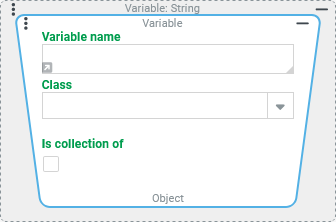*
The [Variable](/v1/docs/en/core-storage-value) value resolver establishes the reference to a variable in the execution context for read or write access. The *input value* is ignored in both cases.
**NOTE:** The [Variable](/v1/docs/en/core-storage-value) value resolver can be used on the left side of a [Set value](/v1/docs/en/core-set-value-actor) event action to assign a value to a variable. Often "write access" can also be achieved without any disadvantages via the [Store value as variable](/v1/docs/en/core-store-value-resolver) value resolver. This is more versatile (e.g. also in [Association criteria](/v1/docs/en/core-association-criteria), where [Event actions](/v1/docs/en/core-i-action-actor-configuration) are not available) and allows more efficient configurations, since, for example, within a value resolver chain any intermediate result can literally be "casually" assigned to a variable.
The **Key** parameter defines the name of the variable that will be created during write access if it does not already exist.
The **Class** and **Is collection of** parameters define the data type expected for subsequent elements in the context of the configuration.
The two parameters are relevant for read and write accesses to variables depending on the context for the following functions in a similar way to the [Input object (type safe)](/v1/docs/en/core-root-entity-resolver) value resolver:
| Function | For read access | For write access |
| --- | --- | --- |
| **Type conversion** for simple values (`String`, `Long`, `Double` etc.) |  automatic |  automatic |
| **Look up an enumeration value** in the enumeration selected as **Class** starting from a text key passed as value, which is compared with a key field defined per enumeration (usually `name`, for [Units](/v1/docs/en/core-unit) `alias`). |  automatic |  automatic |
| **Lookup of an entity** of the selected **Class** (specific entity type) starting from a numeric value for the ID (`id`) of the entity |  supported in server context not supported in the [Client Workflow](/v1/docs/en/frebehav-client-workflow) |  not supported |
| **Check type** against the selected **Class** Checks the class affiliation of a value or all values of a list (if **Is collection of** is checked):→ Return value if passed: Checked value (list, if applicable)→ Return value if failed: "no value" (`$null`) |  automatic |  automatic |
| **NOTE:** The [Check type](/v1/docs/en/core-check-type-rule) always takes place after the other functions that may be applicable. Therefore, if the lookup or type conversion is successful, the check is always passed. If an applicable function fails, the return value is "no value" (`$null`), because after that the selected **Class** is not present. |
> [!WARNING]
> **IMPORTANT:**
>
> If a write access uses the [Variable](/v1/docs/en/core-storage-value) value resolver with the **Class** and/or **Is collection of** parameters of on the target side of the assignment (e.g. on the left in a [Set value](/v1/docs/en/core-set-value-actor) event action), the failure of a type check, type conversion, or lookup of an enumeration value will not result in the assignment of "no value" (`$null`), but in a "silent" abort of the assignment. So the variable defined as the target keeps its previous value unchanged and the execution context continues without any error message. Only in the context of [Tests](/v1/docs/en/core-testing-set) is the abort traceable via the "Log" tab an `UnsupportedOperatonException`.
## Configuration
The *input value* is basically ignored by the [Variable](/v1/docs/en/core-storage-value) value resolver (in contrast to the [Store value as variable](/v1/docs/en/core-store-value-resolver) value resolver).
| **Key** | By default, a [Text field](/v1/docs/en/custom-custom-text-field) is displayed for the **Key** parameter for direct entry of a static text for the variable name. **NOTE:** To address already existing variables, the upper/lower case letters must exactly match the variable name used for write access. | Direct input of a static text: 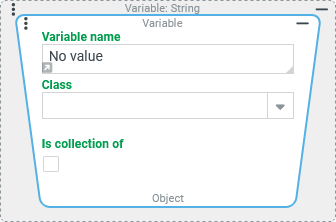 |
| --- | --- | --- |
| As an alternative to direct input, after clicking on the small gray arrow at the bottom left of the [Text field](/v1/docs/en/custom-custom-text-field), value resolvers can be configured for direct input, which should return a string suitable as **Key**. If no text has been entered yet when clicking on the arrow, a placeholder for the configuration of value resolvers will then appear:  | Value resolver configuration: 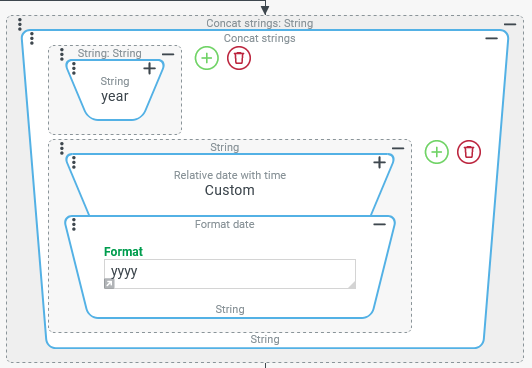 - In the example, a custom date calculation is executed via a [Relative date with time](/v1/docs/en/core-date-time-value) and the four-digit year number is "resolved" as text for the calculated point in time via [Format date](/v1/docs/en/core-date-format-resolver). - The surrounding [Concat strings](/v1/docs/en/core-concat-string-resolver) value resolver associates the year with a static text `year` as a prefix to assign a dynamic variable name such as `year2037` or `year1984` as a **Key** depending on the calculation. **NOTE:** The dynamically assigned variable could be used, for example, to calculate key figures per calendar year in the context of a loop over raw data. |
| **Class** | The optional **Class** parameter supports a static single selection for a class via a [Combobox](/v1/docs/en/fre-combo-box-vo). Its search function (see image on the right) considers matches for the applicable localization as well as the internal name of the class. A selection for the **Class** implies a [Check type](/v1/docs/en/core-check-type-rule) for the value of the variable and may – if automatic conversions are provided – also cause a type conversion or a lookup of enumeration values or entities with respect to the return value. | 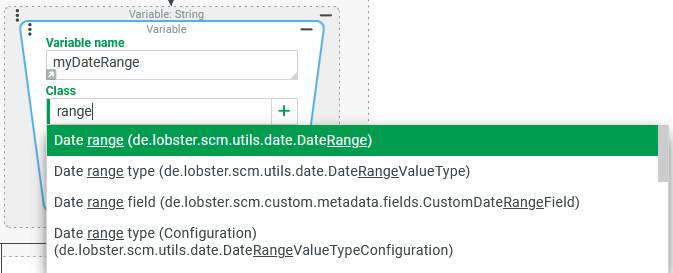 **NOTE:** Using the [**+**] symbol or the Enter key, the string entered here as a search term `range` could also be confirmed as a free text entry for a class (not listed in the dropdown), although this is probably only rarely intended. |
| **Is collection of** | The option **Is collection of** (unchecked by default) specifies that the value of the variable should be a list. If the value is not a list, the [Variable](/v1/docs/en/core-storage-value) value resolver returns "no value" (`$null`). If a **Class** is explicitly specified (see image on the right), checking the **Is collection of** option implies a [Check type](/v1/docs/en/core-check-type-rule) of all list entries against this **Class** , so that the return value is `$null` if at least one of these entries does not match the selected **Class**. | 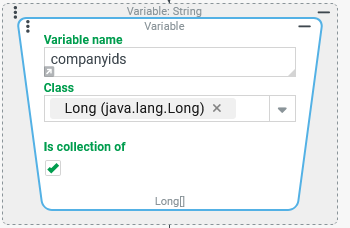 Selecting the **Type** `Long` and the **Is collection of** option implies a [Check type](/v1/docs/en/core-check-type-rule) for the value of the `companyIds` variable. If the variable does *not* contain a list (but e.g. only a single `Long` value) or a list that contains a *check-relevant entry* that is not a `Long` value, the return value is `$null`. |
With regard to "lists" stored in a variable, it should also be noted:
- If the option **Is collection of** is unchecked (default) and no **Class** is checked then no [Check type](/v1/docs/en/core-check-type-rule) takes place. So it is not possible to specify in this way that only one return value is "desired", which is not a list.
- As long as the option **Is collection of** is unchecked, a list is returned directly like any other data object stored in a variable.
- If the option **Is collection of** is unchecked when accessing a list, then the **Class** parameter can be used for a type conversion for the list as a whole.
Example: A `route` variable contains a normal "list" (`java.util.List`) of `String` values defined by IATA codes of flight destinations along a "trip schema":In JSON notation, the list in the `route` variable for a "round trip" could look like this, for example: `[MUC,JFK,GIG,CDG,MUC]`If the `route` variable is accessed by the **Class "**List" (`java.util.List`) or without specifying a type, the return value is exactly the same as the saved value.
If, on the other hand, the `route` variable is accessed by the **Class "**Set" (`java.util.Set`), then the "List" is converted into a "Set", which can change the order and the number of entries. In the specific example, the return value could look like this: `[GIG,CDG,MUC,JFK]`
## Examples
### Simple write access (with and without type conversion)
An approximate value for π/2 (radian measure value for 90°) is written as a decimal number into a `rightAngle` variable.
Configuration:
| Within a [Set value](/v1/docs/en/core-set-value-actor) event action, the [Variable](/v1/docs/en/core-storage-value) value resolver is used to identify the target for the assignment: - The **Key** is defined by direct input as static text (`rightAngle`). - The **Class** specification is omitted. This means that the data type is stored that is returned by the value resolver chain on the right side of the assignment (*here*: "*Big Decimal*"/`java.math.BigDecimal`). | 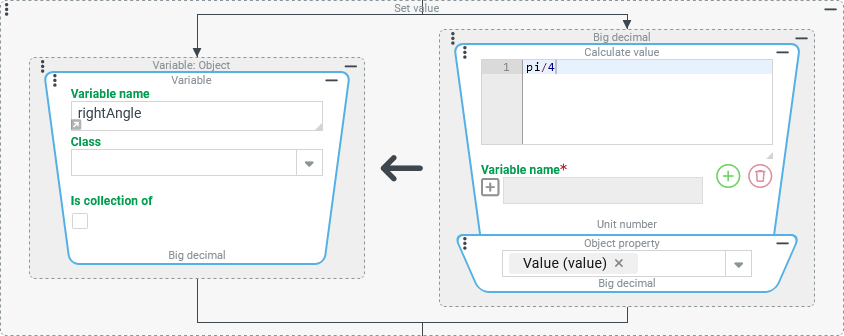 |
| --- | --- |
| Result: (XML image of the variables as entry in the `storage` map). --- rightAngle0.785398163397448309615 |
| Within the previous configuration, the **Class** "Double" (`java.lang.Double`) is now selected for write access via the [Variable](/v1/docs/en/core-storage-value) value resolver (on the left side), which stores the calculation result in the variable less precisely. | 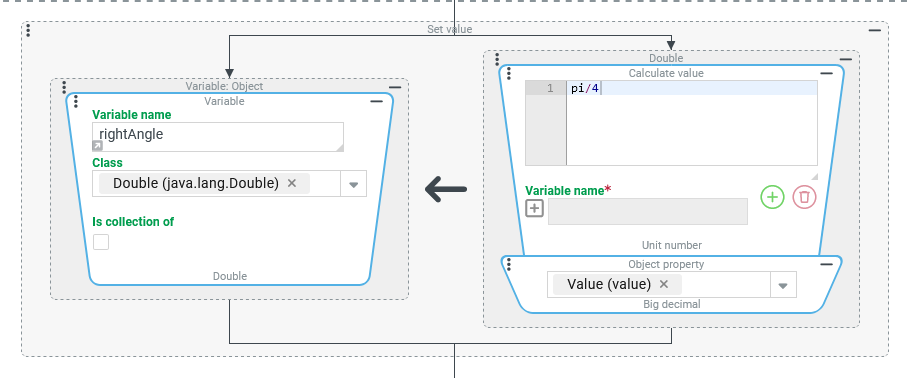 |
| Result: (XML image of the variables as entry in the `storage` map). --- rightAngle0.7853981633974483 |
### Simple read access (with and without type conversion/lookup)
An `origin` variable contains static text that specifies a "home country" via the internal name of a value from the [Country](/v1/docs/en/core-country) dynamic enumeration.
In a notification (via [Show alert (Popup)](/v1/docs/en/core-popup-actor) event action), the static text is to be reproduced in the "Title" and its localization as "Message".
Runtime example:

Configuration:
| In a [Client Workflow](/v1/docs/en/frebehav-client-workflow) (in the context of a form), a [Show alert (Popup)](/v1/docs/en/core-popup-actor) event action can be configured as shown on the right to achieve the desired result: - In the **Title**, the `String` value (`CN`) stored in the `origin` variable is accessed directly (per **Key** `origin` and without selection for the **Class**) via the [Variable](/v1/docs/en/core-storage-value) value resolver. - In the **Message**, the [Variable](/v1/docs/en/core-storage-value) value resolver with the **Key** `origin` is again used to access the variable. However, "Country" (`Country`) is selected as the **Class** here. At runtime, a type conversion of the text value in the `origin` variable to a value from the dynamic enumeration [Country](/v1/docs/en/core-country) will be performed. If no [Country](/v1/docs/en/core-country) is found with an internal "Name" that matches the text value, "no value" (`$null`) is returned.. **IMPORTANT:** The return value for the **Message** is a dynamic enumeration value (`DynamicEnumValue`) if the type conversion is successful, which must be converted back to a `String` value in the context of the **Message** parameter for display in the notification. The string conversion for the [Country](/v1/docs/en/core-country) value only takes the applicable localization into account in the client context (*here*: [Client Workflow](/v1/docs/en/frebehav-client-workflow)). In the server context (e.g. in [Event handling](/v1/docs/en/administration-designer-workflow-action-event-handler-configuration)), on the other hand, the "Name" is output as a string. Then the **Title** and **Message** in the example display `CN`. | 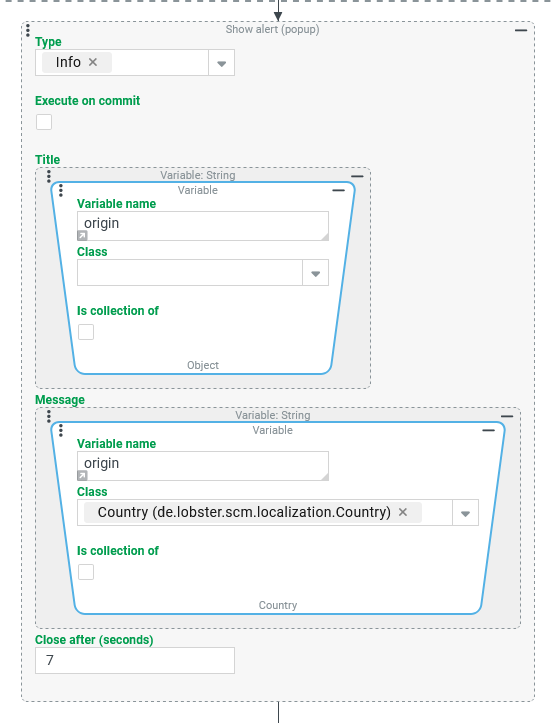 |
| --- | --- |
### Read access to a list of entities from a search in the context of a loop
A typical use case where a variable contains a list of entities is the execution of a [Search (Event action)](/v1/docs/en/core-search-actor) of the "Search" type for which the "Search value" mode is selected.
In the following example, the search should return all addresses that refer to a region defined by a list of countries (see [Country](/v1/docs/en/core-country)) (*here*: "*Benelux*" with the country codes BE, NL, LU).
A loop then iterates over all "found" addresses to determine statistical key figures.
| Since a [Search (Event action)](/v1/docs/en/core-search-actor) can only be executed as an event action and not as a value resolver, the name of a variable into which the result of the search is saved at runtime must be specified during configuration via the **Save result as** parameter. - In our example, [Addresses](/v1/docs/en/base-address) are searched for, so this entity type must be selected in the **Entity** parameter. - The "Search value" **Mode** specifies that a list of all "found" entities of the selected type should be returned. - In addition, the "Search" option must be selected in the **Search** parameter so that complete entities are listed in the result and not just tuples with selected projections from their data. - **Where** checks exactly one condition, namely whether the value for the "Country" (`countryCode`) field of the address is contained in a positive list with the statically defined enumeration values "Belgium" (`BE`), "Netherlands" (`NL`) and "Luxembourg" (`LU`). **NOTE:** The [Search (Event action)](/v1/docs/en/core-search-actor) lists only addresses for the "addresses" entity that can be accessed via [Address book entries](/v1/docs/en/base-address-book-entry) in the given execution context. | 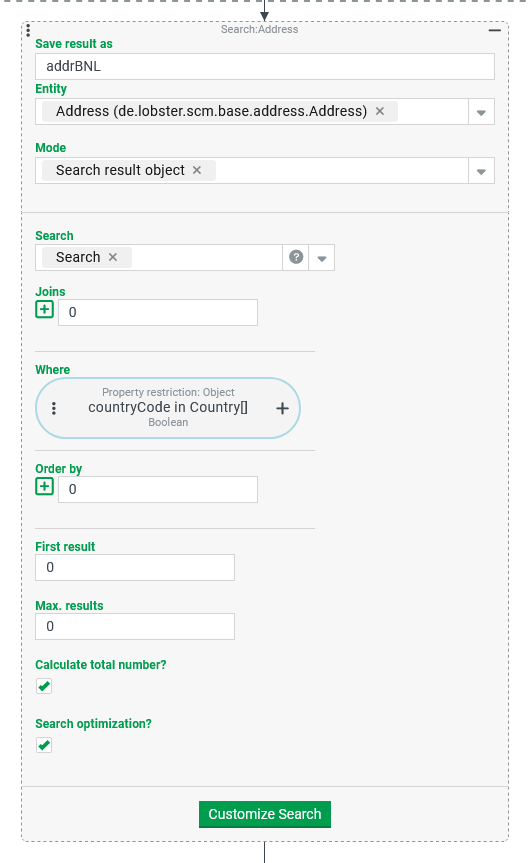 |
| --- | --- |
| The following [For each loop](/v1/docs/en/core-for-each-entity-actor) event action iterates over all "found" addresses. A [Variable](/v1/docs/en/core-storage-value) value resolver is therefore used as the **Resolver for entries** and configured as follows: - The **Key** is the name of the `addrBNL` variable, which was arbitrarily specified in the **Save result as** parameter of the [Search (Event action)](/v1/docs/en/core-search-actor) (see above). - The "Address" entity type is selected as **Class**, like the **Entity** parameter in the [Search (Event action)](/v1/docs/en/core-search-actor) (see above). - The **Is collection of** option is checked because the "Search value" **Mode** for the [Search (Event action)](/v1/docs/en/core-search-actor) (see above) returns a list of entities of the searched type. Accordingly, the expected data type (at the bottom of the value resolver "Address[]" is shown and the type "Address" for the action block of the loop. | 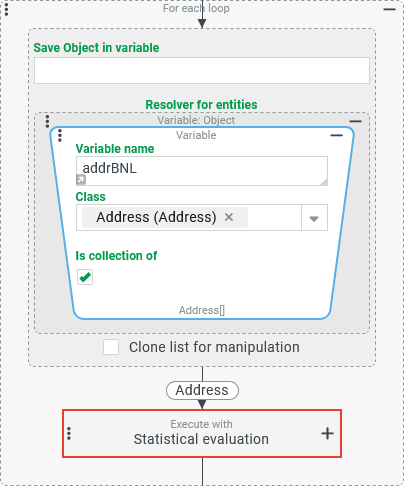 |
| **NOTE:** The selection for **Class** could technically also be omitted, since all entries passed into the `addrBNL` list variable with the **Mode** "Search value" must be of the "Address" entity type. If no entries are found, the variable contains an empty list, so no iterations of the loop are executed. The selection for **Class** here is mainly for declaring the variable content so that it can be transparently traced in the configuration of the loop and the contained [Execute with](/v1/docs/en/core-with-actor) event action and the "right" elements (e.g. value resolvers) are offered as "suitable" for the context. |
### Read access to an entity via its ID in an association criteria.
An association criterion (see [Association criteria](/v1/docs/en/core-association-criteria)) is assumed to be true if the following condition is met:
- The logged in company ([Company of session](/v1/docs/en/base-session-company-account-value)) either owns the user or guest user account ([User of session](/v1/docs/en/base-session-user-value)) used for logging in or owns the company that owns this account.
It could also be formulated: The [User of session](/v1/docs/en/base-session-user-value) should be owned either by the [Company of session](/v1/docs/en/base-session-company-account-value) or by the company that owns it.
| The configuration for an association criteria shown on the right checks the criteria described above in the context of an [Entity property rule](/v1/docs/en/core-entity-property-rule): - On the left side, the registered company is determined by the [Company of session](/v1/docs/en/base-session-company-account-value) value resolver and its ID (`id`) is used for an [In list](/v1/docs/en/core-in-matcher) comparison by a concatenated [Object property](/v1/docs/en/core-property-resolver) value resolver. - On the right side, a list is compiled with the IDs of the two company accounts that, according to the requirement above, should be considered "acceptable" candidates in the sense of the criterion: - The first candidate is the "owner" of the logged-in user account returned by the [User of session](/v1/docs/en/base-session-user-value) value resolver. - The concatenated [Object property](/v1/docs/en/core-property-resolver) value resolver accesses its "owner" (`ownerId`) field, whose value contains the ID (`id`) of the relevant company account relevant for the comparison. - The concatenated [Store value as variable](/v1/docs/en/core-store-value-resolver) value resolver stores this ID in the variable `myOwnerId`, since the company account in question must be accessed to determine its owner as the second candidate. - The second candidate is the "owner" of the company that owns the [User of session](/v1/docs/en/base-session-user-value). To determine this, the company account in question must be evaluated: - The [Variable](/v1/docs/en/core-storage-value) value resolver reads the ID stored in the `myOwnerId` variable and – since this is a numeric value and the **Class** "Company account" (`CompanyAccount`) is selected – looks up the respective company account as return value. - The concatenated [Object property](/v1/docs/en/core-property-resolver) value resolver then accesses the "owner" (`ownerId`) field as above to provide the "ID" (`id`) of the relevant company account as a compare value. **NOTE:** Instead of using the `myOnwerId` variable, the second candidate could also start the value resolver chain at the [User of session](/v1/docs/en/base-session-user-value) and look up the owning company via the `ownerId` field as an input value for an [Input object (type safe)](/v1/docs/en/core-root-entity-resolver) value resolver to then get its `ownerId`. | 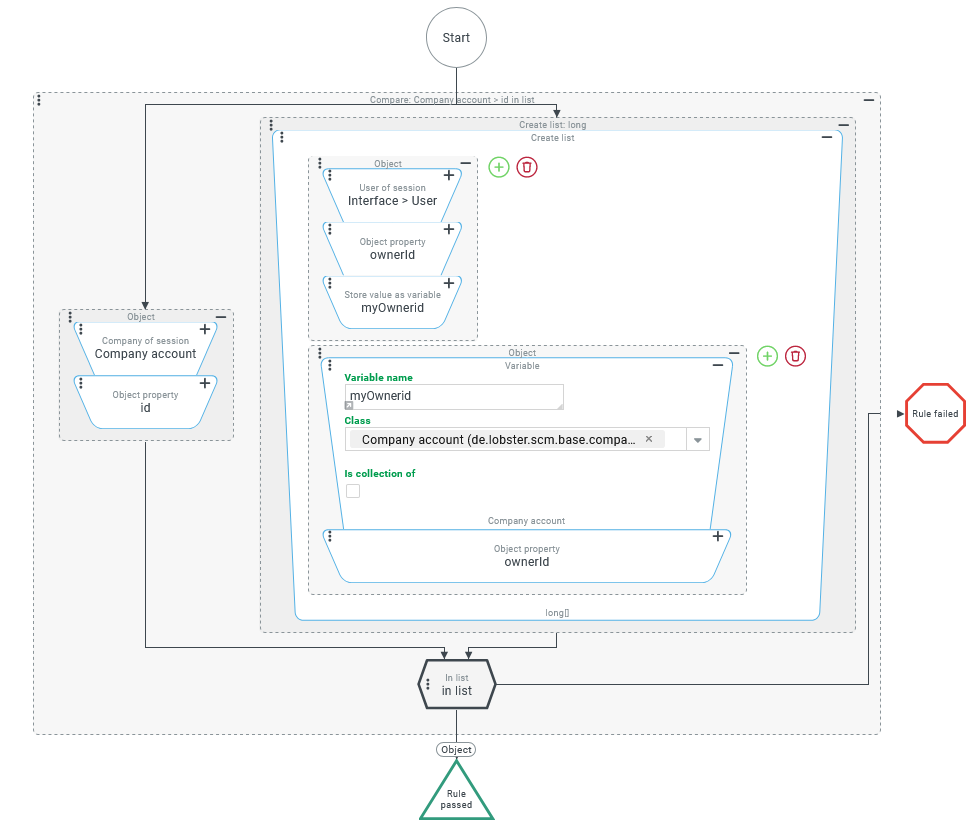 |
| --- | --- |