An index is a lookup structure that the database keeps alongside a table to find records quickly. It works like the index at the back of a book.
Without an index, a query like "all positions of shipment 4711" forces the database to check every row in the table (a full table scan). This is fine with a few records, but slow with millions of rows. An index on the shipment field keeps a sorted list of shipment IDs, which the database uses to jump straight to the matching rows.
Settings
You can create indexes for the following type definitions: Custom entity type, Custom singular attribute, Custom plural attribute, Custom typed attribute, and Custom referenced entity.
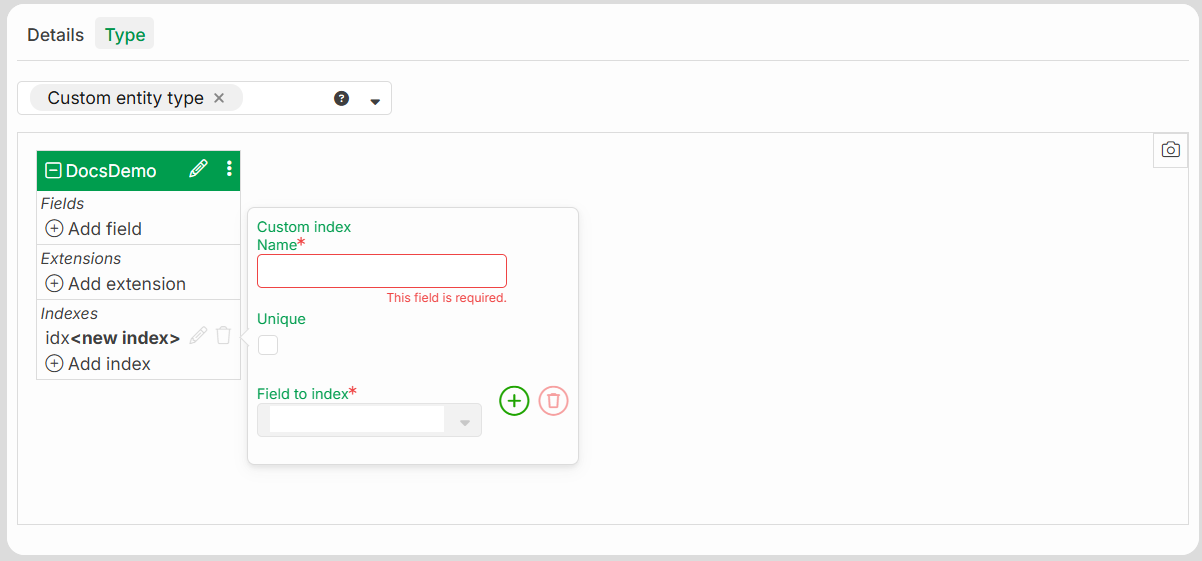
Name | Description |
|---|---|
Name | The name of the index. The editor automatically adds the |
Unique | When this option is enabled, the database does not allow two records with the same values in the indexed fields. A unique index on |
Field to index | One or more fields that the index covers. The order of the fields matters (see the section "When to use an index" below). |
When to use an index
An index is useful for fields that you frequently filter, join, or sort by:
Index | Speeds up |
|---|---|
| "All positions of a shipment": the most common access path to a child table. |
| The same query, additionally sorted by position. |
| Searching or filtering by the article text. |
Field order matters. An index on
(shipment, positionNumber)also helps queries that filter only byshipment. It does not help queries that filter only bypositionNumber. List the field you always filter by first.Not every field needs an index. Each index uses disk space and slightly slows every insert and update, because the database must maintain it. Fields that you only read and do not search by (for example
quantityornetWeightKg) do not need an index.
Validation
The editor rejects an index if:
it contains no fields.
A field is listed twice.
A specified field name does not exist.
The field type cannot be indexed.