Click the bell icon to display the News view:

NOTE: The bell icon only appears if the logged-in user has the permission "Administration/System/Show system information".
Available information
News
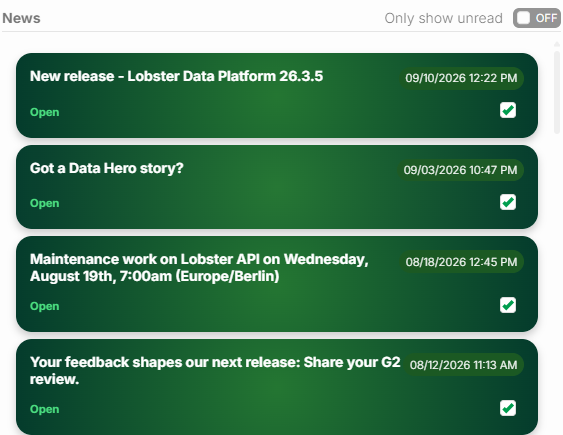
The top of the view shows News published by Lobster as a list of messages. The list is sorted in reverse chronological order, so the newest message comes first.
The list shows the title of each message (top left) and the time it was published (top right).
Click Open, or click anywhere in the display area of a message. The message opens in a dialog so you can read the actual content.
The Only show unread option controls whether messages marked as read are hidden (ON) or not (OFF). You must select the checkbox (bottom right of each message) yourself for a message to count as "read". Opening a message does not select this checkbox.
Status information
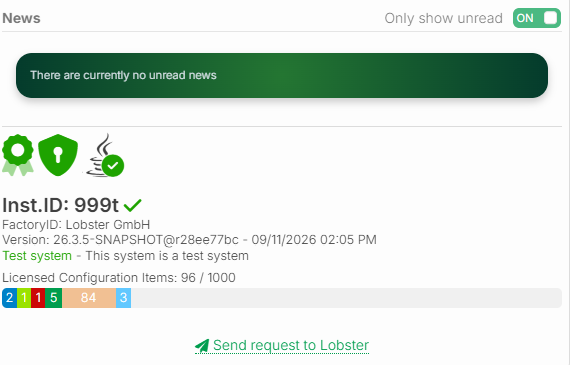
Status information about the system appears below the News list:
License/installation ID
Version and system type
Usage statistics for the licensed configuration items. These include:
Datagrids
ETL/ELT Pipelines
Input forms
MCP Server tools
Portals
Profiles
REST API operations
For details on configuration items and limits, see Licensed configuration items.
Sending a request
Click Send request to Lobster to open an Input form. Use this form to send requests, for example, suggestions for improvement, to product management for the Lobster Data Platform.