The High Availability (HA) architecture is the standard deployment model for TRANSFORM customers. It is also available for SCALE and ACCELERATE customers as a paid optional upgrade. The HA architecture provides a multi-node setup with redundant components across all critical layers. It delivers a guaranteed availability of 99.95% per month.
Overview
The standard architecture relies on a single Lobster Data Platform server. In contrast, the HA architecture distributes the load across multiple nodes. Each critical component has a redundant counterpart. The counterpart takes over automatically if the primary component fails. The system is designed so that a single node failure does not cause a complete outage.
The HA architecture is a software-based solution. The Lobster Data Platform software manages failover and load balancing at the application level. The underlying AWS cloud provides virtual machines, networking, and storage. It does not control the application-level failover logic.
The exceptions to this are the DMZ servers and the database. Amazon Route 53 (the AWS DNS service) manages DMZ failover via health checks. Amazon Aurora PostgreSQL handles database failover with automatic replica promotion.
Further information
For details on components and sizing, see Cloud sizing.
See High availability architecture.
Failover mechanisms
DMZ failover
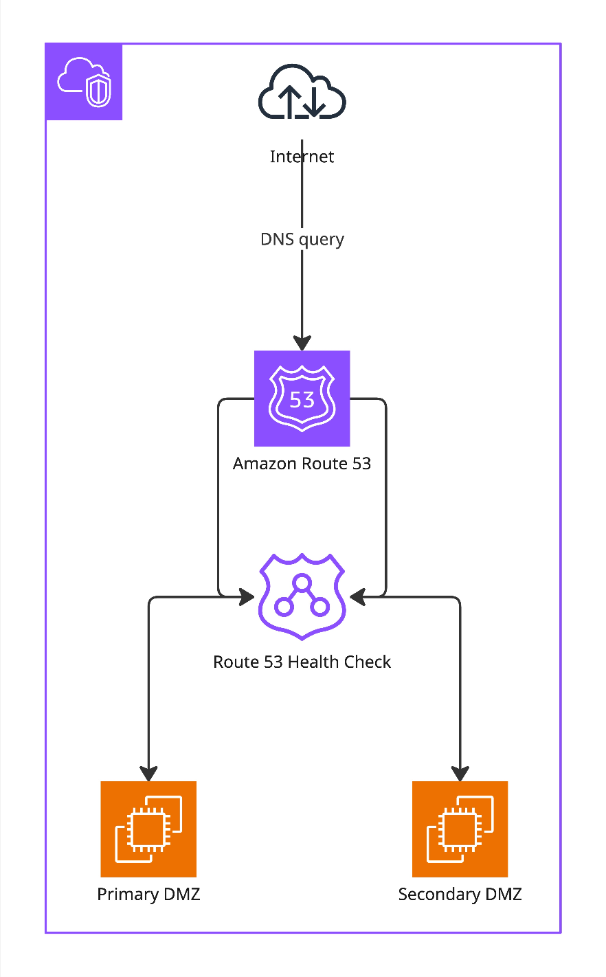
Route 53 manages DMZ failover (see High availability architecture) at the infrastructure level. Health checks continuously monitor the Primary DMZ. If the Primary DMZ becomes unresponsive, Route 53 routes all incoming traffic to the Secondary DMZ. No manual intervention is required.
Node failover
The Lobster Data Platform software manages node failover at the application level. The Node Controller and the Working Nodes continuously monitor each other. If the Node Controller fails, the next Working Node in line detects this and takes over processing. Once the Node Controller comes back online, it automatically resumes control of failover handling.
For details on health checks and load distribution, see Failover concept.
Database failover
Aurora manages database failover. The primary database instance handles all read and write operations. Aurora maintains a synchronized replica in read-only mode. If the primary instance fails, Aurora automatically promotes the replica to the new primary instance. Synchronous replication ensures data integrity.
Shared file system
The HA architecture requires a shared file system that all nodes can access simultaneously. Two options are available:
Standard volume (EFS)
AWS Elastic File System (EFS) is the default shared file system for HA environments. It is suitable for workloads that primarily process larger files (100 KB and above). For details, see Cloud sizing.
EFS uses a minimum accounting unit of 4 KB per file access. Even if you read a 1 KB file, EFS consumes 4 KB of throughput. For workloads with many small files, this overhead can significantly reduce effective throughput.
High volume (FSx)
AWS FSx for NetApp ONTAP is available as an upgrade for customers processing large numbers of small files (under 100 KB). It delivers significantly lower latencies and higher IOPS than EFS. For details, see Cloud sizing.
HA restart and patching behavior
For details, see Maintenance schedule and Cloud update policy.
NOTE:
For information on system availability during software updates and planned maintenance, see Maintenance schedule.
Scalability
Scaling type | Description |
|---|---|
Horizontal scaling | Adds an additional working node to distribute workload across more processing nodes. Maximum one additional Working Node per environment (production and test). |
Vertical scaling | Upgrade from sizing M to sizing L for increased compute and storage capacity on all nodes. |
Storage scaling | Extend shared file system capacity via storage extension packages. Upgrade from standard volume (EFS) to high volume (FSx) for performance-intensive workloads. |
Vertical scaling
Upgrading to a higher sizing tier increases compute and storage capacity on all nodes. Example: an upgrade from sizing M to sizing L. The upgrade is performed sequentially, node by node. During this process, the failover mechanism temporarily promotes a Working Node to Node Controller. The system remains available throughout the procedure. Each node requires a brief maintenance window.
During the sequential upgrade, the system restarts individual nodes and redistributes traffic. Brief interruptions in response time may occur. These interruptions are expected and temporary.
Ideal use cases
The HA architecture is designed for environments where downtime has a direct business impact.
Use case | Description |
|---|---|
24/7 business operations | Near-uninterrupted data integration workflows for enterprises operating around the clock. |
High-volume transaction processing | Environments processing large numbers of transactions where even short outages cause significant backlogs. |
Compliance and disaster recovery | Organizations with strict regulatory requirements for system availability and data protection. |
Mission-critical integrations | Processes where partner systems, APIs, or automated workflows depend on continuous availability. |
HA architecture diagrams
HA setup with standard test system
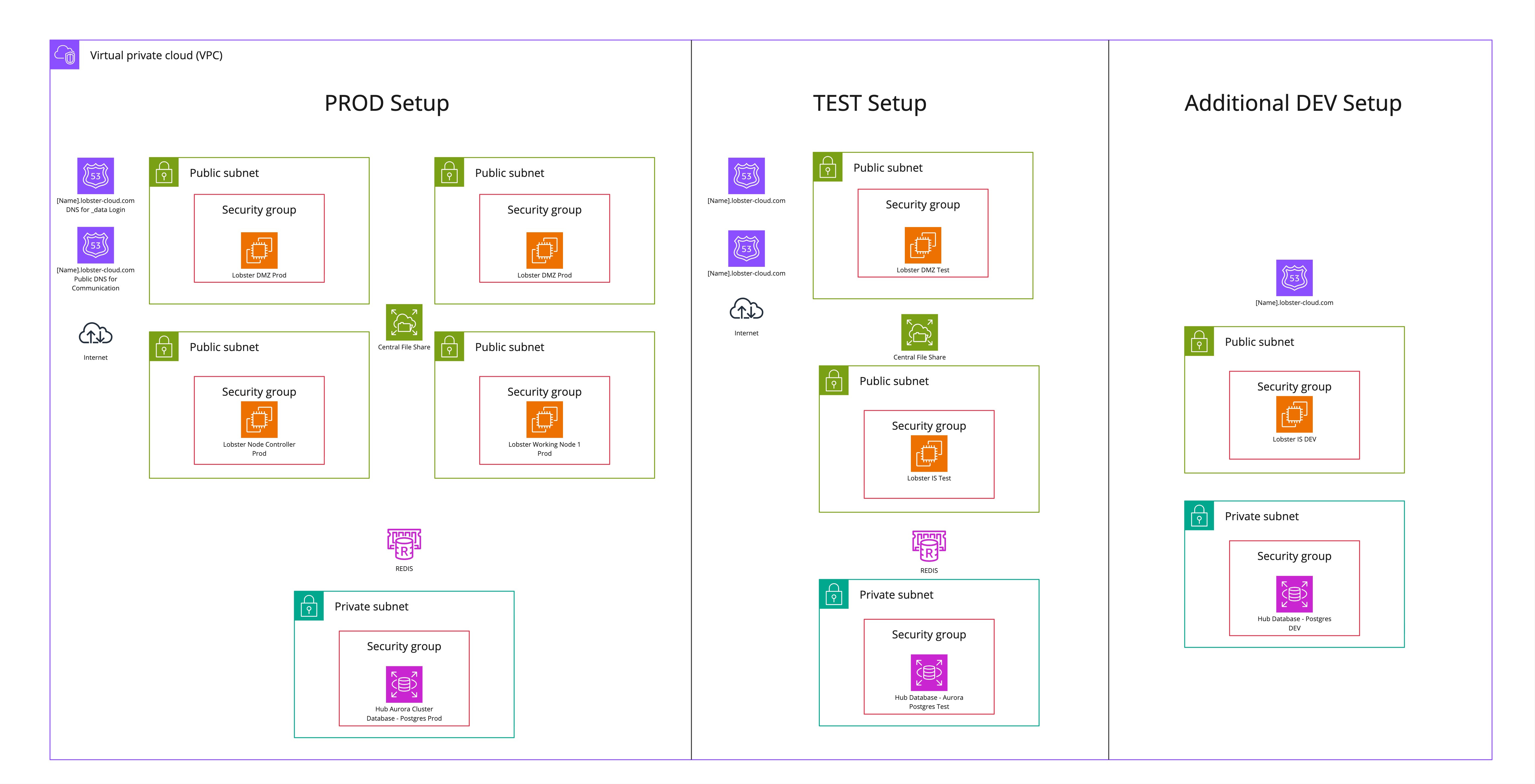
The following diagram illustrates a standard Lobster Cloud High Availability environment with a standard test system. The diagram also shows an optional DEV system. The DEV system is not included in the base setup.
HA setup with HA test system
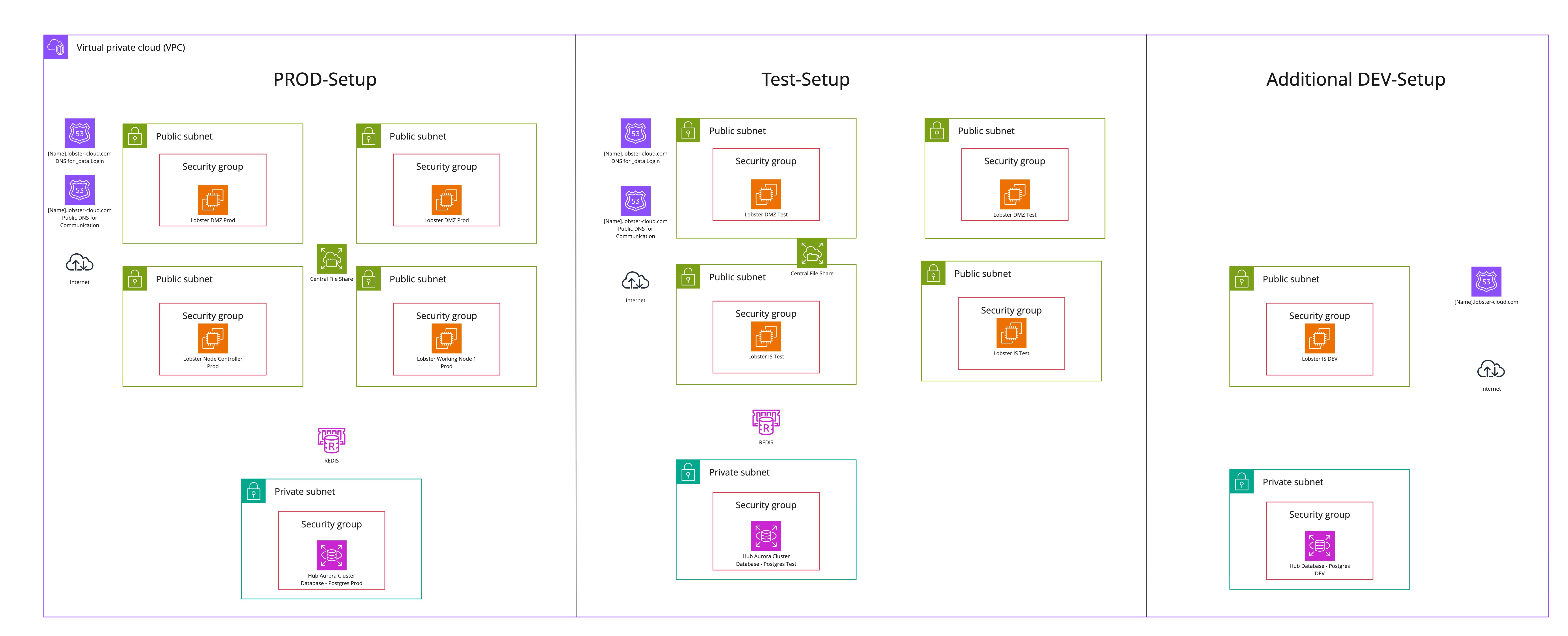
The following diagram illustrates a standard Lobster Cloud High Availability environment with a High Availability test system. You can add the High Availability test system as an optional add-on. The diagram also shows an optional DEV system. The DEV system is not included in the base setup.
HA-DMZ failover: Amazon Route 53 with health checks
The Lobster Cloud HA setup uses Route 53 with automated health checks. This ensures continuous availability of your DMZ layer. Route 53 resolves incoming DNS queries. It continuously monitors the health of the Primary DMZ and the Secondary DMZ. The health check runs every 30 seconds against port 80. If the Primary DMZ fails three consecutive health checks, Route 53 redirects traffic to the Secondary DMZ. No manual intervention is required. Once the Primary DMZ passes the health checks again, Route 53 routes traffic back automatically. This mechanism detects and resolves a primary node failure within a predictable time frame.
Node failover: health check
Route 53 health checks also identify the active Node Controller internally. For logins from outside via the DMZ, the DMZ determines the active Node Controller. It routes the login accordingly. Some users access the internal system directly behind the DMZ. For them, Route 53 health checks identify the active Node Controller and route the login correctly. In both cases, this has no influence on the Failover concept behavior of the system. The Lobster Data Platform software manages failover entirely.