---
title: "AS2"
slug: "intro-concepts-as-2"
updated: 2026-08-05T06:00:05Z
published: 2026-08-05T06:00:05Z
canonical: "docs.lobstersoftware.com/intro-concepts-as-2"
---
> ## Documentation Index
> Fetch the complete documentation index at: https://docs.lobstersoftware.com/llms.txt
> Use this file to discover all available pages before exploring further.
# AS2
You can send and receive AS2 messages via HTTP over TCP/IP. We will describe AS2 and its installation, specific settings and test possibilities. Other EDI tools have their own specific settings that are not described here. Please note that our AS2 service of is certified by Drummond.
## Basic procedure
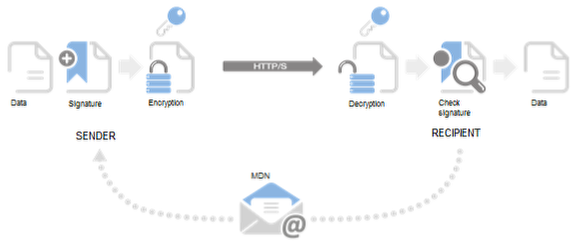
Applicability Statement 2 (AS2) is a standard for securely and reliably transporting data over the Internet via HTTP or HTTPS. AS2 specifies how two communication Partners connect and how messages are sent, validated, and confirmed. AS2 creates an envelope for a message, which is then securely sent.
Digital signatures can check the integrity and the authorship of a message and the data can be secured by encryption. The sender may request a Message Disposition Notification (MDN) if all went well, but does not have to request such a notification. Additionally, the MDN contains information about successful decryption and signature validation.
A characteristical difference to other transmission standards is that the user does not depend on technical protocols to prove a successful transmission since he has the proof in the form of a message itself (MDN). Another advantage of the standard is that there are no additional costs for the transmission and that it is very fast and reliable. On the other hand, you might (not necessarily) have to invest in a certificate.
**NOTE:** To view MDNs in the Control Center, the communication must have been carried out via a partner channel.
AS2 can be seen as a replacement for X.400. We can support you with migrating from X.400 to AS2. Please contact our support or sales staff.
## AS2 installation
After the installation, all the necessary components are available, but make sure that you have licenced the AS2 service and have activated (commented out) the relevant section in the configuration file *./etc/factory.xml*.
```xml
com.ebd.hub.services.as2.As2Service
etc/as2.xml
```
The configuration file *./etc/as2.xml* already contains a segment that is using an HTTP server "*Main Server"*. This HTTP server is a requirement for the operation of the AS2 service and will automatically be started with the start of the Integration Server. Following the relevant segment of configuration file *./etc/as2.xml.*
```xml
Main Server
/partner/*
/AS2Retrieve/*
```
The context of the HTTP server to be used is already specified in this file with */partner/** and */AS2Retrieve/*.* By using wildcards, it is possible that additional subpaths are added.
This setting allows you (or your communication partner) to access the AS2 service under the following address.
| http:///partner/AS2Retrieve/ |
| --- |
The entries in the configuration file can be extended as required. If you want to add another HTTP server, see the [Admin console](/v1/docs/en/manage-ac) documentation for more information.
If you want to use a DMZ server, no additional installation is required for the AS2 service on the DMZ server. In this case, the firewall of the DMZ server must only be configured to automatically forward requests from a specific partner to a particular IP and port number of the previously described internal HTTP server.
The above-shown URL is correct for a standard installation. If you are not sure about the ports (the standard port is *80* and does not have to be specified in the address), you will find them in the following entry under menu item *HTTP/Info* in the Admin console.
```plaintext
HttpServer Main Server [Start]
Listeners:
SocketListener1@0.0.0.0:8080 [Stop]
SunJsseListener2@0.0.0.0:443 [Stop]
```
This results in the following URLs.
- http://:8080/partner/AS2Retrieve
- https://:443/partner/AS2Retrieve
## Testing the availability of the AS2 service
The simplest way to test the AS2 service is by using your browser. Enter the following address.
| http:///partner/AS2Retrieve/ |
| --- |
A correctly configured AS2 service replies with an MDN (file). Please save that file and open it in a regular text editor. The content should be similar to the following.
```plaintext
------=_Part_0_24916054.1236247212828
Content-Type: text/plain; charset=us-ascii
Content-Transfer-Encoding: 7bit
MDN for -
Message-ID: null
From: null
To: null
Received on: n.a.
Status: failed: authentication-failure
Comment: This is not a guarantee that the message has
been completely processed or understood by the receiving
translator
------=_Part_0_24916054.1236247212828
Content-Type: message/disposition-notification
Content-Transfer-Encoding: 7bit
Reporting-UA: Lobster AS2-Server (IS/5.7.19_14147)
Original-Recipient: rfc822; null
Final-Recipient: rfc822; null
Original-Message-ID: null
Received-Content-MIC: 2jmj7l5rSw0yVb/vlWAYkK/YBwk=, sha1
Disposition: automatic-action/MDN-sent-automatically; failed: authentication-failure
Failure: You're unknown to this system
------=_Part_0_24916054.1236247212828--
```
If you get such a response, the AS2 service is reachable and ready to use (you can ignore the authentication error in the MDN since we were only interested in the reachability).
### Different port
If the default HTTP port (*80*) is not used, you can determine the correct one as follows. The configuration file*./etc/as2.xml* contains the following entry.
```xml
Main Server
/partner/*
/AS2Retrieve/*
```
You can use the name of the [HTTP server](/v1/docs/en/ac-http-server) (here *Main* *Server*) in the Admin Console to find the ports of the listeners.
Based on that information, the URLs might then, for example, be
- http://:8080/partner/AS2Retrieve
- https://:8443/partner/AS2Retrieve
## Parameter exchange with partner
The communication with AS2 requires several parameters that have to be exchanged between the communication partners. Following a list of these parameters (you have to send one list to your partner and your partner has to send one to you). Please communicate with your partner and exchange the necessary parameters before you try to establish a connection.
| Parameter | Description | Optional/Mandatory |
| --- | --- | --- |
| AS2 Identifier | The ID you use for your AS2 partner on your system (like a user name/login for your partner). It is recommended to use your company name plus a prefix, e.g. *AS2_EXAMPLECOMPANY*. | M |
| AS2 Address URL | This is the URL of your AS2 service. The standard URL of the AS2 service is *http:///partner/AS2Retrieve/* (as configured in *./etc/as2.xml*). | M |
| Connection IP Address | The IP address of your AS2 service (has to be unblocked on your firewall). | M |
| Connection Port | The port of your AS2 service (has to be unblocked on your firewall). | M |
| Outgoing IP | The IP from which you send AS2 messages (has to be unblocked on your partner's(!) firewall). **NOTE:** You have to use the IP of your DMZ if you are using one. | M |
| Certificate | You might choose to provide a URL for your partner to download [Certificates](/v1/docs/en/manage-partners-certificates), but you can also exchange them otherwise. The use of certificates is optional. | O |
| Encryption Algorithm | Encryption algorithm for the messages. | O |
| Signing Algorithm | Encryption algorithm for the signatures. | O |
| Content Type | Some partners require a certain content type (is set in the response). We do not need a content type. | O |
| MDN Delivery Mode | MDNs can be sent synchronously or asynchronously. If the synchronous mode is chosen, the MDN is expected as an immediate response to the AS2 message (same URL). In asynchronous mode, the MDN is sent to a separately specified URL (at some point in time). **NOTE:** Both sides have to use the same mode. | O |
| MDN URL Async Mode | The URL to which an MDN shall be sent if the asynchronous mode is used, e.g. *http://example.com/as2* | |
## Sending and receiving
### Creating AS2 partner channel
To send or receive data via AS2, you need to create a communication partner in the partner administration.
The AS2 partner channel shown in the screenshot above allows you to send and receive data **(1)**. Your URL will be the one configured in file *./etc/as2.xml*, as mentioned earlier (*http:///partner/AS2Retrieve/*).
The AS2 identifiers **(2)** and **(3)** are mandatory, no matter whether you only want to send or only want to receive data.
Partner administration parameter **(4)** refers to parameter *AS2 Address URL* in section "Parameter Exchange with Partner". Enter the AS2 URL of your partner in this field.
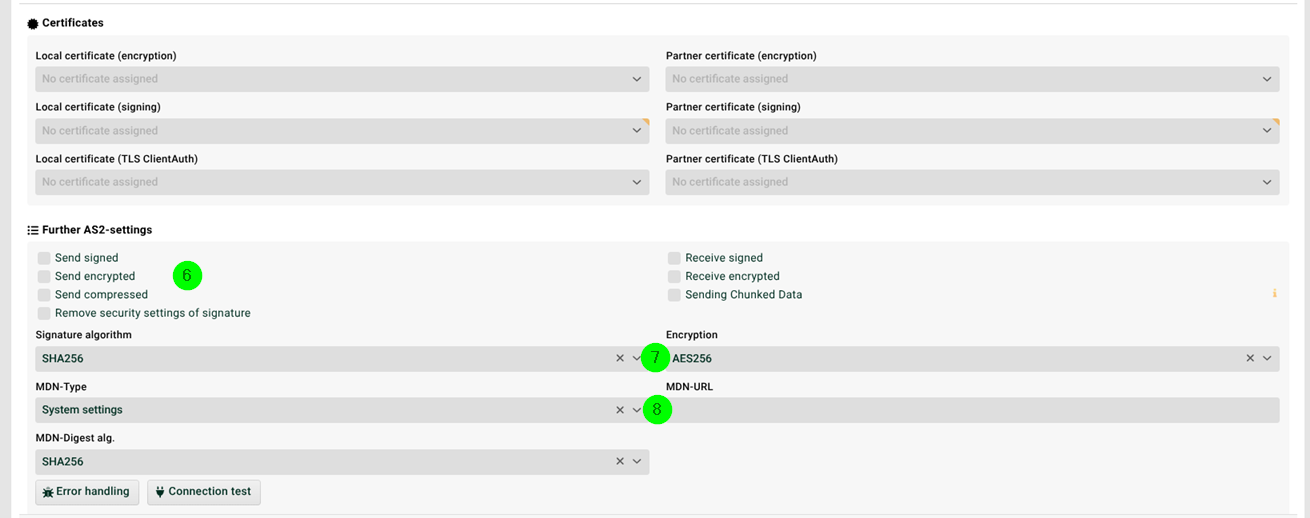
Certificates can be selected in **(5)**. Checkboxes *Send signed*, *Receive signed*, *Send encrypted*, and *Receive encrypted* **(6)** allow you to activate the optional use of signatures and encryption on both sides (incoming and outgoing). The encryption algorithms can be chosen from the drop-down menus *Signature algorithm* and *Encryption*. **(7)**. The two fields with label *MDN Type and MDN URL* (8) allow you to set whether an MDN should be sent synchronously or asynchronously from the partner. If asynchronously is chosen, the MDN has to be sent to the specified URL at some point after the data transmission. If synchronously is chosen, the transmission of the MDN is expected as a direct response to the data transmission.
If no settings are made in the field *MDN Type* and *MDN URL*, the system settings are taken from the configuration file *./etc/as2.xml.* The default setting is synchronous. The default URL in the asynchronous mode is set in file *./etc/as2.xml.*
```xml
```
### Sending data via AS2
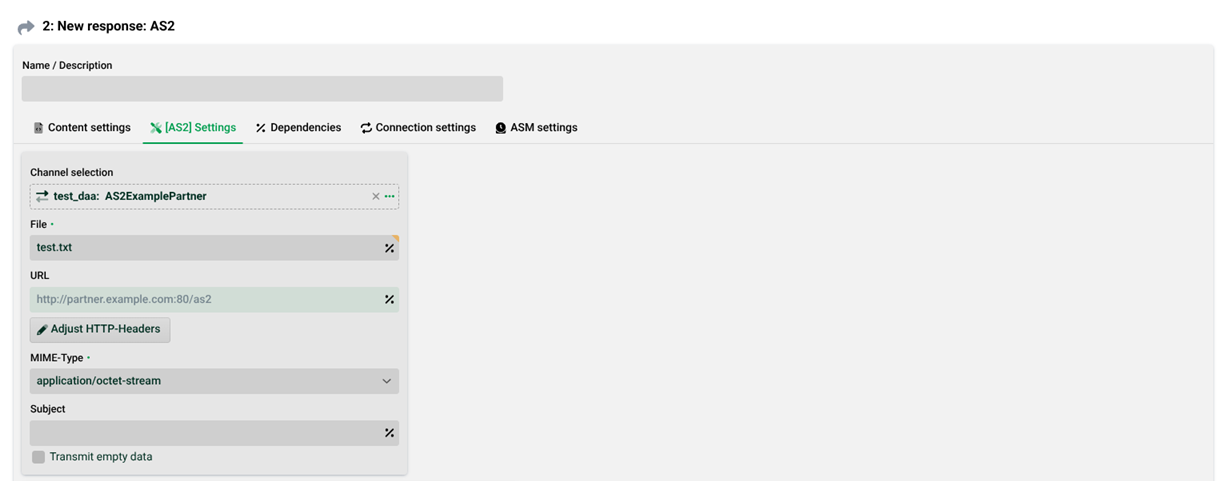
The screenshot shows a response "AS2" with the chosen partner channel "AS2ExamplePartner". All the other parameters can be set like in any other response. If you want to use a URL different to the one set in the partner channel, simply use the field *URL* to overwrite that setting for this response. Parameter field "File" sets the filename.
### Receiving data via AS2
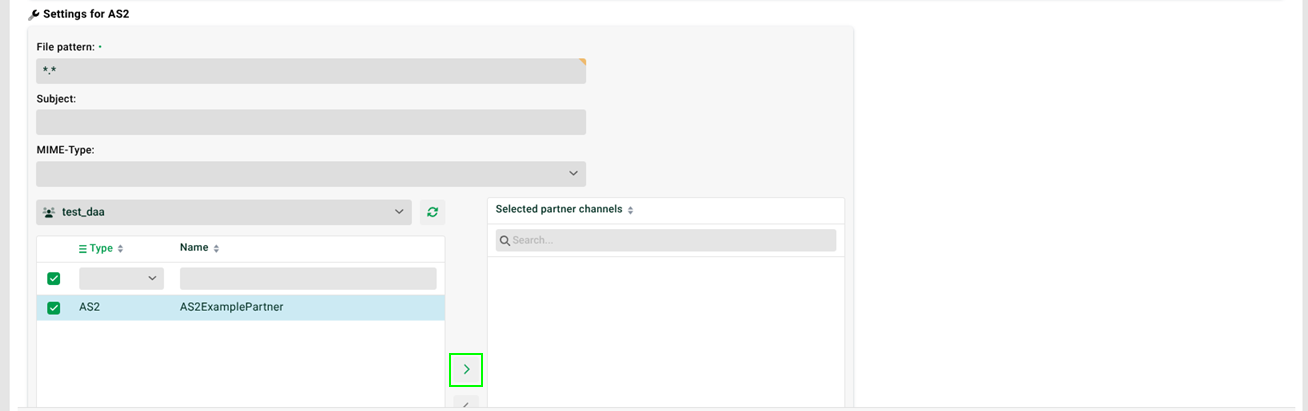
Create an Input agent of type "AS2" and push your communication partner to the right.
The field "File pattern" is an optional parameter that cannot be transmitted by all AS2 systems. The standard setting allows you to receive data with and without filenames.
#### Duplicate detection via message ID with AS2
AS2 messages are identified by a unique message ID. The message ID is assigned by the sending system and must be unique for each message. If another AS2 message with the same message ID is received from the same sender, it is not processed again but discarded as a duplicate. This behavior ensures that each message is only processed once, even if it is technically transmitted multiple times. Only by setting the system property *hub.as2.disableReliableMode=false* (see [Integration Server](/v1/docs/en/intro-integration-server#system-properties)**)** is the so-called "Reliable Mode" deactivated in the AS2Service, i.e., in the event of a duplicate request, the MDN of the last request is not returned, but a new processing is triggered.
## AS2 service with DMZ
There are two options to configure your AS2 service. The first one is an HTTP forwarding from the DMZ server to the internal server, i.e. without an AS2 service on the DMZ server. The second possibility is the one known for the FTP service (see [DMZ Server](/v1/docs/en/intro-dmz)**)**. The data will in most cases be sent from the internal system.
### Forwarding from the DMZ server
This will make sure that your communication partner gets a direct response if the internal system is not available. If you choose that option, make sure to open the HTTP port (default is *80*) between the DMZ server and the internal server.
The following entries have to be added in file *./etc forward.properties* on your DMZ server.
```plaintext
/partner/AS2Retrieve=http://internerserver/partner/AS2Retrieve
/partner/AS2Retrieve/*=http://internerserver/partner/AS2Retrieve
```
### Send AS2 messages via dynamically assigned alternative DMZ
See [Sending via dynamically assigned alternative DMZ](/v1/docs/en/dynamic-alternative-dmz).
## Checklist for AS2 operation
- Running Lobster installation.
- Java(TM) Cryptography Extension (JCE) Unlimited Strength Jurisdiction Policy Files.
- A permanent internet connection when data is to be received.
- AS2 service is activated.
- AS2 parameters have been exchanged between the communication partners.
- AS2 partner created and configured in the partner administration. If certificates are used, they have to be imported for the respective partner.
- Profile for AS2 processing was created using the configured channels.
Communication protocol for secure EDI data exchange via HTTP/HTTPS. AS2 encrypts and signs messages and confirms receipt via MDN. AS2 is defined in the RFC 4130 standard.
Organizational unit in partner management. A partner groups all communication channels of a business partner under a common name and enables their central management.
Message Disposition Notification. Automatic acknowledgment of receipt in the AS2 protocol. The recipient uses this to confirm to the sender that the message has been received and processed.
Central operational overview of the Lobster Data Platform. The Control Center displays running jobs, successful jobs, and error logs. Administrators use it to monitor operations, intervene in running jobs, and restart failed jobs.
The Integration Server is the central runtime component of the Lobster Data Platform. It executes integration processes and processes data. The Integration Server stores local certificates and uses their private keys for signing and decryption. It provides all communication services (e.g., FTP, SMTP, HTTP) and connects the application to the database. It is managed via the Admin console.
An optional security layer between the internet and the Integration Server. The DMZ receives incoming traffic, forwards it in a controlled manner, and protects the internal system from direct external access. When the Integration Server restarts, it buffers incoming requests.
The Integration Server's user interface for configuration, operation, and diagnostics. The Admin console manages services, users, passwords, databases, and system settings. It is independent of the Control Center and is intended for system administrators.
The input agent receives data in Phase 1 and starts a job for further processing. It works either as event based (passively waits for data) or scheduled (actively fetches data).
A profile is the central configuration unit in the Lobster Data Platform. It receives data, processes it, and forwards it. Configuration is done graphically, with no programming required.