
Lobster Integration can communicate with other systems both as an HTTP server and as an HTTP client.
Lobster Integration as HTTP server
Phase 1, event-based input agent "HTTP"
An external HTTP client sends a request to the Lobster Integration Server. The data is passed to a matching profile that uses an event based input agent of the "HTTP" type in Phase 1. The response to the HTTP client is either a fixed value or is generated from the target structure data of the profile.
Phase 1, Any scheduled input agent, "Trigger/External call"
An external HTTP client sends a request to the Lobster Integration Server. That starts a matching profile with a scheduled input agent and the option "Trigger/External call". This input agent collects its input data via its configured data source (e.g., a database), i.e., the data does not come from the HTTP request itself.
The profile can only retrieve request parameters as variable values from the client request. Those variable values can then, for example, be used in the Mapping of the profile or to parameterize the input agent, e.g., in the "WHERE" clause of a database select.
Lobster Integration as HTTP client
Phase 1, scheduled input agent "HTTP"
A profile uses a scheduled input agent of the "HTTP" type in Phase 1. It sends a request to an external HTTP server. The response of the server is received by the profile as input data.
Phase 3, functions
A profile uses one of the following functions in Phase 3. The function sends a request to an external HTTP server. The response from the server can be processed in the target structure.
Phase 6, response "HTTP"
A profile sends a request to an external HTTP server in a response of type "HTTP" in phase 6. The response of the server can be forwarded to a subsequent profile and processed there.
Lobster Integration as HTTPS client
Lobster Integration can authenticate itself as an HTTPS client to an HTTPS server with a client certificate (see Certificates) according to the X.509.3 standard. The procedure is the following.
Searching for keystore file
Lobster Integration looks for a file in directory ./etc/certs that has the name of the host in the URL of the server address. So for the URL "https://www.java.com", for example, Lobster Integration would look for a file named "www.java.com".
If such a file is found, the contents of the file are read in and interpreted as a Java keystore. The keystore must contain the keys (including the private key) and all certificates of the Certificate chain. The keystore may only contain one key pair, and the key password must match the keystore password. This password must be defined with the parameter keystorePassword in the configuration file ./etc/startup.xml.
<Set name="keystorePassword">OBF:1x151v2h1vfx1ym71vgx1v1x1x1h</Set>The password can be specified in plain text or, better, Obfuscation. The keystore can either be created and edited using the program "keytool" or much more comfortably, with "Portecle".
No matching keystore file found
If no matching keystore file is found, the following mechanism takes effect.
If the System variables VAR_AUTH_CERT_ID is defined and a non-empty value (see Empty flag) has been assigned to it, then the value of this variable is interpreted as the ID (serial number) of a Local certificate in the partner administration. If a certificate with this ID is found, it will be passed to the HTTPS server. The client then uses this certificate as client certificate for authentication if the server requires it.
No file with certificate found and variable not defined
If no file with a certificate is found and the variable is not defined, no certificate is passed to the HTTPS server. There will be no error message.
The procedure described is always executed when Lobster Integration appears in the role of HTTPS client. That is, for profiles with the scheduled input agent "HTTP" and for profiles with at least one response of the "HTTP" type.
The ID (serial number) of your local certificate can be obtained from the list of your local certificates in the partner administration. Simply view a certificate and copy the ID with Ctrl+C. This ID can then be entered in the GUI, or you can alternatively select a local certificate from a list, and the ID will be entered automatically.
Basic authentication
HTTP Basic authentication can work in two ways. In the standard flow, the client sends its credentials only after the server prompts for them (two requests). In preemptive authentication, the client sends them with the first request.
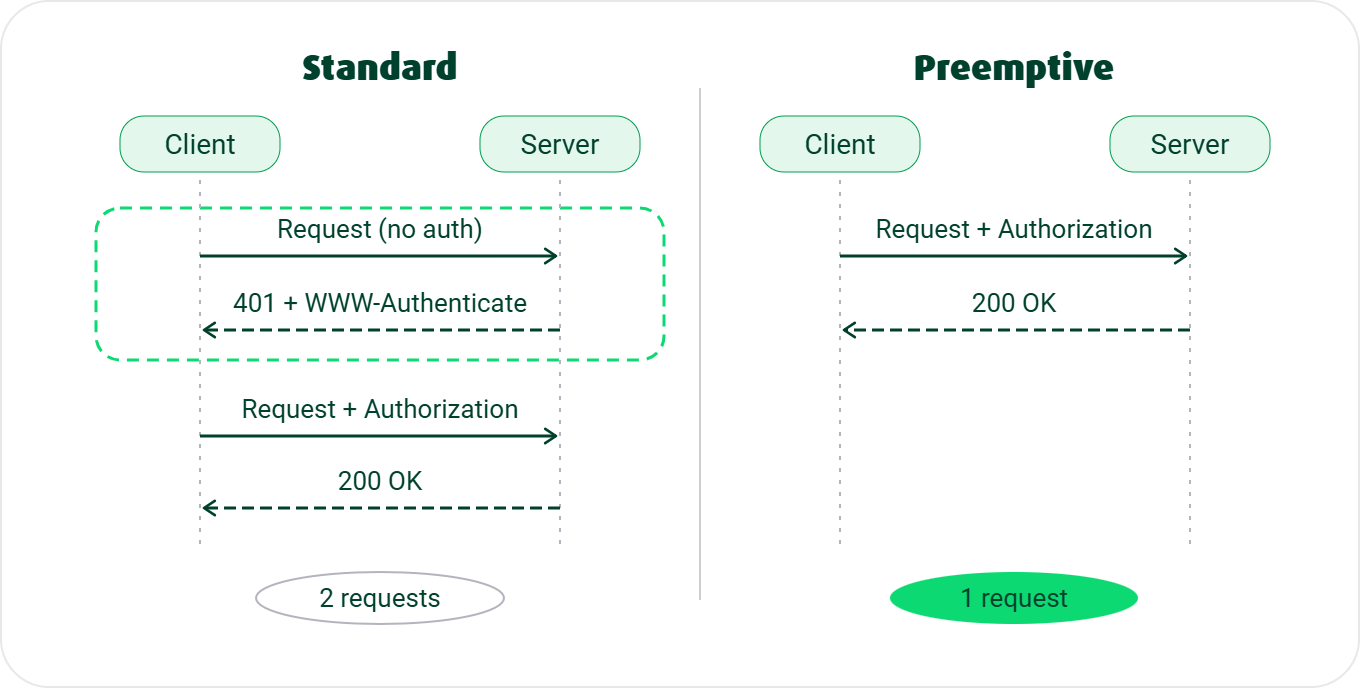
Standard flow
A Basic authentication runs through these steps:
The client sends a request without credentials.
The server requires a login for this URL. It responds with status 401 and the header
WWW-Authenticate: Basic realm="RealmName".The client repeats the request, now with the header
Authorization, for exampleBasic d2lraTpwZWRpYQ==. The value is the Base64 encoding ofwiki:pedia(userwiki, passwordpedia). For details on Base64 encoding, see Create password (Admin console).The server checks the credentials. On success, it grants access. Otherwise, it responds with status 403 or 401 again. Status 403 means an Authorization header was sent, but the user is not authorized (or the operation is forbidden for everyone).
So access takes two requests: the first without a login, the second with credentials (after the server's 401 challenge). For a POST request, this is inefficient. The first request may transfer several kilobytes of payload with no benefit. Preemptive authentication avoids exactly this duplicate request.
See also HTTP authentication and RFC 2617.
Preemptive authentication
Preemptive authentication is the alternative to the standard flow. The client sends the Authorization header with the first request and does not wait for the server's 401 challenge. This drops the first request without credentials. On a POST data upload, this saves transfer volume and time.
A server that allows Basic authentication usually accepts the preemptive variant too. Other methods (for example, NTLM) still need the first request. There, the server first sends a key, hash, or code in its response. The client needs it to build the second request.
NOTE:
With preemptive authentication, the credentials go out immediately with the first request. Basic authentication only Base64-encodes them; it does not encrypt them. They can be exposed to intermediaries (for example, proxies) or on redirects. Use preemptive authentication only over HTTPS.
When the server only supports preemptive authentication
This is a rare special case: a server that strictly requires preemptive authentication. If the client does not send the Authorization header with the first request, no communication happens.
The client sends the first request without a login. The server then responds with 403 right away instead of 401. Without the 401 challenge, the client sends no Authorization header even on a retry. So no successful communication happens.
If status 403 occurs, an expected preemptive login can be the cause. But it is not the only possible cause. See HTTP_403.
Configuring preemptive authentication in Lobster Integration
This configuration is mainly relevant when Lobster Integration acts as a client. There are two ways, depending on the context.
HTTP(S) channel: In the channel settings, enable preemptive login with the Use preemptive login option (section Own access). The credentials stored in the channel then go out with the first request. For newly created HTTP(S) channels, the option is enabled by default from version 26.4. See HTTP(S) (channel settings).
HTTP response route or scheduled input agent (type HTTP): Here you add the Authorization header manually. First create the Base64 value d2lraTpwZWRpYQ== from <username>:<password> (here from wiki:pedia, see the standard flow above). Then add it in the Adjust HTTP header dialog. Entering the username and password in the usual reply-route or cron mask fields is then irrelevant, because they are never used. Example:
HTTP header:
AuthorizationValue:
Basic d2lraTpwZWRpYQ==
SOAP web services
Lobster Integration can act as a SOAP web service and address SOAP web services. See SOAP web services.
AS2
See AS2, AS2 (Channels), AS2 (Input agent) and Response AS2.
System interaction via HTTP (REST API)
Lobster Integration offers numerous possibilities to change system settings via HTTP, to start processes, or to read out information from the system. See REST API.
DMZ server
For security reasons, you can operate Lobster Integration with an additional DMZ server. See DMZ Server.
Configuring the cookie behavior of the HTTP client
The cookie behavior of the HTTP client can be configured centrally and/or per request in Lobster Integration to avoid problems with non-standard cookies.
System property (global)
The system property hub.datawizard.httpClient.cookieSpec defines the global cookie behavior for all HTTP requests in the system (input agents, responses, functions, etc.).
Allowed values:
default (standard)
standard
standard-strict
compatibility
netscape
best-match
ignoreCookies
Example:
hub.datawizard.httpClient.cookieSpec=ignoreCookies
Internal HTTP header (per request)
The internal header LOBSTER_COOKIESPEC can be used to specifically override the cookie behavior for individual HTTP requests. The header is not transmitted to the target endpoint, but is only used internally.
Example:
LOBSTER_COOKIESPEC: standard
Example application
An external service sends a Set-Cookie header with an invalid domain (e.g., google.com). With the default behavior (default), this cookie is rejected, and a warning appears in the log. By setting ignoreCookies, this behavior can be suppressed to keep the log clean.