---
title: "DMZ cluster"
slug: "intro-dmz-cluster"
updated: 2026-07-14T12:06:34Z
published: 2026-07-14T12:06:34Z
canonical: "docs.lobstersoftware.com/intro-dmz-cluster"
---
> ## Documentation Index
> Fetch the complete documentation index at: https://docs.lobstersoftware.com/llms.txt
> Use this file to discover all available pages before exploring further.
# DMZ cluster
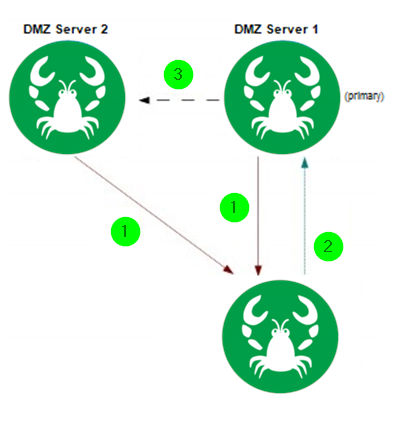
Multiple DMZ servers may be connected in a cluster to achieve higher reliability. The DMZ servers run in parallel. One of the DMZ servers is configured as the primary DMZ server (here "DMZ Server 1").
**NOTE:** First and foremost, a DMZ server is a primary DMZ server in that it is entered as a DMZ server in the inner Integration Server (see [Configuration of inner system (DMZ)](/v1/docs/en/intro-dmz-configuration-inner). In addition, item **(3)** is important.
## Incoming
The DMZ servers forward incoming messages to the inner Integration Server (1). It is irrelevant whether both DMZ systems are running in parallel or only one of them is active. Both DMZ servers may use the same message port as the inner Integration Server.
**NOTE:** If defined, the system variable VAR_SYS_DMZ_ID contains the factory ID of the DMZ server (from*./etc/factory.xml* ) that received the message.
## Outgoing
All requests from the inner Integration Server to the DMZ will be sent to the primary DMZ server (2). But you can assign a dedicated DMZ server for a Channel in the additional IDs (see [Channels](/v1/docs/en/manage-partners-channels) and [Sending via dynamically assigned alternative DMZ](/docs/en/dynamic-alternative-dmz)).
## Shared directories
In a DMZ cluster, multiple DMZ servers run in parallel behind a load balancer. Which DMZ server receives an incoming file is not predetermined. To let every DMZ server access the data, you need a shared file system (file share).
Place the following directories with transactional data on the file share:
- `./as2`
- `./as4`
- `./transfer`
> [!WARNING]
> **IMPORTANT:**
>
> A plain Windows share is not sufficient. It can severely affect performance. Lobster recommends high-performance storage. Suitable options are an NFS share, a NetApp system, or a comparable storage medium.
### DMZ without processing
By default, a DMZ server does not process data. It only receives and buffers data. The three directories `./as2`, `./as4`, and `./transfer` are therefore sufficient.
The other directories used in the internal Load balancing setup are not required on a DMZ server. On a pure DMZ system, some of them may not exist at all.
For a full list of directories required by the internal cluster, see [Requirements before installation (Load balancing)](/v1/docs/en/load-balancing-requirements).
## High availability (failure of inner server)
See sections [High availability (failure inner server)](/v1/docs/en/intro-dmz-configuration-dmz-high-avail) and [High availability (internal server failure)](/v1/docs/en/intro-dmz-configuration-dmz-high-avail#configuration-of-parameter-subid) (for DMZ cluster).
## High availability (failure of primary DMZ server)
If there are changes in the user administration for FTP, OFTP, etc., the primary DMZ server copies all changes of the home directory to the other DMZ servers, see (3). In order to be able to do that, the primary DMZ server needs a list of all the other DMZ servers. This list is maintained in configuration file *./etc/startup_dmz.xml* using the following entry.
```xml
host:port;host2:port2
```
> [!NOTE]
> **NOTE:**
>
> A simple file share or a CSV-FS does not provide sufficient performance in this scenario, since additional mechanisms such as are applied. Lobster therefore recommends high-performance storage, such as an NFS share, a NetApp system, or a comparable storage medium. A thorough performance test in your environment is essential.
If the primary DMZ server can no longer be reached by the inner server, the next available DMZ server is made the new primary DMZ server.
For this purpose, the following entry must be present in the configuration file *./etc/startup.xml* of the inner server.
```xml
10.99.133.8:8020;10.99.133.9:8020
```
These two entries are additional DMZ servers that are checked for availability if the primary DMZ server fails. The first available DMZ server temporarily becomes the new primary DMZ server.
**IMPORTANT:** The "list of active DMZ servers" in [Integration settings](/v1/docs/en/cc-system-settings) is checked.
If the configured primary DMZ server is reachable again, it will become the primary DMZ again.
**IMPORTANT:** If a load balancing system is used and a "Working Node currently has the role of the Node Controllor" (see [Failover concept](/v1/docs/en/load-balancing-failover)), this does not work automatically (because the configured primary DMZ server itself actively contacts the [Configuration of inner system (DMZ)](/v1/docs/en/intro-dmz-configuration-inner) and when using a load balancing system that is the configured Node Controller and not the Working Node that currently has the Node Controller role).
An optional security layer between the internet and the Integration Server. The DMZ receives incoming traffic, forwards it in a controlled manner, and protects the internal system from direct external access. When the Integration Server restarts, it buffers incoming requests.
The Integration Server is the central runtime component of the Lobster Data Platform. It executes integration processes and processes data. The Integration Server stores local certificates and uses their private keys for signing and decryption. It provides all communication services (e.g., FTP, SMTP, HTTP) and connects the application to the database. It is managed via the Admin console.
A central data record in partner management that consolidates the connection parameters for a communication partner, such as the URL, access credentials, and protocol. Changes to a channel immediately affect all profiles, ASM entries, and content inspection entries that use that channel.
The Lobster Data Platform's operating mode ensures high availability and scalability. A node controller accepts input data and distributes processing tasks to any number of working nodes using a round-robin or load-balancing algorithm. If the node controller fails, a working node takes over its role.
Odette File Transfer Protocol. Transmission protocol for secure EDI data exchange, which is mainly used in the European automotive industry. OFTP2 complements encryption and digital signatures.
Controlling server in Lobster's optional Load Balancing module. The Node Controller distributes incoming tasks across several additional servers (Working Nodes) and coordinates them. The module is operated only through it; some tasks run only on it, and a DMZ server must point to the Node Controller.
Additional server that takes on part of the processing within the optional Lobster Load Balancing module: it carries out the tasks assigned to it by the Node Controller. Multiple Working Nodes increase throughput. A Working Node can only be used once it has been activated in the Node Controller.