---
title: "forward.properties, addStandardServlets and tunnelHttp"
slug: "intro-dmz-configuration-dmz-forward-options"
tags: ["HTTP Forwarding", "Legacy Configuration"]
updated: 2026-07-29T08:33:28Z
published: 2026-07-29T08:33:28Z
canonical: "docs.lobstersoftware.com/intro-dmz-configuration-dmz-forward-options"
---
> ## Documentation Index
> Fetch the complete documentation index at: https://docs.lobstersoftware.com/llms.txt
> Use this file to discover all available pages before exploring further.
# forward.properties, addStandardServlets and tunnelHttp
The **Lobster Data Platform** (LDP) forwards HTTP requests differently than the legacy system `_data 4.6`. By default, everything runs through a passive NIO Tunnel. Anyone performing migration or troubleshooting must be able to distinguish between the three mechanisms: `forward.properties`, `addStandardServlets`, and `tunnelHttp`. This article explains the default behavior, the three extension options, and the differences from the legacy configuration.
**NOTE:** This behavior applies to the LDP starting with version 26.1.2.
## Default behavior of the LDP
By default, the LDP uses a tunnel-based reverse proxy on the DMZ server. The component is called `dmz.server`. It forwards the entire HTTP root (`/`) to the inner platform via a passive NIO tunnel.
This has three implications for the configuration:
- You do not need to enable `addStandardServlets`. The DMZ server automatically forwards all HTTP requests.
- You do not need a `forward.properties` file. Ideally, the file shouldn't exist at all.
- The entire platform UI is accessible via the DMZ, including the login page. This is by design.
In a high availability (HA) setup, the DMZ server distributes requests to the working nodes using the round-robin method. It routes authenticated requests to the correct node using session affinity. To do this, it uses the `X-ENV-SessionToken` header.
### Connection direction
The connection direction is reversed compared to the legacy behavior. The inner platform establishes the tunnel connection to the DMZ server. Inbound firewall rules from the DMZ network to the inner network for HTTP traffic are not required.
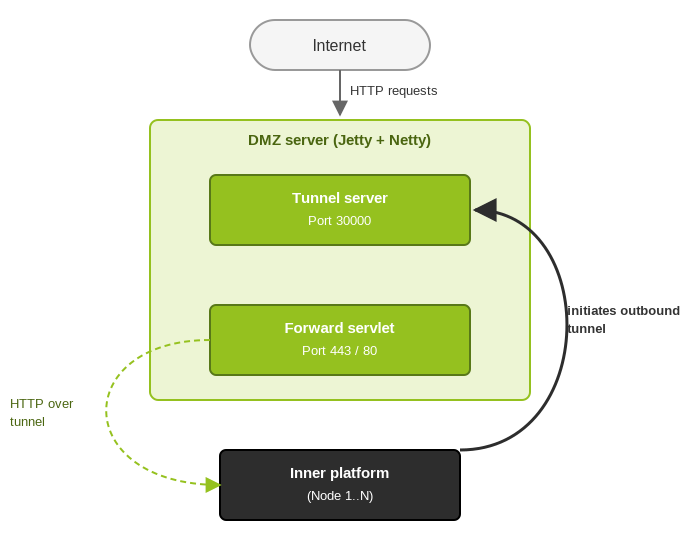
### Required ports
| **Port** | **Direction** | **Protocol** | **Purpose** |
| --- | --- | --- | --- |
| 30000 | Inner → DMZ | TCP (TLS) | Tunnel connection. The inner platform connects outward. |
| 8020 | Inner ↔ DMZ | TCP | MessageService communication, bidirectional. |
| 443/80 | External → DMZ | TCP | HTTPS or HTTP for external requests. |
### Auto-discovery
If no `DmzServerApp` is configured in the `startup_dmz.xml` file, the `DmzServerAutoConfigurator` takes over. It automatically starts a DMZ server with the following default values:
- Tunnel port: `30000`. You can change the port using the system property `dmz.tunnel.port`.
- Tunnel secret: generated automatically. The LDP stores it in `./etc/dmz_tunnel_secret.property`.
- Proxy context: `/`. The DMZ server forwards the entire HTTP root.
- Load balancing: enabled.
## Restrict login access to the DMZ
The LDP makes the entire platform UI available via the DMZ. This means that the login page is also accessible from outside the network. This might surprise you. You are used to the legacy behavior, where the DMZ only forwards specific paths.
Administrators control access through user and role management. Each has a flag for DMZ login. Set the flag to prevent the role from logging in via the DMZ.
**Example**: Monitoring roles are allowed to log in via the DMZ. Administrative roles are restricted to internal access.
**NOTE:** For details on configuration, see [Roles](/v1/docs/en/base-role) in the "Administration" documentation.
## addStandardServlets: Enable additional servlet contexts
The `addStandardServlets` parameter in the `CommunicationForwardManager` enables additional HTTP forwarding servlets on the DMZ server. These servlets use the legacy mechanism. They operate in parallel with the tunnel proxy. The legacy mechanism consists of `HttpForwardServlet` and `forward.properties`.
### Configuration
```xml
...
true
...
```
### Active contexts
When `addStandardServlets=true` is set, the LDP activates the following servlets on the DMZ server.
**IMPORTANT:** Case sensitivity matters. Define both variants for `Request`/`request` and `Trigger`/`trigger`.
| **Servlet** | **Context and path** | **Purpose** |
| --- | --- | --- |
| `trigger` | `/dw/trigger/*` | DataWizard trigger endpoint, lowercase. |
| `Trigger` | `/dw/Trigger/*` | DataWizard trigger endpoint, uppercase. |
| `request` | `/dw/request/*` | DataWizard request endpoint, lowercase. |
| `Request` | `/dw/Request/*` | DataWizard request endpoint, uppercase. |
| `register` | `/dw/register/*` | DataWizard registration endpoint. |
| `oauth2` | `/dw/oauth2/*` | OAuth 2.0 callback endpoint. |
| | `/partner/*` | AS2 partner communication. Active only if `handleAS2=false`. |
| `monitor` | `/dw/monitor/*` | Monitoring endpoint via `MonitorPlainServlet`. |
| `cloud` | `/dw/cloud/*` | Cloud integration endpoint. |
| `link` | `/dw/link/*` | Link endpoint. |
### Requirement: forward.properties
> [!CAUTION]
> **CAUTION****:**
>
> If you enable `addStandardServlets`, the file `./etc/forward.properties` must exist and be configured correctly. Each servlet resolves its destination via `forward.properties`. Without the appropriate entries, requests will return an HTTP 404 error.
Sample configuration:
```properties
/dw/request/*=http:///dw/request
/dw/Request/*=http:///dw/Request
/dw/trigger/*=http:///dw/trigger
/dw/Trigger/*=http:///dw/Trigger
/dw/oauth2/*=http:///dw/oauth2
/dw/cloud/*=http:///dw/cloud
/dw/register/oauth2/*=http:///dw/register/oauth2
/partner/AS2Retrieve/*=http:///partner/AS2Retrieve
```
### When do you need addStandardServlets?
In most LDP installations, you do not need `addStandardServlets`. The tunnel proxy already forwards the entire HTTP root.
There are two cases in which it makes sense to enable this feature:
- You want to route specific paths through the legacy mechanism. The legacy mechanism operates via a direct HTTP connection or a MessageService tunnel.
- You need compatibility with existing configurations. These are based on `forward.properties`.
> [!NOTE]
> **NOTE:**
>
> After the servlet is registered, the `CommunicationForwardManager` automatically calls `startDMZServerApp()`. This triggers the `DmzServerAutoConfigurator`. The LDP therefore also starts the tunnel proxy, unless it is already configured in the XML. Both mechanisms then run in parallel – the tunnel proxy and the legacy servlets.
## tunnelHttp: Tunnel HTTP requests via the MessageService
The `tunnelHttp` option provides an alternative transport method. The DMZ server does not establish a direct HTTP connection to the inner system. Instead, it tunnels HTTP requests through the MessageService on port 8020.
### Configuration
```xml
true
```
### Method of operation
With `tunnelHttp=true`, the LDP processes an external request in five steps:
1. External HTTP requests are received by the `HttpForwardServlet`.
2. The servlet resolves the destination using `forward.properties`.
3. Instead of a direct HTTP connection, the MessageService sends the request to the inner platform via `tunnelByMessage()`.
4. The inner platform processes the request. It sends the response back via the same MessageService.
5. The DMZ side skips the virus scan. Instead, this is handled by the inner platform.
### Requirements
- You must set `handleAS2` to `true`. The startup validation enforces this with the message *AS2 service must run locally if HTTP tunnel is used*.
- You must configure `forward.properties`. The file resolves the target paths.
### Comparison of transportation routes
| **Aspect** | **NIO tunnel (dmz.server)** | **tunnelHttp (MessageService)** | **Direct HTTP connection** |
| --- | --- | --- | --- |
| Proxy scope | Complete HTTP root. | Individual paths defined in `forward.properties`. | Individual paths defined in `forward.properties`. |
| Connection direction | Inner → DMZ. Passive. | Bidirectional via port 8020. | DMZ → Inner. Active. |
| Firewall rules | Tunnels only: Inside → DMZ. | Only MessageService on port 8020. | DMZ → Inner. HTTP and HTTPS ports. |
| Performance | High. NIO with connection pooling. | Subject to MessageService constraints. | Central. Direct connection. |
| Configuration | XML or Auto-discovery. | `forward.properties` and `tunnelHttp=true`. | `forward.properties`. |
| Cluster support | Round-robin and session affinity. | No. A single target. | No. A single target. |
> [!NOTE]
> **NOTE:**
>
> The `tunnelHttp`mode is less efficient than the NIO tunnel approach. It is subject to the limitations of the MessageService. It is only suitable for scenarios that do not use an NIO tunnel or a direct HTTP connection. Which configuration should be used when?
| **Scenario** | **addStandardServlets** | **forward.properties** | **tunnelHttp** | **Tunnel proxy** |
| --- | --- | --- | --- | --- |
| Standard LDP, recommended. | `false` (Default) | Not necessary | `false` (Default) | Automatically enabled. |
| Legacy paths in addition to the tunnel. | `true` | Required | `false` | Automatically enabled. |
| Legacy paths via MessageService. | `true` | Required | `true` | Automatically enabled. |
| Legacy only, no tunnel. | `true` | Required | Optional | Manually disabled. |
> [!NOTE]
> **NOTE:**
>
> For new LDP installations, we recommend the default configuration. It does not require `addStandardServlets` or `forward.properties`. The tunnel proxy handles all HTTP redirects. It also provides cluster support, WebSocket support, and dynamic node management.
## Comparison: LDP and Legacy _data 4.6
| **Aspect** | **LDP** | **Legacy _data 4.6** |
| --- | --- | --- |
| Proxy scope | Entire HTTP root. Full platform UI. | Individual paths such as `/dw/Request` or `/partner`. |
| Connection direction | The inner platform connects to the DMZ. Passive. | DMZ connects to the inner platform. Active. |
| Firewall rules | Tunnel: Inner → DMZ. No incoming HTTP ports to the inner network. | DMZ → Inner. Inbound access to HTTP server ports is required. |
| User management | Platform users with role-based access control. | Separate WebMonitor users on the DMZ. |
| WebMonitor | Not necessary. The Inner platform proxies the UI. | Separate `WebMonitorApplication` with its own database. |
| Cluster support | Round-robin and session affinity. | None. One target per path. |
| WebSocket-Support | Full WebSocket proxying. | HTTP only. |
| Configuration | XML (`startup_dmz.xml`) or auto-discovery. | File `forward.properties`. |
| Login to the DMZ | Possible. Can be restricted via roles. | WebMonitor login only. Separate user. |
### Migration notes from _data 4.6
When migrating from `_data 4.6` to the current platform, check these three points:
- **Remove WebMonitorApplication.** Delete the entry from `startup_dmz.xml`. Also remove the associated WebMonitor database configuration from `database.xml`.
- **Check forward.properties.** If you are using only the tunnel proxy, you no longer need this file. You can delete it.
- **Migrate users.** Platform users with the appropriate roles will replace the WebMonitor users.
## Related topics
- [CommunicationForwardManager class](/v1/docs/en/intro-dmz-configuration-dmz-forwd-manager)
- [Inbound forwarding of HTTP, FTP, SSH, OFTP](/v1/docs/en/intro-dmz-configuration-dmz-forwd-inwards)
- [DMZ cluster](/v1/docs/en/intro-dmz-cluster)
- [High availability (internal server failure)](/v1/docs/en/intro-dmz-configuration-dmz-high-avail)
Persistent, outbound TCP connection from the Lobster Bridge to the Integration Server. Based on Java NIO (Non-blocking I/O) and bundles several sessions in one channel. Reduces firewall openings in the DMZ and enables scalable communication.
An optional security layer between the internet and the Integration Server. The DMZ receives incoming traffic, forwards it in a controlled manner, and protects the internal system from direct external access. When the Integration Server restarts, it buffers incoming requests.
The Lobster Data Platform's operating mode ensures high availability and scalability. A node controller accepts input data and distributes processing tasks to any number of working nodes using a round-robin or load-balancing algorithm. If the node controller fails, a working node takes over its role.
Open standard for delegated access control. OAuth 2.0 makes it possible to grant applications access rights to protected resources without sharing passwords. The Lobster Data Platform supports OAuth 2.0 in HTTP channels.
Communication protocol for secure EDI data exchange via HTTP/HTTPS. AS2 encrypts and signs messages and confirms receipt via MDN. AS2 is defined in the RFC 4130 standard.