Starting with release 26.2, the Lobster Data Platform displays a visual reminder when your installation is still running on an older Java version. This article explains how to check your Java version status and upgrade if needed.
Requirements
Access to the Lobster Data Platform with admin role.
Access to the host running the Lobster Data Platform (required for the JVM upgrade).
Currently supported Java versions: OpenJDK 11 (deprecated – end-of-life) and OpenJDK 21 (recommended).
Identify the warning indicator
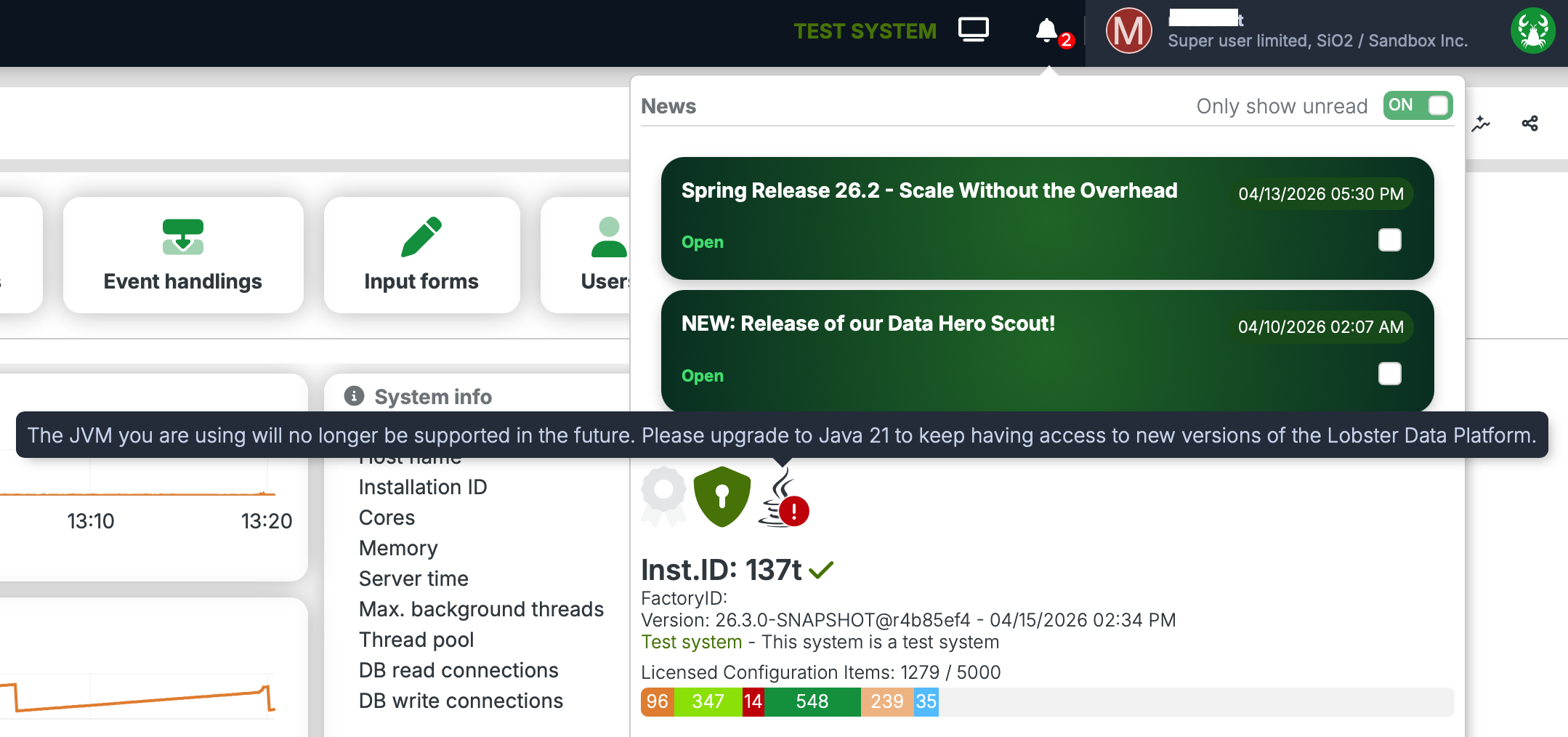
Check the Java icon next to the bell icon in the system info bar.

Icon state | Description |
|---|---|
Java icon without overlay | Your Java version is current. Click the icon for your installed version. No action is required. |
Java icon with red exclamation mark (!) | The Java version is outdated. Upgrading to OpenJDK 21 is recommended. |
Click the red icon to expand the deprecation banner with further details.
Why is this message displayed?
Free LTS support for OpenJDK 11 has already expired for most distributions. Security patches are no longer provided on a regular basis, so continuing to use Java 11 poses an increasing risk. Starting with release 26.3, OpenJDK 21-LTS is the recommended runtime environment for the Lobster Data Platform; starting with release 26.4, it is mandatory. OpenJDK 11 will continue to be supported until then but should be replaced as soon as possible.
This warning on the platform is not a malfunction or a product defect, but a planned notification designed to alert you in advance to the upcoming version update.
Read details in the news panel
Click the bell icon in the top navigation bar.
A red badge indicates unread notifications.
Click the red exclamation mark in the news panel to view the JVM deprecation message, the recommended target Java version, and additional guidance.
Perform the Java upgrade
Schedule the upgrade to OpenJDK 21 during an appropriate maintenance window.
Update the JVM on the Lobster Data Platform host.
Restart the platform.
Verify the installation
After the restart, confirm that the Java icon in the system info bar no longer shows a red exclamation mark. The warning in the news panel should also have cleared.
Continue to: JDBC driver compatibility assessment