---
title: "Merger"
slug: "mod-ci-merger"
updated: 2026-10-28T15:02:36Z
published: 2026-10-28T15:02:36Z
canonical: "docs.lobstersoftware.com/mod-ci-merger"
---
> ## Documentation Index
> Fetch the complete documentation index at: https://docs.lobstersoftware.com/llms.txt
> Use this file to discover all available pages before exploring further.
# Merger
All available mergers are defined in configuration file `./etc/admin/datawizard/ci_merger.properties`. We provide a programming interface (API) that also allows you to develop your own classes in Java. For this, we offer in-depth training. If you are interested, please contact our support or sales staff.
## Merge Edifact
The merger *Merge* *Edifact* can merge several EDIFACT documents. The merged document uses the *UNA*, *UNB* and *UNZ* segments of the first received EDIFACT document.
> [!NOTE]
> **NOTE:**
>
> This means that the interchange control references of the individual documents get lost. The system variable `MSG_CALL_REF_IDS` (if defined) contains the interchange control references of all merged EDIFACT documents and can be read by subsequent profiles. **Example:** *339;338;337*
## Merge JSON
The merger *Merge* *JSON* merges several JSON files into an array.
**Example:**
```JSONfile1
{
"fruit": "Apple",
"color": "Red"
}
```
```JSONfile2
{
"fruit": "Apple",
"color": "Green"
}
```
```MergedJSONfile
[
{
"fruit": "Apple",
"color": "Red"
}
,
{
"fruit": "Apple",
"color": "Green"
}
]
```
## Merge XML
The merger *Merge XML* allows you to syntactically correct merge XML files below an artificial parent tag.
Assume the two following XML files.
```xml
```
```xml
```
The result would be the following XML file.
```xml
```
## Merge text
The first version of *Merge text* is only available for compatibility reasons and is not described here. Please always use version 2.
## Merge text V2
The merger "Merge Text V2" allows you to merge files that match the defined file name patterns and belong to a context, which is defined by the first entry of the list (described in more detail below).
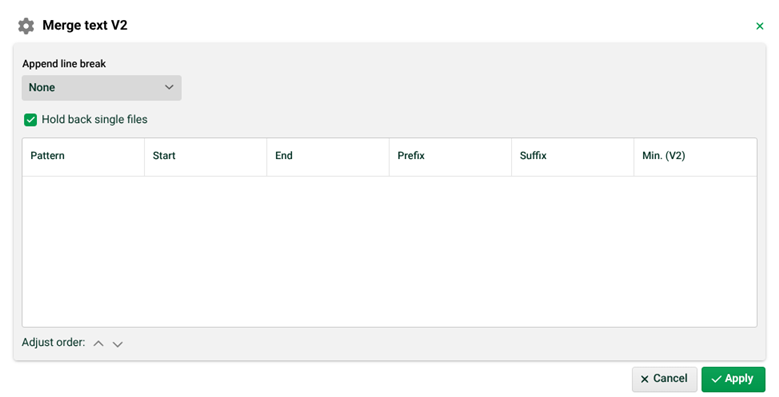
(1) **Append line break:** This allows you to insert a line break between the merged files.
(2) **Hold back single files:** If this option is selected, the [File compound](/v1/docs/en/mod-ci--entry-tab-4) must contain at least 2 files for the merger to start.
(3) List below: The list of entries. **NOTE:** At least two entries have to be defined.
### General approach
- For all files in the file pool, the first entry generates a key value (if the pattern matches). Generation of the key value (with one of the two possible methods):
- (4) **Start/End:** A substring is formed from the file name with a start index and an end index (inclusive). For example, `Start=3` and `End=3` for file `h_1.txt` generate the key value `1` (*Prefix* and *Suffix* must stay empty).
- (5) **Prefix/Suffix:** The key value is generated from the text between *Prefix* and *Suffix*. For example, `Prefix=h_` and `Suffix=.txt` for the file `h_1.txt` generate the key value `1` (*Start* and *End* must stay `0`).
- For each different key value, a context is created.
- The merger now checks (based on the other entries) the context to which any file in the file pool belongs belong (when the file pool is being processed). If the file name matches the pattern of the entry, the key value is also generated. If the key value is identical with that of a context, then the file is associated with that context. When all entries in the list have been processed for all files in the file pool, the files of each context are merged in the order found if condition (6) **Min. (V2)** is met. This is the minimum number of files for the merging to start (you could, for example, ask for at least 2 item files or at least 1 header file).
### Example
The files `h_*.txt` contain an order header and the associated items are in files `d_*.txt`.
So we want to merge files `h_1.txt`, `d_11.txt `and `d_12.txt`, ... and the files `h_2.txt`, `d_21.txt, d_22.txt`, ...
Therefore, we use to the third character of the file name to construct the key value that determines the context of the files to be merged.
For that, we create the first entry with pattern `h_*.txt` and `Start=3` and `End=3`*.*
For the second entry, we use the pattern `d_*.txt` and also `Start=3` and `End=3`*.*
The screenshot above shows the configuration for this example.
File `h_1.txt` matches the pattern `h_*.txt` of the first entry. The third character of the file name `h_1.txt` creates the key `1` for the first context. And we get key `2` from file `h_2.txt` for the second context*.*
File `d_11.txt` matches the pattern `d_*.txt` of the second entry. The third character of the file name `d_1.txt` creates the key `1`, therefore the file is associated with the context with the key `1`. Analogously for `d_12.txt`, `d_21.txt` *a*nd `d_22.txt`*.*
> [!WARNING]
> **IMPORTANT:**
>
> Of course, the Content Inspector may also receive files that do not match the defined patterns. These files also end up in the file pool of the Content Inspector.
>
> If the file pool is processed (due to a timeout or a reached maximum number of files), the merger *Merge Text V2* merges the files in the file pool according to the rules described above. However, files that do not match the defined pattern are not touched and remain in the file pool, and the timer is reset to *0*. But you can manually remove these remaining files from the file pool (if you want to prevent an influence on the maximum number of files, for example).
>
> Files can therefore only automatically leave a Content Inspector with configured merger "Merge Text" V2 when the processing of the file pool is triggered.
>
> But a simultaneously configured splitter works in the usual way (and thus before the processing of the file pool).