---
title: "Semantic check"
slug: "phase-2-semantic-check"
updated: 2026-09-28T13:54:46Z
published: 2026-09-28T13:54:46Z
canonical: "docs.lobstersoftware.com/phase-2-semantic-check"
---
> ## Documentation Index
> Fetch the complete documentation index at: https://docs.lobstersoftware.com/llms.txt
> Use this file to discover all available pages before exploring further.
# Semantic check
The data inserted by the parser into the source structure (Source tree) can be subjected to a Semantic check, i.e. you can check whether certain fields have a certain value. If the check is not successful, the Profile terminates with an error.
## Configuration
In order for the parser to perform this semantic check, the following settings must be made.
- Set checkbox **Semantic check** in *Phase 2*/*Document type*. Alternatively, you can create the system variable `VAR_SYS_ENABLE_SEMANTIC_CHECK` of type *Boolean* with value *true*.
- Uncheck checkbox **Ignore empty source fields** in *Phase 2*/*Extended*.
- In addition, a suitable rule file must be found. See the following section.
- Use the normal data mapper (see [Extended (Phase 2)](/v1/docs/en/profiles--tab-3-advanced)).
## Rule files
The rules for the semantic check are in rule files. When the Integration Server is started, all files with names **rule_*.xml** in directory `./etc/admin/datawizard/semantic/` are read. A rule is used in the profile if the *type* and *format* attributes match (see examples).
There are several ways to modify and reload the rule files at runtime.
- The simplest option is available in [Rule definitions](/v1/docs/en/manage-semdef).
- You can also modify rule files in the [File manager (Admin console)](/v1/docs/en/ac-environment-filemanager). In order for these to be reloaded, the class `com.ebd.hub.datawizard.parser.semantic.SemanticRuleManager` must be executed in the “Class execution” section of the Admin console.
- In addition, you can also trigger the reload via REST API, see [Rule files for semantic check (REST API)](/v1/docs/en/rest-api-semantic-check).
- You can use function [replicate file()](/v1/docs/en/system-replicate-file) in a Load balancing system.
If you want to check whether the reloading worked, you can do this in the "Server logging" (→ "**Administration**") under "internal/message.log".
## Examples
Let's assume we have a profile with document type *CSV* and a simple source structure with a node `node` and below it a field `field`. In principle, the examples also apply to all other allowed formats and more complicated structures.
The corresponding settings for the semantic check are set.
In addition, we have stored and loaded the rule file `rule_CSV.xml`.
### Document type
All of the following examples can be applied to all other document types as well. Allowed document types: *CSV*, *EXCEL*, *FIXRECORD*, *DB*, EDIFACT, IDoc, X12, *BWA*, JSON, *CARGOIMP*, *XML*. The XML V4 parser is not supported. A rule is used if the profile has the document type specified in attribute **format**.
**NOTE:** The format can be overwritten with system variable `VAR_SYS_SEMANTIC_FORMAT`.
### Rule type
If you specify value *common* in attribute **type** in a rule, this rule always applies in the profile (regardless of the setting in the profile). If you enter any other value instead of *common*, you must specify this value in field *Source structure* (above the source structure) in the profile so that this rule applies.
**NOTE:** The type can be overwritten with system variable `VAR_SYS_SEMANTIC_TYPE`.
### Mandatory field value
```rule
somevalue
```
In the semantic check, after parsing the input file of the profile, it is now checked whether the field *field* has the value `somevalue` at least once (`mandatory=true`). If the check takes place, you will find the log line `...semantic check... `(trace messages for Phase 2 must be set – see [Profiles: Specific log settings](/v1/docs/en/cc-logs-config-tab-2).
> [!NOTE]
> **NOTE:**
>
> - Please note that the nodes (attribute `segment`) must be specified in XPath notation.
> - You can use another attribute `regex=true` to specify the mandatory value as a regular expression.
> - If `mandatory` is set to `false` here, it has no effect. It does **not** mean that the value must not occur, but if it occurs, it must have the defined value.
> - For the *EDIFACT* and *X12* format the field `field` is also searched in the component.
### Unique field value
A field value can occur more than once. We can check if a field value is unique and produce an error if the same field value occurs multiple times. To do this, we use the **unique** attribute.
```rule
somevalue
```
In our example, this works without any problems because all the nodes created have the same parent node (the root node):
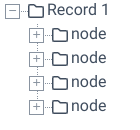
However, if we use a slightly more complex source structure, this is no longer the case and there are several different parent nodes:
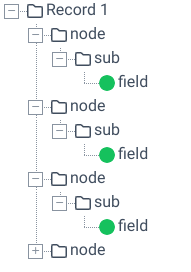
In this case, we have to slightly adjust our rule file (aside from the different node path) with the attribute `cluster=true` so that all parent nodes are grouped together.
```rule
somevalue
```
### Allowed field values
It is also possible to create a list of allowed field values. To do this, use the `ref` attribute and the `definition` element, as in the following file.
```rule
somevalue
somevalue
somevalue2
```
So here the value `somevalue` must occur, but it may occur only once and furthermore only the field values `somevalue` and `somevalue2` are allowed. You can also set `mandatory` to `false` and remove the value `somevalue`, then only the allowed values are checked.
In addition, a further variant is possible. Here it can be specified for each allowed value whether it is mandatory and a wildcard `*` can be used to allow all values. In the following example the mandatory value `somevalue1` and `somevalue2` must occur, but all values may occur.
```rule
somevalue1
somevalue2
*
```
As an alternative to defining the allowed values directly in the rules file, the allowed values can also be swapped out in another file `./etc/admin/datawizard/semantic/common_values.xml`. The `ref` attribute in the rule file then remains the same, but the definition element is omitted. The definition of the allowed values in the rule file itself always takes precedence.
```common
somevalue
somevalue2
```
### Normalization
Node and field names must be unique. To ensure this, suffixes are used in the names. Suppose our source structure had a node `node-1` and a field `field-1` instead of a node `node` and a field `field`. We could still use the same rule file if we added an additional attribute `normalized=true`. Here is a corresponding modification of our first example.
```xml
somevalue
```
Structured representation of the input data in Phase 2. The source tree is generated by parsing the input file and forms the basis for the mapping in Phase 3.
Optional exam in Phase 2. After parsing, the profile checks the source tree against XML rules, e.g. whether there are mandatory fields or whether field values correspond to a list of values. If the check fails, the profile aborts with an error.
A profile is the central configuration unit in the Lobster Data Platform. It receives data, processes it, and forwards it. Configuration is done graphically, with no programming required.
The Integration Server is the central runtime component of the Lobster Data Platform. It executes integration processes and processes data. The Integration Server stores local certificates and uses their private keys for signing and decryption. It provides all communication services (e.g., FTP, SMTP, HTTP) and connects the application to the database. It is managed via the Admin console.
The Integration Server's user interface for configuration, operation, and diagnostics. The Admin console manages services, users, passwords, databases, and system settings. It is independent of the Control Center and is intended for system administrators.
An architecture for web APIs based on HTTP. REST APIs use standard methods such as GET, POST, PUT, and DELETE to access resources. The Lobster Data Platform provides its own REST API and can act as a REST endpoint via an HTTP input agent.
The Lobster Data Platform's operating mode ensures high availability and scalability. A node controller accepts input data and distributes processing tasks to any number of working nodes using a round-robin or load-balancing algorithm. If the node controller fails, a working node takes over its role.
International EDI standard established by the UN for electronic data interchange. EDIFACT defines message types such as ORDERS, INVOICE, and DESADV.
Intermediate Document. SAP proprietary data format for the electronic exchange of business documents. IDocs transport structured data (e.g., orders, delivery notes) between SAP systems or between SAP and third-party systems, e.g., via ALE or EDI.
The EDI standard used primarily in North America. X12 defines message types such as 850 (Purchase order) or 810 (Invoice) and is the North American counterpart to EDIFACT.
JSON (**J**ava**S**cript **O**bject **N**otation) is a lightweight text format for data exchange. The Lobster Data Platform handles JSON in integration profiles, web resources, and API interfaces. Value resolvers convert JSON data to internal objects and vice versa.