A Profile in the Lobster Data Platform can be in multiple states at the same time. This often comes as a surprise: active and suspended seem like opposites, but they are two independent properties of the same profile. This article explains why this distinction exists and how the states interact.
Four independent dimensions instead of a status column
A profile is not defined by a single status but by four characteristics that are all active at the same time:
Why is it called "Dimension"?
A profile cannot be described by a single state; multiple independent properties come into play simultaneously. The word "dimension" captures exactly this: just as a point in space is defined independently by width, length, and height, activation, validity, suspension, and publication describe a profile from four different perspectives.
None of these dimensions excludes the others. A profile can be active, valid, suspended, and cached all at the same time. It is the combination of these that determines what actually happens.
Dimension | Values | What it controls |
|---|---|---|
Activation | active/inactive | Whether the profile accepts data in general. |
Validity | within/outside the time frame | Whether the profile may be used at all at this time. |
Suspension | not suspended/suspended/schedule-based suspended | Whether jobs are processed immediately or placed in a queue. |
Publication | saved/cached | Whether the currently active version is a released version or a private intermediate version. |
Only the combination of all four determines the actual behavior. For example, a profile can be active, valid, and suspended. In this case, it accepts data and creates jobs, but does not start them.
Activation: the main switch
Active means the profile is operational and accepting data. Inactive means the profile is disabled and is not accepting any data at all. Any data received by the sender while the profile is inactive will not be retrieved by the Input agent and may be lost.
This setting is binary and is set intentionally: either for an individual profile or for the entire group. It serves as a toggle for extended, planned outages.
Validity: the time window
The Valid from/Valid till field sets a time window for a profile; outside this window, the profile will not accept any data, even if it is active. This is useful for profiles that are intended to run only seasonally or as part of a project, as well as for planned switches between profile versions (see Replaces profile below).
Both "active" and "valid" must be true for a profile to accept data. One of these two properties is not sufficient.
Suspension: a buffered pause
Suspend is the most important special case – and the most common source of misunderstandings. A suspended profile is not inactive. It continues to receive data and generate jobs, but holds those jobs in a queue instead of starting them. As soon as the suspension is lifted, all pending jobs begin running.
Why this distinction? Inactivation protects against load but discards data. Suspension protects against processing errors and preserves the data. A typical use case is when a target system is scheduled to be unavailable: During the maintenance phase of an FTP server, incoming documents should neither be discarded nor routed to error queues but should be placed on hold.
NOTE: There are three key limitations to be aware of:
Scheduled input agents (polling-based) do not retrieve any data while suspended. Therefore, nothing is buffered because nothing is received.
AMQP and JMS also do not accept data while in a suspended state.
SAP ALE behaves fundamentally differently: Incoming IDocs immediately result in an error. Data is neither accepted nor placed in the queue. After the transaction is rolled back, IDocs must be manually resubmitted in the SAP system.
The suspension can take effect immediately, be scheduled for a specific date range, or be triggered from a Mapping using the suspend profile() or un/suspend profile() functions.
Publication: saved or cached
A profile can be saved temporarily while it is being edited. This intermediate version is not published. The server continues to use the most recently saved version of the profile. The new version only becomes active and the intermediate version is discarded when the profile is saved normally. This separation allows more time-consuming changes to be made safely without interfering with ongoing processing.
Transitions: one profile replaces another
Profiles are not permanent. The Replaces profile field allows you to configure a controlled transition from one version to the next: As soon as the new profile becomes valid and both profiles are active and not suspended, the new profile takes over the name and ID of the old one. The replaced profile becomes inactive and is renamed with the prefix DEPRECATED<timestamp>_. It remains intact but is permanently taken out of service. The deleted status is rarely reached directly during operation; this controlled deprecation path is more common.
When a profile is directly deleted, a backup of the profile is created so that even permanently deleted profiles can still be recovered.
Display in the profile tree
The profile overview immediately displays the four dimensions using icons: activation, inactivity, immediate suspension, and expired validity. Each of these dimensions has its own icon and text label.
Icon | Marker | Meaning |
|---|---|---|
Text in black on white | active profile | |
gray, italic text | inactive profile | |
orange text | manually suspended profile | |
orange text | Valid from/Valid till exceeded |
A profile's intermediate storage status is not color-coded in the profile tree and can only be viewed in the column.
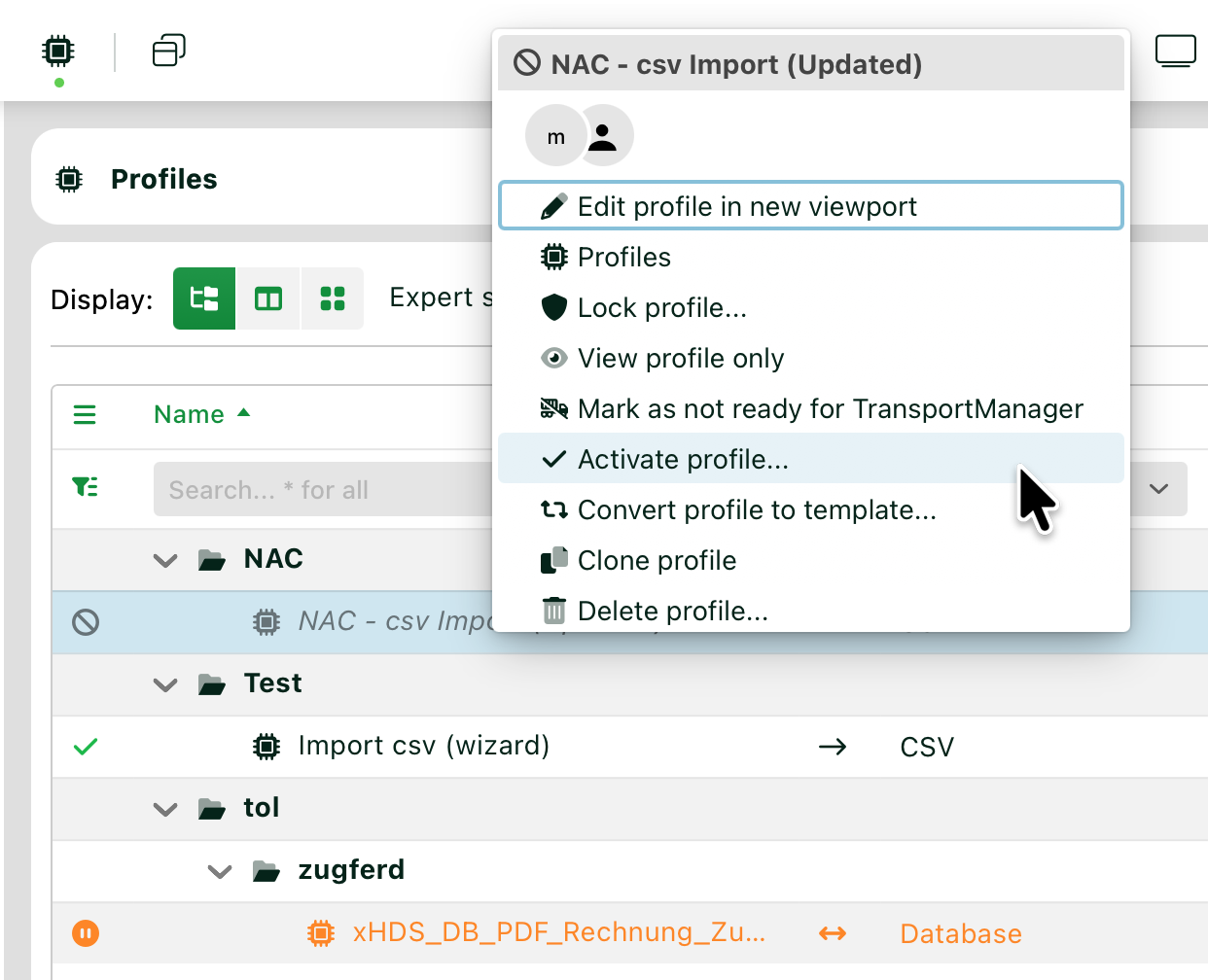
These states can be set and cleared via the context menu, except for the validity range.
When should you use each dimension?
Longer, scheduled outage; data loss acceptable: Set to "inactive".
Temporary operation, planned transition to a subsequent version: Combine the validity window and Replaces profile.
Short break, data must not be lost: profile suspensions.
Target system accessible only at certain times: scheduled suspensions.
Adjust the profile experimentally without affecting production: Create intermediate version.
A rule of thumb: active/inactive refers to the main switch, Valid from/Valid till refers to the schedule, Suspensions refer to the buffer button, and Create intermediate version refers to the working copy concept. If you keep these four concepts clearly separate, you’ll avoid most configuration misunderstandings.
Related topics
Instructions
Profile suspensions: Suspend and unsuspend profiles manually or on a schedule.
Profile configuration
General (Main settings): The fields Activate profile (slider), Valid from/Valid till, and Replaces profile.
Mapping functions for profile states
suspend profile(): Suspends the current profile and terminates the Job.
un/suspend profile(): Suspends or unsuspends any profile, optionally on a scheduled basis.
de/activate profile(): Enables or disables a profile from within a mapping.
check profile(): Checks whether a profile exists, is active, and is not suspended.