Navigate to Integration > Profiles > Select and open a profile > Phase 1 > Selected input agent.
Click Change.
The Type of input agent selector dialog box appears.
Choose Event based > CommLog.
Confirm with Apply.
Use this input agent to analyze CommLog events. Once a profile with this input agent is activated, it receives the configured CommLog events from the Control Center.
IMPORTANT: In the partner channel used, the option Use CommLog must be active for CommLog events to be generated. For protocol X.400, the option Request for MDN must also be active in the X.400 response path of the sending profile.
Settings
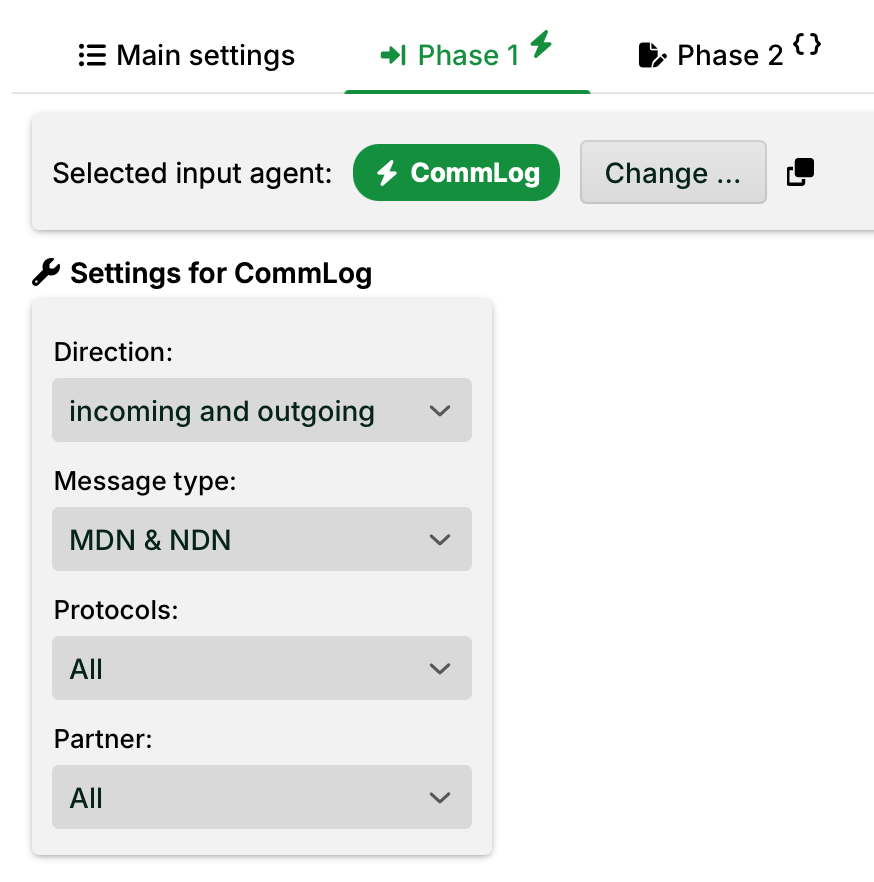
Direction: Data direction of the data to which the Comm log events refer. Available: incoming, outgoing or both.
Message type: Type of the CommLog events. Options:
MDN. Positive delivery confirmations.
NDN. Negative delivery confirmations.
NOTE: Some protocol types (for example, FTP and SSH), see (3), do not generate MDNs/NDNs. CommLog events do not consist only of MDNs and NDNs. For these protocol types, CommLog events still occur, but no MDN events. Setting (2) is therefore ineffective for these protocols.
Protocols: Selection of CommLog events for all or specific transmission protocols.
Partner: Selection of CommLog events for all or specific partners.
Template for source structure and return values
The input agent delivers XML data. In the profile, set the input format to XML, with the value event for the field XML tag for record.
In Phase 3, load the XML template CommLogEvent via the source structure menu.
The following is an example XML input.
<?xml version="1.0" encoding="UTF-8"?>
<event>
	<id_event>1478274779834002</id_event>
	<id_entry>1478274779865005</id_entry>
	<id_channel>1470905156701141</id_channel>
	<id_partner>1470904732807002</id_partner>
	<remote_id>
		<address_attr>http://62.206.113.210:9191/</address_attr>
		<remote_id_val>MARBEHO-TEST</remote_id_val>
	</remote_id>
	<local_id>KNUSTAS2</local_id>
	<type>
		<code_attr>2</code_attr>
		<protocol_attr>1</protocol_attr>
		<protocol_subtype_attr>1</protocol_subtype_attr>
		<direction_attr>2</direction_attr>
		<type_val>message disposition notification</type_val>
	</type>
	<message_id>1449559883.94.1478274779709.JavaMail.SYSTEM@LobsterTestSystem</message_id>
	<resource>merbeho_ordersp_11037911.xml</resource>
	<result>
		<code>0/0</code>
		<text>null</text>
	</result>
</event>
The values have the following meaning.
Element | Meaning | Values |
|---|---|---|
| Direction |
|
| Message type |
|
| Protocol type and subtype |
|
| Response code and response text | The meaning of response code and response text is protocol-dependent. It is taken directly from the respective protocol block. For AS2, for example, the following codes are possible: The content of the response text is not standardized. It is taken 1:1 from the partner's response. |