---
title: "Mail (SMTP) (Input agent)"
slug: "profiles--entry-tab-2-smtp"
updated: 2026-09-22T11:20:34Z
published: 2026-09-22T11:20:34Z
canonical: "docs.lobstersoftware.com/profiles--entry-tab-2-smtp"
---
> ## Documentation Index
> Fetch the complete documentation index at: https://docs.lobstersoftware.com/llms.txt
> Use this file to discover all available pages before exploring further.
# Mail (SMTP) (Input agent)
**URL:** `smtp(s)://<URL or IP of the Integration Server>` (see also [SmtpService](/v1/docs/en/smtp-service))
This Input agent can receive e-mails via the integrated e-mail server on the Integration Server. See also [Input agents that are forced to receive all the data](/v1/docs/en/intro-profiles-phase-1-forced-input). For each incoming e-mail, it is checked whether it can be assigned to a Profile. If an e-mail is assigned to a profile, a job will be started. An e-mail can be assigned to a profile if the e-mail address and the file pattern match the corresponding information in the profile.
> [!NOTE]
> **NOTE:**
>
> - If several profiles are ready to accept a specific file, the profile scoring will decide.
> - See also [Non-assignable e-mails](/v1/docs/en/intro-profiles-phase-1-nonassign-emails) and [Archiving of e-mails and X.400 mails](/v1/docs/en/intro-profiles-phase-1-archive-mails).
## Settings
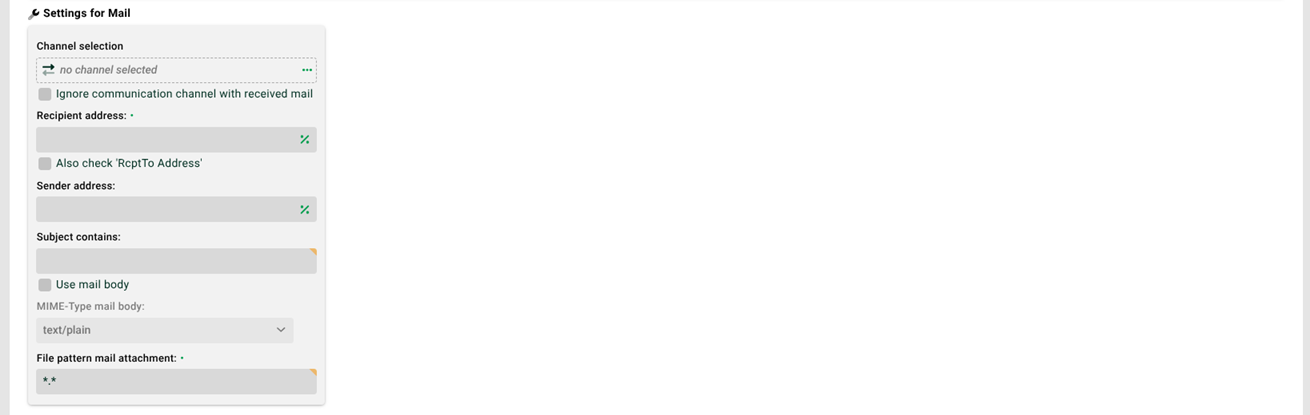
(1) **Channel selection:** You can select a channel of type "Mail". If a channel is selected, its settings will be used. If no channel is assigned, the SMTP service settings of the Integration Server are used. **NOTE:** As background, it should be mentioned that every incoming e-mail internally gets a channel ID assigned. A matching ID is the ID of a channel, whose "Own ID" (the own e-mail address for a channel of type *Mail*) matches the receiver address of the incoming e-mail and whose "Partner ID" (the e-mail address of the partner for a channel of type *Mail*) matches the sender address of the incoming e-mail. The internally determined channel ID is then compared with the ID of the channel selected here. See (2) and (3).
(2) **Also applies to communication channels with the same own identifier:** Normally, if a channel has been selected, only the e-mails corresponding to that channel will be accepted, see (1). However, it might be the case that a partner sends e-mails from different addresses, all of which should be accepted. Which means there will be several channels that have different partner addresses, but the same own address (local ID). If this checkbox is set, all e-mails assigned to channels that have the same local ID as the selected channel will be accepted. The forwarding of attachments that do not match the file name pattern in (10) to other profiles with the same channel will then be extended to profiles with channels that have the same local ID. **NOTE:** If an e-mail gets assigned to a channel, it will not be forwarded to a profile that does not have a channel, even if the address parameters directly set are correct.
(3) **Ignore communication channel with received mail:** The channel assigned to the received e-mail is ignored, see (1) and (2).
(4) **Recipient address:** E-mail address of the recipient of the e-mail. This field must have a value. See also (1).
(5) **Also check RcptTo address:** If this checkbox is set, not only the *To* address but also the *RcptTo* address is considered.
(6) **Sender address:** This field is used to restrict the profile to specific senders. If the field is empty, the sender of the e-mail will not be considered. If there is an entry, there is a check whether the sender of the e-mail contains the character string entered in this field. That means it is sufficient, for example, to enter the domain of the sender's address in this field. Uppercase and lowercase are ignored. Multiple senders and regular expression are not allowed.
(7) **Subject contains:** This field is used to restrict the profile to specific subjects. If the field is empty, the subject of the e-mail will not be considered. If there is an entry, there is a check whether the subject of the e-mail contains the character string entered in this field. Uppercase and lowercase are ignored. Multiple subjects are not allowed. You can use a regular expression with prefix *regex:*
(8) **Use mail body:** If this checkbox is set, only the message text of the e-mail (body) will be considered. The attachments of the e-mail are ignored by the input agent, even if a file name pattern (10) has been specified. If the checkbox is not set, only the attachments of the e-mail will be considered. The message text itself will then be ignored. **NOTE:** The system variable `VAR_SYS_MAIL_BODY` is filled with the content of the e-mail body.
(9) **MIME type mail body:** The MIME type of the received message text. The default is *text/plain* for simple text e-mails. If the sender sends HTML e-mails, you can switch to *text/html*. An HTML e-mail usually contains two bodies, an HTML text with MIME type *text/html* and a plain text with MIME type *text/plain*. See also (8).
(10) **File pattern mail attachment:** File name pattern. You can enter multiple file patterns separated by the pipe (|) character (e.g. `*.txt|*.csv`). The e-mails can contain any number of attachments, but any attachments that do not match the file pattern will be ignored.
> [!NOTE]
> **NOTE:**
>
> - Occasionally, SMTP users may still be logged in when shutting down. Normally these connections are terminated and the SMTP service is shut down. However, if you do not want to stop SMTP sessions automatically, you can set this behavior with the option *stopServices*. The following listing shows the option in configuration file `./etc/startup.xml` in section `com.ebd.hub.datawizard.app.DataWizard`. By default, this entry is commented out.
> - The option also applies to the FTP service.
```xml
false
```
## System variables
Several system variables are available for received e-mails. Special mention should be made here of `VAR_SYS_MAIL_HEADER`*_*. **Example:** The variable `VAR_SYS_MAIL_HEADER_DATE` receives the original string value of the e-mail header *Date*. The e-mail header line *Date: Wed, 6 Sep 2017 13:50:01 +0300* will result in the variable content *Wed, 6 Sep 2017 13:50:01 +0300.*
See also `VAR_SYS_ATTACHMENT_NAME`*.*
**NOTE:** If you use the system variable `VAR_SYS_MAIL_HEADER_RECEIVED`, it will only contain the first “Received” mail header. To receive all of them, please use `VAR_SYS_MAIL_HEADER_RECEIVED_ALLB64`. This will contain all received mail headers, comma-separated and encoded in Base64.
## Activating SMTPS
See [SmtpService](/v1/docs/en/smtp-service).
The input agent receives data in Phase 1 and starts a job for further processing. It works either as event based (passively waits for data) or scheduled (actively fetches data).
A profile is the central configuration unit in the Lobster Data Platform. It receives data, processes it, and forwards it. Configuration is done graphically, with no programming required.