This response method acts as a publisher-client and publishes messages to a Google Pub/Sub topic.
Click path
Integration > Profile > Phase 6 > New response > Google Pub/Sub> [Google Pub/Sub] Settings
Settings
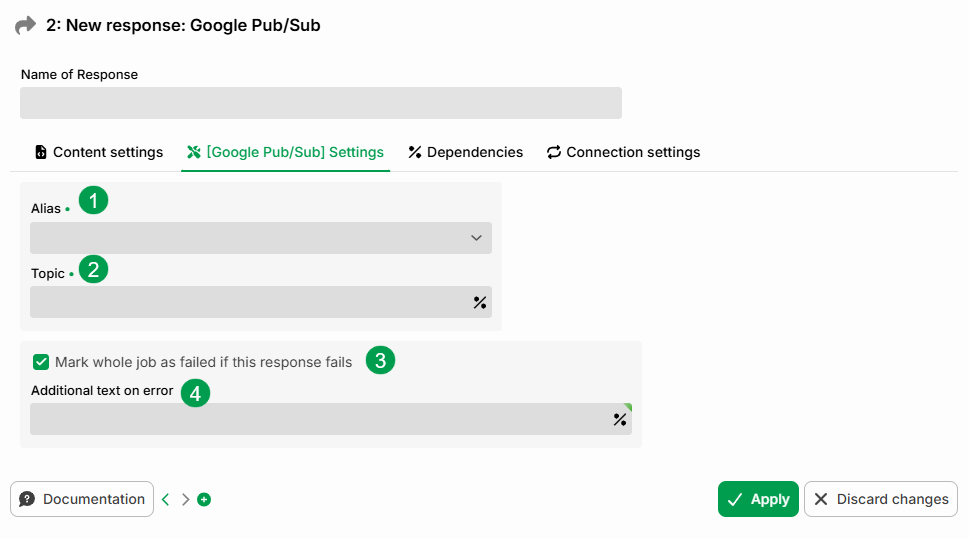
① Alias: The alias for the Google Pub/Sub connections you want to use.
② Topic: The topic in which you want to post the message.
③ Mark whole job as failed if this response fails: A job is not automatically considered to have failed if a single response fails (see the "Status of Phase 6 – error behavior" section in Dependencies). This option allows you to enforce that behavior.
④ Additional text on error: You can enter additional log text here in case of an error.
Retries
Retries for this response are controlled via the Connection settings tab and the general behavior is described there. The following also applies to the Google Pub/Sub response:
The Permitted execution time field specifies the timeout for the publishing process per attempt. If set to "0" or "-1", the timeout is 5 seconds.
A publish request that times out may still reach the topic. The subsequent retry then results in a duplicate message.