Settings
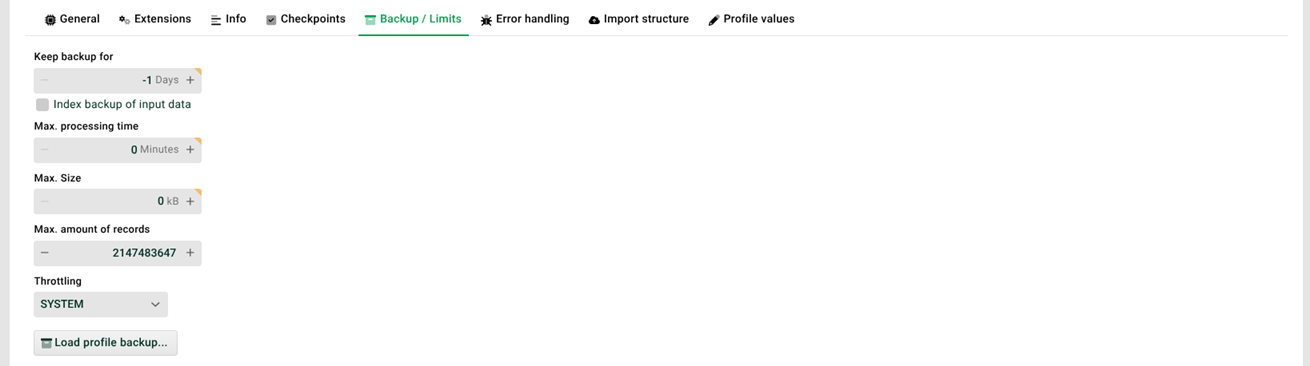
(1) Keep backup for: The backup files of the Profile are kept for the set number of days. During this period, the data is available for a restart of the profile. After expiry of the set retention time, the backup files are deleted automatically.
NOTE: On a test and development system, the retention time is limited to 5 days.
If "-1", the system settings are used (see Retention periods of backup files, logs, crashed jobs).
If "0", then the backup files will be deleted immediately after the successful completion of the respective job. The corresponding log entries of the job are kept according to the system settings. If this setting is missing, the log entries are automatically deleted after three days.
NOTE: If an error occurs, the backup file will not be deleted. This also applies to an abort by function abort execution(). After a successful restart of the error job, the backup file will also not be deleted.If > 0, then the backup files will be kept for the specified number of days. The associated log entries of the job are also kept for the specified number of days.
(2) Index backup of input data: If indexed, you can search in the backed up input files. See the section "Context menu of a profile" in Jobs per profile
(3) Max. processing time: This value specifies a maximum processing duration for the profile (from Phase 2). If this time is exceeded, a notification e-mail will be sent. The recipient of the e-mail is specified in the configuration file ./etc/startup.xml. See the "Error handling" tab.
(4) Max. size: If the maximum size of the input data specified here (in kilobytes) is exceeded, the job aborts with an error immediately after the backup has been created. At a subsequent restart, this setting will no longer be considered. Thus, the job can be restarted manually, for example, after the system's memory has been increased. See also Maximum size of input files and messages.
(5) Max. amount of records: This is where you set the maximum number of records that the profile is allowed to generate. If more are generated, the profile will abort with an error.
IMPORTANT: This does not apply to document type "XML" with XML parser "V4". This also applies in a mapping test.
(6) Throttling: It is possible to activate a throttling of profile jobs. To enable throttling in general, the configuration file ./etc/throttle.xml must be present. Throttling is activated when the system had a certain load over a certain period of time (→ see parameters "limit" and "duration"). If throttling is active, this is indicated by an icon on the "Start" page (see there). The throttling is deactivated again when the load has been below the limit value again over a defined period of time (→ see parameter "durationMultiplier").
NOTE: The profile job throttling can also be activated/deactivated via REST API. See also Profile job throttling (REST API).
ON | If throttling is active, jobs of this profile are throttled. |
OFF | If throttling is active, jobs of this profile are still not throttled. |
SYSTEM | If throttling is active, the setting of parameter "onByDefault" applies. |
<?xml version="1.0" encoding="ISO-8859-1"?>
<!DOCTYPE Configure PUBLIC "-//EBD Integration//DTD Configure 1.0//EN" "http://www.ebd-integration.de/dtd/configure_1_1.dtd">

<Configure class="com.ebd.hub.datawizard.app.ThrottleSettings">
<?xml version="1.0" encoding="ISO-8859-1"?>
<!DOCTYPE Configure PUBLIC "-//EBD Integration//DTD Configure 1.0//EN" "http://www.ebd-integration.de/dtd/configure_1_1.dtd">

<Configure class="com.ebd.hub.datawizard.app.ThrottleSettings">
    <Set name="limit" type="int">97</Set><!-- avg. % of cpu load based on jvm usage -->
    <Set name="duration" type="int">60</Set> <!-- amount of seconds when cpu usage must be >= limit to switch throttling on -->
    <Set name="durationMultiplier" type="int">10</Set> <!-- multiplier for 'duration' to check when throttling must be switched off. In this example, throttling is switched off after 600s (60s x 10) when avg. cpu load is less than 97% -->
    <Set name="minDelay" type="int">1000</Set> <!-- min. delay in ms between each running phase of a profile (2 - 6) -->
    <Set name="minMappingDelay" type="int">10</Set> <!-- min. delay in ms in mapping phase during iteration tasks like entering a node etc. -->
    <Set name="onByDefault" type="boolean">true</Set> <!-- mode 'system' is set to 'on' -->
    <Set name="mailOnThrottle" type="boolean">false</Set> <!-- send mail notification when throttling is switched on. Mail address is already defined in startup.xml -->
    <Set name="simulate" type="boolean">false</Set> <!-- simulate a high cpu usage -->
    <Set name="replicate" type="boolean">false</Set> <!-- on a load balance system, replicate these settings to all working nodes -->
    <Set name="debug" type="boolean">false</Set> <!-- should be switched off since it generates a lot of messages -->
</Configure>
Parameter | Description |
|---|---|
limit | The average percentage utilisation of the CPU (by the Java Virtual Machine) that must be exceeded. |
duration | The number of seconds that the limit must have been exceeded for throttling to be activated. |
durationMultiplier | If the CPU load is <= limit for duration*durationMultiplier seconds, the throttling is deactivated again. |
minDelay | The minimum delay in ms between the individual phases of the profile when throttling is active. The actual delay results from minDelay*priorityfactor. Profile priority - priorityfactor: Highest - 1 High - 2 Normal - 3 Low - 4 Very low - 5 |
minMappingDelay | The minimum delay in ms during mapping in the profile for iterations (e.g. multiple passes through a node) when throttling is active. The actual delay results from minMappingDelay * priorityfactor (→ see parameter "minDelay"). |
onByDefault | If this parameter is set to "true" and throttling is active and the value "SYSTEM" is set in the profile in (6), then jobs of this profile are throttled. If there is no configuration file ./etc/throttle.xml the parameter "onByDefault" is set to "false" (i.e. like "OFF"). |
mailOnThrottle | If "true", a notification email is sent when throttling is activated (address from ./etc/startup.xml). |
simulate | If "true", a high CPU load is simulated. |
replicate | If "false", the settings here are not replicated to other nodes when using the Load balancing module, i.e. each node can have its own settings. NOTE: If a specific node is throttled and the system is set to "load factor" (→ "useLoadInformation", see Configuration of a node controller), then the throttled node reports "float.MAX" as the load factor (i.e. it is taken as the last option). |
debug | If "true", additional debug messages are logged. IMPORTANT: This should normally be set to "false", as a large number of messages are generated. |
(7) Load profile backup: Loads a profile backup. See the section "Backup of profiles" in General control elements.