---
title: "Searching in indexed backup files"
slug: "search-indexed-backup-files"
updated: 2026-07-08T12:31:08Z
published: 2026-07-08T12:31:08Z
canonical: "docs.lobstersoftware.com/search-indexed-backup-files"
---
> ## Documentation Index
> Fetch the complete documentation index at: https://docs.lobstersoftware.com/llms.txt
> Use this file to discover all available pages before exploring further.
# Searching in indexed backup files
The search in indexed backup files can be reached via the context menu of a profile (**Search in backup file**) under **Contol Center > Logs > Jobs per profile**. As a result of the search, only the jobs that meet the search conditions are then displayed in the same place.
The following requirements/restrictions apply:
- The indexing of backup files has been activated in the profile (see [Backup/Limits](/v1/docs/en/profiles--tab-1-5)).
- The indexing can only take place if option "multipleBackupSubDirs" in the configuration file ./etc/startup.xml is set to "true". See [Retention periods of backup files, logs, crashed jobs](/v1/docs/en/intro-profiles-phase-1-retention-periods).
- An indexing can only take place for non-binary files, not for Excel or PDF files.
- The indexing of the backups takes place in the background and may take a while with larger amounts of data. You can check if the indexing is still running under **Control Center > System > Threads** (thread "BackupFileIndexer").
## Settings
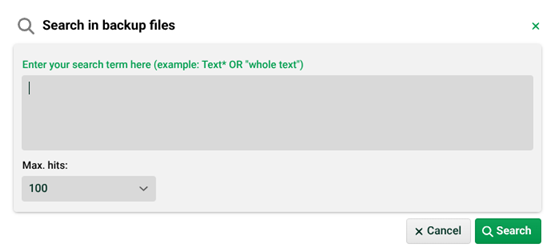
(1) **Enter your search term here:** The search term to be used. See the following sections.
(2) **Max. hits:** Restriction of the search result (so the maximal number of jobs).
## Example
Assume the following two backup files of two different jobs of the profile.
```IndexedSearchBackup
BAYERN
80999 München
80804 München-Schwabing
85356 München-Airport
82343 Pöcking
82319 Starnberg
82327 Tutzing
93059 Regensburg
```
```IndexedSearchBackup
HESSEN
60435 Frankfurt
60549 Frankfurt-Airport
63679 Schotten
35041 Marburg
```
Now we formulate the complete search term.
| 8* AND *Airport* |
| --- |
This searches for jobs of the profile whose backup file contains a line whose postal code begins with "8" and in which the string "Airport" occurs. This would therefore only apply to the Job with the first backup file.
**IMPORTANT:** The individual search terms are not searched as substrings. The search term "Airport" alone would therefore not return a hit!
## More search options
The search uses the Lucene Query Syntax. Below you will find a few of the available options.
- Free-standing strings in the whole text are found, but not substrings. The search term *München* would be found in the first file, but the search term *Münch* would not be found. In XML files, values within tags are found. So if a file had the line *arn*, the search term *arn* would find it.
- Regular expressions are also allowed in the search. For this, the prefix */* and the suffix */* must be used. **Example:** The search term */.*arn.*/* contains the regular expression *.*arn.** and would find the first backup file with the word *Starnberg*.
- The Boolean operators *AND*, *OR* and *NOT* are available.
- You can use the placeholders *** (any number of any character) and *?* (one arbitrary character), but not as the first character of the search term.
- A multi-word string must be enclosed in double quotes, e.g. *"80999 München"*
- A search for source data that must include *Airport* and may not include *München* is *+Airport NOT München*
- A restriction to a period can be specified with *creationtime:[ TO ]*, so *creationtime:[20140924 TO 20140925] AND ("80999 München" OR Starnberg)* for the search above if we only want job from 24.09.2014.
> [!NOTE]
> **NOTE:**
>
> - There must be a difference of at least one day between the two times.
> - Upper and lower case are not considered, but keywords must be capitalized.
Execution instance that arises when an **inbound agent** of a profile accepts data. The platform creates a backup file and processes the **job** through all profile phases. Running, successful, and failed jobs are visible in **the Control Center** .