---
title: "SshService"
slug: "ssh-service"
updated: 2026-06-09T06:44:13Z
published: 2026-06-09T06:44:13Z
canonical: "docs.lobstersoftware.com/ssh-service"
---
> ## Documentation Index
> Fetch the complete documentation index at: https://docs.lobstersoftware.com/llms.txt
> Use this file to discover all available pages before exploring further.
# SshService
The SshService is used for data exchange via SSH. The service behaves like an SSH server that allows sending or receiving files via SFTP and SCP.
## XML configuration
### Complete XML options
The following file shows all available options in the XML configuration file. If you want to use an element, replace “NoSet” with “Set” and “NoCall” with “Call”. Some element are described in detail in the following sections.
```xml
false
0.0.0.01022
true
true
System
ssh
a single ip address
base ip addressa netmask
a single ip address
base ip addressa netmask
true
My_Server_Ident
aes256-ctr,aes256-cbc,aes128-ctr,...
aes256-cbc,aes256-ctr,aes128-ctr,...
hmac-sha2-512,hmac-sha256,hmac-sha1,hmac-sha1-etm@openssh.com,...
hmac-sha256,hmac-sha2-512,hmac-sha1,hmac-sha1-etm@openssh.com,...
diffie-hellman-group14-sha1,diffie-hellman-group1-sha1,...
0
```
### Services
The following XML fragment sets the services to be used.
```xml
AuthenticationService
CommunicationLogService
MessageService
LogService
```
The values to be specified should be self-explanatory. They only need to be changed if services other than the standard ones are to be used.
### Logging
The following XML fragment determines the log behavior.
```xml
SSHLog
true
SSHLog
```
The parameters have the following meaning.
| Parameter | Description |
| --- | --- |
| transferLogManagerName | This parameter sets a LogManager to which log messages are sent. If this manager does not exist, it will be generated. By default, i.e. without specification in the XML file, a FileLogManager with the name *SSHLog* is generated. |
| appendTransferLog | With this parameter you can set, if at the start of the service the set LogManager should create a new file or attach it to an existing file. |
| transferLogDirectoryName | Specifies in which directory the LogManager should save the log messages. |
### Setting message queue and message context
The following XML fragment sets the values to be used for message queue and message context.
```xml
System
ssh
```
The first argument is the context, the second is the queue.
With these settings, SSH events, such as file reception or file pickup, are passed to the MessageService.
### Adding list addresses
The following XML fragment adds a list address.
```xml
127.0.0.0
21
```
### Setting whitelist and blacklist
You can set a whitelist for the SshService (IP addresses of the clients that are allowed to establish a connection via SSH) and a blacklist (IP addresses of the clients that are not allowed to establish a connection via SSH). The following XML fragment sets a whitelist.
```xml
a single ip address
base ip addressa netmask
a single ip address
base ip addressa netmask
```
With "addIpAddress", a specific IP address can be added. With "addAddressRange" (via IP and associated netmask) you can add an address range. The setting of a blacklist is analogous, with the call "setBlackAccessList".
### Setting the ConnectionManager
The following XML fragment sets the ConnectionManager.
```xml
./ssh/
./etc/ssh_host_rsa_key
./etc/ssh_host_rsa_key
true
false
5
```
The "sshRoot" parameter specifies the default user directory for the SSH server.
The parameters "hostKeyFilenameRSA" and "hostKeyFilenameDSA" specify the files from which the keys to be used for the encrypted communication are to be read. If these files do not exist, new files with new keys are automatically generated.
The log behavior of the actual SSH connection can be controlled with the "logDebugMessage" parameter .
"maximumUserConnections" globally defines the maximum number of parallel connections of a user, where "0" stands for unlimited.
#### Accepting empty files
For the service to accept empty files (0 bytes), the option "notifyReceivedEmptyFiles" must be set to "true".
## General settings (GUI)
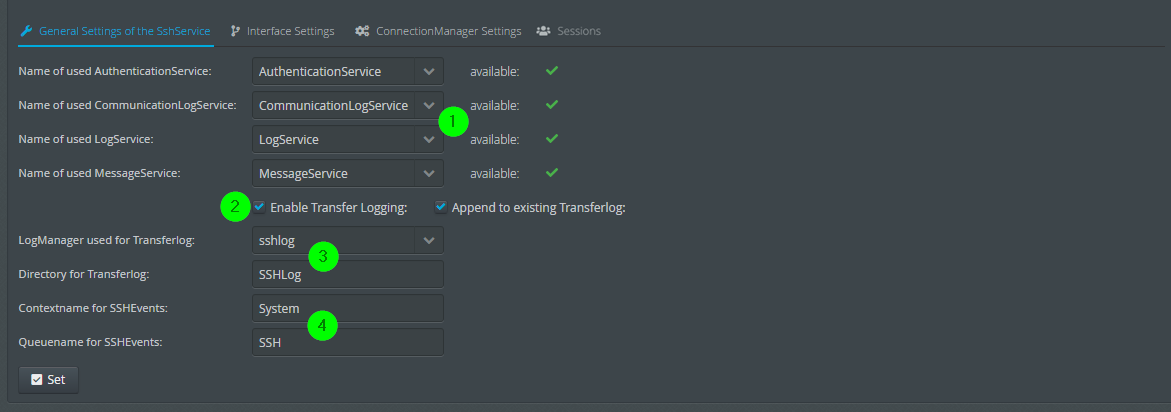
**(1)** Here you can set the services required for the operation of the SshService.
**(2)** Change of log behavior.
**(3)** Here you can select the LogManager and the associated directory.
**(4)** The context and queue to which the SshService forwards SSH events.
## Main interface settings (GUI)

**(1)** Here you can add or remove listening addresses.
**(2)** Here you can edit the whitelist.
**(3)** Here you can edit the blacklist.
## ConnectionManager settings (GUI)

**(1)** Here the base directory of the ConnectionManager can be changed.
**(2)** The logging of debug messages for the ConnectionManger can be set here.
**(3)** The files to store the keys. If the files do not exist, new files with associated keys are created.
## Sessions (GUI)
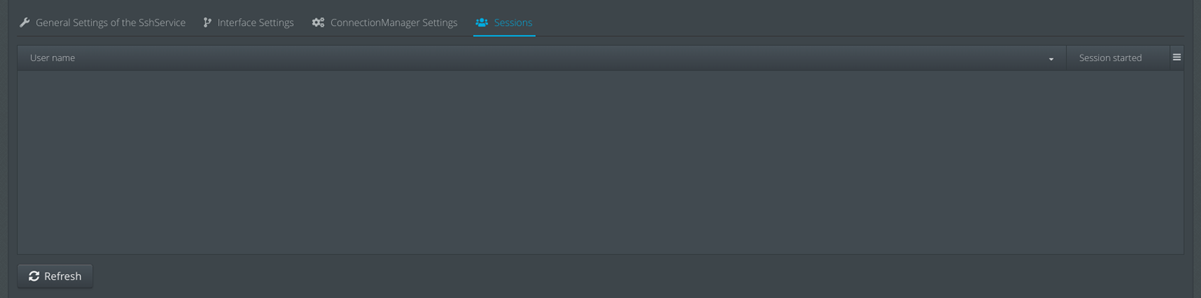
Existing SSH sessions can be closed here.