---
title: "REST API - Tutorial"
slug: "tutorials-rest-api"
updated: 2025-11-18T09:53:27Z
published: 2025-12-04T02:44:08Z
canonical: "docs.lobstersoftware.com/tutorials-rest-api"
---
> ## Documentation Index
> Fetch the complete documentation index at: https://docs.lobstersoftware.com/llms.txt
> Use this file to discover all available pages before exploring further.
# REST API - Tutorial
| *Last Update: 30.08.2024* |
| --- |
## Initial settings
The following settings should be adjusted in advance if APIs are called from or made available:
- Adjust OpenAPI/Swagger URL in configuration file *./etc/startup.xml* of the inner system:
| https://mycompany.com/dw/Request |
| --- |
In order for customers and partners to be able to access the OpenAPI overview, the URL under which the Integration Server can be accessed from outside should be defined here.
If a DMZ server is in use, the URL of the DMZ must be used (please retain the */dw/request*).
- Optional: [Activate HTTPS](/docs/en/add-https-listener).
- Optional: Force HTTPS (set parameter *forceSSL* to *true* in *./etc/startup.xml*).
## Authentication
Most REST APIs are not publicly accessible and require prior authentication so that the data can be accessed.
It is generally recommended to use channels for authentication, as these can be managed centrally and used for multiple profiles.
As soon as a channel has been set in phase 1/3/6, the header *Authorization* is automatically added to the request.
Various authentication options can be configured in the [HTTP channel](/docs/en/channel-http):
- Basic auth/Digest auth
- [OAuth2](/docs/en/tutorials-oauth-2)
- OAuth1
- [Generic Bearer Token](/v1/docs/en/http-channel-generic-bearer-token)
These are active in the following order: Basic *>* OAuth2 *>* Generic Bearer Token.
If the validity of the OAuth2/Generic Bearer Token has expired, the channel is executed beforehand during a profile run and the token is updated in the background.
In specific cases, the Generic Bearer Token may not be sufficient. A separate predecessor profile with its own logic in phase 3 can be used for authentication.
## Setting up HTTP headers in the channel (profile as client)
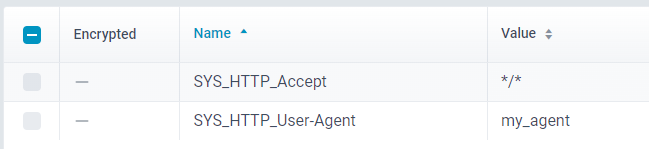
Channel-related HTTP headers can be stored via *Channels* → *Additional IDs*. These are defined using the *SYS_HTTP_* prefix and are automatically sent as soon as the channel has been assigned to a profile.
The additional ID must first be created in the main menu 'Additional IDs'. The values can then be added to the HTTP channel in the Additional IDs tab by right-clicking. In the example shown for headers *Accept* and *User-Agent* HTTP.
## REST API request (profile as client)
The following options are available if a profile is to act as a client, i.e. retrieve data from other web services:
- Phase 1: Time-driven Input Agent "HTTP".
The response of the request is available as the source structure in phase 3 or via system variables.
- Phase 3: *http* or *http json-lookup* function.
The response is written to the specified map of the function.
- Phase 6: Response "HTTP".
The response can be viewed in the log or in the menu 'Server log' → 'internal' log (Base64-encoded). Alternatively, a subsequent profile can be specified for the evaluation (see example profile *Forward response to a subsequent profile*).
### Example profiles
The sample profiles were built using *https://petstore.swagger.io* or other publicly accessible APIs. You require access to the corresponding pages and a current version >= 4.6.11.
**Note:** In many examples, information on mapping and functions has been stored in the node/field descriptions! The description can be activated in phase 3 by using the  button!
| Description | Notes/Other | Example profiles (download) |
| --- | --- | --- |
| GET request. | Simple GET request in phase 1. Saves the response in phase 6 as backup. | [*Profile-GET_request.pak*](https://cdn.document360.io/4be90b94-ec83-41d8-963e-962df16110d4/Images/Documentation/Profile-GET_request.pak) |
| POST request. | Simple POST request with body data in phase 1. Saves the response in phase 6 as backup. | [*Profile-POST_request.pak*](https://cdn.document360.io/4be90b94-ec83-41d8-963e-962df16110d4/Images/Documentation/Profile-POST_request.pak) |
| GET request with metadata. | Simple GET request in phase 1. Evaluation of metadata using system variables such as HTTP headers in phase 3,. Saves the response as a backup. | [*Profile-GET_request_fetch_metadata_phase3.pak*](https://cdn.document360.io/4be90b94-ec83-41d8-963e-962df16110d4/Images/Documentation/Profile-GET_request_fetch_metadata_phase3.pak) |
| Forward response to a subsequent profile. | 1. Profile: GET Request in phase 6 forwards the response as message to profile 2. 2. Profile: Receives the response from profile 1. Saves the response as a backup. | [*Profile-1_forward_response_GET_request_phase6.pak*](https://cdn.document360.io/4be90b94-ec83-41d8-963e-962df16110d4/Images/Documentation/Profile-1_forward_response_GET_request_phase6.pak) [*Profile-2_forward_response_receiver_profile.pak*](https://cdn.document360.io/4be90b94-ec83-41d8-963e-962df16110d4/Images/Documentation/Profile-2_forward_response_receiver_profile.pak) |
| Use *MSG_CALL_* variables in a profile chain. | A variable date is transferred via a predecessor profile. 1. Profile: Prepares a current date and transfers it to the second profile using the *MSG_CALL_* variable. 2. Profile: GET request in phase 1 with the previously generated date. Saves the response in phase 6 as a backup. **Note:** If the current date is required, you can work with format templates, e.g: ** | [*Profile-1_forward_variables_create_specific_date_and_data.pak*](https://cdn.document360.io/4be90b94-ec83-41d8-963e-962df16110d4/Images/Documentation/Profile-1_forward_variables_create_specific_date_and_data.pak) [*Profile-2_forward_variables_POST_request_phase1.pak*](https://cdn.document360.io/4be90b94-ec83-41d8-963e-962df16110d4/Images/Documentation/Profile-2_forward_variables_POST_request_phase1.pak) |
| API paging/pagination. | API paging with two different methods. | See [tutorial](/docs/en/tutorials-paging). |
| Use "Last executed" as variable for next profile start. | The ‘Last-run’ variable is used to pass the date and time of the last profile run as a query parameter. | [*Profile-GET_request_last_run_variable.pak*](https://cdn.document360.io/4be90b94-ec83-41d8-963e-962df16110d4/Images/Documentation/Profile-GET_request_last_run_variable.pak) |
| Multipart request in phase 6. | Sends a multipart request in phase 6 to *requestcatcher.com* (public API endpoint, be careful with sensitive data!). **Note:** Please enter a valid file path and file name! | [*Profile-send_multipart_in_phase6.pak*](https://cdn.document360.io/4be90b94-ec83-41d8-963e-962df16110d4/Images/Documentation/Profile-send_multipart_in_phase6.pak) |
| Multipart request in phase 3. | Sends a multipart request in phase 3 using the "http" function. **Note:** Please enter a valid file path and file name! (with “add to map” function). | [*Profile-send_multipart_in_phase3_httpfunction.pak*](https://cdn.document360.io/4be90b94-ec83-41d8-963e-962df16110d4/Images/Documentation/Profile-send_multipart_in_phase3_httpfunction.pak) |
| ODATA example. | Simple GET request with ODATA standard. Link to API: [https://pragmatiqa.com/xodata/](https://pragmatiqa.com/xodata/) | [*Profile-OData_GET_request_phase1.pak*](https://cdn.document360.io/4be90b94-ec83-41d8-963e-962df16110d4/Images/Documentation/Profile-OData_GET_request_phase1.pak) |
| GraphQL request. | Example of a request using GraphQL. As we do not yet have native support for GraphQL, online converters can be used to convert GraphQL to JSON. Example: [https://datafetcher.com/graphql-json-body-converter](https://datafetcher.com/graphql-json-body-converter) | Like standard GET and POST requests in phases 1/3/6, with JSON body data from the online converter tool. |
## REST API endpoint (profile as server)
If a profile should act as a REST API/web service, the following option is available:
- Phase 1: Event-based HTTP Input Agent.
### Example profiles
**Note:** Please adjust the request URL accordingly: *http* or *https* if HTTPS is active and pay attention to custom ports.
| Description | Notes/Other | Example profiles (download) |
| --- | --- | --- |
| Simple REST API endpoint. | Simple REST API profile for testing whether data can be received or whether the Integration Server can be reached. Request URL: *https:///dw/Request/receiver_endpoint/nomapping/* | [*Profile-receiver_endpoint_nomapping.pak*](https://cdn.document360.io/4be90b94-ec83-41d8-963e-962df16110d4/Images/Documentation/Profile-receiver_endpoint_nomapping.pak) |
| Simple REST API endpoint, web service response. | REST API profile transfers fixed values from phase 3 back to the client as JSON. Request URL: *https:///dw/Request/receiver_endpoint/get_address/* | [*Profile-receiver_endpoint_mapping_custom_response.pak*](https://cdn.document360.io/4be90b94-ec83-41d8-963e-962df16110d4/Images/Documentation/Profile-receiver_endpoint_mapping_custom_response.pak) |
| Save multipart requests/attachments | Accepts multipart requests in phase 1 and saves the information in the log overview. Example request in Postman: 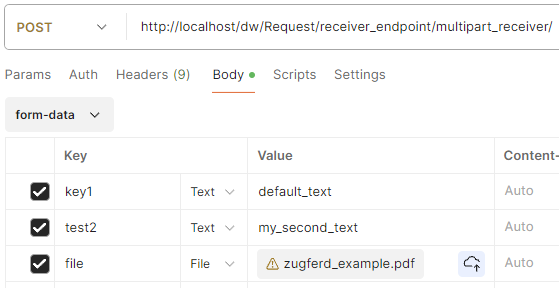 Request URL: *https:///dw/Request/receiver_endpoint/multipart_receiver/* | [*Profile-receiver_multipart.pak*](https://cdn.document360.io/4be90b94-ec83-41d8-963e-962df16110d4/Images/Documentation/Profile-receiver_multipart.pak) |
| Advanced HTTP error response. | Evaluation of the path variable in phase 1, error handling with new functions (throw http error) in phase 3. Return of the fixed values to the client. Request URL: *https:///dw/Request/receiver_endpoint/error_responses/* | [*Profile-error_responses.pak*](https://cdn.document360.io/4be90b94-ec83-41d8-963e-962df16110d4/Images/Documentation/Profile-error_responses.pak) |
| Binary response. | Return locally saved PDFs. Reads locally saved PDF files and returns them to the calling client as direct download. Request URL: *https:///dw/Request/get_pdf/* | [*Profile-Binary_response_pdf.pak*](https://cdn.document360.io/4be90b94-ec83-41d8-963e-962df16110d4/Images/Documentation/Profile-Binary_response_pdf.pak) |
## Error handling
Error message when calling the profile:
| Your *request could not be processed due to unknown/mismatched parameters* |
| --- |
- Problems with mandatory query parameters, the HTTP method (GET/POST) is not correct, URL is not correct.
A status code *404* in the OpenAPI/Swagger overview can have the following causes:
- The profile is not active.
- The port/IP to the endpoint is not correct.
- Internal and external endpoint URLs are different (e.g. if you have a DMZ server).
- There is a second web server (can be checked in the Admin Console).
- Routing, proxy or firewall block access.