---
title: "SMB (Channels)"
slug: "channel-smb"
updated: 2026-05-27T09:28:44Z
published: 2026-05-27T09:28:44Z
canonical: "docs.lobstersoftware.com/channel-smb"
---
> ## Documentation Index
> Fetch the complete documentation index at: https://docs.lobstersoftware.com/llms.txt
> Use this file to discover all available pages before exploring further.
# SMB (Channels)
## Settings
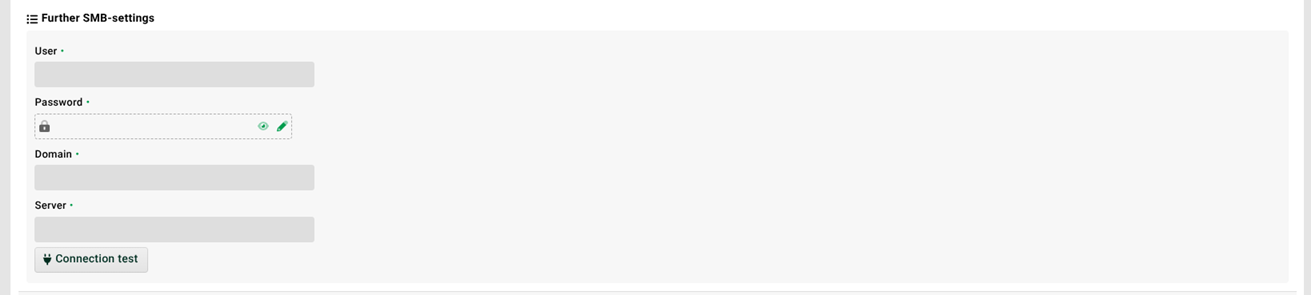
The SMB access data can be entered here.
**IMPORTANT:** Please note that this is only for the login, especially in field **Server** (2). If you use SMB in an input agent or a response, you must explicitly specify the complete UNC path to a file. See also section [Access to external shares](/docs/en/intro-external-systems-external-shares).
**NOTE:** If a local user of the target server is used when logging in, a dot (.) must be entered in the **Domain** (1) field. A local user on an SMB server is a user account that exists on the server itself and is not managed by a centralized directory service such as Active Directory.
## SMB mount manager
As an alternative to the SMB connection via Java (uses SMBv2), the SMB mount manager is available, which provides a higher performance and additionally supports SMBv3. **NOTE:** *See also*: https://support.microsoft.com/en-en/help/2696547/how-to-detect-enable-and-disable-smbv1-smbv2-and-smbv3-in-windows-and.
The SMB mount manager mounts SMB shares as network drives (mount points) via the operating system.
Alternatively, it can also work with internal symlinks (see properties *windows*.*useShareMount and* *baseMountPoint*).
When the SMB Mount Manager is activated, all previous entries in "SMB" channels, "SMB" input agents, and "SMB" responses can (and must) be retained. The only difference is that the connection of external drives is handled at operating system level.
### Configuration
The following entry must be set in configuration file ./etc/startup.xml.
```plaintext
true
```
In addition, the file ./etc/admin/datawizard/smbmount.properties must be present and configured.
```plaintext
#File has to be in <_dataInstallDir>/etc/admin/datawizard
#
# Basic smb mount manager config file
#
#
# for windows system, define the available driver letters
windows.drives=GHIJKLMNOPQRSTUVWXY
#
#
# for windows system, use drive letters or shared folder
windows.useShareMount=true
# for not windows systems: define a base mount point where all shares are mounted underneith
# for windows systems with windows.useShareMount=true: define a folder where all symlinks to the shares are created
baseMountPoint=./mnt
#
#
# mount commands for each supported OS
#
# unix/linux
unix.mount=/bin/mount -t cifs -o user={USER},domain={DOMAIN},password={PASSWORD} //{SERVER}/{SHARE} {MOUNTPOINT}
unix.umount=/bin/umount {MOUNTPOINT}
# mac os x
mac.mount=/sbin/mount_smbfs //{DOMAIN};{USER}:{PASSWORD}@{SERVER}/{SHARE} {MOUNTPOINT}
mac.umount=/sbin/umount {MOUNTPOINT}
# windows
windows.mount=C:\\Windows\\system32\\net.exe use {MOUNTPOINT} \\\\{SERVER}\\{SHARE} /user:{DOMAIN}\\{USER} \"{PASSWORD}\"
# mount command for specific host
# .=, e.g.
# windows.example.com=somecommand
windows.umount=C:\\Windows\\system32\\net.exe use /DELETE {MOUNTPOINT}
# others /unknown
other.mount=please define a command here!
other.umount=please define an umount command here!
```
**IMPORTANT:** The placeholders in curly brackets are automatically populated by the entries in SMB channels, [File (cron input agent)](/docs/en/profiles--entry-tab-2-cron-file-tab-1) and [Response file](/docs/en/profiles--entry-tab-6-file). You do not have to replace any of the placeholders.
| Property | Description |
| --- | --- |
| windows.drives=EFGHIJKLMNOPQRSTUVWXYZ | The available Windows drive letters. You may need to make an adjustment here if certain drive letters are already in use on your system. |
| windows.useShareMount | If *false*, "normal" network drives are use. Falls *true*, the integration takes place via symlinks. This can circumvent the use of normal network drives and thus the limitation of the limited number of (drive) letters. Property *baseMountPoint* is used to specify the folder in which the symlinks are placed. **IMPORTANT:** By default, you have to set key*EnableLUA* to*0x0* in the Windows Registry (execute*regedit* in the Windows console). You will find the key under*HKEY_LOCAL_MACHINE\Software\Microsoft\Windows\CurrentVersion\Policies\System.* If this is not wanted for security reasons, you can also explicitly deactivate this check with the system property *-Dsmb.deactivate.lua=true*. In that case, nothing needs to be changed in the Windows registry. However, the user used for the Integration Server service must then have the right to create symlinks (if they do not have administrator rights). |
| baseMountPoint=./mnt | For UNIX and MacOS systems, the base mount point name can be specified. Default: *./mnt* This property is also used for symlinks under Windows (see property *windows*.*useShareMount*). |
| windows.mountwindows.umount | Mounting and unmounting SMB shares under Windows. **NOTE:** The entries in the configuration file can be used in exactly the same way. |
| unix.mountunix.umount | Mounting and unmounting SMB shares under Unix/Linux. **NOTE:** The entries in the configuration file can be used in exactly the same way. |
| mac.mountmac.umount | Mounting and unmounting SMB shares under Mac. **NOTE:** The entries in the configuration file can be used in exactly the same way. |
| . | A mount command for a specific host can be specified (e.g. different timeout for certain hosts). See Windows example in Windows section in sample file above. Analogously for other operating systems with *mac* or *unix* for **. **NOTE:** There is no host-specific unmount. The ** is the one used in the UNC path *///* in Input Agents or Responses. |
### Control Center
Active SMB connections can be found in the Control Center (→ "System" → "SMB connections").