---
title: "Attribute projection"
slug: "core-attribute-projection"
updated: 2026-05-19T07:32:20Z
published: 2026-05-19T07:32:20Z
canonical: "docs.lobstersoftware.com/core-attribute-projection"
---
> ## Documentation Index
> Fetch the complete documentation index at: https://docs.lobstersoftware.com/llms.txt
> Use this file to discover all available pages before exploring further.
# Attribute projection
> [!NOTE]
> Projection – Abstract
>
> **Purpose:** Returns the values of all instances of a specific *attribute type* for a given or explicitly defined *attribute owner* (without an explicit *Join*).
>
> > [!TIP]
> > Tooltip
> >
> > - **Usage**: An [Attribute projection](/v1/docs/en/core-attribute-projection) searches the attributes of an *attribute owner* specified by the context or by **Attribute owner path** for instances of an *attribute type* specified by **Attribute** and returns a list of attribute values (or from a **Property** of the attribute value) as the return value.
> > - **Parameter**:
> >
> > > [!NOTE]
> > > **NOTE:**
> > >
> > > - In general, the projection returns a "multi-valued" return value with the usual implications for the design of a query.
> > > - Multiple accesses to the same attribute via several instances of the [Attribute projection](/v1/docs/en/core-attribute-projection) do not imply redundant and *independent* joins at the database level (see manual for details).
> > - The **Name** optionally defines the title of an output column (if relevant). By default, the *Name* is derived from the selection for the **Property**.
> > - An **Attribute owner path** only needs to be defined as a *Projection* if the entity in the context of the search is not the *attribute owner* of the attribute to be evaluated.
> > - The **Attribute** parameter must be used to define the *attribute type* (a singular/plural attribute or a typed attribute type) by selecting from the options relevant to the entity type of the attribute owner.
> > - Optionally, a specific **Property** can be selected as the return value. If no selection is made, the *attribute value* (from the `value-property` of the attribute entity) is returned in full.
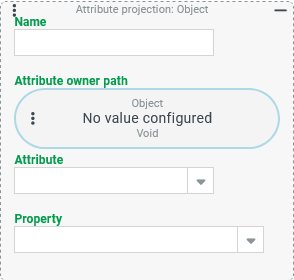
An [Attribute projection](/v1/docs/en/core-attribute-projection) searches the attributes of the attribute owner defined by the context or an explicitly defined **Attribute owner path** for attributes of an *attribute type* selected via the **Attribute** parameter.
Depending on the optional selection for the **Property** to be evaluated, either the complete attribute value or the value in the selected **Property** appears in the return value of the [Attribute projection](/v1/docs/en/core-attribute-projection).
The [Attribute projection](/v1/docs/en/core-attribute-projection) returns the attribute values of all instances of the selected attribute type, so that – in contrast to the [Typed attribute projection](/v1/docs/en/core-typed-attribute-projection) – a *multi-value* return value can always be assumed.
The possible uses of the [Attribute projection](/v1/docs/en/core-attribute-projection) in the context of different attribute types are illustrated by the following case differentiation:
| Carnality of the attribute/subtype ↓ | Attribute type is non-typed | Attribute type is typed |
| --- | --- | --- |
| | | **more specific** **subtype** | **all** **subtypes** |
| "singulär" (≤1) | Default access: [Singular attribute projection](/v1/docs/en/core-singular-attribute-projection) ([Attribute projection](/v1/docs/en/core-attribute-projection) applicable but no added value) | Default access [Typed attribute projection](/v1/docs/en/core-typed-attribute-projection) ([Attribute projection](/v1/docs/en/core-attribute-projection) not applicable due to lack of selection for the (sub)type) | [Attribute projection](/v1/docs/en/core-attribute-projection) evaluates instances for all *singular* and *plural* subtypes and returns a "flat" list (depending on the selection for **Property**). |
| "plural" (≥1:) | [Attribute projection](/v1/docs/en/core-attribute-projection) is the default access |
- A non-typed *singular* attribute can be selected as an **Attribute**. Technically, this is offered by the [Attribute projection](/v1/docs/en/core-attribute-projection). However, the [Singular attribute projection](/v1/docs/en/core-singular-attribute-projection) provides the same result.
- For a non-typed *plural* **Attribute**, e.g. the "communication information" (`AddressCommunicationInfo`) for the entity type "Address" (`Address`), an [Attribute projection](/v1/docs/en/core-attribute-projection) represents the default access.
- If the **Attribute** selection refers to an *attribute type* from the typed attributes group (e.g. "Text attribute" or "Company and address attribute"), the [Attribute projection](/v1/docs/en/core-attribute-projection) provides the attribute values of all *singular* and *plural* subtypes as a "flat list".
- The values of typed attributes with a *plural* subtype therefore do not appear "grouped" or "bundled" per attribute owner and subtype in the return value, but as individual values (with the same subtype but different `index` value).
**NOTE:** At database level, the [Attribute projection](/v1/docs/en/core-attribute-projection) implies an optional LEFT OUTER JOIN to the database table for the implementation of the *attribute type* selected in the **Attribute** parameter. If a search uses multiple instances of the [Attribute projection](/v1/docs/en/core-attribute-projection) for this *attribute type*, the same JOIN is used multiple times and is not executed redundantly. However, if an [Attribute projection](/v1/docs/en/core-attribute-projection) and a similarly equivalent [Singular attribute projection](/v1/docs/en/core-singular-attribute-projection) access the same *singular* attribute, this results in two redundant JOINs.
## Configuration
| Parameter | Type | Description |
| --- | --- | --- |
| **Name** | `String` | The optional **Name** parameter can be used to assign an (alias) name to the projection. - If no **Name** is specified, the name for the selected **Property** is used as the column name (if relevant). |
| **Attribute owner path** | Entity (Projection) | An **Attribute owner path** only needs to be explicitly defined by configuring a *projection* if the entity in the context of the search is not the owner of the attributes that are to be evaluated. This is relevant in the following cases, for example: - The *attribute owner* is an entity included in the search via [Entity join](/v1/docs/en/core-entity-join). - The *attribute owner* is a *position* of an entity in the context of the search. - The *attribute owner* is an entity embedded in the entity data in the context of the search, e.g. the "Address" (`address`) of an account (see [Users](/v1/docs/en/base-user), [Companies/Clients](/v1/docs/en/base-company-account)). |
| **Attribute** | Class (attribute type) | In the [Combobox](/v1/docs/en/fre-combo-box-vo) element for the **Attribute** parameter, a selection must be made from the options for the *attribute type* offered via *dropdown*. Only the *attribute types* that the entity type of the applicable *attribute owner* supports per implementation are available for selection here. **NOTE:** If no options are available for the **Attribute** or if options are missing, then the **Attribute owner path** may not have been set appropriately (e.g. the "address" of an account for which no attributes are implemented) |
| **Property** | Property (of the attribute value) | The [Combobox](/v1/docs/en/fre-combo-box-vo) element for the **Property** allows an optional *single selection* for one of the fields of the *attribute type* selected by **Attribute**. - If no selection is made for the **Property**, the [Attribute projection](/v1/docs/en/core-attribute-projection) returns the complete *attribute value* (`value`). For instances of *plural* attributes, access to the index property (`index` or `orderIndex`) in the *attribute value* can be useful. - There is no access to the fields of the parent attribute *entity* (such as the `id`), which contains the `value` field. |
## Examples
### Typical use case: Evaluate plural attribute
A tuple search should evaluate all tangible instances of the entity type "Address book entry" (`AdressBookEntry`, see [Address book entries](/v1/docs/en/base-address-book-entry)) that reference exactly one address (see [Addresses](/v1/docs/en/base-address)) via the "Address" (`address`) property and provide an overview of the data stored there via the "Communication information" (`CommunicationInfo`) *attribute type*.
Specifically, exactly one tuple is output for each address book entry, which contains, among other things, a list (or collection) of all communication information.
Configuration:
| The screenshot on the right shows the [Projections](/v1/docs/en/core-i-search-projection) configured for the tuple search: - First, a [Property projection](/v1/docs/en/core-property-projection) should name the `addressBookId` to identify the [Address book](/v1/docs/en/base-address-book) that contains the "found" address book entry. Without restrictions in the *condition*, the search considers entries from all (accessible) address books. - The second [Property projection](/v1/docs/en/core-property-projection) uniquely identifies the address book entry using its "ID" (`id`). - The third [Property projection](/v1/docs/en/core-property-projection) returns the "matchcode" from the address of the entry (`address.accMatchCode`), which is intended to enable the systems or users using the data to match the data found. - The [Collection projection](/v1/docs/en/core-collection-projection) shown in the image performs the evaluation of the "Communication information" described in the request under the (alias) name `COMMUNICATION_INFOS`. An [Attribute projection](/v1/docs/en/core-attribute-projection) with the following parameters is configured as a **Property of collection**: - The **Attribute owner path** refers to the `address` property via a [Property projection](/v1/docs/en/core-property-projection), which the address book entry uses to refer to exactly one address. - The *plural* attribute type "Communication information" is selected as the **Attribute** type. - Since no **Property** is selected, the [Attribute projection](/v1/docs/en/core-attribute-projection) lists complete "Communication information" attribute values so that the recipient has access to all payload properties of this attribute type ([Communication type](/v1/docs/en/base-communication-type), Context, Value, Index). | 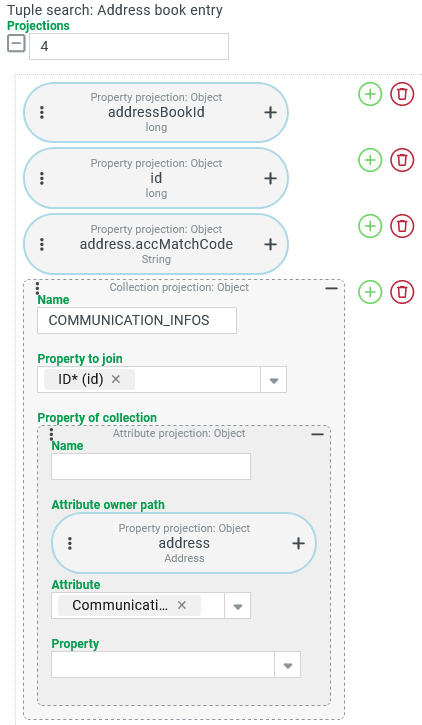 |
| --- | --- |
Runtime example:
```xml
addressBookId
id
address.accMatchCode
COMMUNICATION_INFOS
...
- 1051
- 953
- EDDH
-
noreply@ema.il
noreply2@doma.in
+49 (40) 50750
- 1051
- 952
- EDDF
-
+49 (180) 6 3724636
- 1051
- 951
- EDDL
-
+49 (211) 4210
...
```
- Each `row` element ("tuple") contains a list of "Communication information" assigned to the address book entry as the fourth item.
- The sample data shows attribute values with different [Communication type](/v1/docs/en/base-communication-type) (`EMAIL`, `PHONE`) and "context" (info, `alternate`, `noreply`) for classifying the specific information specified as "value" (`communicationValue`).
Variant: In order to "serve" the "Communication information" in a CSV search as direct readable text, a slightly different formatting of the return values from the [Attribute projection](/v1/docs/en/core-attribute-projection) is recommended:
- Instead of a "list column" (*collection*) in a tuple, the "Communication information" is output on several lines with repetition of the header data of the address book entry.
- The payload properties from the attribute should be distributed to individual columns.
Configuration:
| Instead of the [Collection projection](/v1/docs/en/core-collection-projection) in the previous example, the four instances of the [Attribute projection](/v1/docs/en/core-attribute-projection) shown in the screenshot (right) are used with a uniform parameterization except for the **Property**: - As the expanded instance shows, the **Attribute owner path** and the selection for **Attribute** (attribute type) remain unchanged. - A different **Property** is selected from the "payload" of the attribute value for each instance: - `orderIndex` - `communicationType` - `communicationContext` - `communicationValue` **NOTE:** These projections can be put together quite quickly by "copying, pasting and adapting". As described above in abstract terms, this does not result in four individual JOINS being generated internally and processed at runtime. Rather, all instances of the [Attribute projection](/v1/docs/en/core-attribute-projection) effectively refer automatically to the same join. **NOTE:** As no **Name** is specified, the internal property names appear as labels for each output column. | 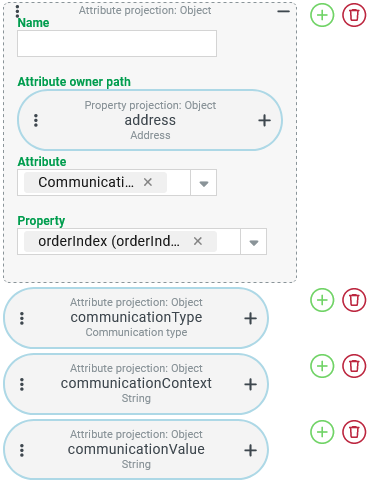 |
| --- | --- |
Runtime example:
For the same section of the sample data, the CSV search returns the text shown below, in which address book entries (see second column, `id`) with multiple lines of "Communication information".
```plaintext
addressBookId,id,address.accMatchCode,orderIndex,communicationType,communicationContext,communicationValue
...
1051,953,EDDH,0,EMAIL,noreply,noreply@ema.il
1051,953,EDDH,2,PHONE,info,+49 (40) 50750
1051,953,EDDH,1,EMAIL,alternate,noreply2@doma.in
1051,952,EDDF,0,PHONE,info,+49 (180) 6 3724636
1051,951,EDDL,0,PHONE,info,+49 (211) 4210
...
```
### Special use case: Evaluating typed attributes of a type
A CSV search should visualize the "progress" in the life cycle of [Shipments](/v1/docs/en/shp-shipment) through a list column that names the [Date type](/v1/docs/en/base-date-type) for each date attribute used.
Configuration:
| The screenshot on the right shows the configuration for CSV search **Projections**: - The [Property projection](/v1/docs/en/core-property-projection) maps the "ID" (`id`) property of the shipment to identify it. - The [Collection projection](/v1/docs/en/core-collection-projection) (**Name** `DATE_ATTRIBUTES`) uses an [Attribute projection](/v1/docs/en/core-attribute-projection) with the following parameterization as the **Property of collection**: - An **Attribute owner path** is not required as the shipment is the direct *attribute owner* in the context. - The *attribute type* "Date attribute" is selected as the **Attribute**. - The **Property** `dateType` should appear in the *Collection*, which names the subtype of the date attribute using a value from the dynamic enumeration [Date type](/v1/docs/en/base-date-type). **NOTE:** The internal name of the enumeration value appears in the CSV for the [Date type](/v1/docs/en/base-date-type) and not an associated localization. | 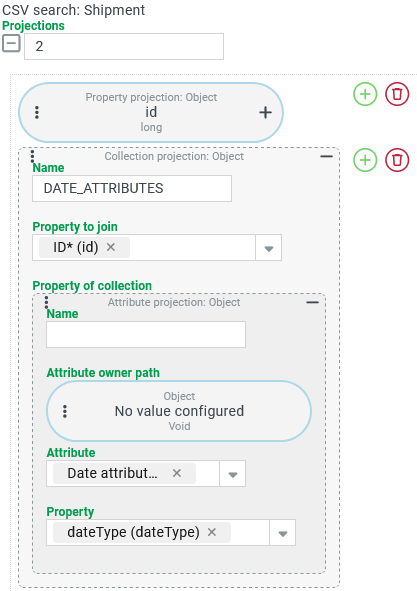 |
| --- | --- |
Runtime example:
```plaintext
id,DATE_ATTRIBUTES
...
4802,[DISPATCH_DATE_PLANNED]
4701,[ARRIVAL_PLANNED]
4651,[ARRIVAL_PLANNED]
4402,[]
4401,[]
4301,[ARRIVAL_PLANNED]
4253,[ARRIVAL_PLANNED]
4203,[]
4202,[ARRIVAL_PLANNED]
4201,[]
4151,[]
4101,"[VESSEL_DEPART, WAYPOINT_ARRIVAL_DATE, WAYPOINT_ARRIVAL_DATE, VESSEL_ARRIVAL, LOADING_DATE]"
4051,"[TEST_DATETYPE, ARRIVAL_PLANNED]"
4006,[]
...
```
> [!NOTE]
> **NOTE:**
>
> - The example shows items with date attributes with subtypes that can be singular or plural.
> - Only the [Date type](/v1/docs/en/base-date-type) `WAYPOINT_ARRIVAL_DATE` can be clearly recognized as plural, as it appears several times in the same *Collection* for one shipment.
> - Whether a [Date type](/v1/docs/en/base-date-type) that only appears once is singular by definition would also not be clear from the complete attribute value. An `index` property with the value 0 also appears for singular attribute values.
**IMPORTANT:** The procedure demonstrated here for evaluating attribute subtypes is only really practical if the following restrictions are not a problem:
1. The individual values in a [Collection projection](/v1/docs/en/core-collection-projection) cannot be sorted. The [Date type](/v1/docs/en/base-date-type) values also do not appear in a logical or chronological order (see `LOADING_DATE`).
2. The [Attribute projection](/v1/docs/en/core-attribute-projection) takes into account *all* attributes of the selected type, including those that are not currently "filled".
Side note:
If an attribute value is deleted, not only the associated attribute entity is usually retained in the data of the attribute owner entity, but also the attribute value itself, as this continues to refer to the subtype:
```xml
```
The search shown above therefore returns the [Date type](/v1/docs/en/base-date-type) in this case, although the attribute value does not contain any further "payload". The [Attribute projection](/v1/docs/en/core-attribute-projection) also provides no option for a corresponding restriction. Only an [Attribute join](/v1/docs/en/core-attribute-join) could do this.