---
title: "Case projection"
slug: "core-case-projection"
updated: 2026-05-19T07:38:25Z
published: 2026-05-19T07:38:25Z
canonical: "docs.lobstersoftware.com/core-case-projection"
---
> ## Documentation Index
> Fetch the complete documentation index at: https://docs.lobstersoftware.com/llms.txt
> Use this file to discover all available pages before exploring further.
# Case projection
> [!NOTE]
> **Projection – Abstract**
>
> **Purpose:** Returns a conditional return value via case differentiation with a variable number of *branches*.
>
> > [!TIP]
> > Tooltip
> >
> > - **Usage**: [Case projection](/v1/docs/en/core-case-projection) enables more or less complex case distinctions by linking alternative *projections* to *conditions*.
> > - **Parameter**:
> > - The **Name** parameter optionally defines the title of an output column (if relevant). If not specified, `null` may appear as the column name.
> > - A variable number of *branches* with a *condition* and a *projection* can be set up for case differentiation.
> > - The *conditions* are checked for each branch from left to right until one applies. The value of the *projection* in this branch is then returned.
> > - If no *condition* applies, the return value is "no value" (`$null`).
> > - If no *condition* is configured, the *branch* passes a test *unconditionally*.
> > - **Note:** All [Projections](/v1/docs/en/core-i-search-projection) configured in *branches* must provide the same data type (or "no value"/`$null`), otherwise errors will occur.
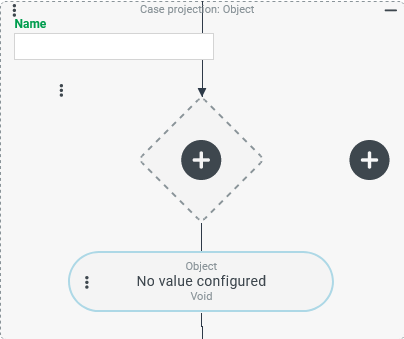
The [Case projection](/v1/docs/en/core-case-projection) provides a conditional return value via case differentiation with a variable number of *branches* for which different [Projections](/v1/docs/en/core-i-search-projection) can be configured.
A *condition* can be defined for each *branch* (via [Restrictions](/v1/docs/en/core-i-search-restriction)). The *conditions* are "checked" from left to right according to the following scheme:
- If the existing *condition* is fulfilled or no condition exists, the *projection* in the associated *branch* determines the return value for the [Case projection](/v1/docs/en/core-case-projection). Other *branches* are then irrelevant.
- If a *condition* exists but is not fulfilled, the next branch is checked. If no further *branch* exists, "no value" (`$null`) is returned.
---
**IMPORTANT:** If an [Case projection](/v1/docs/en/core-case-projection) uses more than one *branch*, all configured [Projections](/v1/docs/en/core-i-search-projection) must provide the same data type, otherwise errors will occur on the database side. Only "no value" (`$null`) is compatible with all other data types.
---
## Configuration
| Parameter | Type | Description |
| --- | --- | --- |
| **Name** | `String` | The optional **Name** parameter can be used to assign an (alias) name to the projection. - If no **Name** is specified, the text `null` may appear as the column name. As an exception, the column names of configured [Projections](/v1/docs/en/core-i-search-projection) (in the *branches*) are not accessed. |
| **Branches** |
| 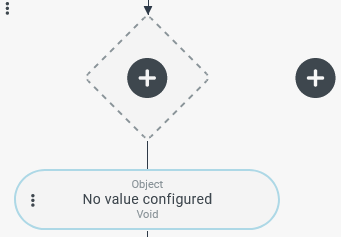 | Initially, the [Case projection](/v1/docs/en/core-case-projection) already contains a *branch* for which a *condition* or a *projection* can be configured immediately. - The menu icon (top left in the screenshot) is repeated for each *branch*. Among other things, it contains functions for copying and pasting (for entire *branches*). - An additional *branch* can be created or inserted from the clipboard using the  icon (on the right in the screenshot). |
| 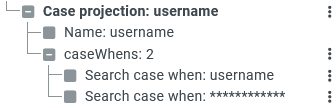 | The sequence (and therefore priority) of the branches can be adjusted via the tree view (far left in the editor) using *drag & drop*. - The screenshot (left) shows an example with two *branches* displayed by the tree in the `caseWhens` node. - *Drag & drop* actions for the elements in the `caseWhens` node immediately change the order of the branches. **NOTE:** A case distinction often contains an "Else" *branch* without a *condition*. If this is moved to an earlier position, subsequent *branches* become ineffective. |
| **Condition** | `` | The hash symbol indicates the placeholder for the configuration of a *condition* within a *branch*. - The first of several [Restrictions](/v1/docs/en/core-i-search-restriction) can be added to the configuration via the  icon. - If no *condition* is defined, the *branch* is treated as if a *condition* had been fulfilled. **NOTE:** The symbolism for rules (see [Rules and values](/v1/docs/en/orchestration-rules-resolvers)) looks similar for good reason. However, rules cannot be used for the *condition* within a search. It must be possible to evaluate the *condition* on the database side. However, [Rules and values](/v1/docs/en/orchestration-rules-resolvers) can only be evaluated directly in **Lobster Data Platform/Orchestration**. In special use cases, it can still be useful to integrate the results of *rules* or *values* into the logic of the *condition* via [Restrictions](/v1/docs/en/core-i-search-restriction). However, such results can only be included as constants in the database query generated by the search. |
| **Projection** | `` | The menu icon (far left within the *projection configuration*) offers [Projections](/v1/docs/en/core-i-search-projection) for selection via the context menu. - If no *projection* is defined, the *branch* returns "no value" (`$null`) if its return value is required. |
## Examples
### Typical example: Conditional editing of address data
| 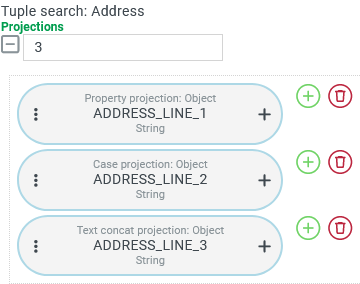 | A tuple search prepares the data from [Addresses](/v1/docs/en/base-address) in such a way that three projections prepare the "text lines" for the address when it is sent by post: - The first line (`ADDRESS_LINE_1`) should directly display the text in the "Name" property (`name1`). - The second line (`ADDRESS_LINE_2`) should be filled according to the following case distinction: - If the "Postbox" (`postboxNumber`) property is filled, the English localized property name should be concatenated with the value via a space character. - Otherwise, the "Street" (`street1`) property should be linked to the "Street number" (`streetNo`) property using a space. - The third line (`ADDRESS_LINE_3`) should output a static text concatenation according to the following scheme: - "Country" (`countryCode`) followed by a minus sign as separator - "ZIP code" (`zipcode`) followed by a space as separator - "City" (`city`) |
| --- | --- |
Runtime example:
```xml
ADDRESS_LINE_1
ADDRESS_LINE_2
ADDRESS_LINE_3
- fixIT Ltd.
- Uphill 247
- IE-X64GB Array on Byte
- MEGATRUST Inc.
- Postbox no. XYZ0815
- MT-SCM Smart City
...
```
Configuration:
As an application example for [Case projection](/v1/docs/en/core-case-projection), the definition for the second address line (`ADDRESS_LINE_2`) is particularly relevant, as the content is to be formatted depending on a *condition*.
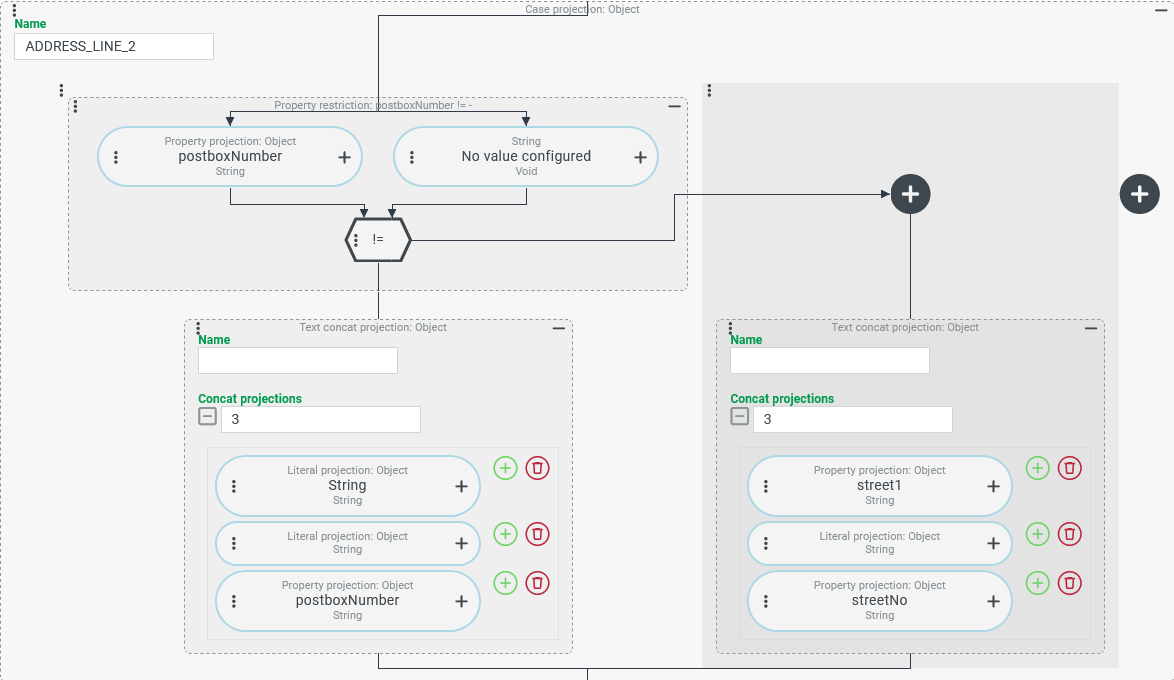
The [Case projection](/v1/docs/en/core-case-projection) is configured as shown in the screenshot:
- The text `ADDRESS_LINE_2` is entered directly as the **Name** for the output column.
- We set up two *branches* for the two cases to be distinguished:
- The first *branch* (left) is intended for the case where a "Postbox" is specified:
- The [Field restriction](/v1/docs/en/core-property-search) in the *condition* checks whether the "Postbox" (`postboxNumber`) property is "filled" (!=`null`).
- In this case, the [Concatenated projection](/v1/docs/en/core-concat-projection) below links the property name as a [Literal projection](/v1/docs/en/core-literal-projection) (see following note for details) with the value from the "Postbox" property via a space ([Literal projection](/v1/docs/en/core-literal-projection)) as desired.
- The second *branch* (right) regulates the default case (no "postbox" specified) via another [Concatenated projection](/v1/docs/en/core-concat-projection).
- No *condition* is configured, so this *branch* always takes effect if the *condition* for the first *branch* is not fulfilled.
**NOTE:** Further *branches* could be added to the case differentiation, e.g. to differentiate between the preparation with and without "house number" or to include the optional second property for the street (`street2`). Of course, it is also possible to use another instance of the [Case projection](/v1/docs/en/core-case-projection) within a *projection* in order to display a hierarchical "decision tree".
| **NOTE:** The prefix (property name) for the "postbox" within the [Concatenated projection](/v1/docs/en/core-concat-projection) configured in the first *branch* provides a [Literal projection](/v1/docs/en/core-literal-projection) whose **Literal** uses a [Value from localization](/v1/docs/en/core-resource-resolver) resolver with the following configuration: - We reference the **Bundle** via the [Class](/v1/docs/en/core-class-value-editor) for which the "Address" (`Address`) class is selected. - The internal property name `postboxNumber` is specified as the **Resource**. - If the **Static** option is selected, the desired [Locale](/v1/docs/en/core-locale) can be selected statically in the **Locale** parameter using the [Combobox](/v1/docs/en/fre-combo-box-vo). Here we select "English" so that the prefix "Postbox number." always appears with the default localization. | 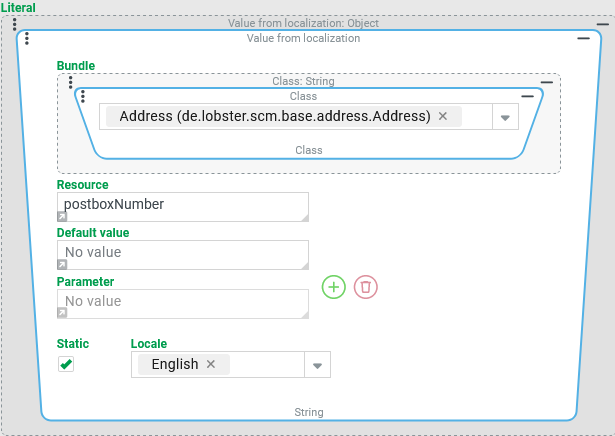 |
| --- | --- |
### More complex example: Conditional evaluation for a company and address attribute
A search should check whether the *consignee address* of a shipment (see [Shipments](/v1/docs/en/shp-shipment)) refers to a [Country](/v1/docs/en/core-country) that is on a "blacklist" for deliveries.
- The "blacklist" is given in the context by a `blacklist` variable, which contains a list of dynamic enumeration values of the [Country](/v1/docs/en/core-country) type.
- The *consignee address* of the shipment is defined via the "Company and address attribute" with the (sub)type "Consignee" (`CNE`):
- If an explicit "Address" (`address`) is specified for the `CNE` attribute, this should be decisive.
- If no explicit "Address" (`address`) is specified, the attribute should by convention reference a "Company" (`company`) instead, whose address (`company.address`) should then be included in the check.
Configuration:
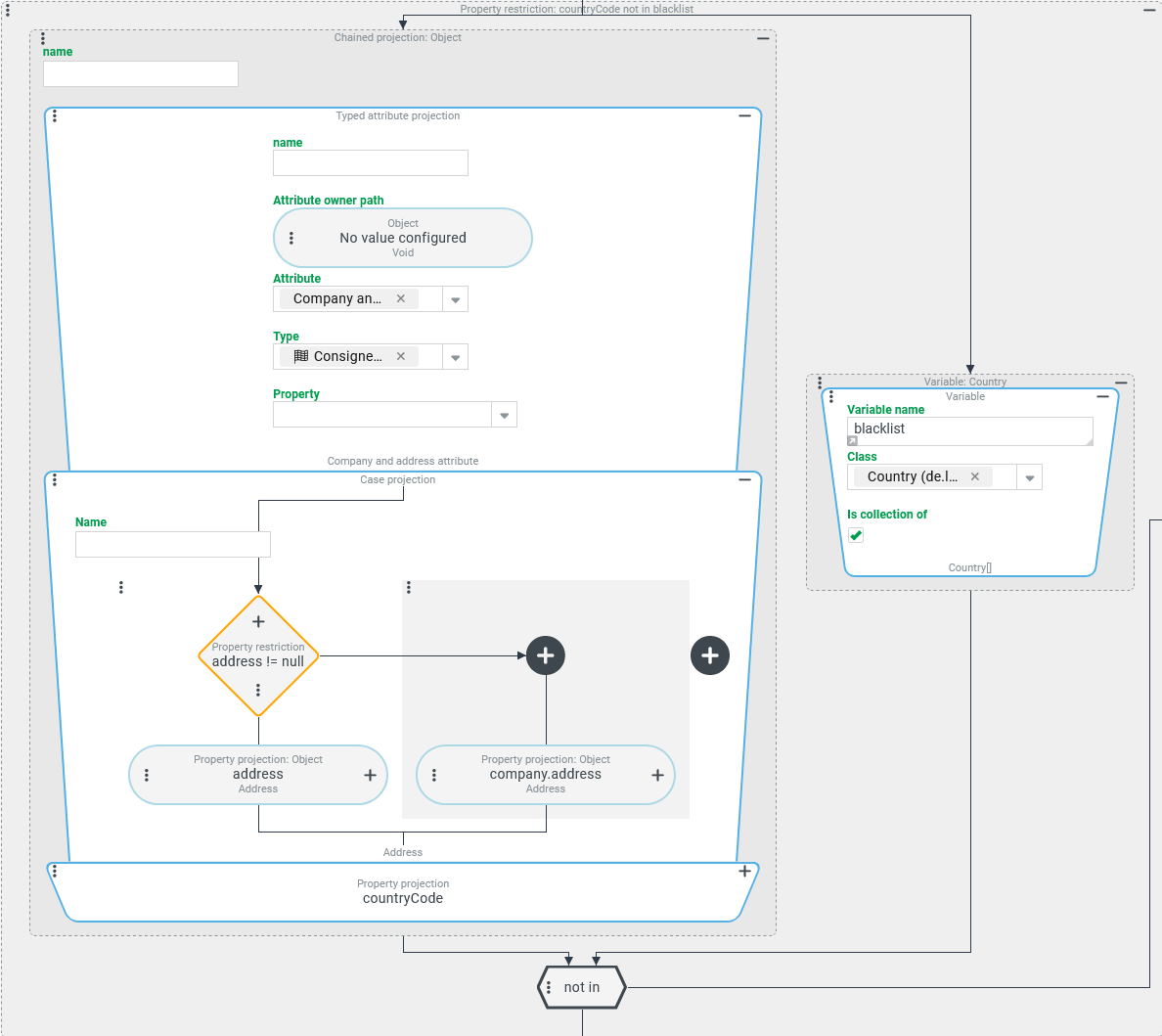
We limit ourselves here to the [Field restriction](/v1/docs/en/core-property-search), which is considered "passed" if the "recipient country" is not included in the "blacklist".
- A [Chained projection](/v1/docs/en/core-chained-projection) is used in the *check value* (left), which enables us to use a case distinction when "resolving" the company and address attribute at the address level:
- The [Typed attribute projection](/v1/docs/en/core-typed-attribute-projection) initially only accesses the complete attribute value:
- The **Attribute** parameter specifies that the attribute type should be "Company and address attribute".
- The **Type** parameter specifies the desired (sub)type "Consignee" (`CNE`) from the dynamic enumeration [Company type](/v1/docs/en/base-company-type) for the attribute type "Company and address attribute".
- No entry is made for the **Property** parameter so that the decision on the decisive property can be made in the next stage of the concatenation.
- Two *branches* are configured within the [Case projection](/v1/docs/en/core-case-projection):
- The first *branch* uses [Field restriction](/v1/docs/en/core-property-search) as a *condition* to determine whether the `address` property of the attribute is filled (*not* `$null`) and, if this is the case, passes the specified address (`address`) on to the next level of the concatenation.
- The second *branch* does not use a *condition*. It is used if the address property is not filled and then forwards the company `address` (`company.address`) to the next level of the concatenation.
- The final [Property projection](/v1/docs/en/core-property-projection) refers to the "Country" property (`countryCode`) to be evaluated, which should not be found in the list value of the `blacklist` variable.
- The *compare value* (right) is provided by the `blacklist` variable, in the form of a list of [Country](/v1/docs/en/core-country) values not specified here.
**NOTE:** The [Chained projection](/v1/docs/en/core-chained-projection) and the [Case projection](/v1/docs/en/core-case-projection) could be "avoided" by testing the following logic instead:(.address.countryCode not in blacklist) OR ((.address.countryCode == $null) AND (.company.address,countryCode not in blacklist))This logical aggregate can be implemented by linking several instances of the [Field restriction](/v1/docs/en/core-property-search). In contrast, the solution approach shown above avoids repeated access to the typed attribute (symbolically referred to as `<CNE>` in the aggregate) via the [Chained projection](/v1/docs/en/core-chained-projection) and the redundant reference to the list variable (`blacklist`) as a *compare value* via the [Case projection](/v1/docs/en/core-case-projection) used within.
**NOTE:** Special cases ("Attribute does not exist", "No company referenced", "Company does not reference an address", "Address does not specify a [Country](/v1/docs/en/core-country)") are not discussed here. We assume that the [Field restriction](/v1/docs/en/core-property-search) is executed in a context in which these cases are already excluded.
### Special case: Evaluating a rule in the condition of a case projection
In addition to the internal "ID" (`id`), a CSV search for [Users](/v1/docs/en/base-user) should output the "Username" (`username`) property as a readable projection if at least one of the following conditions is met:
- In the execution context, refers to a specific role ("Administrator") as the [Role of session](/v1/docs/en/base-session-role-value).
- The "Owner" (`ownerId`) of a listed user account is the [Company of session](/v1/docs/en/base-session-company-account-value).
If neither of the two conditions applies, the static text `************` should appear instead of the username.
Configuration:
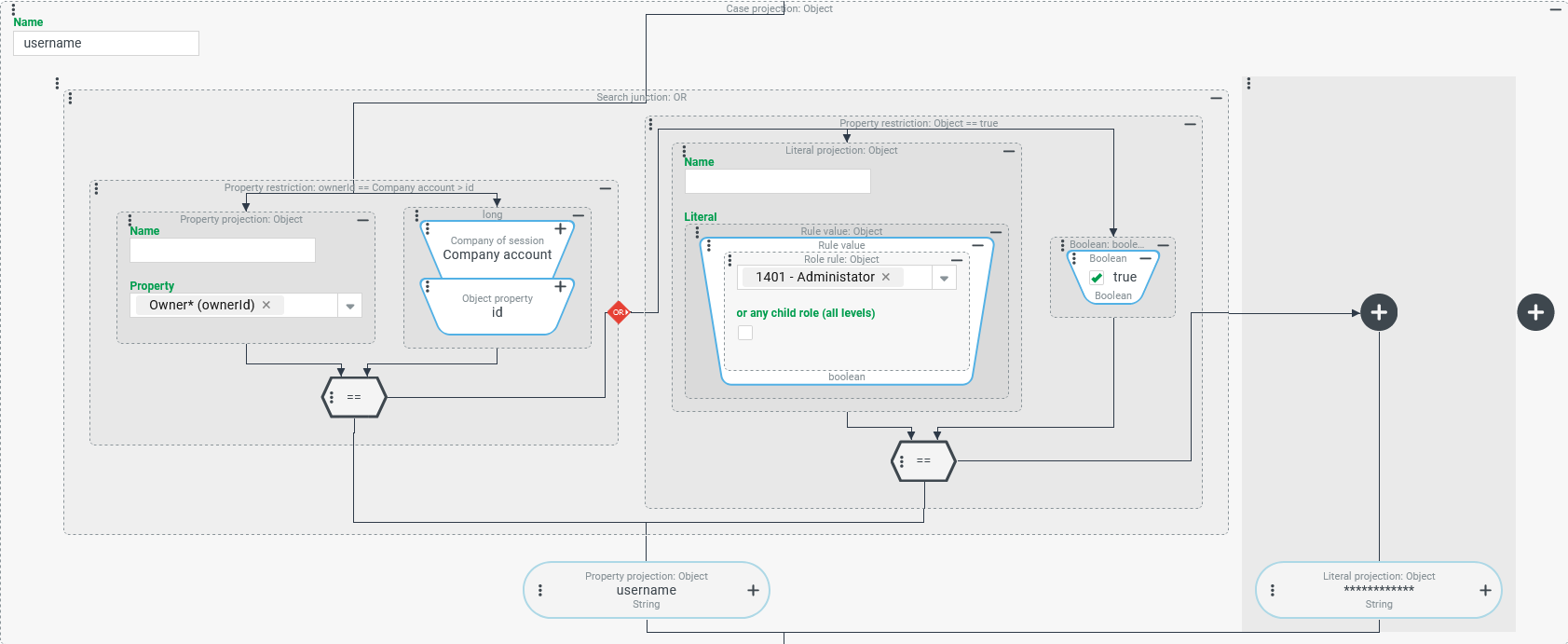
The conditional output for the "Username" (`username`) property is achieved by a [Case projection](/v1/docs/en/core-case-projection) as follows:
- We assign the internal property name (`username`) as the **Name** for the output column to avoid `null` appearing as the column title.
- The [Case projection](/v1/docs/en/core-case-projection) uses two *branches*:
- The first *branch* contains the *condition* to be evaluated with two instances of the [Field restriction](/v1/docs/en/core-property-search) in an OR conjunction:
- The first [Field restriction](/v1/docs/en/core-property-search) compares the "Owner" (`ownerId`) with the value from the `id` property of the [Role of session](/v1/docs/en/base-session-role-value), which is entered as a constant in the database query.
- The second [Field restriction](/v1/docs/en/core-property-search) uses a [Role rule](/v1/docs/en/base-role-rule), to determine whether the "Administrator" role applies as the [Role of session](/v1/docs/en/base-session-role-value).
- The Boolean return value of the [Role rule](/v1/docs/en/base-role-rule) is defined as a **Literal** in a [Literal projection](/v1/docs/en/core-literal-projection) via a [Rule value](/v1/docs/en/core-rule-value) resolver, as only projections can be defined on the left-hand side of the [Field restriction](/v1/docs/en/core-property-search).
- A static Boolean value (`true`) is used as a *compare value*.
- The [Property projection](/v1/docs/en/core-property-projection) for the "User" (`username`) property returns the name in plain text if one of the OR restrictions applies.
- Via the second *branch* of the case differentiation, a [Literal projection](/v1/docs/en/core-literal-projection) without an explicit *condition* returns the static text `************`, which is output if the *condition* in the first *branch* is not fulfilled.
Runtime example:
In the context of a login *without* the "Administrator" role and with a [Company of session](/v1/docs/en/base-session-company-account-value) whose "ID" (`id`) is `1902`, the search returns the following values, for example:
```plaintext
id,ownerId,username
51,501,************
151,502,************
4201,1902,jdsmith0815
4202,1902,jmmustermann
4203,1902,jmustermann
4204,1902,mjmartinez123
...
```