---
title: "Chained resolver"
slug: "core-chained-resolver"
updated: 2026-04-16T13:14:53Z
published: 2026-04-16T13:14:53Z
canonical: "docs.lobstersoftware.com/core-chained-resolver"
---
> ## Documentation Index
> Fetch the complete documentation index at: https://docs.lobstersoftware.com/llms.txt
> Use this file to discover all available pages before exploring further.
# Chained resolver
While all other [Resolvers](/v1/docs/en/core-i-value-resolver) are typically added to a value configuration by interactive selection in a context menu, a [Chained resolver](/v1/docs/en/core-chained-resolver) becomes exclusively an indirect part of a configuration.
| A [Chained resolver](/v1/docs/en/core-chained-resolver) is automatically created when a value configuration for which *exactly* one value resolver is already selected (e.g. an [Object property](/v1/docs/en/core-property-resolver) value resolver, see image above right) is extended by adding a second value resolver to a *value resolver chain* (see below right). As soon as the mouse cursor is moved into the area of an existing value configuration, value resolver  icons (gray in the image) appear at the top and bottom of the already added value resolver. Clicking on one of these icons opens a context menu that allows the selection of a value resolver type to be added at the line item in question. | Initial situation: *Single* value resolver 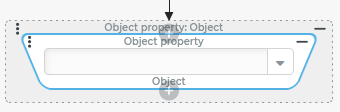 Adding another value resolver via the  symbol (top or bottom) results in a *value resolver chain*: 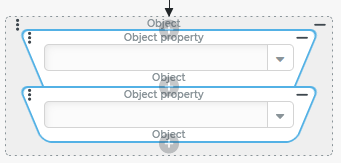 |
| --- | --- |
| The XML definition for the initial situation (see image above right) contains exactly one element, namely the [Object property](/v1/docs/en/core-property-resolver) value resolver (`PropertyResolver`). | ```plaintext ``` |
| The XML definition for the *value resolver chain* (see figure below right) of two value resolvers contains three elements, since an automatically generated [Chained resolver](/v1/docs/en/core-chained-resolver) combines both [Object property](/v1/docs/en/core-property-resolver) value resolvers. | ```plaintext ``` |
**NOTE:**
- If, after removing value resolvers from a *value resolver chain*, only a single value resolver remains, a [Chained resolver](/v1/docs/en/core-chained-resolver) is no longer required. It then disappears automatically.
- A [Chained resolver](/v1/docs/en/core-chained-resolver) cannot be added within a value resolver chain to separate a subset of value resolvers from the rest.
## Processing logic
As indicated by the arrow in the screenshots, an *input value* applicable in context is typically passed to the chained value configuration "from above", if applicable.
In the context of a *value resolver chain*, the return value of a processed value resolver is made available as an input value to a directly chained successor, if applicable.
If no successor exists, then the return value of the last value resolver of the chain defines the "final result" for the entire value configuration.
Example:
| A rule should check in the context of a company account (see [Companies/Clients](/v1/docs/en/base-company-account)) whether the postal code specified in the company address has less than 5 characters. In the example on the right, an [Entity property rule](/v1/docs/en/core-entity-property-rule) is AND-linked with the [Check type](/v1/docs/en/core-check-type-rule) on the "Company account" type. Value configuration for the left side of the [Entity property rule](/v1/docs/en/core-entity-property-rule) is configured as a *value resolver chain* of three [Object property](/v1/docs/en/core-property-resolver) value resolvers as shown: - The first [Object property](/v1/docs/en/core-property-resolver) value resolver accesses the value of the `address` property of the company account to be checked. - If available, the second chained [Object property](/v1/docs/en/core-property-resolver) value resolver receives the company address as *input value* and reads its "Zip code" (`zipcode`) property. - Finally, the third chained [Object property](/v1/docs/en/core-property-resolver) value resolver returns the length (`length`) of the string passed as *input value*, which can be accessed for any text value (`String`) as a property. **NOTE:** Instead of a chain of [Object property](/v1/docs/en/core-property-resolver) value resolvers, in many cases it is possible to replace them by a *single* [Object property](/v1/docs/en/core-property-resolver) value resolver in which the property names are chained via a full stop (.). In the example it works like this: 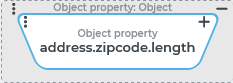 | 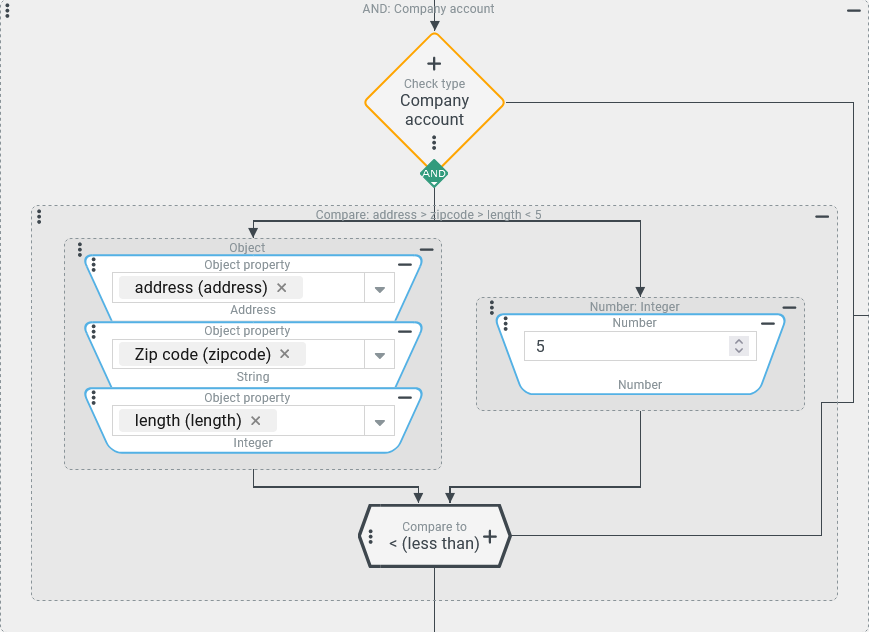 |
| --- | --- |
> [!NOTE]
> **IMPORTANT:** A value resolver chain is NOT ALWAYS processed from top to bottom!
>
> ---
>
> The graphical display and the general arrangement principles for configurations in **Lobster Data Platform/Orchestration** suggest that a value resolver chain is processed step-by-step from *top to bottom*, starting from the *input value*.
>
> In many use cases (see example above), this intuitive assumption is also perfectly confirmed by the results obtained with specific value configurations.
>
> However, a value resolver chain is actually processed backwards (in the graphic "from bottom to top") and only as far as necessary.
>
> If the *value resolver chain* contains a value resolver of a type for which the *input value* is irrelevant ([Static values](/v1/docs/en/core-literal-value-resolver), [Variable](/v1/docs/en/core-storage-value), [Session based (Resolvers)](/v1/docs/en/orchestration-resolvers-session) etc.), all preceding values (above in the chain) are not processed.
Specific example:
Following the example above, two value resolvers were added to the existing *value resolver chain*:
| - At line item 2 of the chain, the complete company address (`address`) is passed to the `companyAddress` variable by a [Store value as variable](/v1/docs/en/core-store-value-resolver) value resolver. - A static [Text](/v1/docs/en/core-text-value-editor) was inserted at line item 4 of the chain to simulate the presence of a four-digit postal code (`8800`) when running [Tests](/v1/docs/en/core-testing-set). Result: Only the last two value resolvers in the chain are processed at all, since the static text at line item 4 makes further "inquiries" (above) superfluous. The `companyAddress` variable is therefore not filled until the static test text value (`8800`) is removed again. | 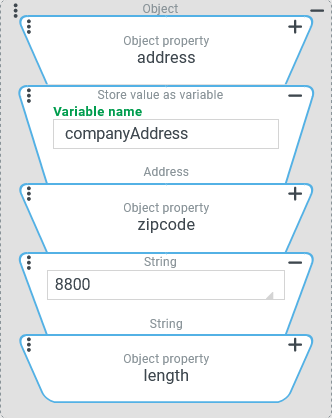 |
| --- | --- |