---
title: "Default value"
slug: "core-default-value-resolver"
updated: 2026-04-27T07:58:45Z
published: 2026-04-27T07:58:45Z
canonical: "docs.lobstersoftware.com/core-default-value-resolver"
---
> ## Documentation Index
> Fetch the complete documentation index at: https://docs.lobstersoftware.com/llms.txt
> Use this file to discover all available pages before exploring further.
# Default value
> [!NOTE]
> Value resolver – Abstract
>
> **Purpose:** Defines a *fallback* value that is determined via the value resolvers configured in the **Default value** parameter exactly when "no value" (`$null`) or an equivalent value due to parameterization is present as *input value* at runtime.
>
> > [!TIP]
> > Tooltip
> >
> > - **Usage**: The value resolver provides the *fallback* value defined by the **Default value** parameter if the *input value* is "no value" (`$null`). In all other cases (e.g. even if the *input* *value* is an empty string or an empty list), the *input value* is returned directly by default. In conjunction with the **On empty string too** is empty option, an empty string will be treated as an *input value* as if "no value" (`$null`) were present as an *input value*.
> > - **Parameter**:
> > - The **Default value** parameter optionally allows the configuration of one or more concatenated value resolvers that are processed at runtime exactly when the *input value* is "no value" (`$null`). Without any configuration, `$null` is considered a *fallback* value, which effectively makes the value resolver ineffective.
> > - The **On empty string too** option can be set if the **Default value** is also returned when an empty string ("") is present as an *input value*.
> > - **NOTE:** The data type for the return value defined by a configuration for the **Default value** formally overrides the possibly alternative data type of the input value for the context of the configuration (see the manual for details).
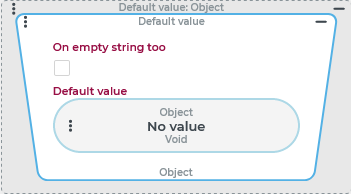
The [Default value](/v1/docs/en/core-default-value-resolver) resolver defines a *fallback* value that is determined by default via the value resolvers configured in the **Default value** parameter exactly when "no value" (`$null`) is present as the *input value* at runtime or an equivalent value based on parameterization. For the runtime behavior the following cases are differentiated:
| *Input value* at runtime | "On empty string too" option | Return value at runtime | Behavior |
| --- | --- | --- | --- |
| No value (`$null`) | *irrelevant* | *Default value* | The **Default value** is provided as a fallback value. Without configuration (default) "no value" (`$null`) is returned. |
| Empty string ("") |  selected |
|  not selected (default) | *Input value* | The *input value* is provided. Value resolvers for the **Default value** are not executed. |
| *Any other value* | *irrelevant* |
**IMPORTANT:** An empty list ([]) is not considered equivalent to "no value" (`$null`).
**NOTE:** The [Default value](/v1/docs/en/core-default-value-resolver) resolver is used particularly often by means of concatenation after another value resolver, for whose return value it is to provide the *fallback* value if required. However, this is not obligatory. As usual, the *reference object* in the context is considered the *input value* if no concatenated predecessor exists. The [Default value](/v1/docs/en/core-default-value-resolver) resolver can also be used to generate a "missing" *reference object* (e.g. via the [Create instance](/v1/docs/en/core-create-instance-resolver) value resolver or the [List item](/v1/docs/en/core-list-item-resolver) value resolver).
## Configuration
The **Default value** parameter optionally allows the configuration of one or more concatenated value resolvers that are processed at runtime exactly when the *input value* is "no value" (`$null`).
- If there is no configuration for the **Default value** parameter, the return value is "no value" (`$null`).
**NOTE:** However, with `$null` as a *fallback* value, the [Default value](/v1/docs/en/core-default-value-resolver) resolver is effectively ineffective if the **On empty string too** is checked.
> [!WARNING]
> **IMPORTANT:**
>
> Since a value resolver configuration for the **Default value** is only relevant at runtime if "no value" (`$null`) is present as *input value*, value resolvers configured for the **Default value** do not refer to its data type in the context of the configuration. The reference object that may exist in the context of the value resolver also does not automatically apply to value resolvers configured in the **Default value** parameter. If the **Default** **value** is determined on the basis of a *reference object*, this must be explicitly specified. Typically, a [Variable](/v1/docs/en/core-storage-value) value resolver is used at the beginning of the value resolution chain. The *reference object* from the context of the value resolver can also be addressed via the `entity` variable, which is automatically filled by the system.
| The **On empty string too** option is unchecked by default. If the option (see image on the right) is checked, the configured **Default value** will be used even if the input value is an empty string. In the example on the right, an empty string in the input value would be replaced by "no value" (`$null`) because no **Default value** is configured. | 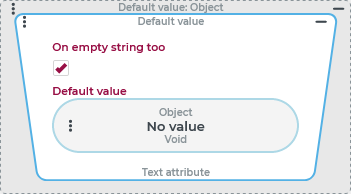 |
| --- | --- |
**NOTE:** If at least one value resolver is configured for the **Default value**, its data type overrides the possibly alternative data type of the *input value* in the context of the configuration. In specific terms, this means, for example, that the configuration of "subsequent" value resolvers (e.g. via concatenation) always "assumes" the **Default value** as the return value.
The following very simple example illustrates the effect:
| In the context of an unspecified text attribute, the **Object Resolver** parameter in an [Execute with](/v1/docs/en/core-with-actor) event action accesses its "Text" (`textValue`) field, whose value is defined as a `String`. The concatenated [Default value](/v1/docs/en/core-default-value-resolver) resolver should return the `Long` value `404` as a *fallback* if no text is returned from the attribute, for example, because it does not exist at all. At runtime, the returned data type can effectively be both `String` and `Long`. For the context of the configuration, however, `Long` is always assumed in purely formal terms, since this data type is technically at the end of the chain. If the value resolver chain is extended by a value resolver from the [String processing](/v1/docs/en/orchestration-resolvers-text) category in the context of the configuration, the reference to the `Long` data type results in the [Substring](/v1/docs/en/core-sub-string-resolver) value resolver, for example, appearing in the "Unsuitable" category. In practice, such restrictions can often simply be ignored, provided – as in the example of the `Long` data type (after an automatic string conversion) in conjunction with the [Substring](/v1/docs/en/core-sub-string-resolver) value resolver – the expected results are achieved. However, this is not always guaranteed. **NOTE:** If the configuration is formally oriented primarily to the data type of the value "above" the [Default value](/v1/docs/en/core-default-value-resolver) resolver, it may be advantageous to initially dispense with the [Default value](/v1/docs/en/core-default-value-resolver) resolver and only add it when the configuration for the data type expected in the normal case (*input value* is not `$null`) has been completed. In any case, [Tests](/v1/docs/en/core-testing-set) should finally be performed to ensure that even a **Default value** with an alternative data type is processed without any problems and with the expected results. | 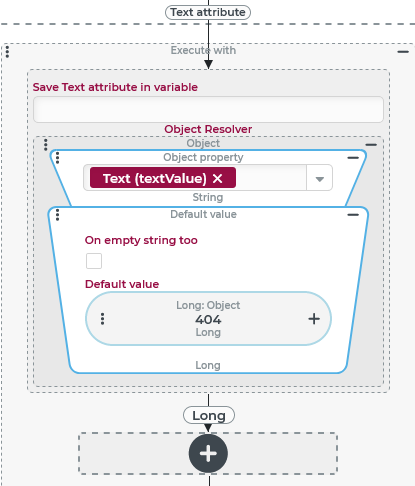 |
| --- | --- |
## Examples
### Simple use case: Remove empty text field of an entity from XML
The input form for [Roles](/v1/docs/en/base-role) offers, among other things, a [Text field](/v1/docs/en/custom-custom-text-field) element for editing the "Role description" (roleDescription) field, in which an informative description for the role can optionally be stored.
If the server-side saved state of a role already contains a "Role description" and all text characters are removed in the input form, an "empty string" is assigned to the role description when the role is saved.
This leaves an empty `roleDescription` element in the XML format:
XML export (shortened) of a role with "emptied" role description
```plaintext
myRole
1001
...
```
The user cannot use the input form to make the `roleDescription` element disappear completely after the entity field has been saved once.
On the other hand, in an event handler that is executed when a role is "changed", the "Role description" (`roleDescription` ) field can be automatically assigned "no value" (`$null`) to clear the field completely.
Configuration:
| The event handling shown on the right reacts to the "Change" event (see [Common action event](/v1/docs/en/core-common-action-event)) as the **Triggering event**. --- The **Validating rule** uses [Check type](/v1/docs/en/core-check-type-rule) to ensure that the following event actions are executed only in the context of a "Role". --- The only **Action on passed rule** is a [Set value](/v1/docs/en/core-set-value-actor) event action: - The left side defines the "Role description" (`roleDescription`) field as the target of the assignment. - The right side accesses this field in read-only mode via the [Object property](/v1/docs/en/core-property-resolver) value resolver. The concatenated [Default value](/v1/docs/en/core-default-value-resolver) resolver should become active exactly if the field contains an empty string. Then the **Default value** "no value" (`$null`) is assigned so that the field is deleted and also "disappears" from the XML. - The **On empty string too** option has been checked to ensure the desired replacement in case the user has emptied the "Role description" in the input form. - If the "Role description" field does not yet exist because it has never been filled, the input value (`$null`) is replaced by the default value (`$null`). The assignment is then "value neutral". - Any other value for the "Role description" other than `$null` will be assigned to this field unchanged. This makes the assignment "value neutral" as well. | 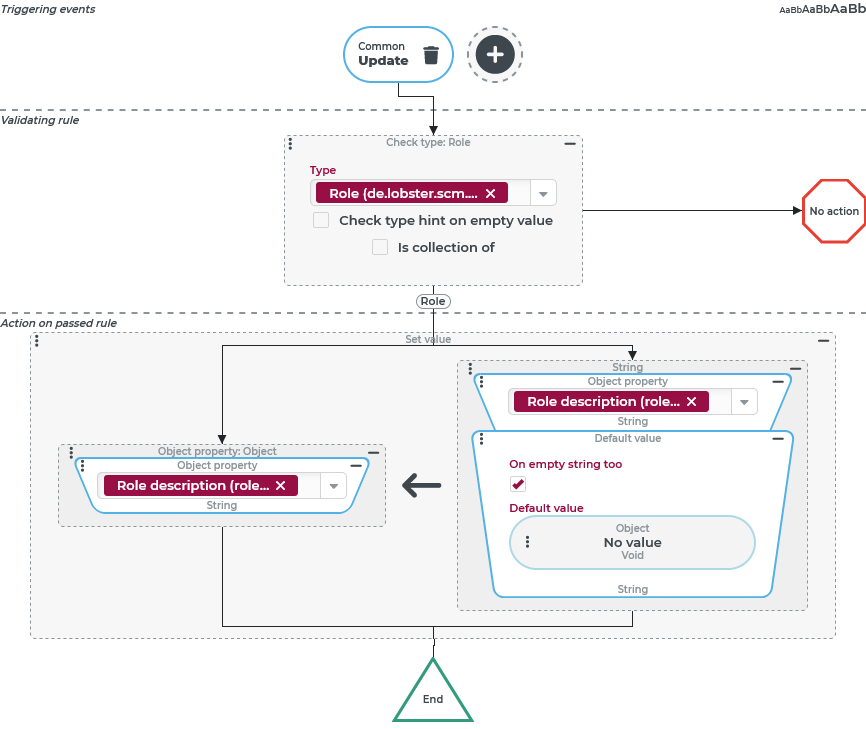 |
| --- | --- |
### Typical use case: Define a fallback value for the source value in the context of an assignment
Within a shipment (see [Shipments](/v1/docs/en/shp-shipment)) the "Invoice address" (more *precisely*: the address in a "Company and address attribute" for the [Company type](/v1/docs/en/base-company-type) "Bill to party"/`INV`) should be initialized automatically with an existing address specification for another company type.
There are two types of companies that can be considered as the source for the pre-assignment:
1. [Company type](/v1/docs/en/base-company-type) "Principal" (`AAL`)*or – if no address for the "Principal" is given –*
2. [Company type](/v1/docs/en/base-company-type) "Delivery party" (`DDA`)
Configuration:
The desired priority rule when initializing the "Billing address" can be solved clearly with the [Default value](/v1/docs/en/core-default-value-resolver) resolver:
| To prepare, two [Set value](/v1/docs/en/core-set-value-actor) event actions transfer the addresses from the two company and attributes into variables that are candidates for initialization. This is not technically necessary, but it allows a clearer display and simplifies access to the *fallback* value in the [Default value](/v1/docs/en/core-default-value-resolver) resolver, for which the shipment is not automatically available as a *reference object* (see note in the "Configuration" section). The internal name for the respective [Company type](/v1/docs/en/base-company-type) (`AAL`, `DDA`) is used as the variable name. **NOTE:** If no address is specified for the respective [Company type](/v1/docs/en/base-company-type), the variable is assigned "no value" (`$null`). The third [Set value](/v1/docs/en/core-set-value-actor) event action can operate on the two variables to define the actual value assignment for the "Billing address" (on the left side of the assignment). On the right side of the assignment, two value resolvers are concatenated for this purpose: - The first [Variable](/v1/docs/en/core-storage-value) value resolver first accesses the higher priority source value from the variable `AAL`. - The concatenated [Default value](/v1/docs/en/core-default-value-resolver) resolver returns the `AAL` address from the *input value* if it exists (i.e. is not `$null`). If no `AAL` address is available, the `DDA` address is used as a "substitute". If this does not exist either, no address is assigned (or any existing assignment is deleted). | 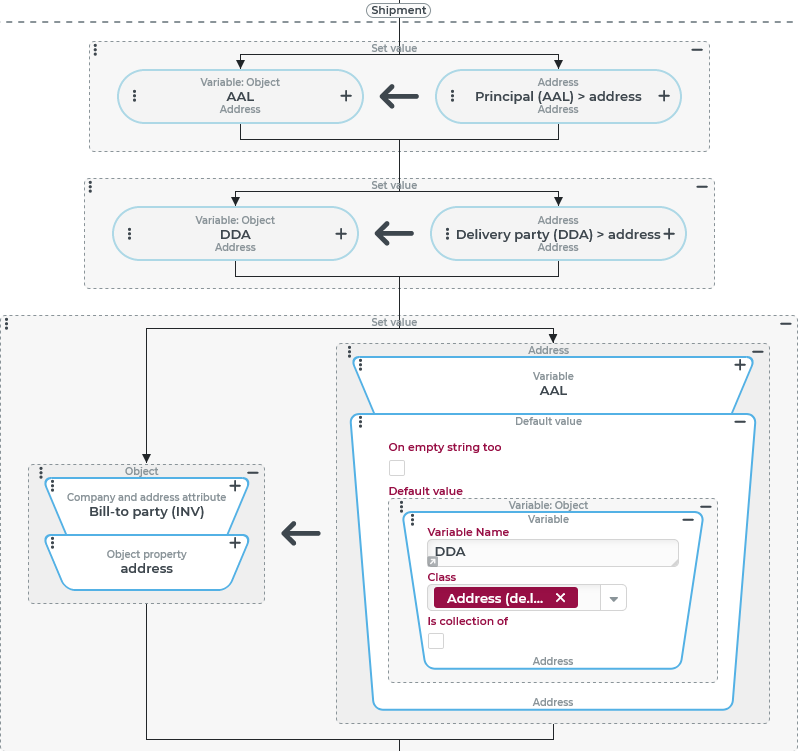 |
| --- | --- |
### More complex use case: Cascading testing of multiple fallback values
Sometimes several sources come into question for a value assignment, which are checked step by step as a cascade of *fallback* values until a value is found.
In a specific use case, the [User of session](/v1/docs/en/base-session-user-value) is addressed in a notification about the first filled field from the following list:
- "Name 3" from the address (`address.name3`) *or if not filled in.*
- "Name 2" from the address (`address.name2`) *or if not filled in.*
- "Name 1" from the address (`address.name1`) *or if not filled in.*
- "Username" (`username`)
**NOTE:** Since the "Username" for a user account must always be filled in, this field is the ideal completion for the *fallback* cascade.
Runtime example:
| Username | Name 1 | Name 2 | Name 3 | Effective salutation |
| --- | --- | --- | --- | --- |
| anne | Anne | | | Anne |
| abusch | Anne | Busch | | Busch |
| ahbusch | Anne | Helga | Busch | Busch |
| import | | | | import |
Configuration:
In the configuration, a *fallback* cascade can be achieved using two different methods:
- Concatenating multiple instances of the [Default value](/v1/docs/en/core-default-value-resolver) resolver
- Nesting multiple instances of the [Default value](/v1/docs/en/core-default-value-resolver) resolver
In both cases, it must be taken into account that the *reference object* (*here*: the user account identified as the [User of session](/v1/docs/en/base-session-user-value)) must be addressed again in each instance of the [Default value](/v1/docs/en/core-default-value-resolver) resolver in order to access its fields in the **Default value** parameter.
*Solution option 1:* Concatenating several instances of the [Default value](/v1/docs/en/core-default-value-resolver) resolver
| The configuration shown on the right shows how the "*fallback* cascade" can be mapped by *concatenating* instances of the default value resolver: - The [User of session](/v1/docs/en/base-session-user-value) value resolver, in conjunction with the [Input object (type safe)](/v1/docs/en/core-root-entity-resolver) value resolver, returns the currently logged in user account. - Per [Store value as variable](/v1/docs/en/core-store-value-resolver), this user account is stored in the `USER` variable to simplify repeated access by the various instances of the [Default value](/v1/docs/en/core-default-value-resolver) resolver. - The concatenated [Object property](/v1/docs/en/core-property-resolver) value resolver accesses the `address.name3` field, which has the highest priority for consideration as a salutation. - The following concatenated instances of the [Default value](/v1/docs/en/core-default-value-resolver) resolver access further source field candidates according to the required hierarchy, if necessary, because there is no available input value yet. The user account stored in the `USER` variable must first be set as the *reference object* in the **Default value** parameter. **NOTE:** If the user account were given as a *reference object* (e.g. within an [Execute with](/v1/docs/en/core-with-actor) event action), the [Store value as variable](/v1/docs/en/core-store-value-resolver) value resolver could be omitted if the `entity` variable, which is automatically filled by the system, is specified in the **Default value** instead of the `USER` variable. | 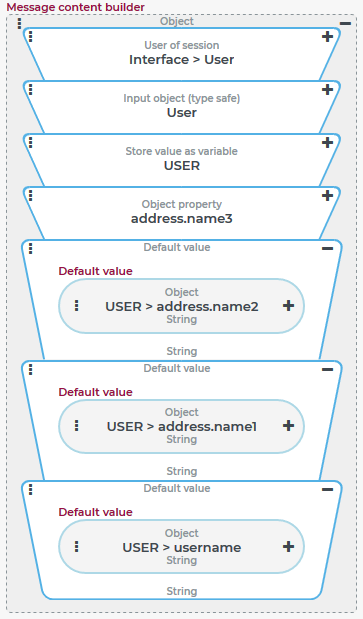 |
| --- | --- |
*Solution option 2:* Nesting of several instances of the [Default value](/v1/docs/en/core-default-value-resolver) resolver.
| The concatenation of the [Default value](/v1/docs/en/core-default-value-resolver) resolvers shown above results in all three instances of the value resolver always being run through "serially" at runtime, even if a value has already been found for the salutation. The **Default value** is only "resolved" in each case as long as no value has yet been found for the salutation. But the chain must be worked off purely in a technical way step by step up to the last value resolver, although the final result is already fixed. In the alternative configuration shown on the right, nesting the instances of the [Default value](/v1/docs/en/core-default-value-resolver) resolver ensures that the *fallback* cascade only needs to be run until a result is obtained: - The configuration is identical to the above example up to the first instance of the [Default value](/v1/docs/en/core-default-value-resolver) resolver. - The second instance of the [Default value](/v1/docs/en/core-default-value-resolver) resolver, on the other hand, is now not appended at the end of the entire concatenation, but is appended to the value resolver chain in the **Default value** parameter of the first instance. At this position the instance is processed only if the `address.name3` field does not contain a value. - The value resolver chain in the **Default value** of the second instance is executed only if `address.name2` does not contain a value either. Only then is the third instance of the [Default value](/v1/docs/en/core-default-value-resolver) resolver contained therein processed at all, to check whether the access to `address.name1` returns a return value. - The value resolver chain in the **Default value** of the third instance is executed only if none of the previously checked fields contains a value. Then the user name (`username`) is assigned as a salutation, which by definition must be filled in for each user account. | 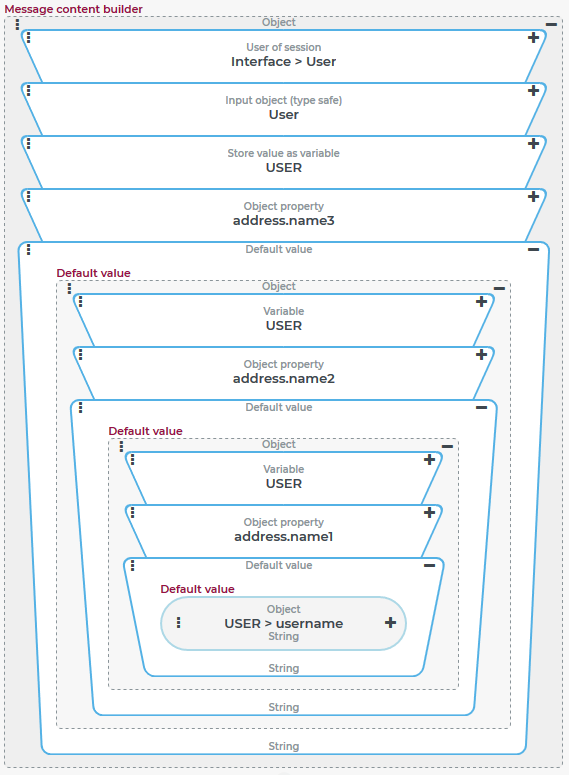 |
| --- | --- |
**NOTE:** Even if the nested use of the [Default value](/v1/docs/en/core-default-value-resolver) resolver in *solution option 2* represents the logically more consistent configuration and theoretically promises a minimal performance advantage with an increasing number of "escalation levels", *solution option 1* appears to be significantly more transparent and more "readable" for a cascade of only three levels. It is also easier to maintain if the order of the steps in the cascade needs to be adjusted later.