---
title: "Print document"
slug: "core-print-document-content-builder"
updated: 2026-04-15T06:39:13Z
published: 2026-04-15T06:39:13Z
canonical: "docs.lobstersoftware.com/core-print-document-content-builder"
---
> ## Documentation Index
> Fetch the complete documentation index at: https://docs.lobstersoftware.com/llms.txt
> Use this file to discover all available pages before exploring further.
# Print document
*See also:* [Print documents](/v1/docs/en/core-print-document) ,[Print document type](/v1/docs/en/print-print-document-type), [Print document category](/v1/docs/en/print-print-document-kind)
> [!NOTE]
> Value resolver – Abstract
>
> **Purpose:** Maps the data from one or more related objects to one of the [Print documents](/v1/docs/en/core-print-document) applicable in the data context, and generates content from it in a selectable output format.
>
> > [!TIP]
> > Tooltip
> >
> > - **Usage**: The data context must be a single serializable object or a list of such objects. From their data a *Print XML* is generated, which is transferred to one of the applicable [Print documents](/v1/docs/en/core-print-document). The parameters (**Document type**, **Mode**, **Category** and **Search key**/**Search value**) serve as selection criteria to define a reproducible selection of the print document to be used among all *applicable* print documents for the data context. The **Output format** parameter determines the format of the return value transferred as "action event content".
> > - **Parameter**:
> > - **Document type** (optional): Defines a specific [Print document type](/v1/docs/en/print-print-document-type) for the print document used.
> > - **Mode** (required field): Defines the [Print document mode](/v1/docs/en/print-print-document-mode) that the used print document must support ("Single" and/or "Multi").
> > - **Category** (optional): Defines allowed values for the [Print document category](/v1/docs/en/print-print-document-kind) for the print document used.
> > - **Search key** (optional): Defines the name of a variable to which the **Search value** is assigned.
> > - **Search value** (optional): Defines the value of the variable defined as the **Search key**, which can be evaluated by [Association criteria](/v1/docs/en/core-association-criteria) for [Print documents](/v1/docs/en/core-print-document).
> > - **WARNING:** The selected **Output format** must be supported by the print **Document type**, otherwise "no value" (`null`) will be returned.
> > - **NOTE:** This value resolver is only available on the server side and not in a [Client Workflow](/v1/docs/en/frebehav-client-workflow).
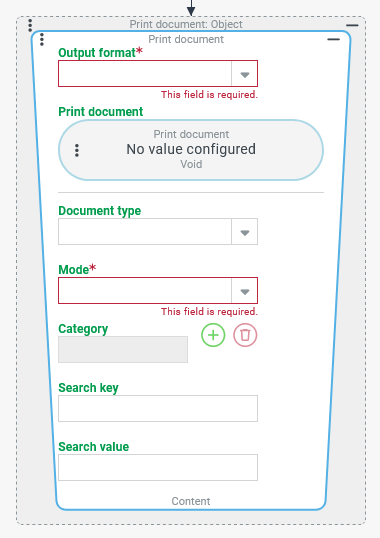
The [Print document](/v1/docs/en/core-print-document-content-builder) value resolver maps the data from one or more serializable objects to one of the [Print documents](/v1/docs/en/core-print-document) applicable in the data context and returns the content generated from it in the selected **Output format** as a data object of the **Content** (`content`) type.
Based on the *reference object* of the [Print document](/v1/docs/en/core-print-document-content-builder) value resolver, an object of the "Print" (`core:Print`) type is first created in a similar way to the interactive "Print" (see also the "Display Print XML" command in the "Export" ribbon in relevant views). On one hand, the `Print` object contains general information about the applicable login context (especially user/`user` , company/`currentOwner` and language/`locale`). On the other hand, it contains the data of the *printable objects* (as a list in the `printObjects` field). As a rule, [Print documents](/v1/docs/en/core-print-document) refer to selected content from the `Print` object, in which they access the structure of the *Print XML* via `XPath` expressions.
> [!NOTE]
> Background: What are "printable objects":
>
> All *serializable objects* are considered "printable objects", i.e. objects that refer to a server-defined *class* and use its predefined data structure.
>
> - If the *reference object* of the [Print document](/v1/docs/en/core-print-document-content-builder) value resolver is a single *serializable object*, then its data appears as the only element of the list in the `printObjects` field.
> - If the *reference object* of the [Print document](/v1/docs/en/core-print-document-content-builder) value resolver is a list of objects, then the `printObjects` field lists the subset of *serializable objects* from that list.
>
> **NOTE:** While the interactive "Printing" through the context of an overview ensures that all selected objects refer to the same class, the [Print document](/v1/docs/en/core-print-document-content-builder) value resolver can also be executed with a list of objects of different classes. If this option is used, this must be taken into account in an appropriate form when designing the [Print documents](/v1/docs/en/core-print-document) and their [Association criteria](/v1/docs/en/core-association-criteria).
The selection of the print document used is made according to the following procedure:
If there is a *value configuration* for the **Print document** parameter, a "Print document" entity is expected for its return value at runtime. The selection process via [Association criteria](/v1/docs/en/core-association-criteria) and further parameters is then omitted.
- Whether an explicitly provided "Print document" entity has [Association criteria](/v1/docs/en/core-association-criteria) assigned to it at all is just as irrelevant as whether any assigned [Association criteria](/v1/docs/en/core-association-criteria) applies in context.
- The data state of an explicitly provided "Print document" entity can also be "volatile" – i.e.: unsaved. It can therefore be different from the server-side state or not yet known there at all.
- If the value configuration does not return a "Print document" entity or one whose document type is not compatible with the selected **Output format**, the return value is "no value" (`$null`). An error message will not occur!
Only if there is no *value configuration* for the **Print document** parameter, the conventional selection procedure with the following steps takes effect:
1. According to the *all-matching* principle, the [Print documents](/v1/docs/en/core-print-document) *applicable* to the current context are determined by evaluating the [Association criteria](/v1/docs/en/core-association-criteria):
- This applies to all [Print documents](/v1/docs/en/core-print-document) with an assignment to at least one association criterion that applies in the current data context and for which read access exists in the current login context.
- Assignments to a variable via the optional parameters **Search key** and **Search value** can be checked within the [Association criteria](/v1/docs/en/core-association-criteria).
- If no print document exists or none of the configured [Print documents](/v1/docs/en/core-print-document) are *applicable*, the [Print document](/v1/docs/en/core-print-document-content-builder) value resolver returns "no value" (`null`).
2. As far as the configuration contains defaults for the partly optional parameters **Document type**, **Mode** and **Category**, the list of *applicable* [Print documents](/v1/docs/en/core-print-document) is limited to "suitable" candidates (for details see "Configuration" below).
- If none of the *applicable* [Print documents](/v1/docs/en/core-print-document) meet all of the criteria used, no content is generated and the return value of the value resolver is "no value" (`null`).
3. If several [Print documents](/v1/docs/en/core-print-document) meet all criteria, the priority of the applicable association criteria (from step 1) determines the selection: The applicable association criterion with the highest value for the priority determines selection. If this still does not result in a clear assignment, the *first* print document from the list of candidates with the same priority is used.
If a print document that can be used for "printing" can be identified according to this scheme, an attempt is then made to obtain the **Output format** parameterized in the configuration (see [Print type](/v1/docs/en/print-print-type)) from this print document as a return value. The print document can take into account all contents from the data context contained in the *Print XML*, namely: *printable objects* (`printObjects`), [User of session](/v1/docs/en/base-session-user-value), [Company of session](/v1/docs/en/base-session-company-account-value) and [Current locale](/v1/docs/en/core-current-locale-resolver).
**NOTE:** The options for the **Output format** basically correspond to the selection options in the ribbon under the **Export** tab and **Print** in the interactive flow:

## Configuration
| A selection for the **Output format** parameter is required. It defines the format of the generated action event content, i.e. the [Print type](/v1/docs/en/print-print-type) for the export. **CAUTION****:** The [Print type](/v1/docs/en/print-print-type) specified as the **Output format** can only be generated if the [Print document type](/v1/docs/en/print-print-document-type) in the configuration of the print document automatically selected by the value resolver also supports this format. However, this compatibility is not a selection criterion for choosing the print document to be used. If a print document is selected at runtime that does not support the **Output format** specified in the configuration, the value resolver will not return any action event content, but "no value" (`null`) instead. - The [Print document type](/v1/docs/en/print-print-document-type) "RAW" supports the **Output format** "Text" (`TXT`), "Web" (`HTML`) or "Zebra" (`ZPL`). | 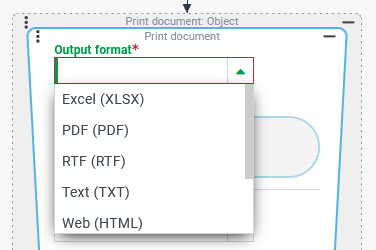 |
| --- | --- |
For the further configuration two variants are to be distinguished, which are described in the following sections.
**Configuration with explicitly provided print document:**
| As soon as there is a *value configuration* for the **Print document** parameter, all other parameters (except the mandatory **Output format** field) are hidden. The return value of the *value configuration* is expected to be an entity of the "Print document" type, i.e. a specific definition for a print document (see [Print documents](/v1/docs/en/core-print-document)). The [Print document](/v1/docs/en/core-print-document-content-builder) value resolver uses the possibly "volatile" data status for the provided "Print document" to generate the content for a document in the selected **Output format** from it – typically taking into account the data of the *reference object*. In the example on the right, a [Variable](/v1/docs/en/core-storage-value) value resolver provides the print document. Typically, this variable should be filled via a [Search (Event action)](/v1/docs/en/core-search-actor) for the [Print documents](/v1/docs/en/core-print-document) entity, which contains suitable criteria (e.g. the name of the print document and possibly other properties). Assignment via an ID (`id`) statically defined by a `Long` value is not a really solid solution with regard to a [Meta exchange](/v1/docs/en/administration-metaexchange) between systems (e.g. test and production system) (see example below). --- **NOTE:** When selecting the **Type**, the selection of the *correct "*Print document" option is crucial: - "Print document" is the correct term (`de.lobster.scm.print.PrintDocument`). - This is easily confused due to the identical localization with: "Print document" (`de.lobster.scm.actionevent.actor.content.PrintDocumentContentBuilder` | 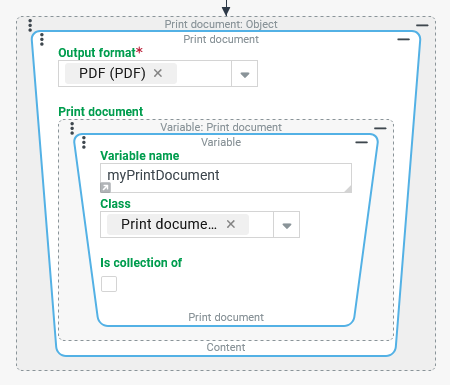 |
| --- | --- |
**Configuration for the automatic assignment of a print document**
| The automatic assignment of a print document only takes effect if there is no *value configuration* for the **Print document** parameter. **NOTE:** An existing value configuration must be deleted via the context menu functions "Cut" or "Remove value" so that the configuration interface displays the selection parameters again. Assigning [No value](/v1/docs/en/core-null-value-editor) for the **Print document** parameter, on the other hand, is not useful for this purpose. |  |
| --- | --- |
| The optional **Document type** parameter can be used to specify a particular [Print document type](/v1/docs/en/print-print-document-type) with which the selected print document must comply. All [Print documents](/v1/docs/en/core-print-document) must be uniquely assigned to a "type" that can be selected here. Without any selection for the **Document type**, applicable print documents are accepted without regard to their "type". **NOTE:** Applicable [Enumeration filters](/v1/docs/en/core-dynamic-enum-filter) for the [Print document type](/v1/docs/en/print-print-document-type) limit the selection during configuration, but not the applicability of print documents at runtime. **NOTE:** The "GLS BOX" (`GLS_BOX`) type is available only if the relevant module is installed and licensed. | 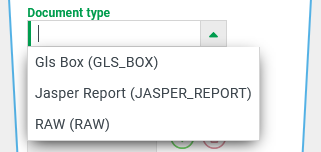 |
| A specification for the **Mode** parameter is required. It defines a requirement for the [Print document mode](/v1/docs/en/print-print-document-mode) that the selected print document must support. All [Print documents](/v1/docs/en/core-print-document) must be clearly assigned to a "mode" that can be selected here. The specification refers to whether the print document requires a single or multiple objects in the `printObjects` field of the specified *Print XML* (or `Print` object). - A print document with the "Single" and "Multi" mode is compatible with any selection for the **Mode** parameter. - The "Single and multi" selection for the **Mode** parameter accepts only print documents for this mode. **NOTE:** Applicable [Enumeration filters](/v1/docs/en/core-dynamic-enum-filter) for [Print document mode](/v1/docs/en/print-print-document-mode) limit the selection in the course of configuration, but not the usability of print documents at runtime. | 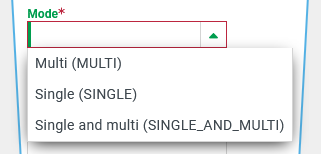 |
| A [Repeatable element](/v1/docs/en/fre-duplicate-element-container-vo) for the **Category** parameter optionally allows to specify values from the dynamic enumeration [Print document category](/v1/docs/en/print-print-document-kind). If at least one **Category** is selected, only [Print documents](/v1/docs/en/core-print-document) whose "category" corresponds to one of the values specified here are considered. As long as no **Category** is specified, applicable [Print documents](/v1/docs/en/core-print-document) are accepted without regard to their "category". **NOTE:** Applicable [Enumeration filters](/v1/docs/en/core-dynamic-enum-filter) for the [Print document category](/v1/docs/en/print-print-document-kind) limit the selection during configuration, but not the applicability of print documents at runtime. | 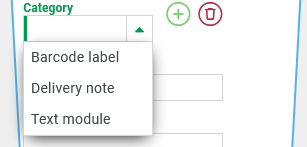 |
| The **Search key** and **Search value** parameters can be used in combination to specify by static texts that a variable with the name defined by **Search key** is assigned the text value from the **Search value** parameter before the selection of applicable print documents is executed based on [Association criteria](/v1/docs/en/core-association-criteria). Corresponding assignments can be examined within the [Association criteria](/v1/docs/en/core-association-criteria) assigned for [Print documents](/v1/docs/en/core-print-document), e.g. to determine the exact match with the **Search value** using a [Variable rule](/v1/docs/en/core-storage-string-rule) or to find a partial match in an [Entity property rule](/v1/docs/en/core-entity-property-rule) using the [Variable](/v1/docs/en/core-storage-value) resolver (via [Starts with](/v1/docs/en/core-starts-with-matcher), [Ends with](/v1/docs/en/core-ends-with-matcher) or [Contains](/v1/docs/en/core-contains-matcher) matcher). | 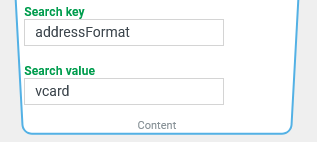 |
## Examples
### Simple example with direct provision of the print document
We have created a print document with the name "HELLO_USER" and the [Print document type](/v1/docs/en/print-print-document-type) "RAW" and uploaded a text file with the following content to define the RAW output:
```plaintext
Hello {/core:Print/base:User/address/@name1}!
```
This "Print document" can be used in any context to generate a salutation text (e.g. for a note) for the logged-in user.
Runtime example:
```plaintext
Hello Karola!
```
The print document in question is meant to be used directly in the context of an event handling without taking [Association criteria](/v1/docs/en/core-association-criteria) etc. into account, in order to output the document specified in the title of a note.
Configuration:
| As a preparatory step, we perform a [Search (Event action)](/v1/docs/en/core-search-actor) to identify the relevant instance of the print document entity: - The **Save result as** parameter specifies the name of the variable (`myPrintDocument`) to which the search result should be written. - The **Search** should concern the **Entity "**Print document" (`PrintDocument`) with the **Mode** "First result value", so that the return value is directly the first print document that fulfills the **Where** condition. - As the only **Where** condition, we provide a [Field restriction](/v1/docs/en/core-property-search) for the [Property projection](/v1/docs/en/core-property-projection) on the "name" property (`name`), whose content should be precisely "HELLO_USER". **NOTE:** - If several print documents with the searched name are created, the database returns the one with the highest internal ID. The last created variant is therefore used. Under certain circumstances, additional AND-linked criteria (e.g. for the [Print document type](/v1/docs/en/print-print-document-type), the print [Print document category](/v1/docs/en/print-print-document-kind) or the "Description" property) could be used to avoid confusion. - In this example, no error handling is provided in case no suitable print document is found. - Of course, read access to print documents must be given in the execution context so that we can find a print document definition via the "Search" action. If necessary, the [Search (Event action)](/v1/docs/en/core-search-actor) can be executed within a [Run as](/v1/docs/en/base-run-as-actor) event action in a different context so that the variable can be filled safely. | 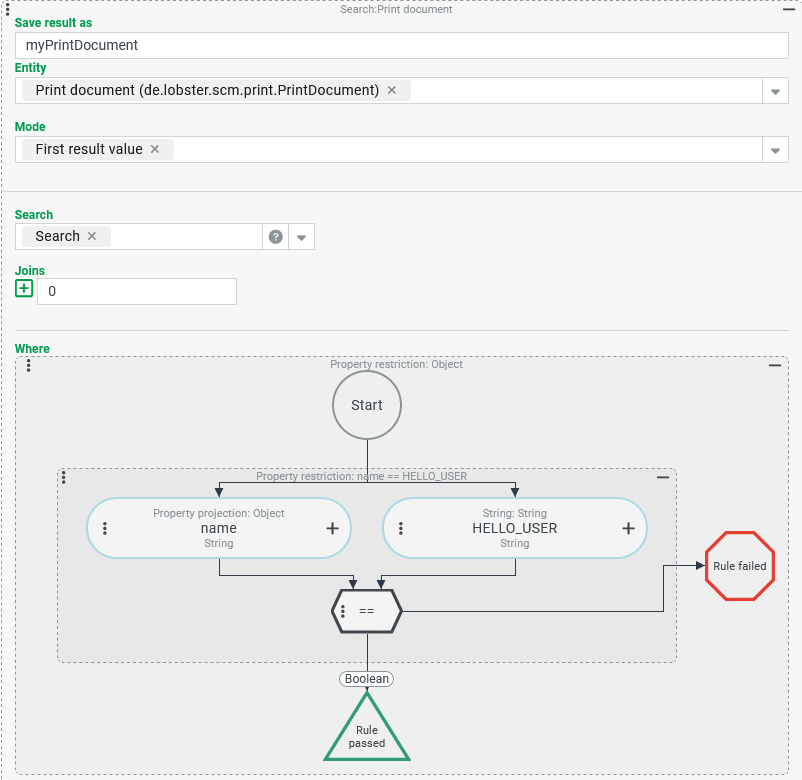 |
| --- | --- |
| The "Print document" identified via the `myPrintDocument` variable is subsequently used in a [Print document](/v1/docs/en/core-print-document-content-builder) resolver in the **Print document** parameter to define the content for the **Title** of a [Show alert](/v1/docs/en/freaction-show-alert) event action in conjunction with the "Text" (`TXT`) **Output format**. The message below is defined as static text. **NOTE:** The [Print document type](/v1/docs/en/print-print-document-type) "RAW" provides plain text that can be printed directly. Runtime example:  **NOTE:** In the example, the output is in English without regard to the [Current locale](/v1/docs/en/core-current-locale-resolver). In the print document, one could access localized content for text sections. Alternatively, language-specific [Print documents](/v1/docs/en/core-print-document) could be created and the [Current locale](/v1/docs/en/core-current-locale-resolver) could be included in the [Search (Event action)](/v1/docs/en/core-search-actor) to search for names like "HELLO_USER_en" or "HELLO_USER_fr". | 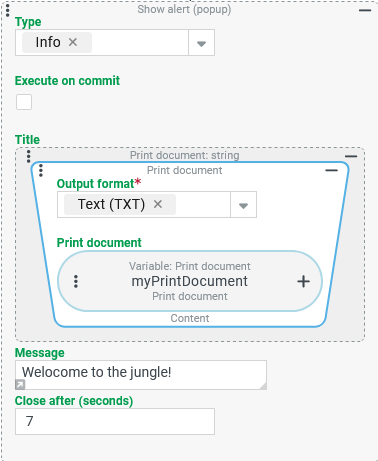 |
### More complex example with direct print document delivery
The simple filling of an "XPath gap text" with information from the call context – as in the previous example – could be implemented even more "directly" using the [Template](/v1/docs/en/core-template-content-builder) value resolver or a [Concat strings](/v1/docs/en/core-concat-string-resolver), for example. But the application example was also kept untypically simple for the sake of clarity.
In practice, more complex print documents are typically used with the [Print document type](/v1/docs/en/print-print-document-type) "Jasper Report" (see [Integration Jaspersoft Studio](/v1/docs/en/orchestration-jaspersoft-studio)), for which more complex **Output formats** (e.g. PDF) are then also supported.
The following configuration example demonstrates how, starting from a [Search (Event action)](/v1/docs/en/core-search-actor) with the "Results list" mode, to let the user choose which print document to use to display context data in a new tab as a PDF.
Configuration:
| Within an event handling the following event actions are concatenated: - The introductory [Search (Event action)](/v1/docs/en/core-search-actor) determines all qualified [Print documents](/v1/docs/en/core-print-document) for the given context based on criteria tailored for the use case and writes the "result list" to an arbitrarily named `candidatePrintDocuments` variable. - The subsequent [Show context menu](/v1/docs/en/core-show-context-menu-actor) event action offers the candidates for selection and specifies the "name" (`name`) and the print [Print document mode](/v1/docs/en/print-print-document-mode) (`mode`) of the candidate in the **Label expression**. The selection is mapped to another arbitrarily named `selectedPrintDocument` variable. **NOTE:** After calling a context menu, it should actually be checked whether a selection has been made or not. The typical [If then else](/v1/docs/en/core-if-then-else-actor) event action for the conditional execution of actions has been omitted here in favor of clarity. Before calling a context menu, one could of course also check whether a selection from several candidates is required at all. If the search returns no result, further steps are superfluous. If there is a clear result, the print document in question may want to be displayed without selection. - Finally, we access the selected print document via the `selectedPrintDocument` variable to first generate the content for the current context data (*reference object*, login context) via the [Print document](/v1/docs/en/core-print-document-content-builder) value resolver. The returned "Content" data object is here equated to the **Content to show** parameter for triggering a [Show content](/v1/docs/en/core-show-content-actor) event action. The PDF appears in a standalone browser tab, if the browser can display this file type directly. Alternatively, it is downloaded as a file. | 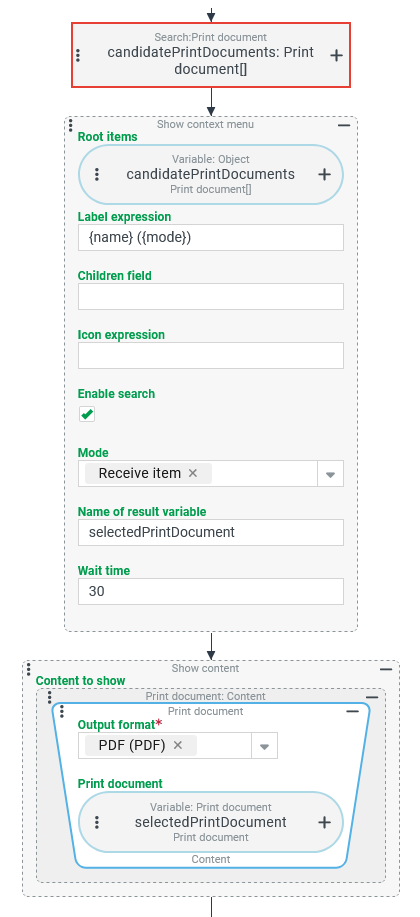 |
| --- | --- |
### Example with conventional selection of the print document
*In the following example, the applicable print document is selected via the conventional mechanism, taking into account* [Association criteria](/v1/docs/en/core-association-criteria) *and parameterized properties.*
| Triggered by a [Custom action event](/v1/docs/en/core-custom-action-events), a [Search (Event action)](/v1/docs/en/core-search-actor) determines all [Shipments](/v1/docs/en/shp-shipment) with the working state "Released" for a specific recipient. The recipient is informed by e-mail about the released shipments, receiving an HTML document in the e-mail attachment that reflects important information about a shipment in a standardized "Delivery Note". As shown in the example on the right, the "Delivery Note" lists the names and values of all text attributes, numeric attributes and reference attributes in the shipment header to which a specific value is assigned. As values of a text attribute (`TRACKING_LINK`), a URL via **Lobster Data Platform/Orchestration** also appears here which provides further details on the tracking history of the respective shipment. | 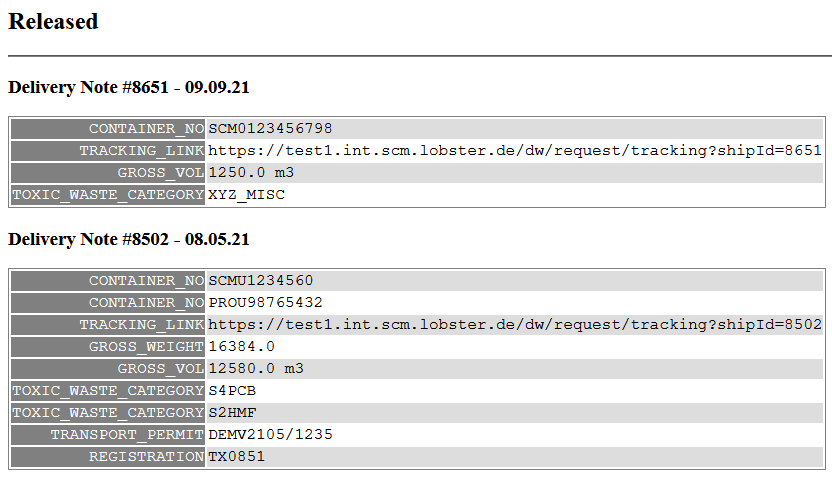 |
| --- | --- |
The following example for the definition of a print document with the [Document type](/v1/docs/en/doc-document-type) "RAW" illustrates how the source code for the HTML document shown above could be generated. Details on the syntax are discussed in the [Template](/v1/docs/en/core-template-content-builder) value resolver documentation, which uses the same logic to evaluate the data of a `Print` object via XPath expressions to generate a specific text output. Here, the source code for a complete HTML document is generated as text output that evaluates the relevant data of all [Shipments](/v1/docs/en/shp-shipment) that the `printObjects` field lists at runtime for the specific data context.
RAW print document example:
```xml
{$r(de.lobster.scm.base.bto.workingstate.WorkingState,RELEASED)}
{$foreach({//printObjects/*})
{$r(de.lobster.scm.print.PrintDocumentKind,DELIVERY_NOTE)} #{@id} - {$with({attributes/shp:ShipmentDate/value[@dateType='ARRIVAL_PLANNED']/date}){$date(dd.MM.yy,{@start};{@timeZone})}}
{$foreach({attributes/shp:ShipmentText/value[textValue/text()!='']})| {@textType} | {textValue} |
}
{$foreach({attributes/shp:ShipmentNumericValue/value[@value>0]})| {@numericValueType} | {@value} {@unit} |
}
{$foreach({attributes/shp:ShipmentReference/value[@reference!='']})| {@referenceType} | {@reference} |
}
}
```
**NOTE:** Similar to this use case, XPath expressions could be used to generate the ZPL source code for a "Zebra" label print with shipment data instead of an HTML document.
Configuration:
| Within an event handling, the [Search (Event action)](/v1/docs/en/core-search-actor) is first executed to identify the relevant released [Shipments](/v1/docs/en/shp-shipment). - The [Search (Event action)](/v1/docs/en/core-search-actor) writes the [Shipments](/v1/docs/en/shp-shipment) found here as a "Search value" to the `releasedShipments` variable. This is then specified as a *different* *reference object* via the [Variable](/v1/docs/en/core-storage-value) value resolver in the **Object Resolver** of an [Execute with](/v1/docs/en/core-with-actor) event action. - This makes the list of relevant [Shipments](/v1/docs/en/shp-shipment) available as a *reference* *object* for the [Print document](/v1/docs/en/core-print-document-content-builder) value resolver, which is used within a [E-mail](/v1/docs/en/core-send-mail-actor) event action in the **Attachments** tab to define the **Content** parameter, i.e. the data to be attached as a file: - An optional specification for the **Document type** for the print document has been omitted here. - Since "Single and multi" has been selected as the **Mode**, this mode must also be set for the print document. - The selection of the **Print document** **Category** "Delivery note" must also be selected in the selected print document. - The **Output format** assigned here is "Web" (`HTML`). This specifies in particular that the text value `text/html` is entered in the `mediaType` field for the generated **Content** event action. This assignment is taken over by the [E-mail](/v1/docs/en/core-send-mail-actor) event action per default for the parameter **Mime type** (further below). - The variable name `shipmentFormat` is specified as the **Search key**. This variable is assigned the **Search value** `htmlList`. An association criterion that checks this arbitrarily assigned value, e.g. by a [Variable rule](/v1/docs/en/core-storage-string-rule), should therefore be used to specifically qualify certain print documents for the associated automation context: 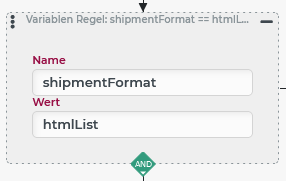 - The **File name** for the attachment is statically set here to the text "details.htm" to indicate that details have been attached in HTML format. | 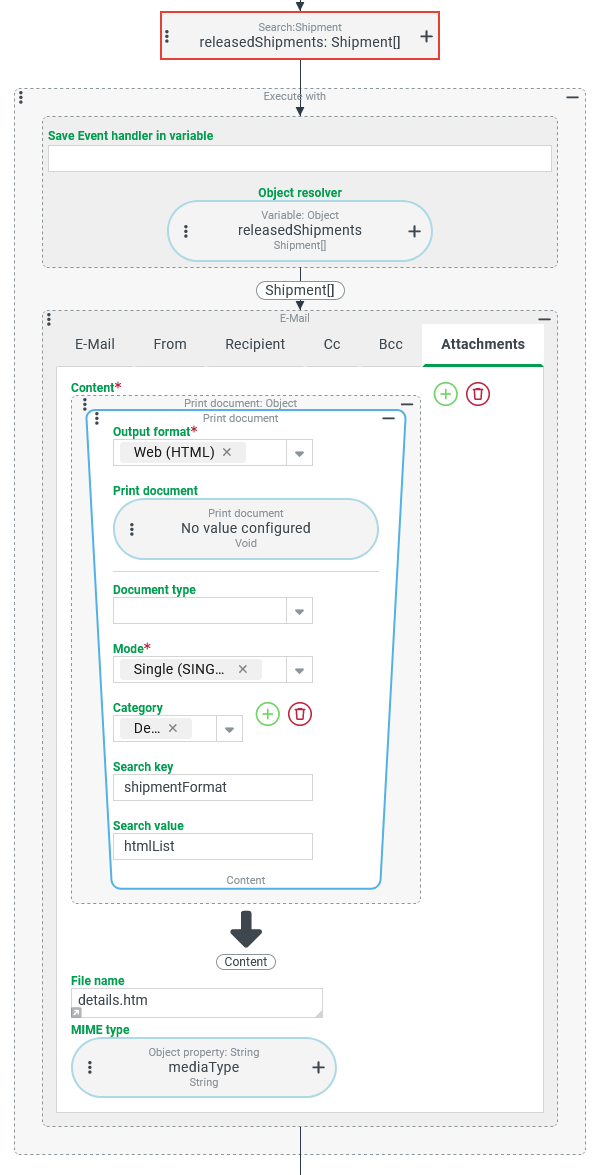 |
| --- | --- |
Runtime example:
The e-mail shown below was generated with the **Mail attachment** "details.htm" shown above:
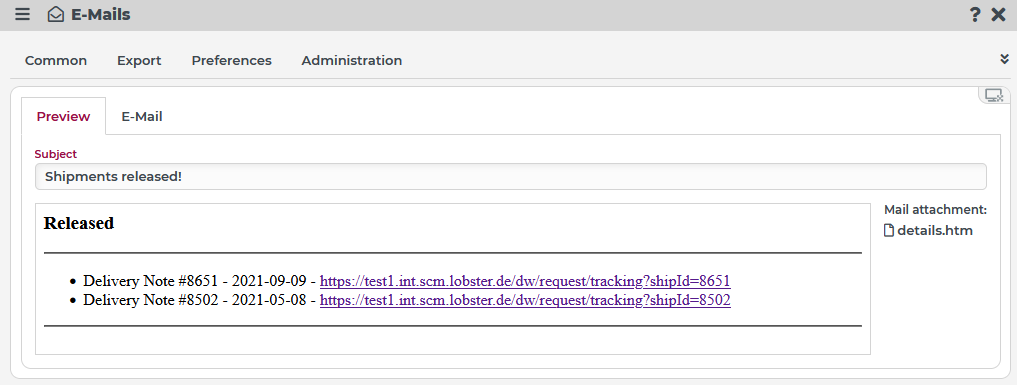
**NOTE:** The **Preview** above shows the e-mail body, which was also generated here in HTML format via the [Print document](/v1/docs/en/core-print-document-content-builder) value resolver. However, another print document was used here via the **Category** parameter with the selection "Text module" (*above*: "Delivery Note"), which uses a definition like the following:
RAW print document example:
```xml
{$r(de.lobster.scm.base.bto.workingstate.WorkingState,RELEASED)}
{$foreach({//printObjects/*})
- {$r(de.lobster.scm.print.PrintDocumentKind,DELIVERY_NOTE)} #{@id}
- {$with({attributes/shp:ShipmentDate/value[@dateType='ARRIVAL_PLANNED']/date}){$date(yyyy-MM-dd,{@start};{@timeZone})}}
- {$with({attributes/shp:ShipmentText/value[@textType='TRACKING_LINK']}){textValue}}
}
```
- The HTML source code here does not need the `html` and `body` elements because they are provided in the e-mail.
- In contrast to the HTML attachment, the print document for the mail body defines the tracking links as anchor elements (a), which could also be provided with an alternative label ("tracking link") if necessary.
**NOTE:** For a public tracking link to work, a web service must be configured via **Lobster Data Platform/Integration** to provide appropriate data.