---
title: "SearchTask (Integration function)"
slug: "de-lobster-scm-dw-filters-scm-search-filter"
updated: 2026-04-29T12:01:32Z
published: 2026-04-29T12:01:32Z
canonical: "docs.lobstersoftware.com/de-lobster-scm-dw-filters-scm-search-filter"
---
> ## Documentation Index
> Fetch the complete documentation index at: https://docs.lobstersoftware.com/llms.txt
> Use this file to discover all available pages before exploring further.
# SearchTask (Integration function)
The [SearchTask (Integration function)](/v1/docs/en/de-lobster-scm-dw-filters-scm-search-filter) function allows you to query content from the **Lobster Data Platform/Orchestration** database (see [Search API](/v1/docs/en/common-search-api)) in the mapping (phase 3) of a profile.
The search query is defined via the XML structure of a `SearchTask` object in parameter **a**, which can be built and tested interactively with the [Search builder](/v1/docs/en/administration-system-search-builder).
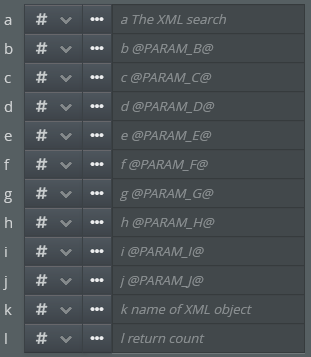
The XML structure can refer in the syntax `@PARAM_X@` (with `X` from `{B,C,D,E,F,G,H,I,J}`) to the values of the *optional* parameters **b-j** from the function call.
Similarly, the syntax `@VARIABLENNAME@` can be used to access the values of variables from the context of the profile.
The *return value* of the function is always the search result of a specific `SearchResult` object (`SearchResult`, `TupleSearchResult` or `CsvSearchResult`, see [Search types](/v1/docs/en/core-abstract-search)) as text in XML format.
The *optional* parameter **k** can be used to parse this structure into a named DOM object, e.g. to evaluate this object with the function `get value from XML ()` using XPath expressions.
## Parameter
| Parameter | Description | Example | Note |
| --- | --- | --- | --- |
| a | XML structure of a `SearchTask` object | SearchTask ```xml ``` - This search will use a [Tuple search](/v1/docs/en/core-tuple-search) to find the accounts of all [Users](/v1/docs/en/base-user) that do not have a name (`address.name1`) in the address and return a list of usernames (`username`). | A "query" can be created and tested interactively with the [Search builder](/v1/docs/en/administration-system-search-builder). The XML structure of the `SearchTask` object is then displayed in the XML tab. This query definition can then simply be pasted via the clipboard as a static value for parameter **a** and edited if necessary. Often – in contrast to the very simple example on the left – data from the runtime context in the profile must be included in the search so that it delivers the "right" results. For this purpose, the XML can be applied to variables or parameters whose values are inserted at runtime from the context of the profile call. Especially for more complex application cases, it can be helpful to integrate the XML structure of the `SearchTask` object into the target structure of the profile, so that the "search" can be linked to source data via mapping and dynamically constructed at runtime. Then parameter **a** is filled using the function `create xml` `from node()`(see a more detailed example below). Even then the XML definition can include parameters and variables. |
| b-j | Parameters which – similar to regular variables between two "@" characters – can be addressed in the XML definition of the search | SearchTask ```xml ``` *Based on the above example, parameters and variables were inserted here:* - The variable `MSG_CALL_SCM_Company_id` defines the company for the login context of the query. - Parameter **b** (`PARAM_B`) defines the field of the user account to be checked against "empty". - Parameter **c** (`PARAM_C`) defines the field of the user account that should appear in the result. | To get the same search results as in the static case above, the following conditions must be met: - The profile call must be made in the login context of the company with ID 1, so that the variable `MSG_CALL_SCM_Company_id` has the value 1. - When calling the function, the parameters **b** and **c** must return the following text values: - `PARAM_B`: `address.name1` - `PARAM_C`: `username` |
## Examples
**Search definition by SearchTask node**
In the following example, all [Shipments](/v1/docs/en/shp-shipment) with the working status "Released" (`RELEASED`) are searched.
The corresponding search was built via the [Search builder](/v1/docs/en/administration-system-search-builder) and inserted via the menu item [Orchestration templates](/v1/docs/en/orchestration-integration-templates) as a sub-node `SearchTask` to the node `SearchNode` (with the option set "Only for SQL") (see [Creating static target structures](/v1/docs/en/orchestration-integration-components-templates-static-target)).
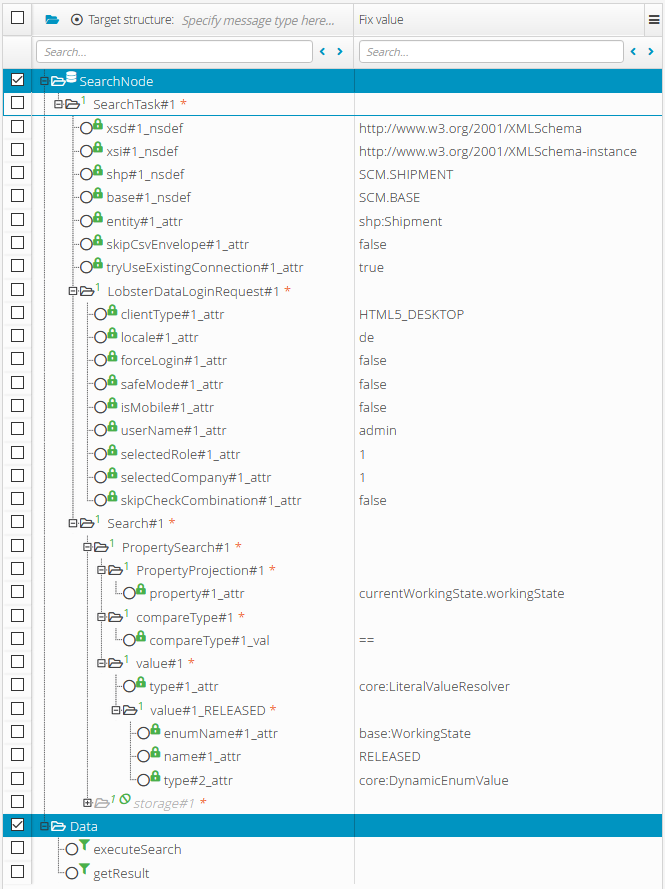
The execution of the [Search](/v1/docs/en/core-search) is triggered by function calls for the `executeSearch` field in the `Data` node:
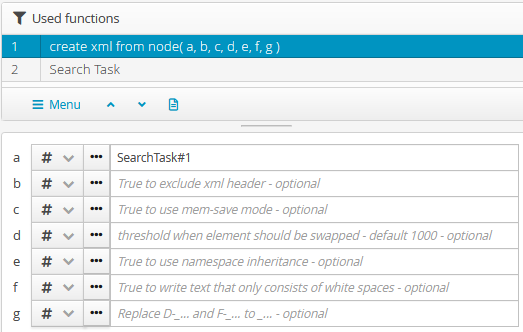
- The function `create xml from node()` returns the XML of the `SearchTask` node:
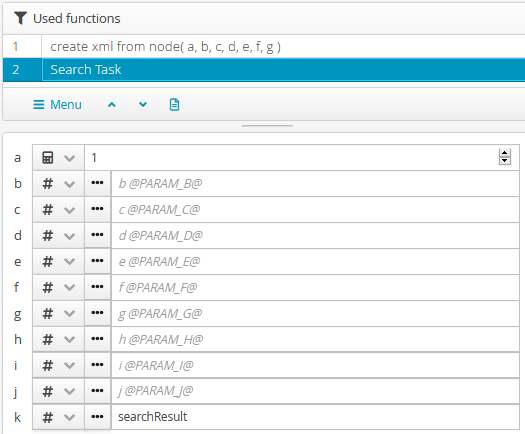
- The XML structure of the `SearchTask` node is taken as result in parameter **a** of the [SearchTask (Integration function)](/v1/docs/en/de-lobster-scm-dw-filters-scm-search-filter) function, which executes the search and stores the result in the DOM object `searchResult `(parameter **k**):
- The following `getResult` field uses the function `get value from XML()`to evaluate the DOM object with an XPath expression: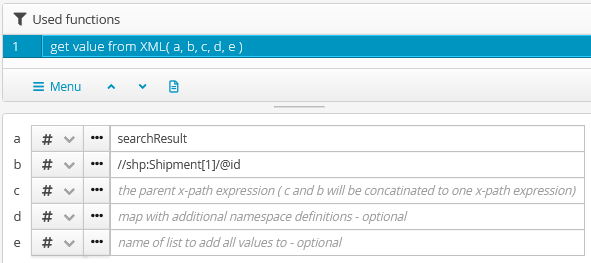
- In the example, the `getResult` field is assigned the ID (`id`) of the first shipment that the [Search](/v1/docs/en/core-search) returns.
**Search definition with parameters by a profile variable.**
A [Tuple search](/v1/docs/en/core-tuple-search) should identify a specific [Users](/v1/docs/en/base-user) account in **Lobster Data Platform/Orchestration** via two parameters (`username`, and `address.accNumber`) and – if a match exists – return its ID (`id`).
| 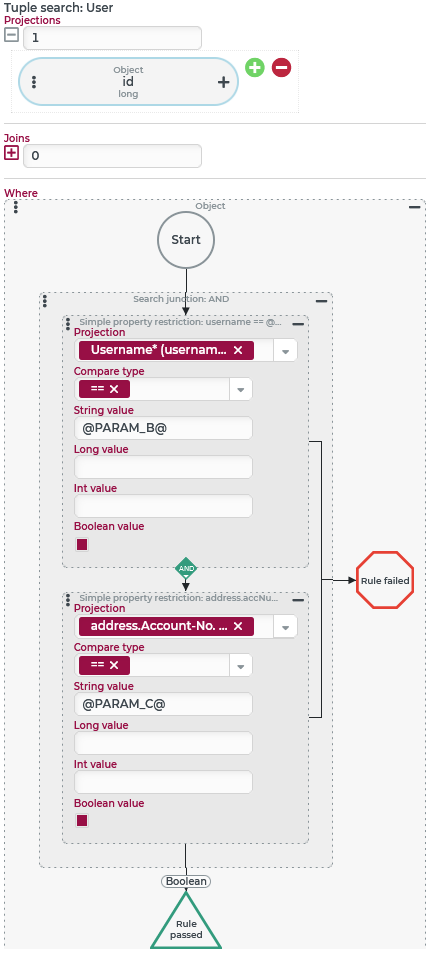 | As in the previous example, the [Search builder](/v1/docs/en/administration-system-search-builder) (left) is used to build a suitable `SearchTask` object. The references to parameters can be entered directly as comparative values in the respective conditions. Ideally, this is only done after the query has been tested with concrete sample data. The XML structure of the `SearchTask` object can then be displayed in the XML tab. For the current example the following structure results: XML ```xml ... ... ``` From the XML tab in the [Search builder](/v1/docs/en/administration-system-search-builder) this structure can be copied to the clipboard and pasted as the value of a variable in the profile:  - Here the search XML was inserted as (default) **value** in a user-defined variable (of **type** String) named `var__searchUserId`. - In the **Description** field, the purpose of the search can be optionally specified. |
| --- | --- |
As a concrete use case, the [Tuple search](/v1/docs/en/core-tuple-search) with changing parameters predefined in the variable `var__searchUserId` shall be used to update the accounts of certain [Users](/v1/docs/en/base-user) via [Batch import](/v1/docs/en/core-batch-import).
**NOTE:** Since the [Tuple search](/v1/docs/en/core-tuple-search) identifies the [Users](/v1/docs/en/base-user) to be updated through the returned ID (`id`), the `search` node can be disabled in the `batch` node of the import if assigned as a value for the `id` attribute in the `User` node.
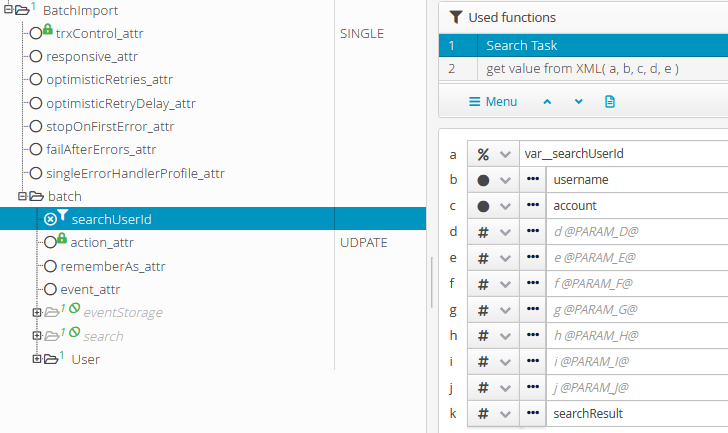
In the `batch` node of the `BatchImport` structure a calculation field `searchUserId` has been added, which links two function calls:
First, the [SearchTask (Integration function)](/v1/docs/en/de-lobster-scm-dw-filters-scm-search-filter) function selected in the screenshot above is called, which accesses the variable `var_searchUserId` via parameter **a**.
- The "search parameters" **b** and **c** are assigned values of source fields ("username" and "account") so that each iteration of the `batch` node performs an individual search.
- The search result is stored by parameter **k** as a DOM object named `searchResult`.
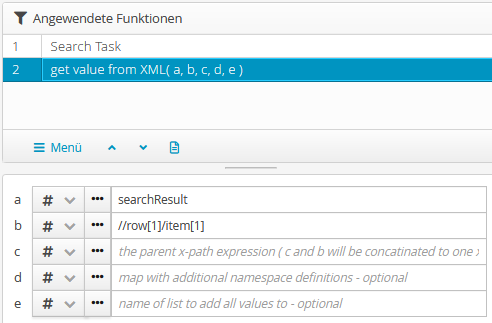
The function `get value from XML()`accesses the value of the first column (`item[1]`) of the first row (`row[1]`) within the `result` node of the `TupleSearchResult` structure (see [Tuple search](/v1/docs/en/core-tuple-search)) via the XPath expression `//row[1]/item[1]`. Since the search uses only one projection (`id`), this is the ID of the first match, if there are any matches at all. This value is assigned to the `searchUserId` field as the calculation result. The `id_attr` field in the `User` object can copy this value to the target `searchUserId` field, for example, using the function `copy()`.
**Search definition with parameters by static text in function call parameter.**
Within a profile, a [Tuple search](/v1/docs/en/core-tuple-search) is intended to find all [Users](/v1/docs/en/base-user) whose address is assigned a specific account number (`address.accNumber`) in order to check whether this account number is uniquely assigned.
| 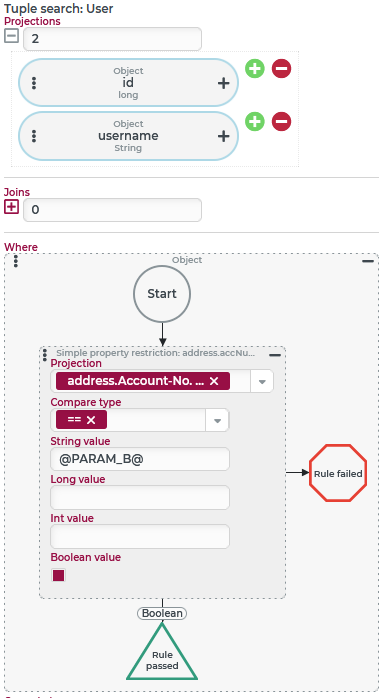 | The [Search builder](/v1/docs/en/administration-system-search-builder) (left) is used to build a suitable `SearchTask` object. Here the reference to the parameter **b** can be entered directly as a comparison value in the respective conditions. Ideally, this is only done after the query has been tested with concrete sample data. The XML structure of the `SearchTaskobject` can then be displayed in the XML tab. For the current example the following structure results: XML ```xml ... ``` This structure is copied directly from the XML tab in the [Search builder](/v1/docs/en/administration-system-search-builder) to the clipboard. |
| --- | --- |
In the target structure a calculation field is provided with two function calls.
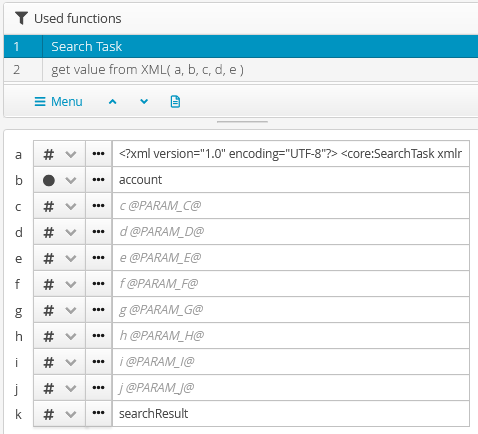
First, the [SearchTask (Integration function)](/v1/docs/en/de-lobster-scm-dw-filters-scm-search-filter) function is executed with parameter **a** for assigning the XML structure from the clipboard as static text value.
- Parameter **b** is linked to a source data field `account`, which defines the account number to be checked.
- The search result is stored by parameter **k** as a DOM object named `searchResult`.
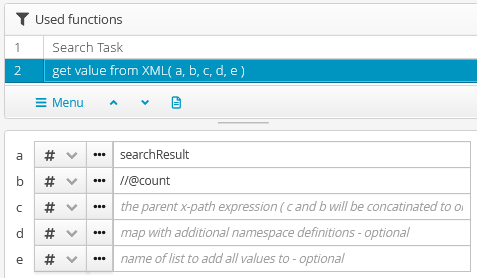
The DOM object `searchResult` (parameter **a**) returned as search result is then evaluated with the function `get value from XML()`.
- The XPath expression (`//@count`) returns the number of lines within the `TupleSearchResult` structure (see [Tuple search](/v1/docs/en/core-tuple-search)), which are passed as an attribute in the search header.