---
title: "SearchCronTask"
slug: "de-lobster-scm-edi-search-cron-task"
updated: 2026-04-29T09:24:57Z
published: 2026-04-29T09:24:57Z
canonical: "docs.lobstersoftware.com/de-lobster-scm-edi-search-cron-task"
---
> ## Documentation Index
> Fetch the complete documentation index at: https://docs.lobstersoftware.com/llms.txt
> Use this file to discover all available pages before exploring further.
# SearchCronTask
The [SearchCronTask](/v1/docs/en/de-lobster-scm-edi-search-cron-task) API enables data queries from **Lobster Data Platform/Orchestration** via a [Search](/v1/docs/en/core-search) or [Tuple search](/v1/docs/en/core-tuple-search) by a CronJob profile. The *search result* defines the *input data* of the profile, so that further processing steps can follow immediately.
The [Search](/v1/docs/en/core-search) or [Tuple search](/v1/docs/en/core-tuple-search) to execute is defined by a configuration file for the **input agent (phase 1)** of the profile, which uses the XML format of the class `core:SearchTask`.
- The [Search builder](/v1/docs/en/administration-system-search-builder) provides a graphical user interface with which XML configuration files for defining searches can be systematically designed and interactively tested (see [Search API](/v1/docs/en/common-search-api)).
- The configuration file can involve *metadata variables* from the profile call in the format `@VARIABLE_NAME@` and without the `MSG_CALL_` prefix.
- When creating a search with the [Search builder](/v1/docs/en/administration-system-search-builder), the login data used for authentication is automatically included (see [Integration login](/v1/docs/en/base-lobster-data-login-request)).
- The respective sub-node `base:LobsterDataLoginRequest` can then be customized by editing the XML file.
- Instead of absolute data, metadata variables from the profile call can be referred to as login parameters (user, role, company, etc.).
- If the profile is called via **Lobster Data Platform/Orchestration**, the login data of the session is available e.g. via the variables populated by default (such as `SCM_User_username`, `SCM_Company_id` etc.).
## Configuration
The following configuration steps are limited to the first phases (1-3) of the profile, in which define the acquisition of input data (search results) from the [SearchCronTask](/v1/docs/en/de-lobster-scm-edi-search-cron-task) API.
The further processing steps starting from the source structure filled with the search results in phase 3 is not specific for [SearchCronTask](/v1/docs/en/de-lobster-scm-edi-search-cron-task) API and relies on general functionalities of profiles to match a given objective.
### General Data
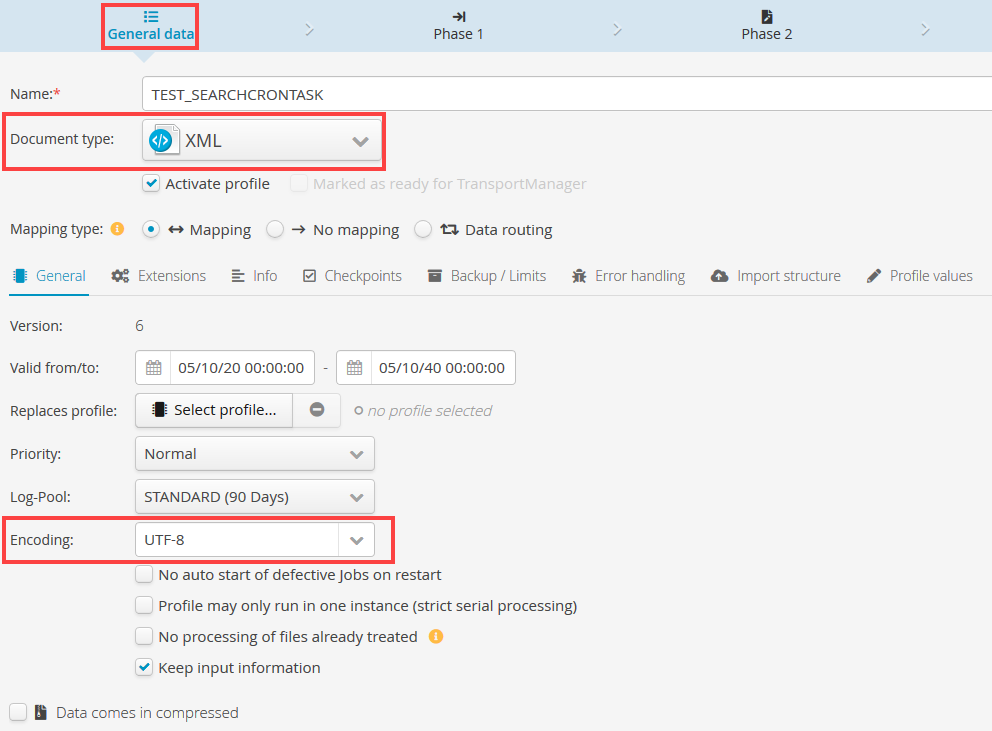
Two settings are relevant on the **General data** tab of the profile:
- XML must be specified as the **Document type** because the search results of are returned in XML format.
- As **Encoding** "UTF-8" must be selected, because this coding is given for the search results.
### Phase 1: Input agent
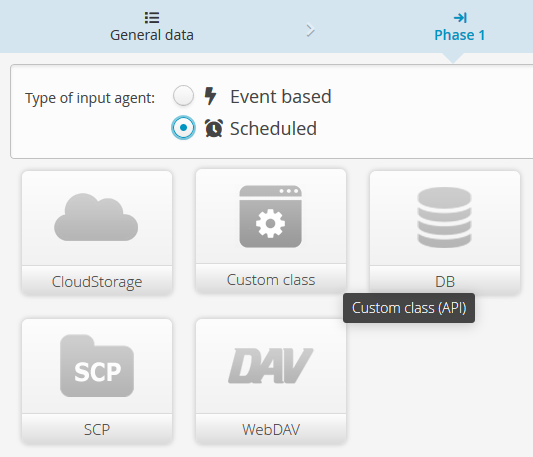
In the **Phase 1** tab, the **Type of input agent** must first be selected. After selecting **Scheduled**, the option **Custom class (API)**, to which the [SearchCronTask](/v1/docs/en/de-lobster-scm-edi-search-cron-task) API belongs, appears below.
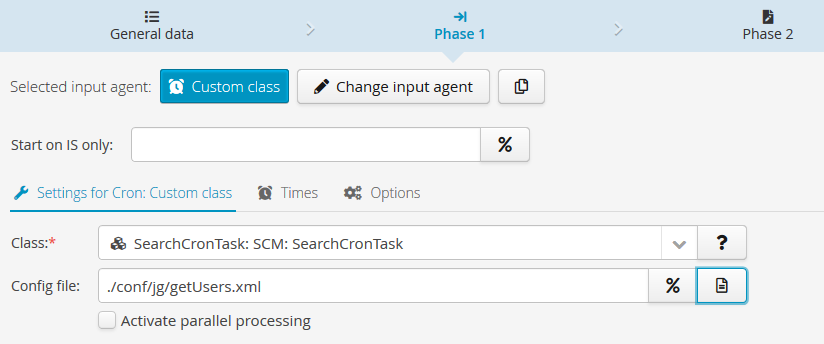
After selecting the category **Custom class**, the **input agent** can be parameterized:
- `SCM: SearchCronTask` must be selected as **Class**.
- The **Config file** must be selected from existing files or be completely created from scratch.
Example for creating a configuration file:
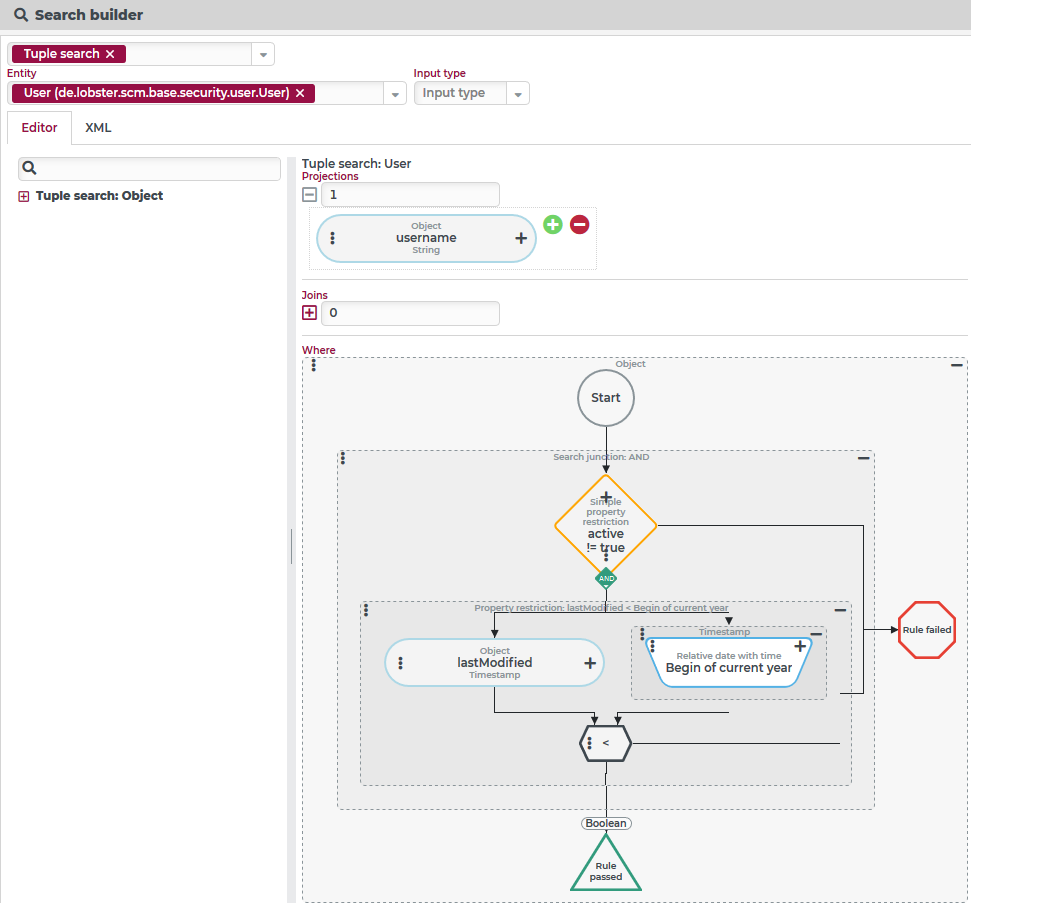
A profile should receive a simple list of all "usernames" as input data, whose accounts are set to inactive and have not been changed in the current calendar year.
A corresponding search can be created and tested via [Search builder](/v1/docs/en/administration-system-search-builder) with a login granting at least read access for the respective user accounts:
- In a [Tuple search](/v1/docs/en/core-tuple-search) for the **Entity** "User", the field "username" is specified under **Projections**.
- As a condition, a conjunction of a [Simple property restriction](/v1/docs/en/core-simple-property-search) (`active` not equal `true`) with a [Field restriction](/v1/docs/en/core-property-search) (`lastModified` less than "Beginning of the year") is defined.
 From the XML tab in the [Search builder](/v1/docs/en/administration-system-search-builder), the XML definition of the search can be transferred directly to a (possibly newly created) configuration file via the clipboard:
```xml
<
...
```
### Phase 2: Parser
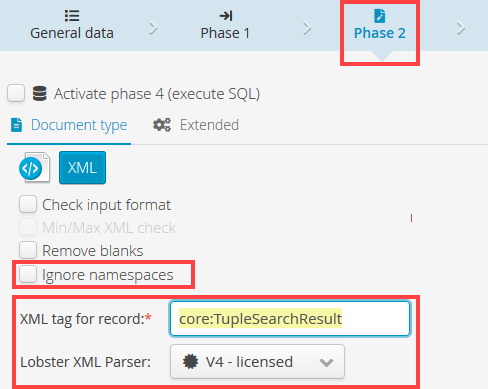
In the **Phase 2** tab three important settings for the "Parser" have to be made:
- The **Ignore namespaces** option must be disabled .
- The **XML tag for record** must refer to the node name matching the type of search (for a [Search](/v1/docs/en/core-search) `core:SearchResult`, for a [Tuple search](/v1/docs/en/core-tuple-search) `core:TupleSearchResult`).
- As **Lobster XML Parser** the version "V4" (if licensed, otherwise "V2") must be selected.
### Phase 3: Mapping (Source structure)
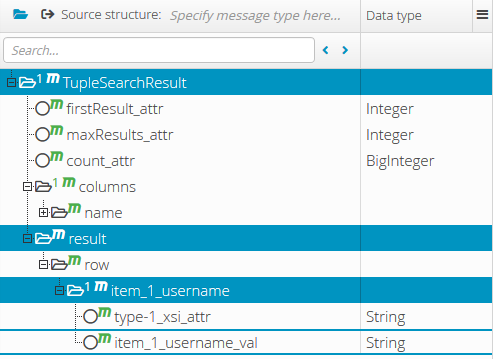
The *source structure* for the **Mapping (Phase 3**) in the profile can be generated automatically according to the search definition. Depending on the type of search used, a structure of the class `core:SearchResult` or `core:TupleSearchResult` appears, whose subnode `result` lists the actual *search results* (data objects from a [Search](/v1/docs/en/core-search) or tuples of projections from a [Tuple search](/v1/docs/en/core-tuple-search)).
The dialog for loading [Orchestration templates](/v1/docs/en/orchestration-integration-templates) can be used to create a source structure based on the `SearchTask` definition in the configuration file (Menu bar of the source structure > "Load template" > "Lobster SCM").
- Since the custom class `core:SearchCronTask` is selected as the input agent (see Phase 1), the dialog shows the checkbox **From search task** (set by default).
- The field **Entity** also already preset to the applicable class name according to the search definition in the configuration file.
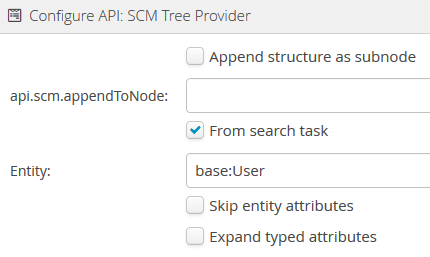
By clicking the **Apply** button (not shown in the image), the source structure is created from the class `core:SearchResult` or `core:TupleSearchResult` (see screenshot):
**CAUTION****:** If the search definition uses parameters in the configuration file (see also the section below), these parameters are not populated with values when creating the source structure. This leads to difficulties if a parameter refers to a field of the search definition for which an empty value is not acceptable. In this case, a discrete value should be entered instead of the parameter. Once the source structure has been generated, the parameter can be entered into the configuration file again.
## Using parameters within the configuration file
The search definition in the configuration file can use parameters, which are replaced by the values of *metadata variables* of the profile at runtime.
The reference to the variable is established via the syntax @@, where instead of the name of a *metadata variable* without the prefix `MSG_CALL_` must be indicated.
Example:
Within the search definition for a [SearchCronTask](/v1/docs/en/de-lobster-scm-edi-search-cron-task), a specific condition for querying a subset of user accounts is first defined in the [Search builder](/v1/docs/en/administration-system-search-builder):
| Search builder (clipped) | XML (clipped) |
| --- | --- |
| 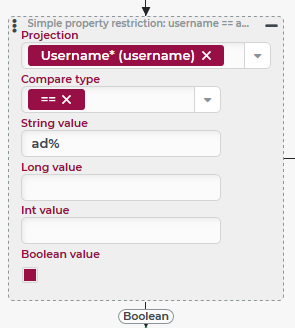 | All attributes for the [Simple property restriction](/v1/docs/en/core-simple-property-search) are explicitly assigned with values. ```xml ``` This condition returns only user accounts whose username (`username`) begins with the string AD (not case-sensitive). |
In the next step, a parameter will obtain the comparison string for this condition at the profile runtime from the *metadata* *variable* named `var__USERNAME_ILIKE`:
| Search builder (clipped) | XML (clipped) |
| --- | --- |
| 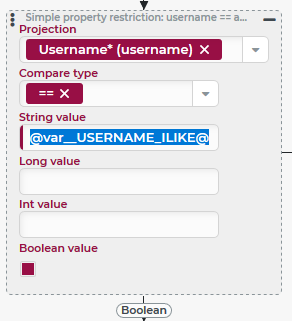 | The parameter is entered in the search builder as a **String value** for the [Simple property restriction](/v1/docs/en/core-simple-property-search). ```xml ``` This condition returns only user accounts whose username is case-insensitive and corresponds to the comparison string that is present as the value of the variable `var__USERNAME_ILIKE` when the profile is called. If this variable contains the value `ad%`, the results match the previous variant. |
To be able to use the profile in an even more flexible way, the attributes `projection` and `compareType` should be set for the [Simple property restriction](/v1/docs/en/core-simple-property-search) by parameter as well.
| Search builder (clipped) | XML (clipped) |
| --- | --- |
| The graphical user interface does not allow the assignment of parameter strings for the settings to be made in the selection field. Therefore the configuration file must be processed for this purpose directly in the XML format (see right for the result). | Here parameters refer to the *metadata variables* `PROJECTION` , `COMPARE_TYPE` and `COMPARE_STRING`: ```xml ``` At runtime, flexible conditions can be "formulated" based on these variables as long as a string comparison is always suitable. Example: (with different combinations of *variable:value*) `PROJECTION:locale, COMPARE_TYPE:!=, COMPARE_STRING:de` - This combination of variables returns only user accounts for which a language (`locale`) other than "German" (`de`) is selected. `PROJECTION:address.countryCode, COMPARE_TYPE:==, COMPARE_STRING:AT` - This variable combination returns only user accounts with an address in Austria (`AT`). |