---
title: "Deleting files with an internal cron job"
slug: "delete-files-cron-job"
updated: 2026-09-23T05:49:50Z
published: 2026-09-23T05:49:50Z
canonical: "docs.lobstersoftware.com/delete-files-cron-job"
---
> ## Documentation Index
> Fetch the complete documentation index at: https://docs.lobstersoftware.com/llms.txt
> Use this file to discover all available pages before exploring further.
# Deleting files with an internal cron job
You can configure a class that creates an internal cron job. This job runs without a Profile and deletes old files. A legacy class and a more powerful new class are available. **Deleted files are permanently removed.**
## Legacy class
**Use the new class for new developments.**
Activate the following section in the configuration file `./etc/cron.xml.` This defines a cron job that deletes old files every 10 minutes.
```xml
...
Remove files
./conf/sample_delete_cron_old.properties
600000
...
```
Specify the path to a properties file in parameter **configFilename**. This file contains the specific settings for deletion.
```
# sample config for cron job to delete files within named directory
# define the entry folder to look for
directory=./tmp
# do this for sub folders within named directory as well
recursive=true
# define file pattern for selecting files
file.pattern=*.tmp
# files older than 7 days are being removed
retain.days=7
```
## New class (DeleteFilesCronJobWithPathSupport)
Insert the following section in the configuration file `./etc/cron.xml`.
```xml
...
Remove files
./conf/sample_wildcard_delete_cron.properties
600000
...
```
### Cron job name
The **CronJob** class sets the name of the cron job. In this case, the name is "Remove files".
### Cron job interval
The **Schedule** class sets the cron interval in milliseconds. In this case, `600000` milliseconds equal 10 minutes.
### Configuration file
The properties file defines the detailed parameters of the class. Specify this file in parameter **configFilename**.
**Example 1:**
```
directory=./var/logs
file.pattern=*.log
exclude.pattern=*.tmp;important/*
retain.days=30
recursive=true
verbose=false
```
This simple configuration is **backward compatible**. You can use the properties files from the legacy class.
**Example 2:**
```
# Default/Global settings (optional fallback)
retain.days=30
recursive=true
verbose=true
# Path configuration 1
path.1.directory=./var/logs/application
path.1.pattern=*.log;*.txt
path.1.exclude=important/*;*backup*
path.1.retain.days=7
path.1.recursive=true
# Path configuration 2
path.2.directory=./var/logs/system
path.2.pattern=*.log
path.2.exclude=critical/*;audit/*
path.2.retain.days=90
path.2.recursive=false
# Path configuration 3
path.3.directory=./tmp/cache;/tmp/temp
path.3.pattern=*.*
path.3.retain.days=1
```
The advanced settings let you define **multiple deletion paths** with specific parameters. If you do not set an optional parameter for a path, the respective **global default value** applies.
#### Parameters (global defaults)
| Parameter | Type | Default | Description |
| --- | --- | --- | --- |
| directory | String | No default value. | (**mandatory**) Semicolon-separated list of directories to monitor. The job skips directories that do not exist. |
| file.pattern | String | `*.*` | (**optional**) Semicolon-separated file inclusion patterns. |
| exclude.pattern | String | No default value. | (**optional**) Semicolon-separated file exclusion patterns. |
| retain.days | Integer | `7` | (**optional**) Number of days to retain the files. Must be ≥ 1. The job skips execution for zero or negative values. |
| recursive | Boolean | `false` | (**optional**) Scan subdirectories recursively? |
| verbose | Boolean | `false` | (**optional**) Enable detailed logging? |
#### Parameters (path-specific)
The placeholder **N** can range from 1 to 100.
| Parameter | Type | Description |
| --- | --- | --- |
| path.N.directory | String | (**mandatory**) Semicolon-separated list of directories to monitor. The job skips directories that do not exist. |
| path.N.pattern | String | (**optional**) Semicolon-separated file inclusion patterns. Overwrites the global parameter `file.pattern`. |
| path.N.exclude | String | (**optional**) Semicolon-separated file exclusion patterns. Overwrites the global parameter `exclude.pattern`. |
| path.N.retain.days | Integer | (**optional**) Number of days to retain the files. Overwrites the global parameter `retain.days`. |
| path.N.recursive | Boolean | (**optional**) Scan subdirectories recursively? Overwrites the global parameter `recursive`. |
### Pattern matching
| Pattern | Description | Match |
| --- | --- | --- |
| `*` | Matches any characters. | `*.log` matches all `.log` files. |
| `*.*` | Matches any file with a file extension. | Matches all files with a dot in the name. |
| `test*` | Matches files that start with "test". | `test.log` and `test123.txt` match. |
| `*backup*` | Matches files that contain "backup". | `mybackup.sql` and `backup_old.zip` match. |
Patterns that contain **/** are matched against the full relative path.
| Pattern | Description | Match |
| --- | --- | --- |
| `logs/*/*.tmp` | Temp files in subdirectories. | `logs/app/cache.tmp` |
| `*/temp/*` | All files in temp folders. | `data/temp/file.txt` |
| `important/*` | All files in the "important" directory. | `important/data.xml` |
| `*backup*/*` | All files in directories whose name contains "backup". | `mybackup/file.txt` |
Use the prefix **regex:** for complex patterns. **Incorrect regex patterns cause errors.**
```plaintext
file.pattern=regex:.*\.(log|txt)$
exclude.pattern=regex:.*_(backup|archive)_.*
```
## Where can I see my cron job?
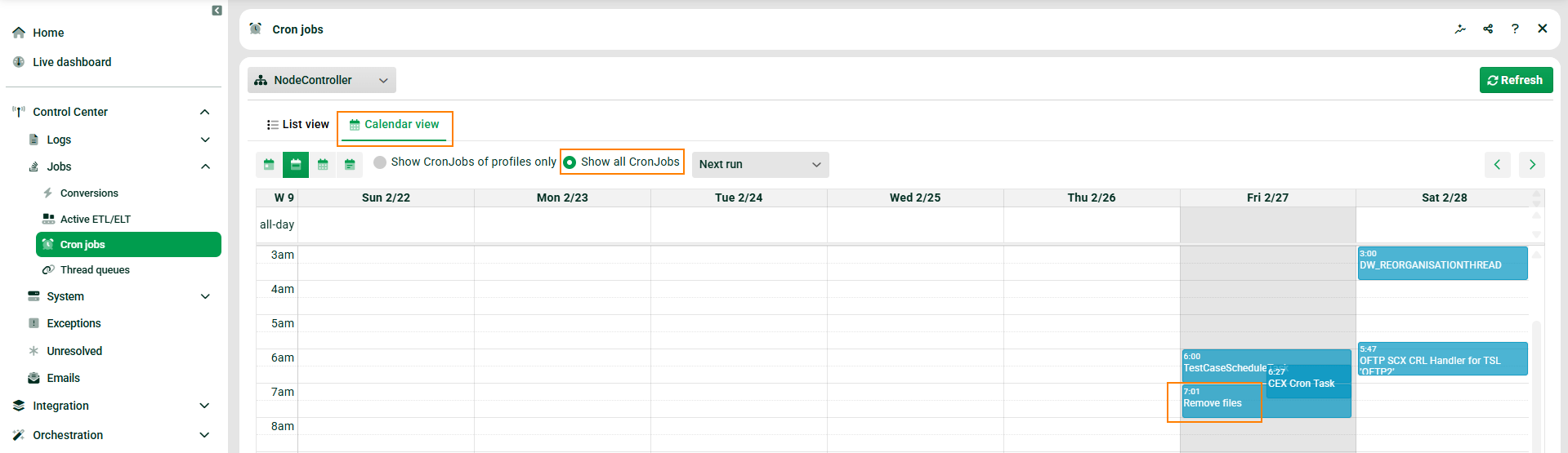
To see your cron job, navigate to **Control Center** > **Jobs** > **Cron jobs**. Select **Calendar view** and enable the option **Show all cron jobs**. This is necessary because it is an internal cron job, not a profile cron job.
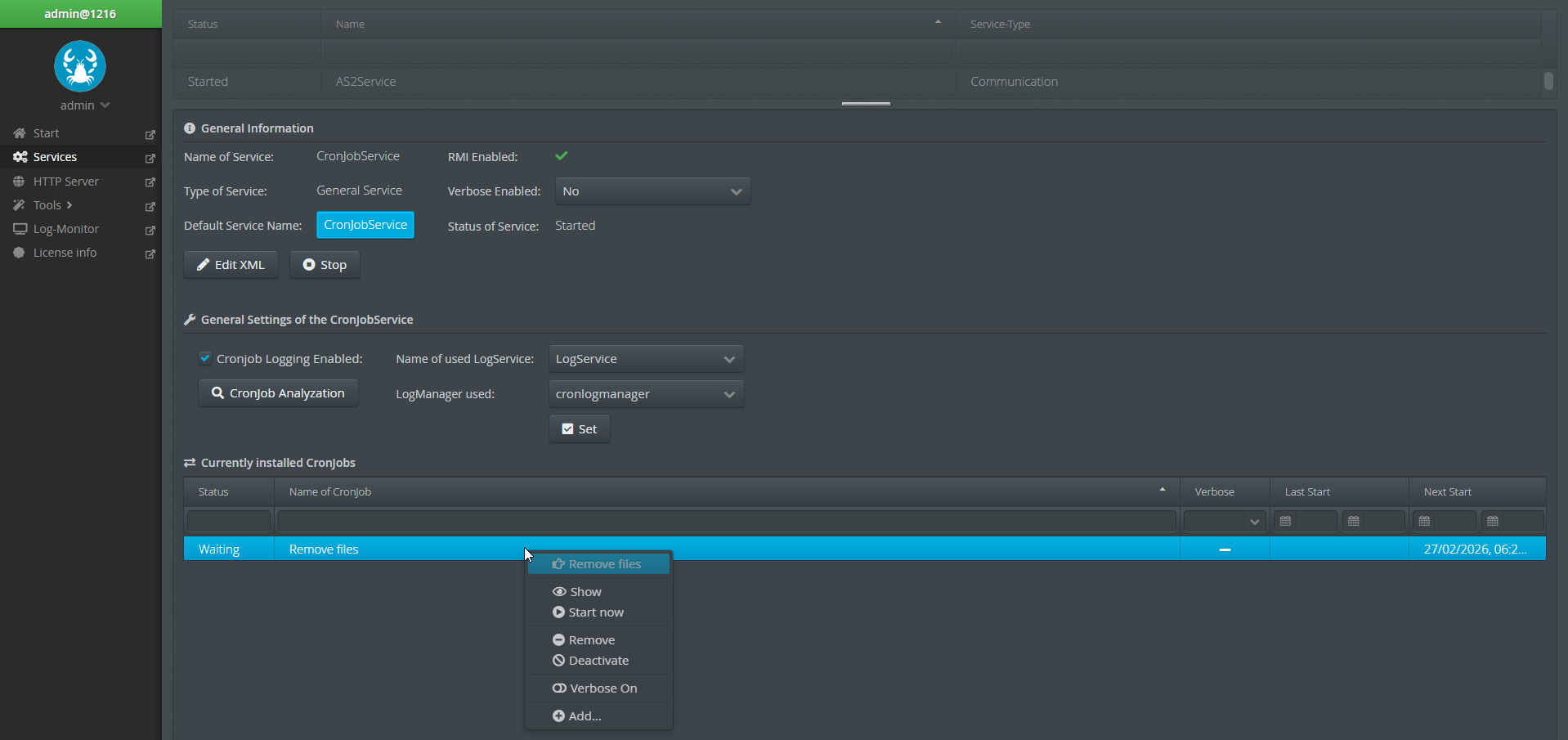
Another option is to navigate to **Administration** > **Admin console** and then to **Services** > **CronJobService**.
## Logging
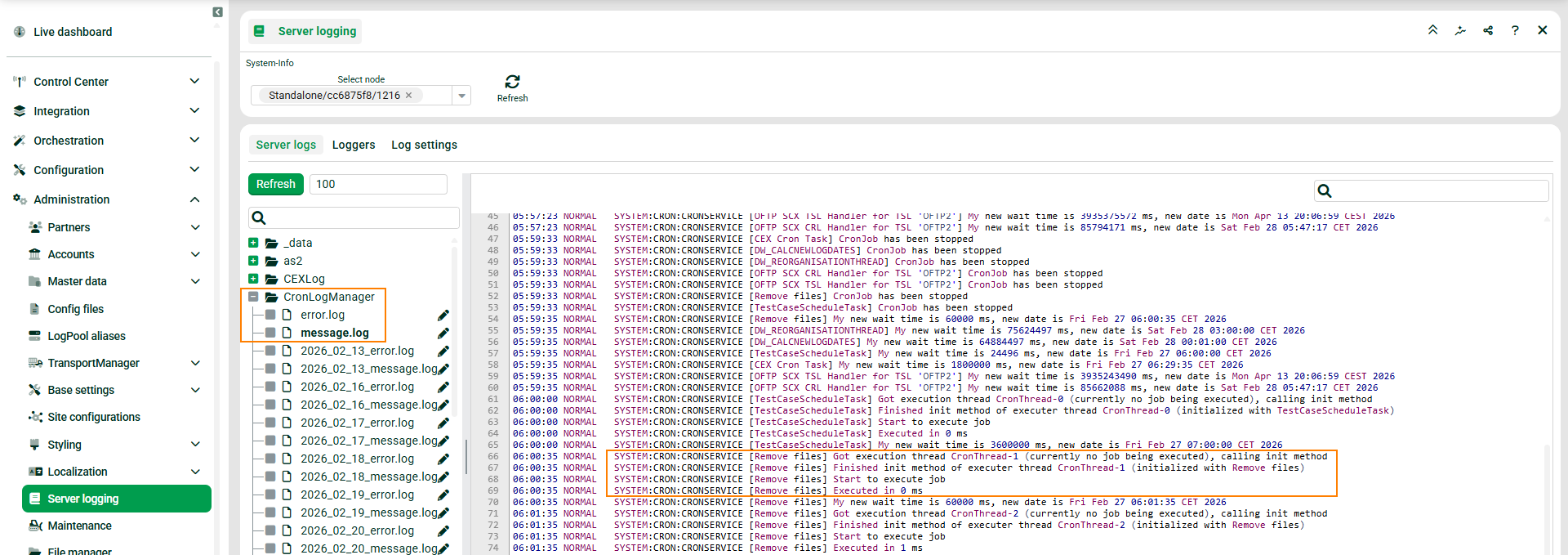
To view the log messages of your cron job, navigate to **Administration** > **Server logging** > **CronLogManager**.
## General usage examples
### Example 1: Clean application logs
```plaintext
# Clean logs older than 7 days, keep important logs
directory=./opt/app/logs
file.pattern=*.log;*.out
exclude.pattern=error.log;fatal.log;important/*
retain.days=7
recursive=true
verbose=true
```
### Example 2: Multiple directory cleanup
```plaintext
# Default settings
retain.days=30
recursive=true
# Application logs - keep 7 days
path.1.directory=./var/log/myapp
path.1.pattern=*.log
path.1.exclude=audit/*;security/*
path.1.retain.days=7
# System logs - keep 90 days
path.2.directory=./var/log/system
path.2.pattern=*.log
path.2.retain.days=90
# Temp files - delete after 1 day
path.3.directory=./tmp/app;./tmp/cache
path.3.pattern=*.*
path.3.retain.days=1
```
### Example 3: Advanced exclusions
```plaintext
directory=./data/uploads
file.pattern=*.*
exclude.pattern=*important*;*/archive/*;*/backup/*;permanent/*
retain.days=14
recursive=true
```
### Example 4: Regex-based cleanup
```plaintext
directory=./logs
file.pattern=regex:^(debug|trace)_.*\.log$
exclude.pattern=regex:.*_(critical|fatal)_.*
retain.days=3
recursive=true
```
A profile is the central configuration unit in the Lobster Data Platform. It receives data, processes it, and forwards it. Configuration is done graphically, with no programming required.