For files that contain data in CSV or fixed-length format, the structure of the data is essentially determined by the data that forms one line.
Nodes have an attribute Line break, which determines whether a new line should be started after the node has been processed. If this property has the value Yes, the mapper works as follows.
After processing the node, a new line is started.
If the node contains output fields before a subnode with a line break, then the associated output fields and subnodes are placed in one line.
If the node contains output fields after a subnode with a line break, the associated output fields are placed in a new line.
If attribute Line break has the value No, there will be no new line created after a node is exited. The following screenshot shows the effects when the Line break attribute has value No for both a node and a subnode.
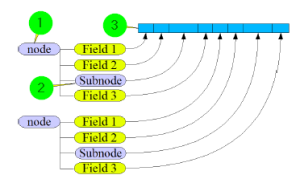
① Attribute Line break of node node has the value No.
② Attribute Line break of node Subnode also has the value No.
③ With those settings, all fields will be written in one line.
The next screenshot shows the effects if the Line break attribute for Document type "CSV"/"Fixed-length" has value Yes for a node and value No for a subnode.
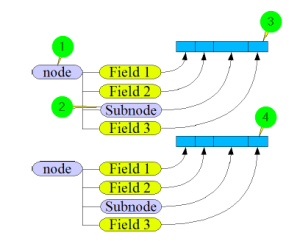
① Attribute Line break of node node has the value Yes. Therefore, a line feed is executed after exiting the node in the Target tree.
② Attribute Line break of node Subnode also has the value No.
③ With those settings, all fields will be written in one line. A line feed is executed after exiting the node.
④ The values of the subsequent node will be written in one line and a line feed will be executed after that.
The next screenshot shows the effects if the Line break attribute for document type "CSV"/"Fixed-length" has value No for a node and value Yes for a subnode.
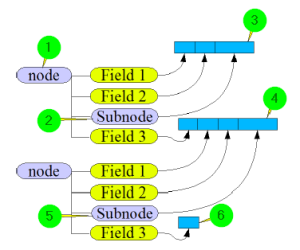
① Attribute Line break of node node has the value No.
② Attribute Line break of node Subnode has the value Yes. Therefore, after exiting the node in the target tree, a line feed is executed.
③ All values of the fields will be written in one line.
④ All values of the fields (and also those of the subsequent node) will be written in one line.
⑤ After exiting the node Subnode a line feed is executed.
⑥ The value of the field will be written in one line.
The last screenshot shows the effects if the Line break attribute for document type "CSV"/"Fixed-length" has value Yes for a node and for a subnode.
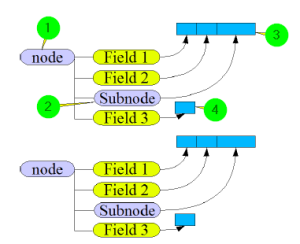
① Attribute Line break of node node has the value Yes. Therefore, after exiting the node in the target tree, a line feed is executed.
② Attribute Line break of node Subnode has the value Yes. Therefore, after exiting the node in the target tree, a line feed is executed.
③ The values of the fields will be written in one line. After exiting node Subnode a line feed is executed.
④ The values of the fields will be written in one line. After exiting node node a line feed is executed.