---
title: "AMQP connections (Legacy)"
slug: "manage-amqp"
updated: 2026-10-27T09:03:09Z
published: 2026-10-27T09:03:09Z
canonical: "docs.lobstersoftware.com/manage-amqp"
---
> ## Documentation Index
> Fetch the complete documentation index at: https://docs.lobstersoftware.com/llms.txt
> Use this file to discover all available pages before exploring further.
# AMQP connections (Legacy)
Existing AMQP and JMS connections are displayed here. You can use the context menu to edit or delete them, or to create new ones.
## Creating an AMQP connection
> [!WARNING]
> **WARNING: Breaking change starting with version 26.4.0 of the Lobster Data Platform:**
>
> Legacy AMQP connections using AMQP 0.9.1 over TLS now verify the broker’s hostname. Previously, they only verified the certificate’s chain of trust. If the hostname in the broker’s certificate does not match the configured host, the connection will fail after the upgrade. Check your affected connections before upgrading. For more information: [**Preparing AMQP 0.9.1 Connections with TLS for the Upgrade to 26.4.0**](https://portal.document360.io/v1/docs/amqp-0-9-1-tls-hostname-verification).
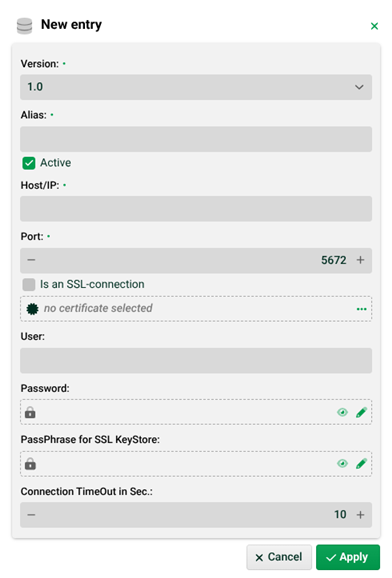
(1) **Version:** The AMQP version ("0.9.1" or "1.0"). The value "JMS" is for JMS connections, see below. See also the following sections. **NOTE:** For AMQP connections of version 1.0 (and only there) the message header `ContentType` is set with the value of the system variable `AMQP_SYS_ContentType`. The message property `ContentType`, on the other hand, is set with `AMQP_ContentType`. Example value: `application/json`.
(2) **Alias:** Here you specify the alias of a connected AMQP server. **NOTE:** The alias (and therefore the connection) is activated if the corresponding checkbox is set.
(3) **Host/IP**, **Port:** The URL/IP and the port of the AMQP server. The default port is "5672".
(4) **Is an SSL connection:** If SSL is used, the keystore, with the client certificate in format PKCS#12, is expected as file `./conf/amqp/<alias>/keycert.p12`. The truststore, containing the public key of the server, is expected as file `./conf/amqp/<alias>/trustStore`. The keystore and truststore have to be protected with the same passphrase (7). Obfuscation is allowed. See also (5).
(5) **Certificate:** As an alternative to using a truststore, a certificate can be selected here. The certificate need to have option "TLS Client" set. If one has been selected, the value in (7) is deleted and the field disappears.
(6) **User**, **Password:** User name and password if necessary. For Vault passwords see section [Vault provider configuration](/v1/docs/en/manage-vault-providers).
(7) **Passphrase for SSL KeyStore:** If (4) is set, but there is no passphrase specified (and (5) is not set), the SSL connection will not use a client certificate and the server certificates will not be checked. Keystore and truststore are not necessary in that case. For Vault passwords see section [Vault provider configuration](/v1/docs/en/manage-vault-providers).
### Special features for AMQP version 0.9.1
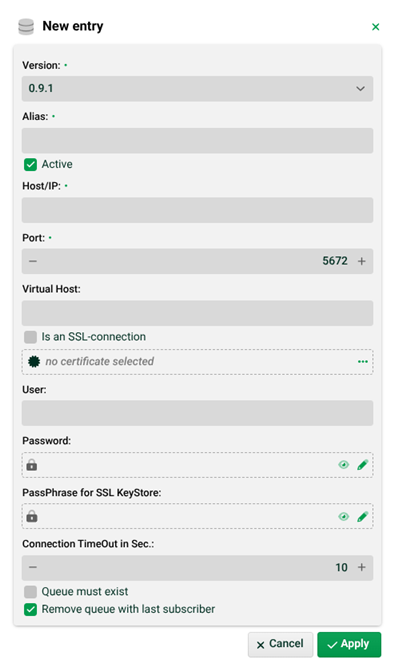
(8) **Virtual host:** See https://www.rabbitmq.com/vhosts.html.
(9) **Connection timeout in sec:** The connection timeout in seconds should be greater than "0". The value "0" means no timeout.
(10) **Queue must exist:** If the checkbox is set, the queue is not created if it does not exist. This might generate an error if a Profile wants to log on to a queue that does not exist with an Input agent of the type "AMQP/JMS".
(11) **Remove queue with last subscriber:** If the checkbox is set, a queue that no longer has any profile listening to it, is removed. This can be useful if queues are only used by Lobster Integration.
**NOTE:** You will also find settings (10) and (11) in the configuration file `./etc/startup.xml`.
```xml
false
true
```
## Creating a JMS connection
You can use these settings to connect to a JMS server.
**NOTE:** Please place the jar file (e.g. "activemq-all-5.10.0.jar") of your JMS server into folder `./extlib`.
### Settings
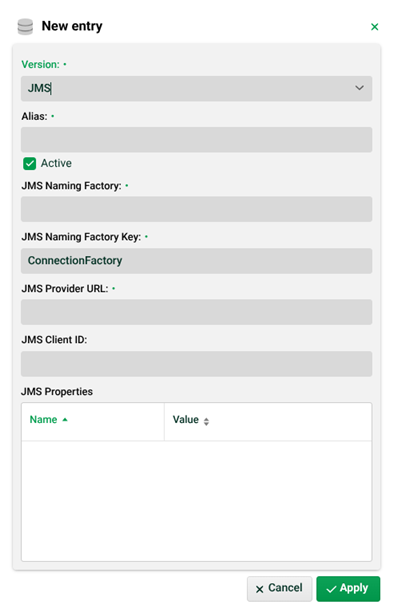
(12) **Version:** Use value "JMS" here.
(13) **JMS Naming Factory:** Here, the initial JNDI Context Factory of the JMS server must be specified. When using ActiveMQ, you can use the value `org.apache.activemq.jndi.ActiveMQInitialContextFactory`.
(14) **JMS Naming Factory Key:** Here, the name of the Connection Factory (of the Context Factory) must be specified. When using ActiveMQ, you can use the default value `ConnectionFactory`.
(15) **JMS Provider URL:** The URL of your JMS server. Example: "tcp://192.168.132.58:61616". **NOTE:** SSL is unfortunately not very generic with JMS. The URL should start with *ssl://* instead of *tcp://* (unless the manufacturer already does something different). The certificate should be in the keystore (unless you can also override/pass this with JMS properties). Furthermore, the two JMS properties `jms.ssl.certificate.username` and` jms.ssl.certificate.password` should be defined, see (17).
(16) **JMS Client ID:** Optionally, a client ID for the connection can be specified. A client ID is used to uniquely identify an application. This is necessary, for example, for so-called durable subscriptions. For details, see the documentation of your JMS server.
(17) **JMS Properties:** Optionally, further JMS properties can be set for the connection here. For details, see the documentation of your JMS server.
#### Azure service bus
First, put the current Apache Qpid driver jars (*qpid-jms-driver* and *proton-j*) in the `./extlib` directory.
You must enter specific values for the following items.
(13) Enter value `org.apache.qpid.jms.jndi.JmsInitialContextFactory`.
(14) Enter value `SBCF`.
(15) Enter value `amqps://<SERVICEBUS_NAMESPACE>`. You can ask your Azure admin for the `<SERVICEBUS_NAMESPACE>`.
(17) Here you need to insert the following properties. First for the login:
- `java.naming.security.principal=RootManageSharedAccessKey`
- `java.naming.security.credentials=<PRIMARY_KEY_VALUE>`
In addition, a property of the following kind must be created **for each queue**:
- `queue.<IDENTIFIER>=<SERVICEBUS_QUEUE_NAME>`
You can also ask your Azure admin for the `<PRIMARY_KEY_VALUE>` and the `<SERVICEBUS_QUEUE_NAME>`. You can freely assign the `<IDENTIFIER>` value. You then use it in a profile as the queue name.
Acronym for **Advanced Message Queuing Protocol**. Open protocol for message-based middleware that enables reliable, asynchronous data exchange across message queues and topics. Available in the Lobster Data Platform as an AMQP ingress agent and response. The requirement is an existing AMQP server.
Java Message Service. Java API for asynchronous message exchange via message queues and topics. JMS abstracts access to message brokers such as IBM MQ or HornetQ and is available in the Lobster Data Platform as an input agent.
A profile is the central configuration unit in the Lobster Data Platform. It receives data, processes it, and forwards it. Configuration is done graphically, with no programming required.
The input agent receives data in Phase 1 and starts a job for further processing. It works either as event based (passively waits for data) or scheduled (actively fetches data).