---
title: "OftpService"
slug: "oftp-service"
updated: 2026-06-09T06:07:48Z
published: 2026-06-09T06:07:48Z
canonical: "docs.lobstersoftware.com/oftp-service"
---
> ## Documentation Index
> Fetch the complete documentation index at: https://docs.lobstersoftware.com/llms.txt
> Use this file to discover all available pages before exploring further.
# OftpService
The OFTPService makes it possible to receive data transmissions via Odette file transfer in accordance with VDA 4914-2 and make them available to subsequent processes. Communication can take place via ISDN or TCP/IP.
When operation via ISDN, a CAPI-capable ISDN card and a CAPI driver installed on the system is necessary.
Since a so-called JNI layer has to be used for the connection via Java, the compilation of a special C file is required depending on the operating system used. Precompiled files already exist for the following operating systems.
- All supported Windows versions.
- Linux systems with CAPI 2.0 drivers (no l4i).
Similar to the FTPService, received data are passed on via MessageService to subsequent processes. The context and queue to be used have to be set accordingly.
## XML configuration
The following XML fragment with all possible basic settings can be used for the configuration of OFTPService.
```xml
1
false
2
```
The parameters have the following meaning.
| controller | The controller to use to access the CAPI system. A controller usually corresponds to an ISDN card. If no explicit controller is specified, the first available controller will be used. |
| --- | --- |
| ignoreTooBigTransferedSize | Some systems that send data via OFTP provide incorrect information about the amount of data transferred at the end of the transfer. Therefore, by default, this is ignored. If you want to change this behaviour, you can do this by setting value *false*. |
| maximumReceiverThreads | Specifies the number of concurrent receive threads. If all threads are busy receiving data, no further calls will be accepted. |
| traceBaseDirectory | If the CAPI messages are to be logged, specify the directory in which the messages are to be stored. The tracing will only start in **Verbose** mode. Since the data size of such a logging can be very large, this setting should only be used when dealing with connection problems. |
### Enabling the message-based notification
The following XML fragment activates the notification of applications via the MessageService for incoming files and other OFTP-based events.
```xml
MessageService
System
oftp
```
The arguments have the following meaning.
| Argument | Description |
| --- | --- |
| | The name of the MessageService to use. This is usually the name seen in the example and does not have to be changed. |
| | The message context. |
| | The message queue. |
### Enabling the TCP/IP-based OFTP server
The following XML fragment enables TCP/IP-based reception.
```xml
listenaddress
port
nrThreads
```
The arguments have the following meaning.
| | The address on which to listen for incoming requests. If this should happen on all available interfaces, use *0.0.0.0*. |
| --- | --- |
| | Number of threads that wait for incoming requests. |
### Setting the MSN to use when answering calls
The following XML fragment restricts accepted incoming call to a certain MSN.
```xml
08154711
12
```
This sets the number to be accepted to the *0815*/*4711* and the subaddress to be used to *12*. If no subaddress is used, the *NullClass* must be set. This is done with the following XML fragment.
```xml
```
### Setting the MSN to use for outgoing calls
The following XML fragment sets the MSN for outgoing calls.
```xml
08154711
```
This number is used by the CAPI driver for outgoing calls.
## General settings
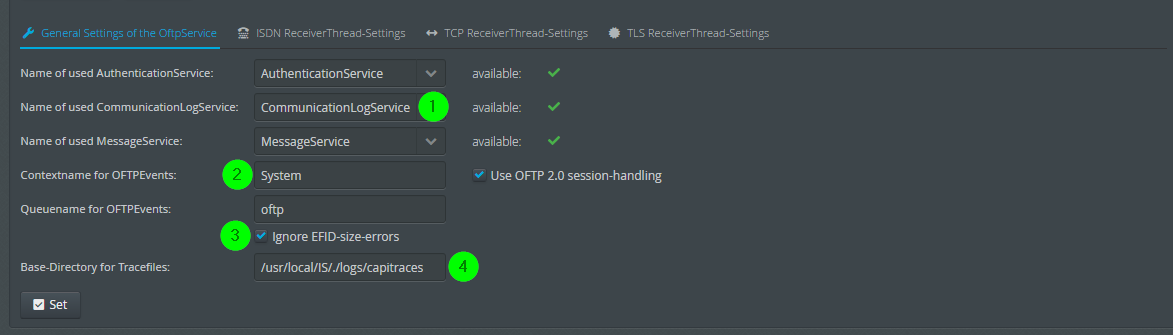
**(1)** Selection of AuthenticationService, CommunicationLogService *a*nd MessageService. These values usually do not need to be changed.
**(2)** Context and queue for the messages that send OFTP events to the MessageService.
**(3)** If set, EFID size errors are ignored.
**(4)** The OftpService generates CAPI traces when the base directory is set and the service is in **Verbose** mode.
**CAUTION****:** The traces can generate a lot of data on the hard disk.
## ISDN receiver thread settings

**(1)** Number of threads that process incoming calls.
**(2)** Number of the used ISDN controller.
**(3)** The MSN to use for answering calls. See the section “Setting the MSN to use when answering calls” above.
**(4)** Timeout for waiting for the confirmation of a transmission of a B3 data block.
**(5)** The MSN to use when sending calls. See the section “Setting the MSN to use for outgoing calls” above.
**(6)** The subaddress of the MSN to use for answering calls. See the section “Setting the MSN to use when answering calls” above.
## TCP receiver thread settings

**(1)** Number of threads that process incoming requests.
**(2)** The IP address and port on which the service registers as a listener.
## TLS receiver thread settings

**(1)** Number of threads that process incoming requests.
**(2)** The IP address and port on which the service registers as a listener.