---
title: "core:clear (Delete all entries from a list)"
slug: "orchestration-integration-control-attribute-clear"
updated: 2026-04-29T06:02:20Z
published: 2026-04-29T06:02:20Z
canonical: "docs.lobstersoftware.com/orchestration-integration-control-attribute-clear"
---
> ## Documentation Index
> Fetch the complete documentation index at: https://docs.lobstersoftware.com/llms.txt
> Use this file to discover all available pages before exploring further.
# core:clear (Delete all entries from a list)
> [!NOTE]
> Data structures can contain "plural characteristics" of different types, which can be described in a simplified way as a "list" with possibly several "entries".
>
> The attribute `core:clear` can be used within an import structure for an update (`UPDATE` action) in order to remove any existing entries from such "lists", possibly to populate them with new entries afterwards.
- A list is only deleted if the attribute contains the boolean value `true`.
- With the value `false` (or another value different from `true`) the attribute is ignored and any entries listed in the import structure are processed individually by either adding, updating or deleting (see [core:delete (Delete individual elements)](/v1/docs/en/orchestration-integration-control-attribute-delete)) list entries.
**IMPORTANT:** Depending on the type of data structure to be cleared as a list, the procedure differs in details, as the following examples illustrate.
## Example 1: Delete all values in a list
At a certain point in the life cycle of a business object of the "order" type, all existing attributes are to be deleted by an import, so that afterwards only the attribute values provided by the same [Import](/v1/docs/en/orchestration-integration-import) apply. These should mark the order as "archived" and indicate a reference number by which archived data can be obtained, if required.
| The [Import](/v1/docs/en/orchestration-integration-import) shown on the right uses the action `UPDATE`. - The search defined by the `search` node (not presented in detail here) must identify the relevant order as a single result. --- - `The attributes` node contains the attribute core:clear with the value `true,` so that all attributes are removed before subsequent assignments. --- - The `ARCHIVED` flag attribute is assigned the value `true` and a reference number is assigned to a reference attribute `ARCHIVED_ORDER_NO`. **NOTE:** The header data of the order and the item data (including attributes) remain unchanged. | ```xml ... ``` |
| --- | --- |
## Example 2: Delete all values of a plural attribute
Via an [Import](/v1/docs/en/orchestration-integration-import) from another system, "communication information" is to be regularly synchronized into the address data for [Users](/v1/docs/en/base-user). If this *plural attribute* (see [Plural attributes](/v1/docs/en/orchestration-plural-attributes)) contains data already, the data provided by the [Import](/v1/docs/en/orchestration-integration-import) should replace it completely. In the following example, the external system only provides two e-mail addresses that are classified using the "Context" property`(communicationContext`), which is evaluated when automatic notifications are sent (for example, by the [Mail address user](/v1/docs/en/base-user-mail-address-resolver) resolver).
> [!WARNING]
> **IMPORTANT:** The values of a plural attribute are not stored in a dedicated list element, but appear as a group of formally independent elements of the type `AddressCommunicationInfo` in the list `attributes`, which also contains all other attributes. Therefore the` core:clear` attribute cannot be assigned to a parent element for "Communication infos" in the import. Instead, it must appear exactly once (with the value `true`), namely in the first imported` AddressCommunicationInfo` element, to ensure that any existing entries are removed and replaced by those defined in the import.
>
> If the purpose of the import is not to create any entries, but to delete existing entries in the list without replacing them by others, the import must still feature a dummy entry like the following, which must combine the attribute `core:clear` with the attribute `core:delete` with the value `true`, to prevent the creation of an empty entry:
>
> `<base:AddressCommunicationInfo core:clear="true" core:delete="true"></base:AddressCommunicationInfo>`
| Before the import, the "Communication infos" shown on the right are assigned for a specific user account: - The import will provide updates for the two e-mail addresses in the example. - A fax number is no longer required. It should therefore also disappear from the address in the user account. | 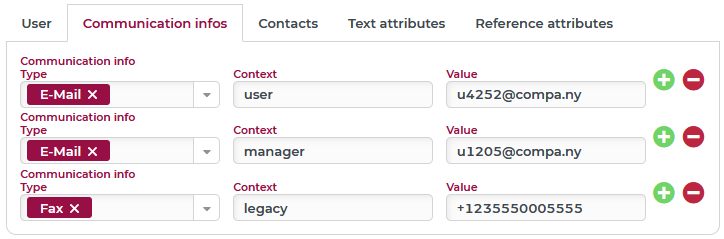 |
| --- | --- |
| The [Import](/v1/docs/en/orchestration-integration-import) shown on the right uses the action `UPDATE`: - The internal ID (`id`=`"4252"`) of the user account is explicitly addressed in this example. A search is therefore not necessary. --- - The `attributes` node contains two values for the plural attribute "Communication info" `(AddressCommunicationInfo)`, of which only the first provides the value `true` for attribute core:clear . --- - For the second "Communication info" the attribute core:clear explicitly provides the value `false`. Instead, it could be omitted completely. | ```xml u4252@compa.ny u2407@compa.ny ``` |
| After the import, only the two current e-mail addresses appear in the user account (for ID 4252): - The e-mail address for the context `user` corresponds to the status before the import, but was rewritten. - The e-mail address for the context `manager` is new. - The fax number has disappeared because all entries were removed before the update, and the import did not provide a current entry for "Fax". | 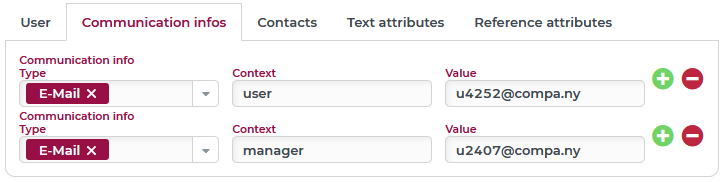 |
## Example 3: Delete all values of a typed plural attribute
In principle, the same methodology is used for a typed plural attribute as for a multiple attribute (see previous example). However, it is necessary to specify the type of typed plural attribute whose values are to be deleted.
In the following example, an [Import](/v1/docs/en/orchestration-integration-import) will delete all entries for a plural text attribute "Container No." (`CONTAINER_NO`) on the header level of an order.
| The [Import](/v1/docs/en/orchestration-integration-import) shown on the right uses the action `UPDATE`: - In the `search` indicated here, the relevant order must be clearly identified by a search. --- - The `attributes` node contains, among other attributes not shown here, an `OrderText` node that specifies the value `true` for the attributes core:clear and core:delete and refers to the `textType` for the "Container No." in the contained `value` element. Therefore all `OrderText` entries of this type are deleted. | ```xml ... ... ... ``` |
| --- | --- |