---
title: "Connection settings"
slug: "phase-6-response-connection-settings"
updated: 2026-10-27T09:03:09Z
published: 2026-10-27T09:03:09Z
canonical: "docs.lobstersoftware.com/phase-6-response-connection-settings"
---
> ## Documentation Index
> Fetch the complete documentation index at: https://docs.lobstersoftware.com/llms.txt
> Use this file to discover all available pages before exploring further.
# Connection settings
## Settings
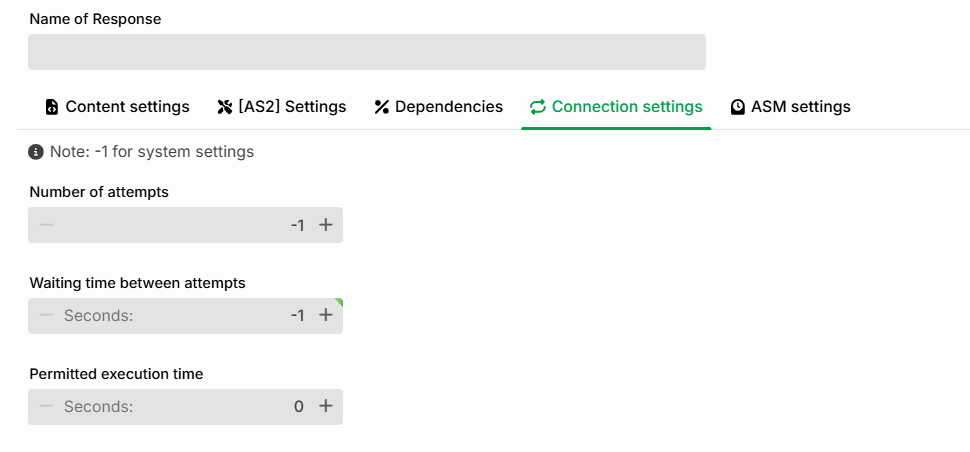
| Name | Description |
| --- | --- |
| **Number of attempts** | This field specifies the maximum number of attempts that should be made to deliver the data. If the last attempt to deliver the data also fails, the response is considered to have failed, and no further attempts will be made to execute the response. See also [Dependencies](/v1/docs/en/phase-6-response-dependencies). **NOTE:** The default value in the interface is "-1". As long as "-1" is entered, the value `maxRetries` from the configuration file `./etc/startup.xml` applies. |
| **Waiting time between attempts** | If an attempt fails, the specified number of seconds is waited before another retry is attempted. **NOTE:** The default value in the interface is "-1". As long as "-1" is entered, the value `retryInterval` from the configuration file `./etc/startup.xml` applies. The default startup.xml file specifies 3 attempts and a 10-second wait time; these values can be adjusted at any time. ```xml … 3 10 … ``` |
| **Permitted execution time** | Specifies the maximum amount of time to wait for a response from the remote station (timeout in seconds). If no response is received within the specified time period, the response is set to the "error" state, and no further attempts are made to execute it. If a positive acknowledgment is sent by the remote station after the timeout has expired, the response remains in the error state nonetheless. Generally, the timeout applies independently of the "Number of attempts" and "Waiting time between attempts" fields and does not determine how long to wait during a single attempt. For some response paths, the behavior differs (see [/v1/docs/phase-6-response-connection-settings#erlaubte-ausführungsdauer-je-nach-antwortweg1](/v1/docs/phase-6-response-connection-settings#erlaubte-ausführungsdauer-je-nach-antwortweg1)) |
## Permitted execution time depending on the response
For some responses, the behavior of the **Permitted execution time** field differs from the general behavior described above:
| Response | Effect of the "Permitted execution time" |
| --- | --- |
| **HTTP** | Timeout is set: This value is used. See also [Response HTTP](/v1/docs/en/profiles--entry-tab-6-http). Timeout is not set or ≤ *0*: The value calculated from the transmission volume is used: *(/16000)+90*. |
| Kafka | This field is not evaluated. See also [Response Kafka](/v1/docs/en/profiles--entry-tab-6-kafka). |
| **Google Pub/Sub** | Timeout for the publish operation per attempt. If set to "0" or "-1", the timeout is 5 seconds. See also [Response Google Pub/Sub](/v1/docs/en/profiles--entry-tab-6-google-pubsub). |
| MQTT | If set to “0”, the publish remains “fire-and-forget” and only connection and alias errors are retried. If the value is greater than 0, the unit waits for the specified amount of time for each attempt to receive confirmation from the broker. See also [Response MQTT](/v1/docs/en/profiles--entry-tab-6-mqtt). |
| **Message** | This field is not displayed for this response. See also [Response message](/v1/docs/en/profiles--entry-tab-6-message). |
| **CloudStorage** | If the value is greater than 0, it represents the total timeout across all attempts, not per attempt. See also [Response CloudStorage](/v1/docs/en/profiles--entry-tab-6-cloud). |
| **Orchestration class** | Das Feld wird nicht ausgewertet. Siehe auch [Antwortweg Orchestration Klasse](/v1/docs/antwortweg-orchestration-klasse). |
| **AS/400** | This value represents the total timeout across all attempts, not per attempt. The field was moved from the AS/400 form to this tab; an existing value set for a single call can cause the retries to stop after just the first failed attempt. See also [Response AS/400](/v1/docs/en/profiles--entry-tab-6-as-400). |
## Duplicates and possible double processing
A failed attempt is repeated only if it results in an exception. If an attempt fails after the remote end has already received the data, the next attempt results in a second delivery or execution. Delivery therefore follows the "at least once" principle.
**NOTE:** The remote station must be able to handle data that has been sent twice.
## Time behavior and statistics
If the target cannot be reached, the following wait time elapses before the job returns an error message: `("Number of attempts" − 1) × "Wait time between attempts"` plus the duration of each failed attempt. Using the default values in the included startup.xml file (3 attempts, 10 seconds), this results in a 20-second wait time plus the time each attempt takes until it fails.
In the statistics, a failed response is counted as one failed response, not as multiple responses.
## Log messages
The iterations generate the following log messages:
- `Attempt n/m failed for alias '<x>' (...), retrying in Ns`
- `All attempts (m) for alias '<x>' exhausted (...)`
- This is followed by the error message typically displayed for that particular response method.
If the job is stopped before the first attempt has started, the following is logged: `... not called/sent/uploaded, job was stopped`. This is not considered an error.
If the job is stopped after one attempt has already failed, the remaining attempts are skipped, and the response is reported as failed with the error from that attempt.
## Migrating existing units (version 26.4 and later)
For the response methods that were added to this tab starting with version 26.4 (Kafka, Google Pub/Sub, MQTT, Message, CloudStorage, Orchestration class, AS/400), units saved prior to version 26.4 are set to "Number of attempts = 1" when loading or importing a profile XML. As long as this value is not increased, the behavior remains unchanged. Newly created units use the default value "-1" and thus the default values from ./etc/startup.xml.
A distributed streaming platform for reliable, high-volume data exchange. Kafka stores news in topics and decouples producers from consumers. Available in the Lobster Data Platform as an input agent and response.
A lightweight publish-subscribe protocol for IoT and machine-to-machine communication. MQTT transmits messages via topics and is optimized for environments with low bandwidth or unstable connections.