Click path
Integration > Profile > Phase 6 > New response > Kafka> [Kafka] Settings
Settings
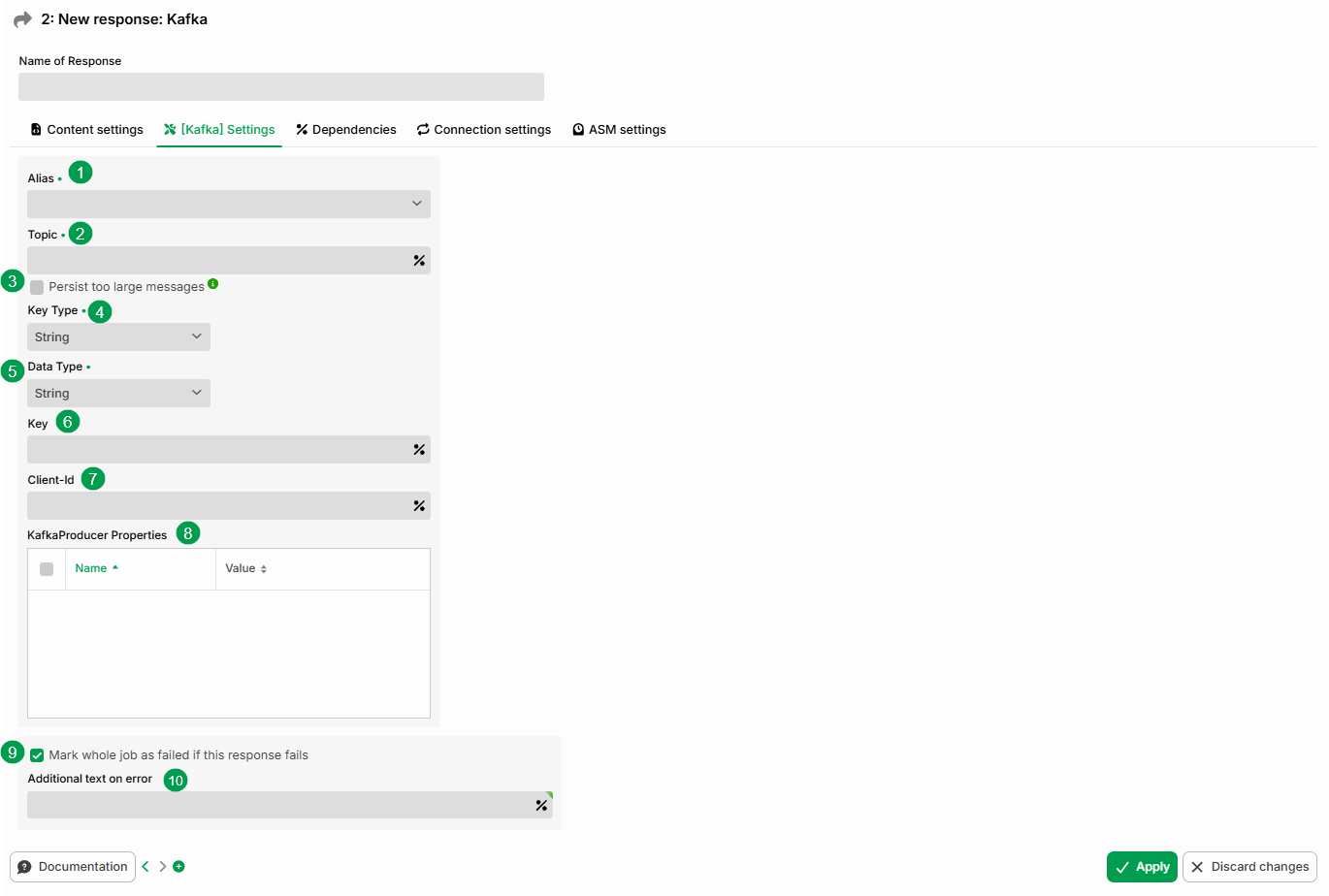
① Alias: The Kafka alias. See Kafka connections.
② Topic: The topic to which the message is sent. NOTE: If the system variable KAFKA_PARTITION of type Integer is defined and has a value >=0 , this value will be passed as the topic of the partition to be used.
③ Persist too large messages: This is a special setting that you can (and should) ignore under normal circumstances. If a sent message is too large (broker limit 1 MB by default, 10 MB protocol limit), an exception is normally thrown. If this checkbox is set, this exception is caught, the file is stored in a local folder instead and a dummy message with a reference to the local file is sent, with which the recipient automatically obtains this local file. However, this currently only works if the consumers listening to topic ② are in the same load balancing system. Otherwise, do not set this checkbox, as this will give the impression that the message has been sent successfully, but the recipient cannot receive it.
④ Key type: The key type of the message data to be sent. IMPORTANT: The data type must always be specified. Be sure to use matching types when sending and receiving data. For example, if a message is defined and sent as a byte/string but then read as an integer/byte, this will result in an error and the message cannot be read. The Lobster Data Platform, acting as the consumer, will remain blocked until someone removes this incorrect message from the broker and will not process any messages from this topic until then!
⑤ Data type: The data type of the message's data to be sent. IMPORTANT: The data type must always be specified. Be sure to use matching types when sending and receiving data. For example, if a message is defined and sent as a byte/string but then read as an integer/byte, this will result in an error and the message cannot be read. The Lobster Data Platform, acting as the consumer, will remain blocked until someone removes this incorrect message from the broker and will not process any messages from this topic until then!
"Avro" and "Avro_apicurio" types:
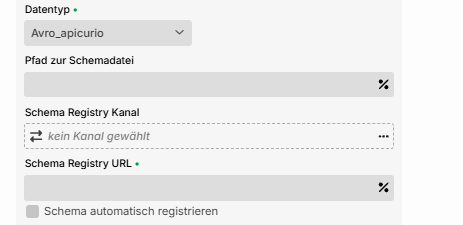
Path to schema file: The path to the schema file being used.
Schema registry channel: An HTTP channel from which the values “Partner Address” (for the Schema registry URL field), “Own ID” and “Own password” are retrieved.
Schema registry URL: The URL of the schema registry. A value entered here overrides the value from the channel. The consumer properties in ⑧ also override the channel values.
Automatically register schema: If this checkbox is selected, the schema is automatically registered on the schema registry server. Select this option only if the specified schema file is correct and you want to register it.
⑥ Key: The (optional) key of the message.
⑦ Client Id: An optional identifier of a Kafka consumer (in a consumer group) that is passed to a Kafka broker with every request.
⑧ KafkaProducer properties: Additional producer properties can be defined via the context menu. You can use the variables @VAR_NAME@.
⑨ Mark whole job as failed if this response fails: Normally a job is not necessarily considered to be erroneous if a single response fails (see Dependencies). But it can be enforced with this option here.
⑩ Additional text on error: Here you can specify an additional log text for the error case.
Tombstone
If the system variable KAFKA_TOMBSTONE is set to true, a tombstone record is sent (this allows records to be deleted early in certain topics).
Header-Properties
You can transfer header properties with system variables of the form KAFKA_<keyname>. NOTE: Since only byte arrays can be specified as values for a header property, Lobster Integration always uses UTF-8 as encoding.
Autoserialized lists and maps
If you use a profile with a Kafka response to send messages (to a Kafka server) that are retrieved by a profile with a Kafka input agent, serialize map/list() are automatically available in the profile with the Kafka input agent if the variable KAFKA_ADD_AUTOSERIALZE_DATA of type Boolean with the value true is created in the profile with the Kafka response.
Example:
Profile 1 has a Kafka response, a variable
KAFKA_ADD_AUTOSERIALZE_DATA=trueand creates the map autoserialize_mymap in Phase 3.Profile 2 has a Kafka input agent that retrieves the message sent by Profile 1. In Phase 3, the map autoserialize_mymap can be accessed directly.
Retries
Retries for this response are controlled via the Connection settings tab; the general behavior is described there. The following also applies to the Kafka response:
The Permitted execution time field is not evaluated.
The Kafka producer properties
retriesanddelivery.timeout.msapply within a single attempt; the tab represents the outer level.