Click path
Integration > Profile > Phase 6 > New response > MQTT> [MQTT] Settings
Settings
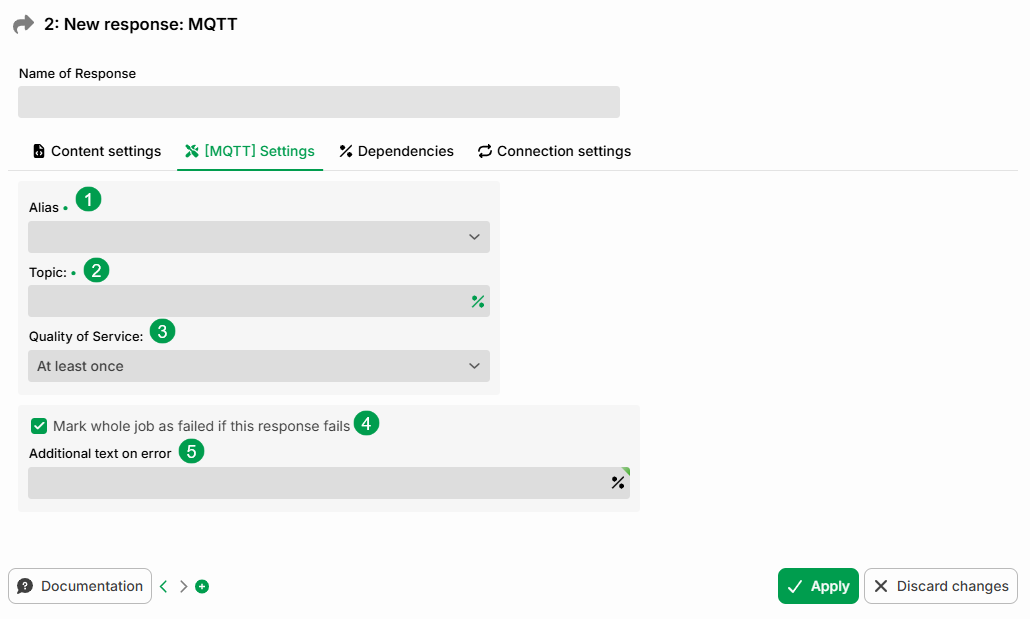
① Alias: The MQTT alias. See MQTT connections..
② Topic: The topic to which the message is sent.
③ Quality of Service: The quality of service (QoS).
At most once: The lowest cost in terms of volume of data transfer. This is suitable if you have a reliable connection between the Integration Server and the MQTT broker.
At least once: A good choice if you need to be sure every message gets through and the receiving application can tolerate receiving a message more than once.
Exactly once: Guarantees delivery exactly once, but has a relatively high cost in terms of data transfer.
④ Mark whole job as failed if this response fails: Normally a job is not necessarily considered to be erroneous if a single response fails (see Dependencies). But it can be enforced with this option here.
⑤ Additional text on error: Here you can specify an additional log text for the error case.
System variables
In MQTT version 5, you can pass the form MQTT_<keyname> user properties (key, value) using system variables. See also MQTT_SYS_CONTENTTYPE and MQTT_SYS_CORRELATIONDATA under System variables.
Retries
Retries for this response are controlled via the Connection settings tab; the general behavior is described there. The following also applies to the MQTT response:
If “Permitted execution time” = "0", the publication remains "fire-and-forget"; in this case, only connection and alias errors are repeated.
If the value is greater than 0, the unit waits for the specified amount of time per attempt for confirmation from the broker. A publication with QoS 1 or 2 that times out is not retracted; therefore, the retry may result in a duplicate message.