---
title: "Error handling"
slug: "profiles--tab-1-6"
status: "update"
updated: 2026-09-10T13:03:20Z
published: 2026-09-10T13:03:34Z
canonical: "docs.lobstersoftware.com/profiles--tab-1-6"
---
> ## Documentation Index
> Fetch the complete documentation index at: https://docs.lobstersoftware.com/llms.txt
> Use this file to discover all available pages before exploring further.
# Error handling
## Configuration of the SMTP server
If errors occur, e-mail notifications can be sent. As a prerequisite, an SMTP server must be set up in configuration file ./etc/startup.xml. The following listing shows the relevant section. All error notifications are sent via this SMTP server. Alternatively, a Channel of the "Mail" type can be used.
```xml
smtps
win-mx.example.com
587
username
password
```
## Configuration of the error e-mail recipients
There are three different entries, in which the recipients of error e-mails can be configured. In principle, all three entries send e-mails independently of each other if the respective conditions apply. Exceptions are specifically mentioned below.
### Configuration file ./etc/startup.xml
The following setting applies to all profiles and to errors in Phase 1.
```xml
...
true
info@example.com
admin@example.com;other@example.com
...
```
If "enableErrorMail" has the value "true", an e-mail for each error entry in the "General Messages" (with the content of the error entry) to the specified recipients in "MailRecipient" (so even if no job has been created yet) is sent.
> [!WARNING]
> **IMPORTANT:**
>
> Since this can generate a large number of e-mails very quickly, this functionality should only be used with caution. This address is also used, for example, to send a notification if the disk space of the computer on which the Integration Server is installed is running low.
### In the client settings
For clients, e-mail recipients can be defined for errors in all six phases of a Profile (applies to all profiles of this client).
The e-mail contains the job number, the profile name, the name of the input file and the error message. Existing input files are attached to the e-mail. This default behavior can be prevented by setting the system property "-Dhub.datawizard.error_mail.no_attachment" to "true".
**NOTE:** The entered e-mail address for Phases 2-5 in the profile overwrites the e-mail addresses for Phases 2-5 in the client if an error occurs.
### Here on page "Error handling" – Phases 2-5
The following settings only apply to this profile and to errors in Phases 2-5.
The e-mail contains the job number, the profile name, the name of the input file and the error message. Existing input files are attached to the e-mail. This default behavior can be prevented by setting the system property "-Dhub.datawizard.error_mail.no_attachment" to "true".
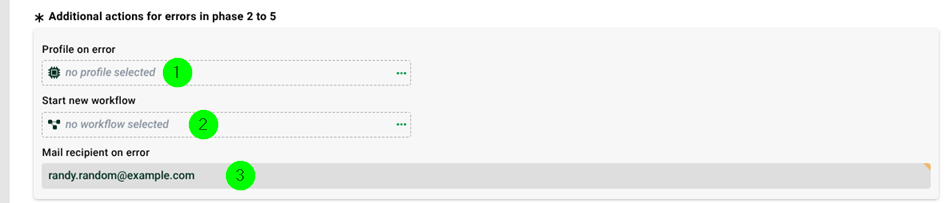
**(1)** **Profile on error:** You can specify a profile to be called if an error has occurred in Phases 2-5. The profile needs to be active and have an Input agent of the "Message" type. The context and queue are irrelevant. The input file and all variables are passed on. If an error occurs before Phase 3, variables only contain the defined default values, but you can always access the system variable VAR_FILENAME. The system variable VAR_SYS_EXCEPTION contains the error message and VAR_SYS_CURRENT_RECORD contains the number of the record in which the error occurred (only relevant in Phase 3, otherwise, it is always "0").
**(2)** **Start new workflow:** You can specify a workflow to be called if an error has occurred in Phases 2-5. Variables of the profile can be passed on. For details see the "Passing profile variables to workflows" section in [Variables (workflows)](/v1/docs/en/mod-workflow--entry-tab-2#passing-profile-variables-to-workflows). If the workflow allows attaching files (see [Main settings (workflows)](/v1/docs/en/mod-workflow--entry-tab-1), the input data of the profile is transferred.
**NOTE:** The display name of these workflows begins with the prefix "Error of profile", followed by the profile name and the job number.
(3) **Mail recipient on error:** Here you can set the e-mail addresses to which an error e-mail is sent if errors have occurred in Phases 2-5.
### Here on page "Error handling" – Phases 2-6
The following settings only apply to this profile and to errors in Phases 2-6.
The content of the e-mail can be freely edited.
**NOTE:** You may use variables, but depending on the phase in which an error occurs, they may not yet have been initialized.
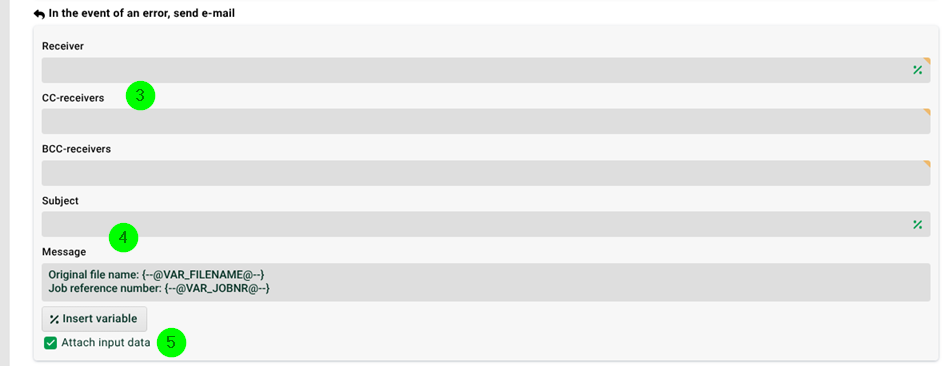
**(3)** **Receiver**, **CC receivers**, **BCC receivers:** If an error has occurred during the profile run, an e-mail can be sent to one or more recipients.
**(4)** **Subject**, **Message:** You can use constants and system variables (e.g. VAR_PROFILENAME, VAR_JOBNR, VAR_SENDER, VAR_MAILSUBJECT, VAR_FILENAME, VAR_SYS_CLIENTNAME and VAR_SYS_EXCEPTION) if they have been defined in the profile (in (3) as well).
**(5)** **Attach input data:** This option decides whether the input file is attached to the e-mail. **NOTE:** The system property "-Dhub.datawizard.error_mail.no_attachment" hat has no influence on this setting and the setting also has no influence on the system property.
## Further settings
### Here on page "Error Handling" – Checkboxes
The following settings only apply to this profile and to errors in Phases 1-6.

(6) **Is an error if profile is called when suspended:** If this checkbox is set, calling this profile is interpreted as an error if it is suspended. The profile must have an Input Agent of type "Message". Error e-mails are sent to the recipients in the error handling for Phases 2-6 (see above). No error e-mails are sent to the recipients in configuration file ./etc/startup.xml (see above). This setting does not create error entries on pages "Errors" and "General Messages", but it does create them on page "Overview".
(7) **Do not report errors and do not send error mail:** If this checkbox is set, no error e-mails are sent for errors in Phases 2-6. Error entries are not created on the "Errors" page, but they are created on page "Overview". Error e-mails for errors in Phase 1 are still sent to the recipients specified in ./etc/startup.xml (see above).
### Phase 1/Options in scheduled input agents – Checkboxes
The following settings only apply to this profile and to errors in Phase 1.
You will find them in the "Options" tab of scheduled input agents.

(8) **Cronjob is considered on error if no data is found:** If this checkbox is set, it is interpreted as an error if the input agent does not produce data. If (7) is not set, error e-mails are sent to the recipients defined in configuration file ./etc/startup.xml (see above), the recipients in the error handling for Phases 2-6 (see above). If (7) is set, e-mails are only sent to the recipients defined in configuration file ./etc/startup.xml. These errors are not shown on the "Overview" and "Errors" pages, only on the "General Messages" page.
(9) **Also send notification mail on connection error:** Connection errors in Phase 1 will also trigger error e-mails (usually that would only trigger e-mails to the recipients in configuration file ./etc/startup.xml, see above). If (7) is not set, error e-mails are sent to the recipients defined in configuration file ./etc/startup.xml (see above), the recipients in the error handling for Phases 2-6 (see above). If (7) is set, e-mails are only sent to the recipients defined in configuration file ./etc/startup.xml. These errors are not shown on the "Overview" and "Errors" pages, only on the "General Messages" page.
## See also
### Automatic error correction
See [Automatic error correction](/v1/docs/en/automatic-error-correction).
### Evaluation of logs
Not all log messages, which may be problematic, are classified as errors. If you want to react to certain (possibly self-generated) log messages, it is possible to set up a log listener (see [Activating the log listener](/v1/docs/en/log-listener-activation)). A log listener "listens" to certain keywords in the error messages and if necessary sends a notification e-mail.
You can react to [Comm log](/v1/docs/en/cc-logs-comm) events with the input agent "CommLog".
A central data record in partner management that consolidates the connection parameters for a communication partner, such as the URL, access credentials, and protocol. Changes to a channel immediately affect all profiles, ASM entries, and content inspection entries that use that channel.
Input: An input agent receives the data. It can work either as event based (e.g. FTP upload) or scheduled (cron).
The Integration Server is the central runtime component of the Lobster Data Platform. It executes integration processes and processes data. The Integration Server stores local certificates and uses their private keys for signing and decryption. It provides all communication services (e.g., FTP, SMTP, HTTP) and connects the application to the database. It is managed via the Admin console.
A profile is the central configuration unit in the Lobster Data Platform. It receives data, processes it, and forwards it. Configuration is done graphically, with no programming required.
The input agent receives data in Phase 1 and starts a job for further processing. It works either as event based (passively waits for data) or scheduled (actively fetches data).
Mapping: Rules transfer the data from the source structure to the target structure. This is the core of the profile.