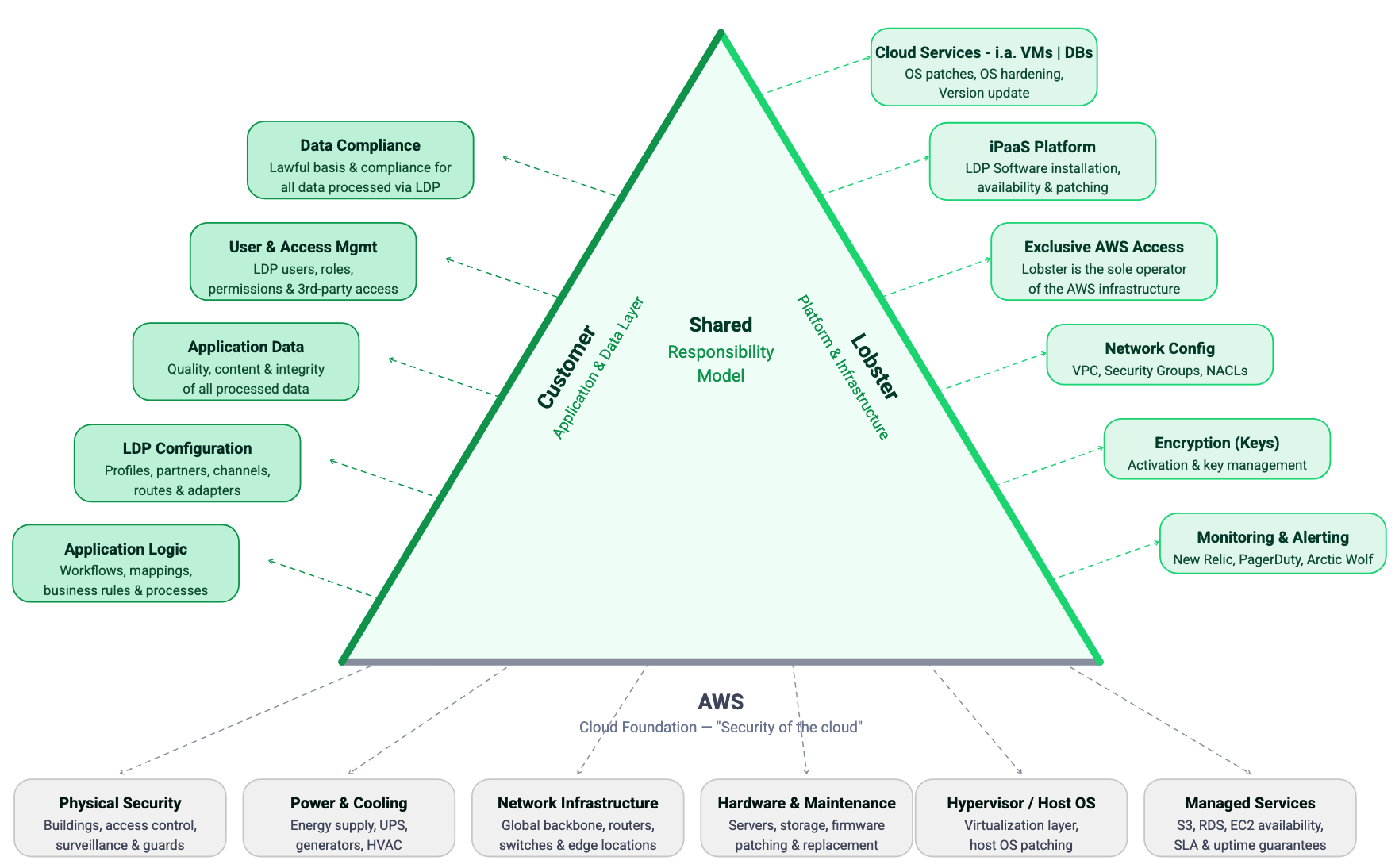
Lobster Cloud operates on a shared responsibility model. This means that Lobster and you as the customer each have clearly defined areas of responsibility. This page provides you with a transparent overview of who manages what, so there are no ambiguities about ownership and accountability.
Overview
As a fully managed iPaaS solution, Lobster takes responsibility for the complete infrastructure layer. This includes provisioning, maintaining, securing, and monitoring all components of your cloud environment. You are responsible for using the Lobster Data Platform to configure and manage your integration processes.
The following sections break down responsibilities by area in detail.
Infrastructure and operations
Responsibility | Lobster | Customer |
|---|---|---|
AWS infrastructure (EC2, RDS, VPC, Redis, EFS) | Fully managed. | No access. |
Operating system installation and updates | Fully managed. | No action is required. |
Database administration and maintenance | Fully managed. The database runs on a protected private network with no external access. No connection via VPN or the internet is possible. Only the corresponding Lobster web server has access to the database. | No access. |
Network and firewall configuration | Managed by Lobster. Changes via support ticket. | Request changes via ticket if needed. |
System provisioning and decommissioning | Fully managed. | Details will be clarified during the Onboarding process. |
System restarts | Performed by Lobster upon request. | Submit a restart request via a support ticket. |
Storage management | Fully managed. Lobster monitors storage usage and informs you proactively when capacity is running low. | If additional storage is needed, contact your Lobster Sales representative. A separate quote is required for storage extensions in Cloud sizing. |
Security
Responsibility | Lobster | Customer |
|---|---|---|
Firewall rules and security groups | Managed by Lobster. | Request IP-based rule changes via ticket. |
Automatically provisioned and renewed. | No action is required. | |
No access. | Provides a certificate, manage annual renewal. | |
Vulnerability management | Continuous scanning and patching by Lobster. | No action is required. |
Penetration testing | Conducted regularly by Lobster's internal and external security teams or service providers. | You may conduct your own penetration tests, but you must notify Lobster in advance. |
Incident handling and response. Managed by Lobster Cloud Operations and the SOC team. | Informed via ticket when incidents occur. | |
Data encryption in transit. Enforced via HTTPS/TLS. | No action is required. | |
User access to Lobster Data Platform | Lobster has no access to your Lobster Data Platform at any time. The initial login credentials are generated automatically and sent directly to you. They are not known to Lobster. | Full responsibility for managing all users, passwords, and permissions within the platform. |
Software and updates
Responsibility | Lobster | Customer |
|---|---|---|
Lobster Data Platform software updates (see Maintenance schedule) | Deployed automatically on a fixed Maintenance schedule (test first, production three weeks later). | No action is required. Optional: Manage updates yourself via Update Center. |
Operating system patches (see Maintenance schedule) | Applied monthly on the 1st Sunday. | No action is required. |
Database maintenance (see Maintenance schedule) | Performed weekly (every Monday). | No action is required. |
Lobster always provides the latest available version in the Lobster Cloud. | If you manage updates yourself, test thoroughly before production deployment. | |
Approximately 7 days in advance via the status page and as a notification directly in the news feed of the affected system (LDP). | Check notifications and schedule maintenance accordingly. |
Network and connectivity
Responsibility | Lobster | Customer |
|---|---|---|
VPN connections (Lobster side) | Configured and managed by Lobster. | Configure your firewall (IPSec/IKE, static public IP). Ensure compatibility. |
VPN connections (customer side) | Not managed by Lobster. | Full responsibility for your on-premise firewall and VPN configuration. |
Opened by Lobster upon request. | Submit a ticket with the desired ports and IP addresses. Ensure ports are also open in your local firewall. | |
DNS configuration (standard .lobster-cloud.com) | Provisioned automatically. | No action is required. |
DNS configuration (custom domain names) | Lobster provides public IP addresses. | Create and manage your own DNS records (A-Record or CNAME). |
Internal DNS resolution (Route53) | Configured by Lobster if requested (chargeable). | Provide access to your internal DNS servers; open Port 53. |
E-mail server (see Error handling) | Not provided by Lobster. | Provide your own SMTP server (Port 587), credentials, and sender/recipient addresses. |
Monitoring and backup
Responsibility | Lobster | Customer |
|---|---|---|
24/7 automated system monitoring (see Standard monitoring) | Included by default. | No action is required. |
Proactive incident resolution | Lobster resolves most issues automatically. | Informed via ticket after resolution. |
Lobster 24/7 Data Cloud Monitoring Response Premium (see Premium monitoring) | Available as an optional upgrade. | Contact Lobster to activate. |
Automated (production: 30 days, test: 7 days). | No action is required. | |
Backup restoration | Performed by Lobster upon request. | Submit a ticket to request restoration. |
Lobster Data Platform usage
Responsibility | Lobster | Customer |
|---|---|---|
Platform configuration (profiles, jobs, mappings). | Not managed by Lobster. | Full responsibility. |
Administration of users and permissions within the platform. | Not managed by Lobster. | Full responsibility. |
Integration logic and data flows. | Not managed by Lobster. | Full responsibility. |
Testing of business processes after updates. | Not managed by Lobster. | Recommended after each software update on your test system. |
Customization requests. | Processed via support ticket. | Submit requests via support@lobstersoftware.com |
What you cannot do in Lobster Cloud
The following restrictions apply to all Lobster Cloud environments. They are in place to ensure security, stability, and consistent service quality across all customer systems.
Restriction | Reason |
|---|---|
No direct access to servers, operating systems, or databases. | Managed service approach. All infrastructure is maintained exclusively by Lobster. |
No SSH, shell, or root access. | Security policy. No direct system access is provided. |
No installation of third-party software, scripts, or containers. | Prevents security vulnerabilities from uncontrolled software. Lobster maintains full control over the environment. |
No execution of custom scripts (Bash, Python, PowerShell). | Same security rationale as above. |
No modification of standard ports (443, 9000, 8020, 80). | These are fixed system ports used by the Lobster Data Platform and cannot be changed. |
No use of DNS names in firewall rules. | AWS security groups are IP-based only. |
No NAT routing in VPN connections. | AWS limitation for site-to-site VPN. |
Support channels
All requests, whether technical issues, change requests or questions, must be submitted through the official Lobster support channels:
Channel | Purpose |
|---|---|
Technical support, incident reports, service requests, and change requests. |
All requests must be submitted through the ticket system. This ensures traceability, prioritization, and SLA compliance for every customer request.
Shared responsibility model — Lobster Cloud hosting
Summary
Area | Lobster | Customer |
|---|---|---|
Infrastructure (AWS, OS, database) | Full ownership. | No access. |
Security (firewall, certificates, patching) | Full ownership. | Request changes via ticket. |
Software updates | Automatic deployment. | Optional self-management via Update Center. |
Network (VPN, DNS, ports) | AWS-side configuration. | Customer-side configuration (firewall, DNS, e-mail server). |
Monitoring and backups | Fully automated. | No action is required. |
Lobster Data Platform usage | Not managed. | Full ownership. |
Support | Provided via ticket system. | All requests via support@lobstersoftware.com. Storage extensions via Sales contact. |