---
title: "SmtpService"
slug: "smtp-service"
updated: 2026-06-09T06:39:12Z
published: 2026-06-09T06:39:12Z
canonical: "docs.lobstersoftware.com/smtp-service"
---
> ## Documentation Index
> Fetch the complete documentation index at: https://docs.lobstersoftware.com/llms.txt
> Use this file to discover all available pages before exploring further.
# SmtpService
With the SmtpService, the Integration Server provides a complete SMTP server that, through its integration into the overall system, is able to inform all connected applications about incoming mails.
The SmtpService offers the following possibilities to offer mail-based data exchange.
- Receive mails using the SMTP protocol.
- Limitation of the delivering partners using authentication methods, e.g. PLAIN or LOGIN for ASMTP.
## XML configuration
The following XML fragment with all possible base settings can be used to configure the SmtpService.
```xml
MessageService
0.0.0.0
2048
5
true
25
```
The parameters have the following meaning.
| Parameter | Description |
| --- | --- |
| defaultMessageService | The name of the MessageService to forward incoming mails. |
| listenAddress | The IP address of the network interface to which incoming requests should be restricted. If all interfaces are to be supported, the parameter can be omitted or set to *0.0.0.0*. |
| maxAllowedMailSize | The maximum size in bytes that an e-mail may have to be accepted by the SmtpService. The size must be specified in KB (1024 bytes). So if you want to accept up to 2 MB (the default) is accepted, the value 2048 should be specified. The value *-1* specifies that there is no size limit. |
| numberOfThreads | The number of threads waiting in parallel for incoming requests. If all threads are busy with requests, further requests are not processed. Therefore, the number should be set high enough to avoid loss of speed. |
| port | The port to use for receiving incoming SMTP requests. |
| usePersistantMessaging | The mails are forwarded as persistent messages to the MessageService. |
### Enabling SMTPS
To enable SMTPS, the following section must be inserted.
```xml
465
*CN=*SMTP Server Certificate Example*
true
```
Parameter *tlsPort* activates an additional port, on which the service is listening and direct TLS connections are established. For this to work, if acting as server, a certificate is needed, which must be set via the search string *tlsSubjectName*. If the certificate is set and found, the command *STARTTLS* is offered on the unencrypted port, which allows you to switch to TLS. With *tlsRequired* set to *true*, *STARTTLS* must be executed before any other operation can be performed, otherwise its use is optional.
### Setting whitelist and blacklist entries
With this XML fragment a whitelist (allowed addresses) and blacklist (not allowed addresses) can be added.
"AddIpAddress" adds a single IP address, "addAddressRange" adds an address range.
```xml
a_single_IP_address
base_IP_address
a_netmask
a_single_IP_address
base_IP_address
a_netmask
```
### Restricting to specific senders and receivers
You can use the configuration file *./etc/mail_address.properties* exists to specify e-mail senders and e-mail recipients (including CCs). Only if both the sender and the recipient of the received e-mail are found in this file, the the e-mail be processed. This is especially useful when you are using a DMZ server to exclude spam e-mails. The file is structured as follows.
```plaintext
# define access list for smtp service
# only accept mails if sender address or (cc) recipients of incoming mail
# are found within this list
# addresses are separated by ;
# example:
# mail.sender=info@lobster.de;lobster.de
# mail.recipients=dw@lobster.de;lobster.de
#
mail.sender=lobster.de;test.org
mail.recipients=hub.org;xxx.org
```
### Adding an SmtpAction
The following XML fragment adds an SmtpAction to the SmtpService.
```xml
System
smtp
allowedAddress@domain
```
The two parameters correspond to the message context and the message queue to be used. For each e-mail address that is to be activated for this queue, a corresponding call entry must be added to the configuration file.
### Setting a NoActionDefinedHandler
If an e-mail is received that does not contain an address for which a SmtpAction has been defined, it can be forwarded to a corresponding handler. If no such handler is set, these incoming e-mails are ignored and discarded.
The following XML fragment adds a NoActionDefinedHandler to the SmtpService.
```xml
[possibly necessary settings]
```
The class to be set must implement the interface *com.ebd.hub.services.smtp.INoActionDefinedHandler*. We provide a programming interface (API) that also allows you to develop your own classes (preparsers, functions, etc.) in Java. For this, we offer in-depth training. If you are interested, please contact our support or sales staff.
A default handler is the DefaultNoActionDefinedHandler, which is described below.
### Setting a DefaultNoActionDefinedHandler
If this handler is set as NoActionDefinedHandler, all e-mails that cannot be further processed by a corresponding SmtpAction, are forwarded to a specified e-mail address. The forwarding takes place via a correspondingly defined e-mail server. The following XML fragment creates a DefaultNoActionDefinedHandler.
```xml
mailserver
25
user
passwd
sender@domain.invalid
recipient@domain.invalid
```
The parameters have the following meaning.
| Parameter | Description |
| --- | --- |
| host | The host name of the SMTP server to use. |
| port | The port of the SMTP server. If no port is set, the default value *25* is used. |
| user | The user name to use for authentication to the SMTP server. If no user name is specified, no authentication is attempted. |
| pwd | The password to use for authentication to the SMTP server. |
| sender | The sender address to use for the e-mail. |
| forwardAddress | The address to which the e-mail should be forwarded. |
**NOTE:** The forwarded e-mail no longer corresponds to the format of the original e-mail. It is reassembled from the individual parts (body, attachments).
### Setting an SmtpAuthenticator
If an authentication for the SMTP protocol is to be activated, it is necessary to set the authenticator to be used. The SmtpService provides two possible authenticator.
- The DirectSetAuthentificator whose users are set directly in the XML configuration file.
- The FileAuthentificator whose users are defined in a separate file and loaded on startup.
The following XML fragment sets the Authenticator to be used by the SmtpService.
```xml
[possibly necessary settings]
```
### Setting a DirectSetAuthentificator
The DirectSetAuthentificator can set the allowed users directly within the XML configuration file.
The class name to add it to the SmtpService is *com.ebd.hub.services.smtp.auth.direct.DirectSetAuthentificator*.
### Adding a user
The following XML fragment adds a user to the DirectSetAuthentificator.
```xml
username
password
```
### Setting a FileAuthentificator
The FileAuthentificator loads the allowed users via another file containing all usernames and passwords.
The class name to add it to the SmtpService is *com.ebd.hub.services.smtp.auth.direct.FileAuthentificator*.
### Reading the user file
The following XML fragment makes the manager read the user file.
```xml
./etc/mail_users.cfg
```
The structure of a file for defining users is described in section [Format of the FileAuthentificator user file](/docs/en/format-file-authenticator).
## General settings and available SMTPActions


**(1)** The MessageService to be used.
**(2)** The messages are forwarded as persistent messages to the MessageService.
**(3)** IP address and port of the SmtpService.
**(4)** Number of threads used to process incoming e-mails.
**(5)** Whitelist and blacklist can be edited here.
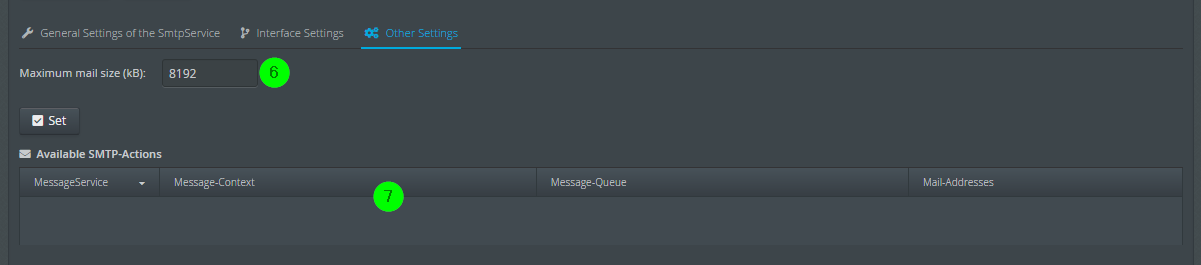
**(6)** The maximum size in bytes that an e-mail may have to be accepted by the SmtpService. The size must be specified in kB (1024 bytes). So, if you want to accept a maximum of 2 MB (the default), specify *2048*. The value *-1* specifies that there is no limit to amount of data to be accepted.
**(7)** List of the available SMTPActions. These can be added, edited and removed via the context menu.
### Editing SMTPAction
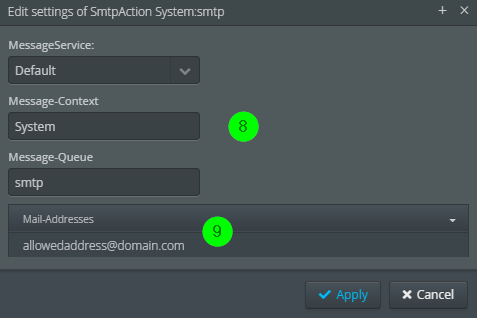
**(8)** Settings of the MessageService for the SMTPAction. You can either use the Default MessageService, or any other one. With the parameters *Message Context* and *Message Queue*, you can use the MessageService to control who should receive the messages.
**(9)** E-mail addresses can be added, changed and deleted here.