---
title: "StorageService"
slug: "storage-service"
tags: ["StorageService", "PersistentManager", "Database Connection"]
updated: 2026-07-09T14:59:22Z
published: 2026-07-09T14:59:22Z
canonical: "docs.lobstersoftware.com/storage-service"
---
> ## Documentation Index
> Fetch the complete documentation index at: https://docs.lobstersoftware.com/llms.txt
> Use this file to discover all available pages before exploring further.
# StorageService
The StorageService stores data for the Integration Server, either briefly in main memory or over the longer term. You can retrieve this stored data using a simple ID.
To store data persistently, you need a PersistentManager (see below).
## XML configuration
### Setting the standard waiting time
The following XML fragment sets the waiting time between two validity checks of the stored values.
```xml
5000
```
The waiting time is specified in milliseconds.
### Setting a PersistentManager
The following XML fragment sets and activates the DefaultPersistentManager for the StorageService. You pass this argument when you initialize the DefaultPersistentManager. The argument specifies the directory where the StorageService saves the objects.
```xml
./logs/storage
```
The following XML fragment sets and activates the JDOPersistentManager for the StorageService. You pass this argument when you initialize the JDOPersistentManager. The argument specifies the database alias to use.
```xml
hub
true
```
Lobster recommends the Redis database in a load balancing environment. The following XML fragment sets and activates the RedisPersistentManager for the StorageService.
```xml
redis://localhost:6379
my password
```
If you want to migrate existing entries from the JDOPersistentManager, specify the database alias of the JDO manager.
```xml
redis://localhost:6379
my password
hub
```
If you want to address a Redis cluster (here consisting of the three machines *node1*, *node2*, and *node3*), use the following XML fragment.
```xml
node1
6379
node2
6379
node3
6379
my password
```
## General settings

**(1)** The waiting time between two validity checks of the stored values.
**(2)** The PersistentManager in use and the directory where it stores the objects.
## Currently managed objects
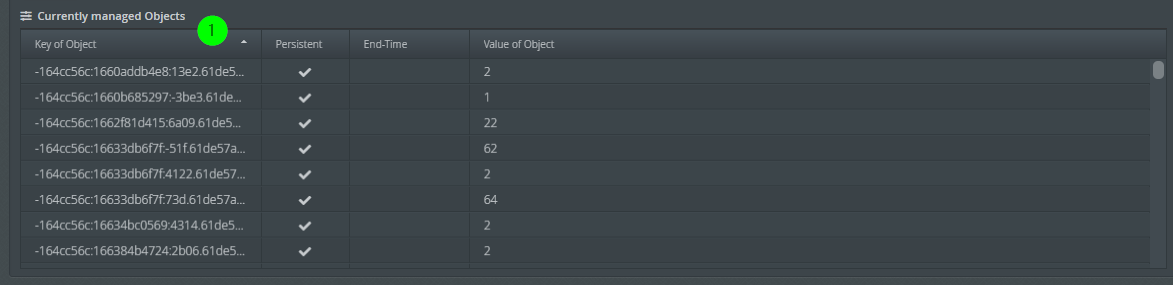
**(1)** The list of currently managed objects. For each object, the list shows the unique key, the persistence status, the time until removal if it is no longer accessed, and the value if it can be displayed. Use the context menu to delete an object from memory.
## Log level dependencies
Changes to the log level of the LogService have no influence on the logging behavior of the StorageService.
If you set the service to **Verbose** mode, it logs the keys of all added and removed entries.
## Behavior on loss of database connection
As of version **26.3.0**, the following applies. If the StorageService loses the database connection, the **Lobster Data Platform** responds automatically. It checks repeatedly whether the database is reachable again. If the connection stays interrupted permanently, the **Lobster Data Platform** shuts down with exit code `136`.
The [Lobster Application Wrapper](/docs/en/application-wrapper) detects this exit code. It then restarts the **Lobster Data Platform** automatically. This restart does not perform an update. It only runs the regular startup sequence.
| Exit code | Meaning | Wrapper action |
| --- | --- | --- |
| `136` | The StorageService could not restore the database connection. | Automatic platform restart without an update. |
The **Lobster Data Platform** does not shut down after the first failed connection attempt. An internal mechanism only triggers the shutdown after several consecutive attempts fail. The same mechanism applies if the database is unreachable when LDP starts.
**NOTE:** The automatic restart requires that the **Lobster Data Platform** runs under the Application Wrapper. If you start the **Lobster Data Platform** directly without the wrapper, no automatic restart occurs.
Background: The StorageService manages central data such as unique job numbers and auto numbers. Internal and customer-specific processes need this data. If the database connection is missing, this data cannot be persisted. The LDP then shuts down to prevent data loss. The restart through the wrapper ensures a defined recovery.
In versions before 26.3.0, the **Lobster Data Platform** stayed in a reconnection loop. This happened when the database connection was lost permanently. A deliberate shutdown followed by a wrapper restart did not occur.