The Lobster Data Platform can connect to a database on the Bridge system through the tunnel. This enables the Lobster Data Platform to use the database that is located on the bridge system.
You can create the database connection itself under Configuration > Databases/Connectors.
Prerequisites
You need a configured bridge. How to create and install a bridge on the platform is described in Attended bridge installation.
The same JDBC driver must be installed on both systems. On the Lobster Data Platform, you manage the drivers as usual. On the bridge system, place the JDBC driver in the folder
./extlib. Then restart the bridge.
Select connection mode
There are two modes for bridge database connections. You select the mode under Connection type.
Via Bridge (Standard): This is the default mode, available from version 26.3.3. Transfers data faster than the legacy mode and is the recommended choice. See also JDBC fetch size.
Via Bridge (Legacy): the compatibility mode.
Migrating connections from legacy to standard
A connection in legacy mode is not automatically switched to standard mode. You migrate it manually, without losing any data.
Steps
Open Configuration > Databases/Connectors.
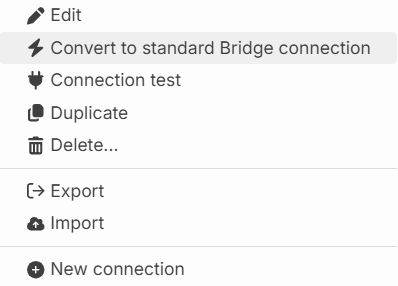
Open the context menu of the connection.
Select Convert to standard Bridge connection. The connection will then use standard mode.
NOTE:
You can revert a connection to legacy mode at any time. To do so, select Convert to legacy Bridge connection in the context menu of the standard connection.
Bridge database connection on the bridge
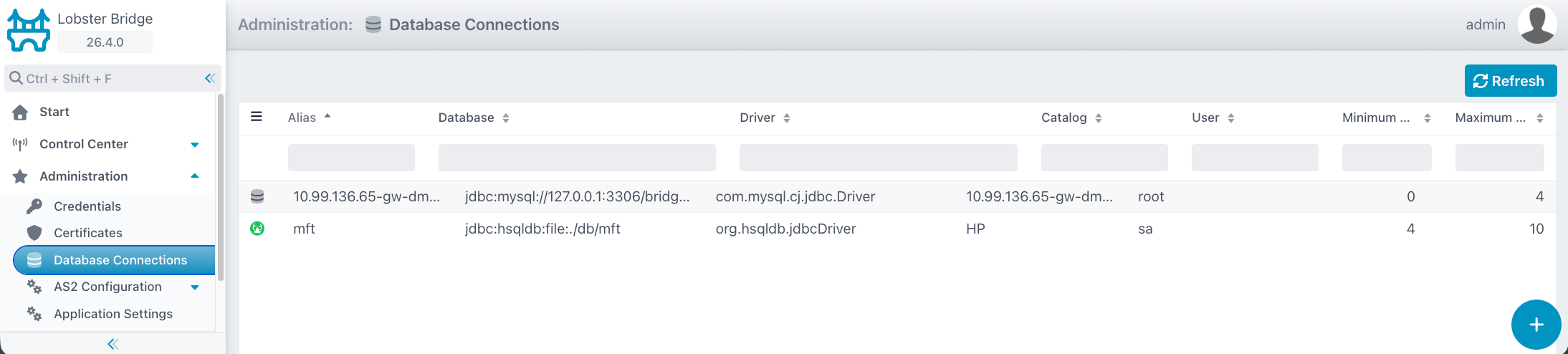
In the bridge, you can view a database connection under Administration > Database Connections.